
For developers
Website analytics built for developers who want to ship.
Add tracking to your website, capture the events that matter, and connect traffic to conversions and revenue — without building your own analytics infrastructure.
14-day free trial · No card required · From $9/month
<script
  defer
  supr-website-id="YOUR_WEBSITE_ID"
  supr-domain="yourdomain.com"
  src="https://supranalytics.app/js/script.js"
></script>window.supr?.("signup_completed", { plan: "pro" });metadata: { supr_visitor_id: req.cookies.supr_visitor_id },Replace YOUR_WEBSITE_ID with the id in your website's settings. Step 3 is a line of a Stripe Checkout Session; each payment provider has its own way.
Your product needs analytics. Not another backend to maintain.
Rolling your own means an ingestion endpoint, identity rules, aggregation queries, a dashboard and payment webhooks, plus keeping them all running. Here's what you'd be building, and what's already there.
- Event collection
- An endpoint browsers post to, that refuses other websites' hostnames, drops bots and rate-limits floods. That's /api/event, already running.
- Visitors and sessions
- Ids that survive page loads and client-side routing, sessions that end after 30 minutes idle, and a cookieless mode if you'd rather not set cookies.
- Reporting
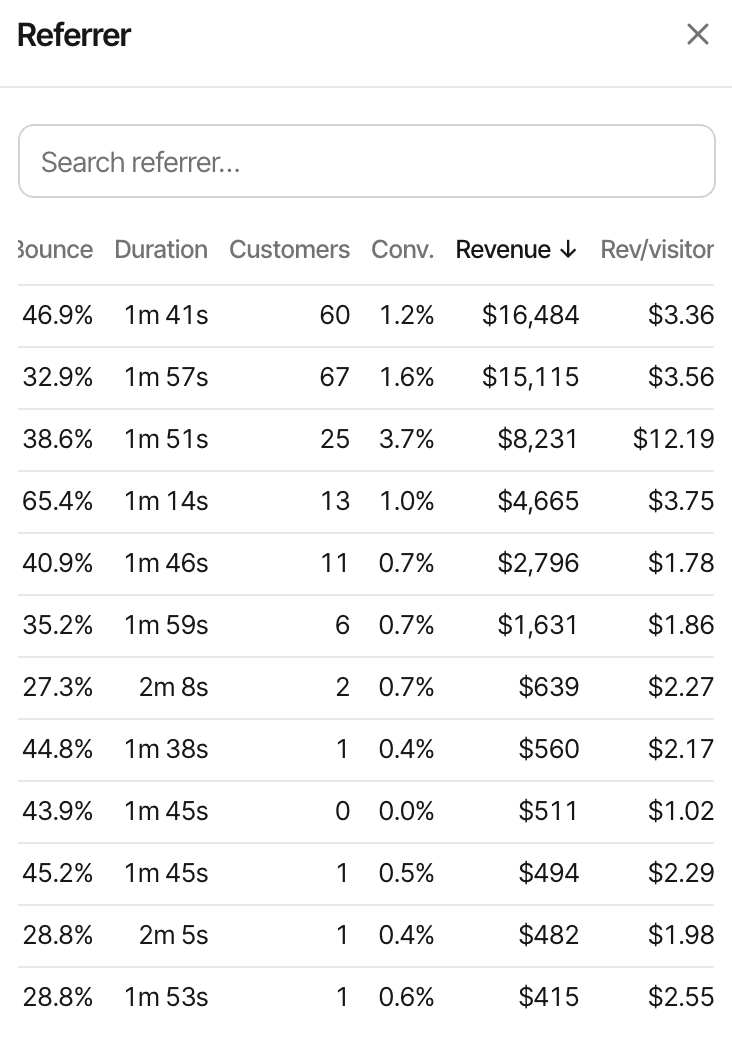
- Channels, referrers, UTM campaigns, pages, countries and devices for any date range, each row a filter for the rest.
- Goal tracking
- Event goals from your code, page goals from the dashboard, conversion rates, and the source behind each completion.
- Revenue matching
- Signed webhooks from five payment providers, or an API, tied back to the visitor who paid and the visits before.
- Dashboards
- Realtime, visitor journeys and funnels, for as many websites as you run, on one account.
What it doesn't replace
It isn't an event pipeline or a warehouse. There's no raw event export, no SQL over your events and no product-analytics features such as retention cohorts. Its REST API takes data in (goals, payments, crawler hits); to read reports from code, there's an MCP server.
Add tracking without rebuilding your app.
One deferred script on every page. No package to install, no build step, no wrapper component.
Static HTML, or any website with a shared head
<!doctype html>
<html>
  <head>
    <meta charset="utf-8" />
    <title>My website</title>
    <script
      defer
      supr-website-id="YOUR_WEBSITE_ID"
      supr-domain="yourdomain.com"
      src="https://supranalytics.app/js/script.js"
    ></script>
  </head>
  <body>…</body>
</html>
React with Vite or Create React App works the same way: paste the snippet into index.html. React Router changes pages with history.pushState, which the script listens for, so every route is a pageview. React guide
Next.js, App Router
// app/layout.tsx
import Script from "next/script";

export default function RootLayout({ children }: { children: React.ReactNode }) {
  return (
    <html lang="en">
      <body>
        {children}
        <Script
          defer
          supr-website-id="YOUR_WEBSITE_ID"
          supr-domain="yourdomain.com"
          src="https://supranalytics.app/js/script.js"
        />
      </body>
    </html>
  );
}
Client-side navigation needs nothing extra: next/link moves through history.pushState too. The Pages Router puts the same <Script> in pages/_app.tsx. If a component calls supr() before the script has loaded, add the queue stub below with strategy="beforeInteractive". Next.js guide
What it does on its own
- A pageview on load, and on every
pushState,replaceStateand back or forward navigation - A click on a link to another website, for the exit links report
- A heartbeat every 30 seconds while the tab is visible and in use, for session time and the live view
- Nothing on localhost, from headless browsers or bots, or from a browser opted out with ?supr_ignore=true
There's no switch to turn automatic pageviews off. supr("pageview") sends an extra one, for a router the script can't see.
Script attributes
- supr-website-id
- Required: which website the visits belong to.
- supr-domain
- Your main domain: the visitor cookie is set on it, so subdomains count as one visitor.
- supr-allow-localhost="true"
- Records localhost, 127.0.0.1 and .local, which are ignored otherwise.
- supr-hash="true"
- Counts #/route changes as pages, for hash routers.
- supr-cookieless="true"
- Sets no cookies (trade-offs below).
- supr-api
- Where hits are sent, for serving through your own proxy.
- supr-outbound="false"
- Stops tracking clicks on links to other websites.
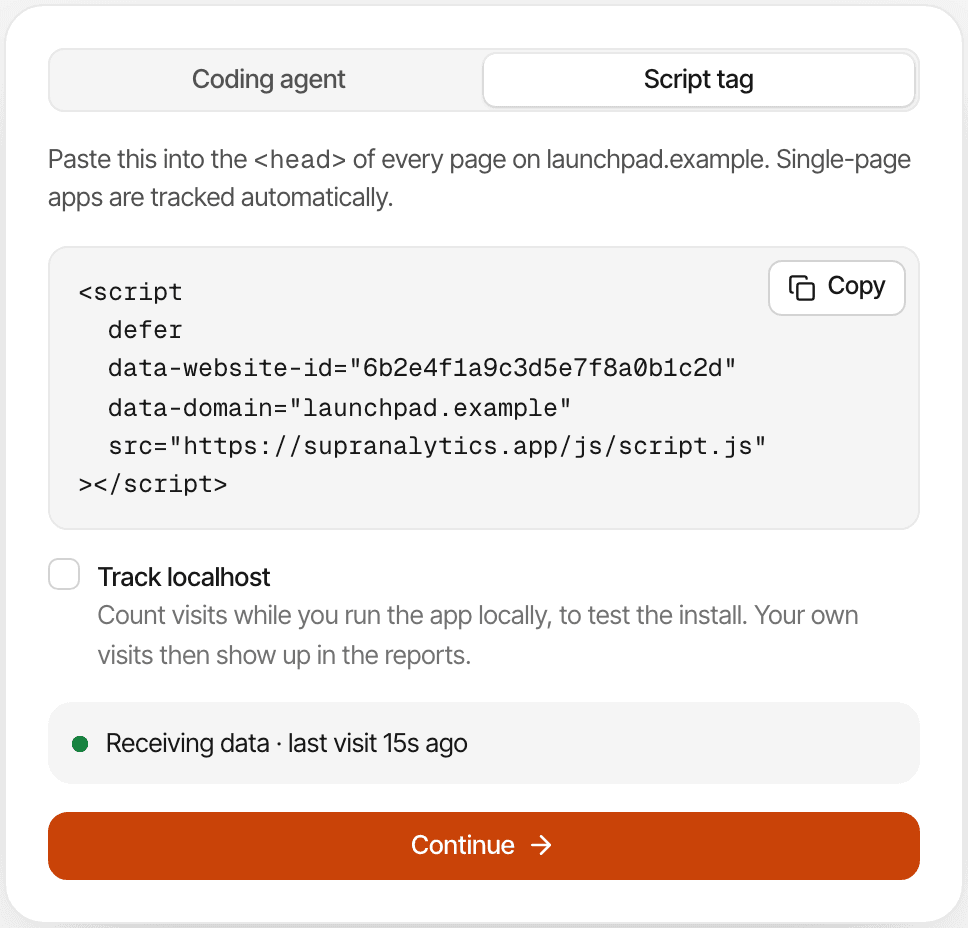
Your snippet is in the website's settings with its id filled in, and the install step tells you once the first visit arrives. Visits are only recorded from your website's domain, its subdomains and any additional domains you list, so test deployments on other addresses stay out of your numbers until you add them.
Some visitors' ad blockers stop analytics scripts. The managed proxy serves the script and its hits from your own domain instead.
Measure the events your product actually cares about.
Call window.supr() where the thing happens, with a name and a few properties.
// After the signup request succeeds
window.supr?.("signup_completed", { plan: "pro", method: "email" });

// Once you know who's signed in
window.supr?.("identify", { user_id: "usr_123", email: "ada@example.com", name: "Ada Lovelace" });<script>window.supr=window.supr||function(){(supr.q=supr.q||[]).push(arguments)}</script>window.supr only exists once the script has run. With ?. an early call is skipped quietly; with the stub, calls wait in a queue and are sent when the script loads. There's no npm package, React hook or typed client: it's this one function, and the docs have a TypeScript declaration for it.
Names and properties
- Names are lowercased, spaces become
_, and they're cut at 64 characters - Up to 10 properties; keys up to 32 characters, values up to 255
- Numbers and booleans are stored as text; objects and arrays are skipped
- Properties show in the goal's details and the visitor's journey, never on a public dashboard
What to expect
Each call is one completion; nothing is deduplicated, so call it after the action succeeds, not on every render. Hits are sent with fetch and keepalive, without retries or batching: an ad blocker, a closed network or an excluded IP means the event isn't recorded.
An event is a pageview, a custom goal or an outbound link click recorded on your websites (goals sent through the API count too). Bots, excluded traffic, the script's background pings and chat messages don't count. Usage resets at the start of each billing cycle.
- signup_completed
- trial_started
- demo_requested
- onboarding_completed
Examples: none of these is tracked until your code sends it. An event goal shows up on the Goals page with its first completion, no setup needed; you can also add it ahead, with a friendlier label, so it's listed before then. To put a name on a visitor, call identify after sign-in. Custom goals docsUser identification
Turn meaningful actions into conversion goals.
Four ways to define one, two of them without JavaScript.
Event goals
From supr() or your backend. Listed as soon as the first one arrives.
Pageview goals
A name and a path in the dashboard, like /welcome or /docs/*. No code, and past visits count too.
Click attributes
supr-goal on a button or link completes the goal on click. Every supr-goal-* attribute becomes a property.
Visibility attributes
supr-scroll completes it when the element comes into view: half of it by default, with supr-scroll-threshold and supr-scroll-delay to tune. Once per page view.
<!-- A click completes the goal; supr-goal-* become its properties -->
<button supr-goal="demo_requested" supr-goal-plan="team">Book a demo</button>

<!-- Completed once per page view when half of it is in view -->
<section supr-scroll="saw_pricing">…</section>
Forms aren't tracked by themselves
There's no automatic form or checkout tracking. An attribute on a submit button counts the click, even when validation fails; to count successful submissions, call supr() once your handler succeeds, or send the goal from your server.
The buttons on this page carry the same attributes: it's how SuprAnalytics measures its own website.
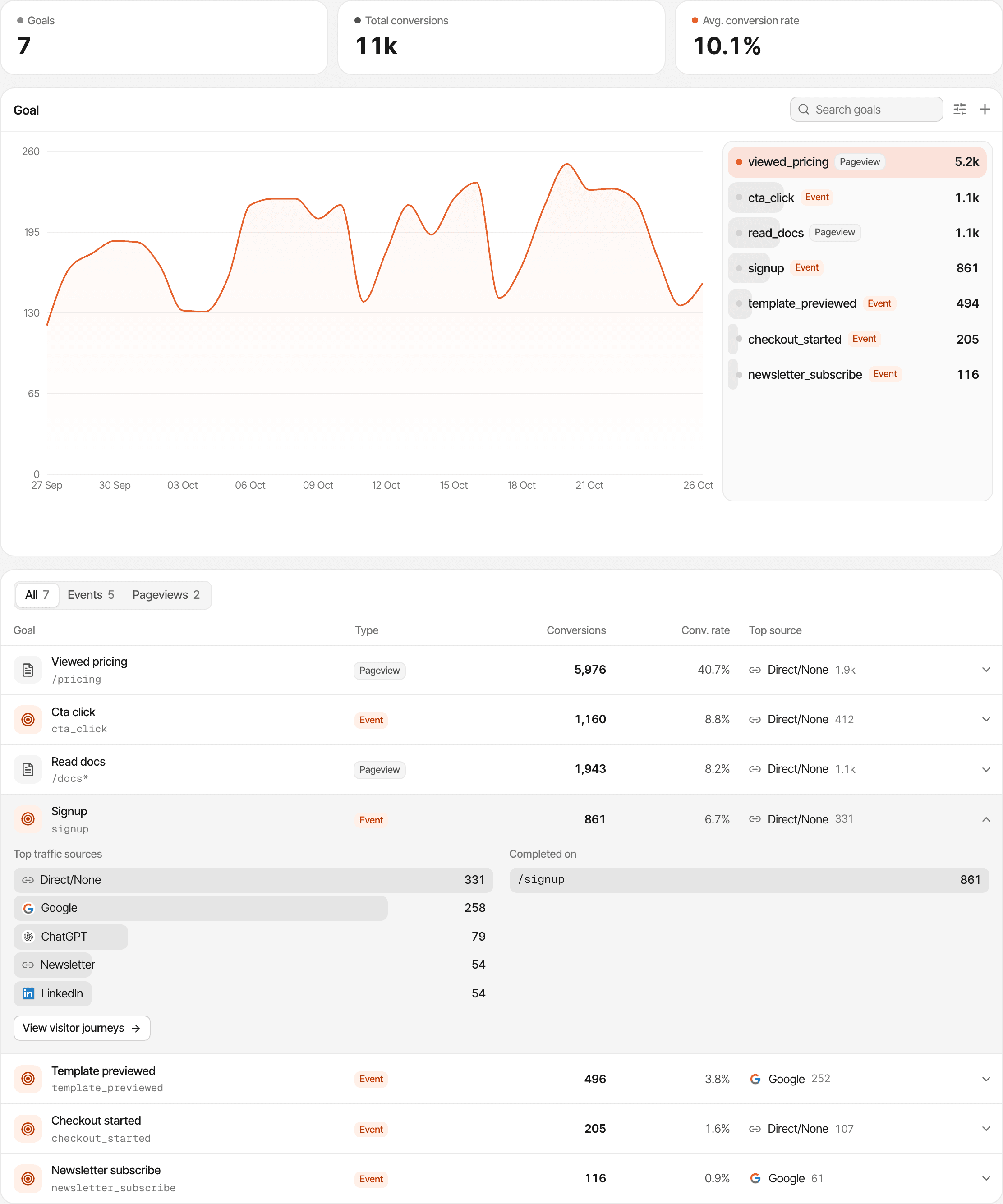
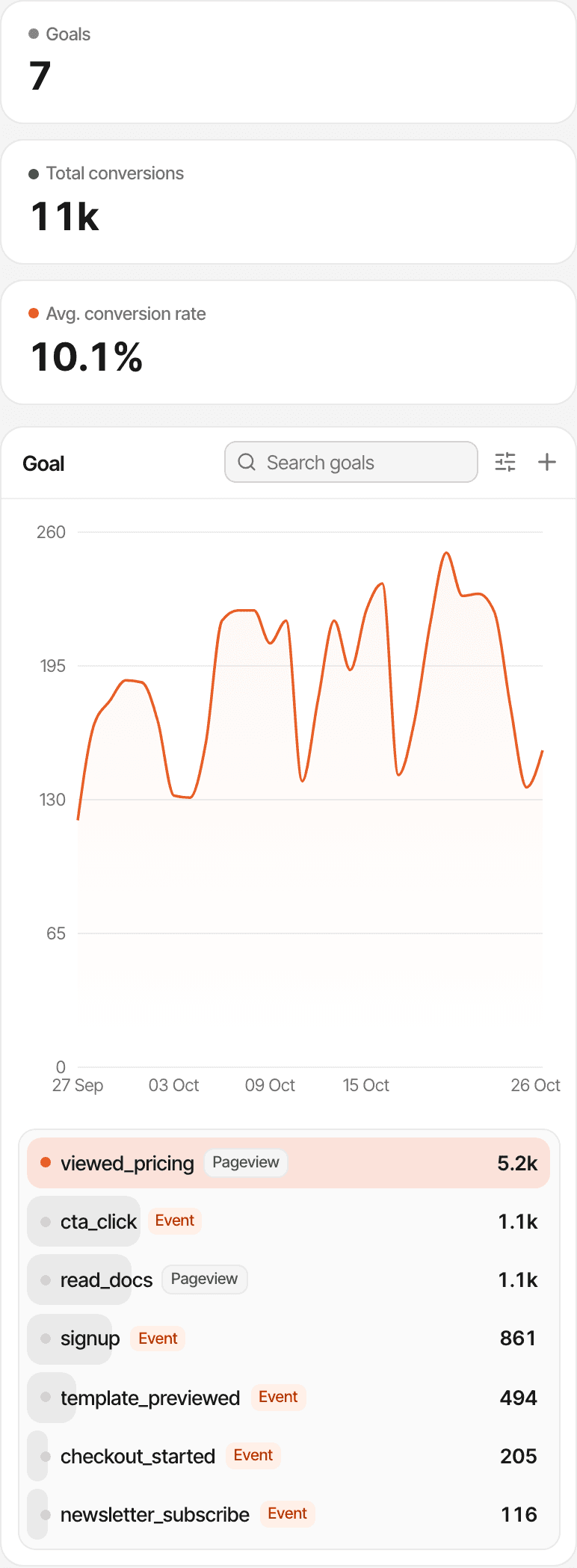
A goal's conversion rate is the share of the period's visitors who completed it at least once. Each completion is credited to the source of the visit it happened in. Goal trackingScroll goals
Track server-side actions when the browser isn't enough.
A confirmed email, a finished onboarding job, an upgrade made by a webhook: send it to the Goals API from your backend.
// Server only: the API key never reaches the browser.
await fetch("https://supranalytics.app/api/v1/goals", {
  method: "POST",
  headers: {
    Authorization: `Bearer ${process.env.SUPRANALYTICS_API_KEY}`,
    "Content-Type": "application/json",
  },
  body: JSON.stringify({
    visitor_id: req.cookies.supr_visitor_id,
    name: "onboarding_completed",
    props: { plan: "pro" },
  }),
});| Status | Body |
|---|---|
| 200 | { "ok": true } |
| 400 | { "error": "visitor_id and name are required" } |
| 401 | { "error": "Invalid API key" } |
| 404 | { "error": "Visitor has no sessions yet" } |
| 429 | Too many requests: wait for Retry-After seconds |
The key stays on your server
Each website has its own API keys (they start with pk_), sent as Authorization: Bearer. Create, name, roll or delete them in the website's settings. The API answers no cross-origin browser requests, on purpose: call it from your backend, with the key in an environment variable.
It needs a visitor who has been on your website
Send the supr_visitor_id cookie the script sets. Your backend gets it with the page's requests when it's on the same host, or under the domain set in supr-domain; otherwise read supr.visitorId() on the page and send it along with your own request.
The goal is attached to that visitor's latest visit and its source. A visitor with no recorded visit gets a 404, and nothing is stored.
Limits
3,000 requests a minute per key. Goals sent this way count toward your plan's events, and they aren't deduplicated, so don't retry a request that already succeeded. While an account is paused, requests answer { "ok": true, "paused": true } and record nothing.
Know where paying customers came from.
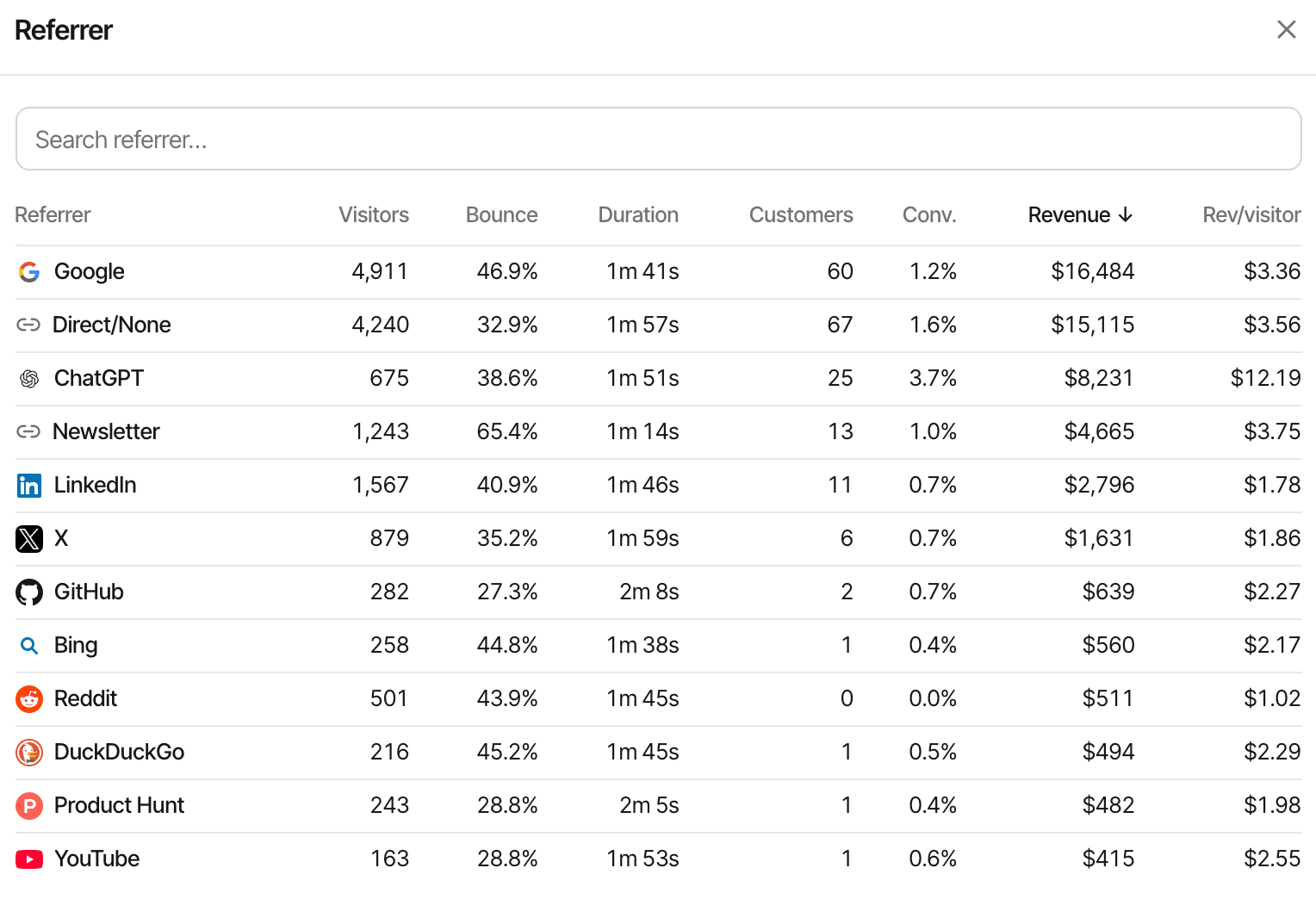
Connect your payment provider, pass the visitor id to your checkout, and revenue shows up on every source, campaign and page.
const session = await stripe.checkout.sessions.create({
  mode: "subscription", // or "payment"
  line_items: [{ price: "price_123", quantity: 1 }],
  success_url: "https://yourdomain.com/thanks",
  metadata: {
    supr_visitor_id: req.cookies.supr_visitor_id,
    supr_session_id: req.cookies.supr_session_id,
  },
  // Subscriptions: renewals' invoices read the subscription's metadata.
  subscription_data: {
    metadata: { supr_visitor_id: req.cookies.supr_visitor_id },
  },
});
No code is needed for Polar Checkout Links, Dodo Payments payment links or Paddle.js checkout buttons: the script adds the visitor id when they're used. For any other provider, send each payment to POST /api/v1/payments with an amount and a transaction_id; sending the same transaction_id again updates that payment, so retries are safe.
Signed webhooks
Each provider's webhook needs its signing secret, pasted into the website's settings. Without it, the webhook is refused as not configured; with a wrong signature, as invalid.
Matching and models
A payment is credited through the visitor id it carries. Without one, through the customer id of an earlier payment or a visitor with the same email (from identify or a payment). If nothing matches, it still counts as revenue, without a source.
Credit goes to the visitor's last visit before paying, or their first visit ever, as you choose per website; last touch is the default.
What it doesn't do
Renewals count as revenue, not new customers, and refunds follow each provider's rules (Stripe's partial refunds aren't subtracted). There's no MRR, ARR, churn or cohort reporting, and a purchase on another device is only matched through an email or customer id.
Debug your funnel with real visitor journeys.
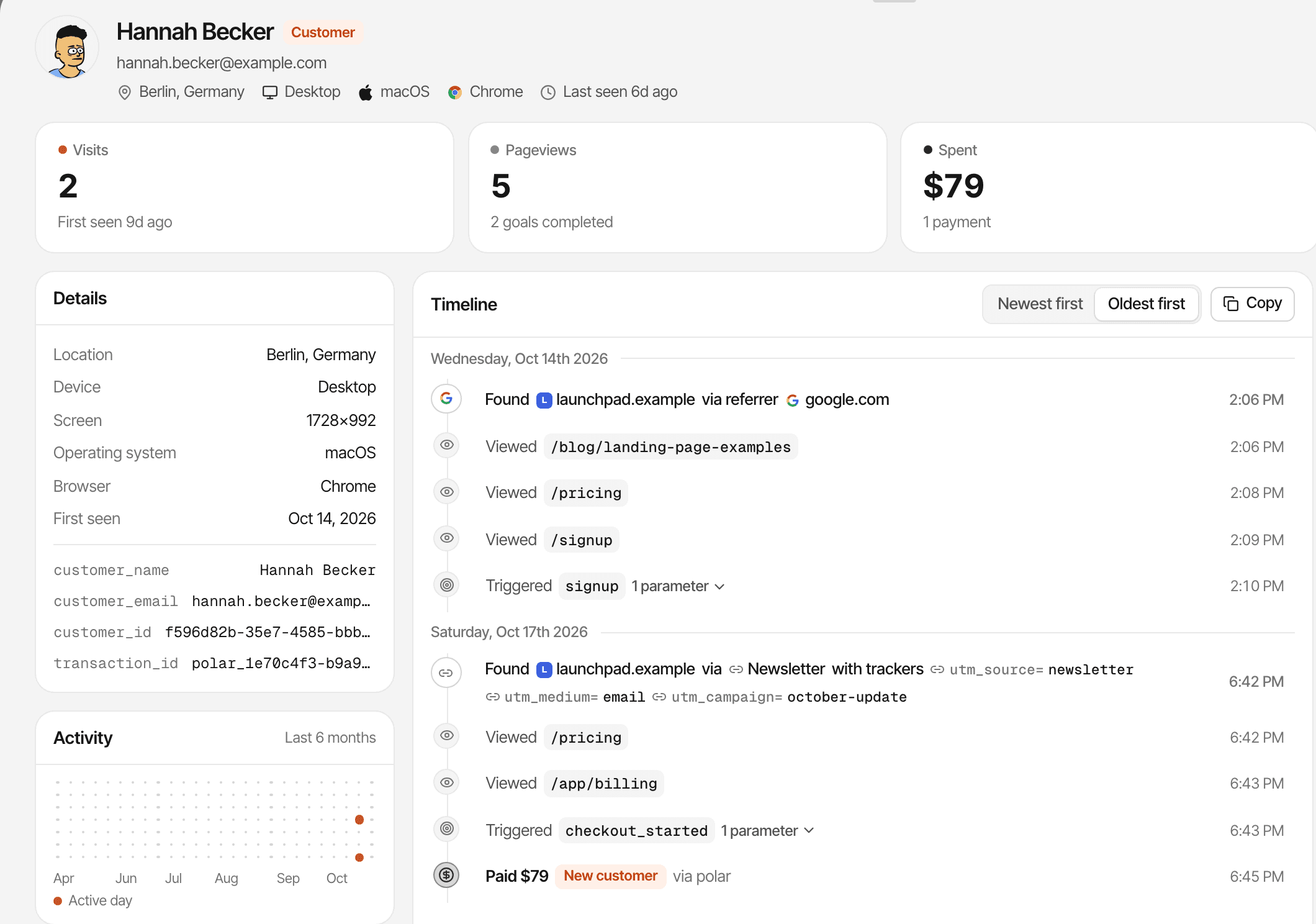
When the numbers look off, open the people behind them.
Visitor journeys
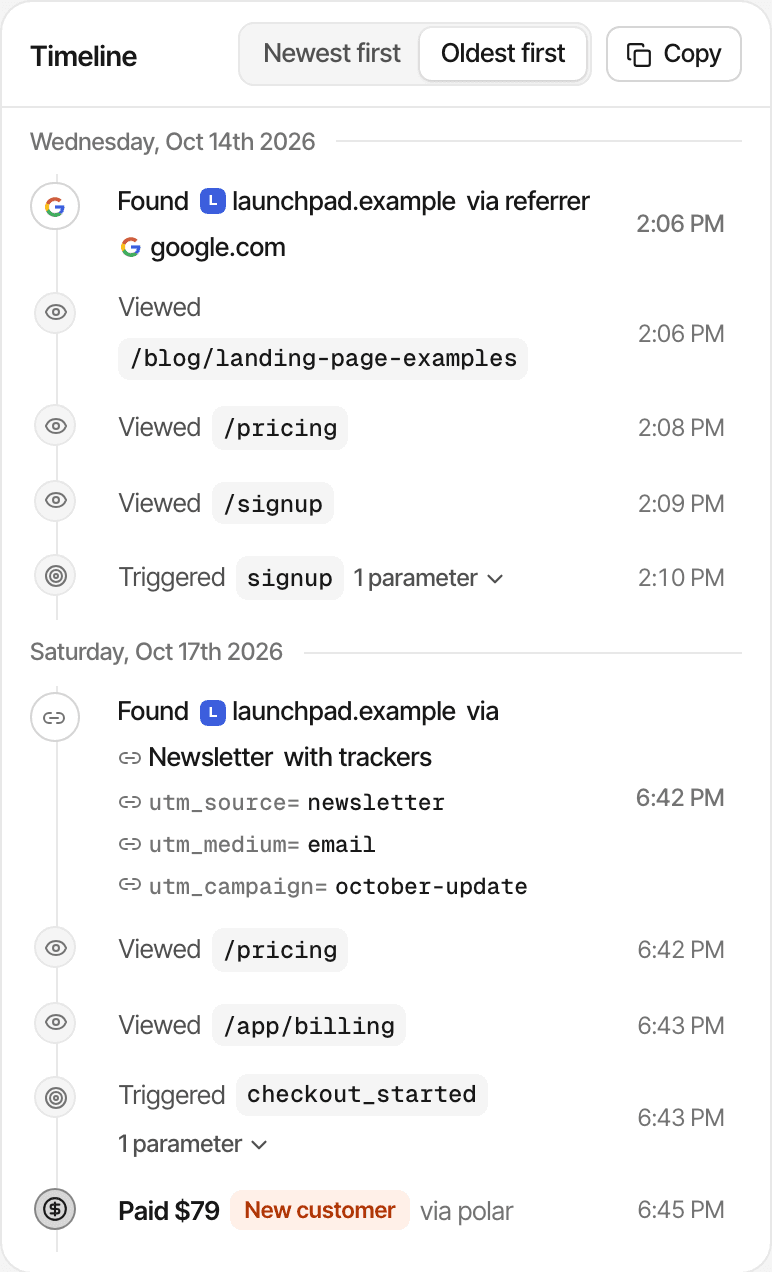
Every visit a visitor made, with its source and campaign, and every page, goal (with its properties) and payment in order. Find a customer, or someone you identified, by name or email.
Funnels
Save 2 to 8 steps, each a page, a goal or a payment, including “didn't complete this goal”. See how many people reach each step, where they drop off and how long each step takes, with the dashboard's filters applied.
Recordings only if you turn them on
Journeys and funnels are built from pageviews, goals and payments. Session recordings and heatmaps are off until you turn them on for a website; text typed into form fields is always masked, and supr-mask or supr-block hides more.
See what's happening after you ship.
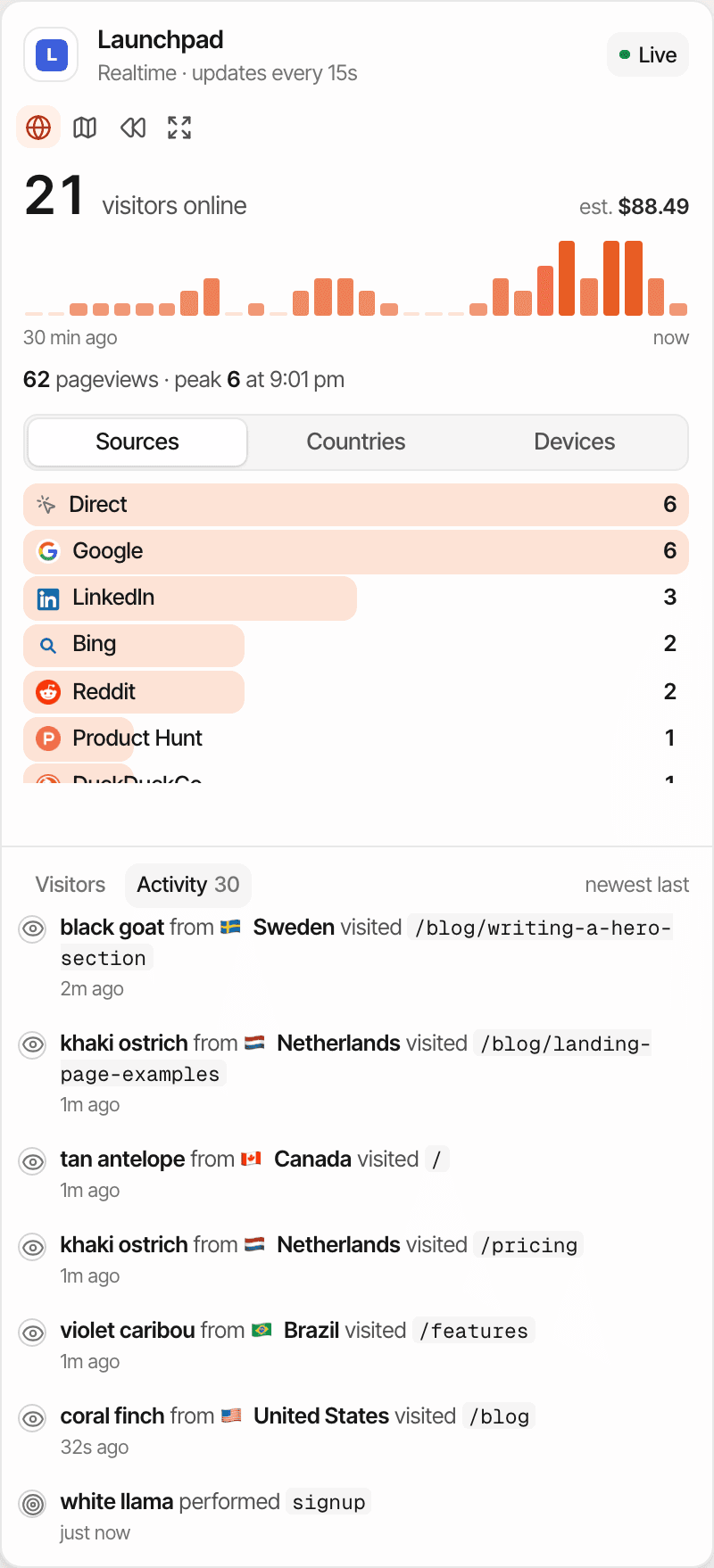
Deploy, open the realtime view, click through your own flow, and watch the events arrive.
How live it is
- Online means active in the last 5 minutes
- The realtime view refreshes every 15 seconds
- The activity feed is a server-sent events stream: pageviews, goals and payments appear as they're recorded, goals from your API included
Checking an install
There's no debug mode or event inspector. Your browser's Network tab shows each hit as a POST to /api/event, and its status tells you what happened:
- 202
- Taken. Also the answer for traffic dropped on purpose: bots, exclusions, a paused account.
- 200
- Taken, with a small body, when live chat or cookieless mode is on.
- 403
- Hostname not allowed for this website: add the address to the website's domains.
- 404
- Unknown website: check supr-website-id.
- 400
- Invalid event: usually a malformed hit.
- 429
- Too many hits in a minute, from one address or to one website.
Choose how your website recognizes visitors.
First-party cookies by default, or none at all with one attribute. Each has a cost.
- Kept on the device
Default: Two first-party cookies: supr_visitor_id (1 year) and supr_session_id (30 minutes)
Cookieless: Nothing
- How a visitor is recognised
Default: The visitor cookie
Cookieless: A hash of the IP address, browser and website with a secret that changes every UTC day
- Returning visitors
Default: Recognised on later days, in the same browser
Cookieless: Only within the same day; the next day they're new
- Revenue attribution
Default: Payments on any later day
Cookieless: Payments on the same day only
- Goals from your server
Default: Read the cookie
Cookieless: Pass supr.visitorId() from the page; it's valid that day
- Links between your domains
Default: One visitor across them (supr-allowed-hostnames)
Cookieless: Not available
In both modes
- IP addresses are used for location, rate limits and exclusions, and not stored
- Stored per visit: country, region and city, browser, OS, device, language, screen size, referrer, campaign and pages
- No matching across devices: a phone and a laptop are two visitors unless identify or a payment's email links them
Consent is still your call
Whether you need a consent banner depends on where you and your visitors are and how you use the data. Cookieless mode sets no cookies; it doesn't settle that question by itself, and neither does this page. It isn't legal advice.
From your first deploy to your first paying customer.
Five steps. The first is a paste; the rest are as much code as you choose.
Add the tracking script
Once, in your layout.
From then on, pageviews, sources, campaigns and client-side routes are recorded.
Configure a conversion goal
In the dashboard, or in your code.
A page goal such as /welcome needs no code; an event goal is defined by the name you send.
Instrument an important event
In your code.
Call supr() after the action succeeds, or send it from your backend with the Goals API.
Connect a payment provider when needed
In your provider and your checkout.
Add the webhook and its secret, then pass the visitor id to your checkout.
Review sources, journeys, and revenue
In the dashboard.
Which channels convert, where people drop off, and which sources bring paying customers.
Nothing past step 1 happens by itself: goals, events and payments are recorded once you've set them up. Get started in 3 steps
Questions, answered.
How do I add SuprAnalytics to my website?
Does SuprAnalytics work with React and Next.js?
Can I track custom JavaScript events?
Can I send conversion events from my backend?
Does SuprAnalytics support automatic pageview tracking?
Can I connect Stripe and other payment providers?
Does SuprAnalytics offer cookieless tracking?
Is SuprAnalytics a replacement for product analytics tools?
The live demo is a made-up website with made-up visitors, so you can click through goals, journeys and revenue before installing anything.
More solutions
- For indie hackersTraffic, signups and payments by source, for solo founders shipping fast.Open
- For SaaSTrack traffic, trials and subscription revenue back to their sources.Open
- For startupsSee which launches and channels bring paying customers, on a small budget.Open
- For agenciesEvery client website in one account, with shareable public dashboards.Open
- For creatorsWhich posts and newsletters sell your digital products.Open
- For small businessesSimple website analytics, goals and a live chat, without the setup.Open
- For landing pagesTrack a landing page's traffic, conversions and campaigns.Open
Ship your product. Understand what happens next.
Add website analytics, track conversions, and connect your traffic to revenue without maintaining another analytics backend.
14-day free trial · No card requiredPricingDocumentationAll features