
Dodo Payments + SuprAnalytics
See which traffic sources bring your Dodo Payments revenue
Dodo takes the payment. SuprAnalytics shows where it came from: connect the two and every traffic source, campaign and page shows the Dodo revenue it brought, with each customer's journey from first visit to payment.
14-day free trial · No card required · From $9/monthExplore the live demo
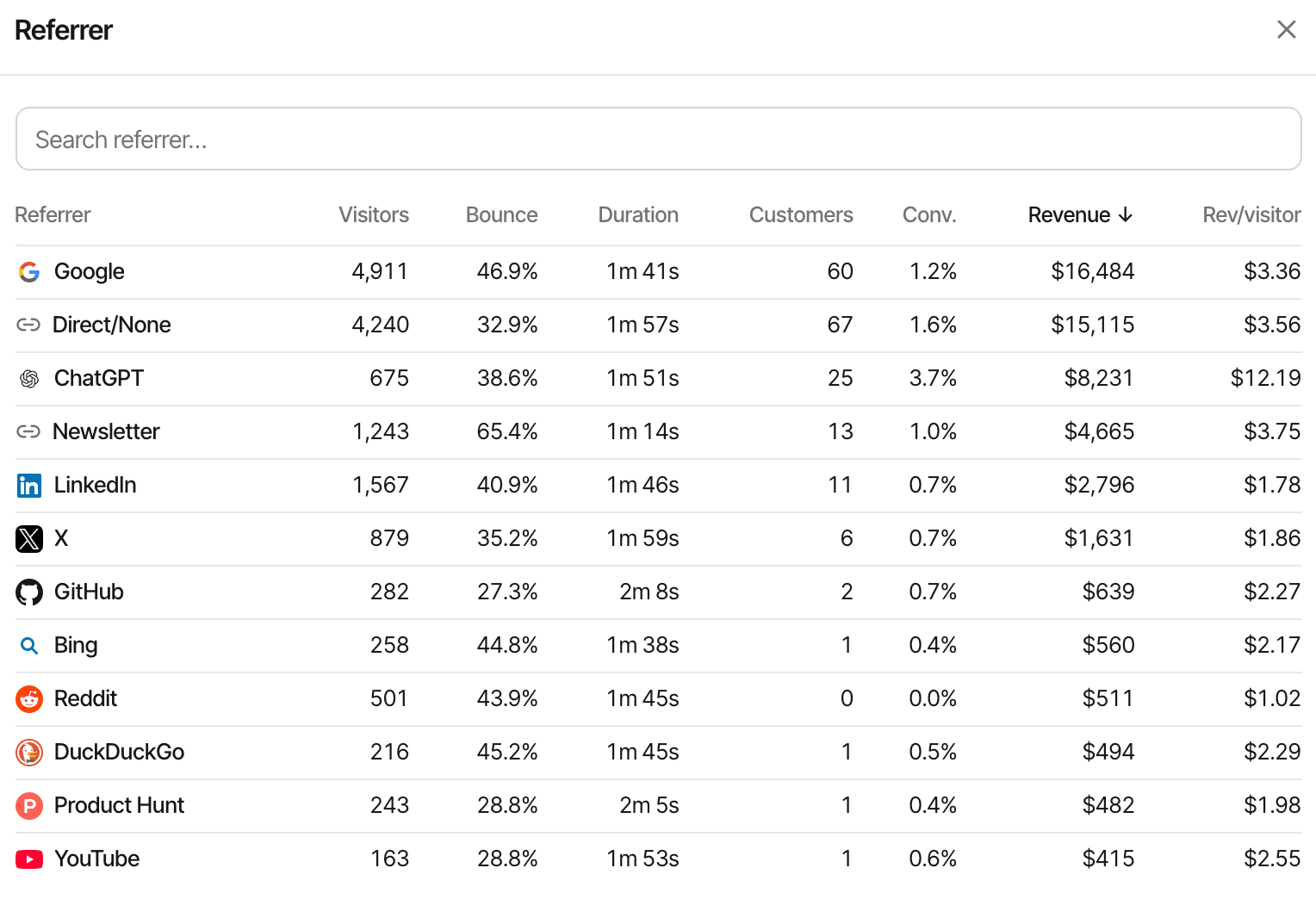
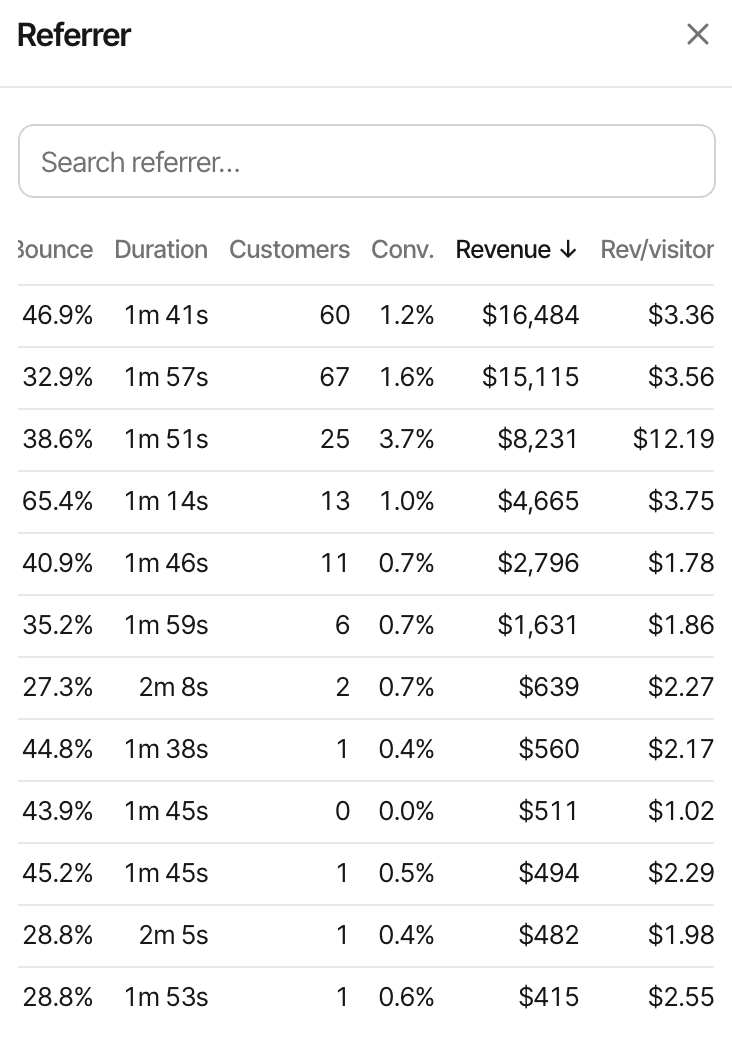
Your payment dashboard shows sales. Attribution connects them to traffic.
Three different things are easy to confuse. Dodo's dashboard is billing: what was sold, for how much, to whom. Website analytics is traffic: who came, from where, and what they read. Attribution is the join between the two: which of those visits turned into which of those payments.
Traffic and revenue rarely rise together. A source can send a crowd that never buys, and another a trickle that does. Attribution shows where paying customers came from; it isn't complete for every payment, and it doesn't prove a channel caused the sale on its own.
- Google1,500$240
- Direct850$110
- Reddit480$390
- X320$170
Connect Dodo Payments to SuprAnalytics
About five minutes. One endpoint in Dodo's dashboard, one key in SuprAnalytics, and the visitor id riding along with the checkout.
- Website visit
- Dodo checkout
- Payment webhook
- Revenue attribution
Install the SuprAnalytics script
One line in the
<head>of your pages, or the guide for your platform. Every visit is then recorded with its source, campaign and landing page, and each visitor gets an id.Add the webhook in Dodo Payments
In the Dodo dashboard, Developer → Webhooks → Add endpoint, with the URL SuprAnalytics shows for your website, subscribed to
payment.succeededandrefund.succeeded.Paste the signing key in SuprAnalytics
Copy the endpoint's signing key (
whsec_…) into Settings → Revenue with Dodo Payments selected. Every event is checked against it (Standard Webhooks), so nothing but Dodo can report a payment.Pass the visitor id with the checkout
Payment links need nothing: the script adds the id when a visitor clicks. For checkout sessions your server creates, pass it as metadata. Both are below.
See attributed payments
Each payment arrives through the webhook, is tied to the visitor and their visits, and shows up on the dashboard, the live view and the customer's journey within seconds. To try it with Dodo's test mode, use a second website for your staging site, with its own webhook and test-mode key: test payments sent to your real website stay in its revenue.
How a payment finds its visit. The script keeps a random id in the visitor's browser, the supr_visitor_id cookie. Dodo stores it in the payment's metadata as supr_visitor_id, and the webhook brings it back. SuprAnalytics looks it up, finds the person's visits, and the payment joins their journey. A renewal with no metadata of its own is matched through Dodo's customer id to the customer's earlier payment. A payment with neither still counts in your revenue, without a source.
Keep attribution connected through checkout
Two ways to get the visitor id into the payment's metadata. Use either, or both on the same website.
Dodo payment links
No code
A link to checkout.dodopayments.com/buy/pdt_… anywhere on your pages. When a visitor clicks it, the script adds metadata_supr_visitor_id and metadata_supr_session_id to the link; Dodo stores metadata_* parameters in the payment's metadata.
- Works on links added later too: the ids are set at the click, not at page load
- The visit's id comes along, so the payment is credited to the exact visit the link was clicked in
- A link that already carries a visitor id is left alone
- To stop the script touching links, add
supr-dodo="false"to it
Dodo checkout sessions
A few lines on your server
When your server creates the checkout session, read the supr_visitor_id cookie from the request and pass it as metadata. supr_session_id is optional and credits the payment to that exact visit.
import DodoPayments from "dodopayments";

const dodo = new DodoPayments({ bearerToken: process.env.DODO_PAYMENTS_API_KEY });

const session = await dodo.checkoutSessions.create({
  product_cart: [{ product_id: "pdt_123", quantity: 1 }],
  return_url: "https://yourdomain.com/thanks",
  metadata: {
    supr_visitor_id: req.cookies.supr_visitor_id,
    supr_session_id: req.cookies.supr_session_id,
  },
});
res.redirect(303, session.checkout_url);
Server-side code, from the guide: the API key never reaches the browser. The customer's metadata is read as well, so a subscription's later charges keep their attribution.
Know which channels generate Dodo sales
Is Google bringing paying customers, or only readers? Are Reddit visitors converting? Which newsletter issue sold, and which sources bring the customers who spend more? Every breakdown shows the revenue beside the visitors.
By channel and referrer
Search, social, AI assistants, email, referrals and direct visits, and the websites behind them, each with its customers and revenue.
By campaign
UTM tags and ref links read on arrival, so a sponsored post or a newsletter issue gets its own revenue line.
By landing page, page and country
Which pages people arrive on and read before they pay, and where in the world they pay from.
Over time
Revenue on the traffic chart as its own series, new and renewals apart, with the period before to compare.
Conversion rate and revenue per visitor
The two numbers that rank channels fairly, on every row, so a small source that pays well stands out.
Filtered
Click any row and the whole dashboard, revenue included, narrows to it.
Understand the first visit and the purchase visit
Most customers don't pay the first time they come. Pick, per website, which visit gets the credit.
- Mon · visit 1
Finds you on Google
Reads the pricing page, leaves
- Thu · visit 2
Types your address in
A direct visit
- Thu · visit 2
Clicks a Dodo payment link
Pays $49
First touch
The $49 is credited to
The visit that first brought this person to your website, however long ago. Answers which channels find new customers.
Last touch
The $49 is credited to
Direct
The visit the payment happened in. A direct return counts as direct; SuprAnalytics doesn't skip it in favour of an earlier source. Answers which visits close. This is the default.
A tagged payment link carries the visit's id as well, so the last touch is the visit the link was clicked in; a checkout session without supr_session_id falls back to the visitor's most recent visit before the payment. Someone who browses on one device and pays on another is two visitors until an email or your app's identify call joins them, and in cookieless mode the visitor id changes daily. More on attribution models
See what happens after the first payment
Dodo sends one event for every successful charge and one for every refund. SuprAnalytics keeps them on the customer's record, so a subscription's second month and a refund in its third are part of the same story.
- What arrives
- payment.succeeded for one-time payments and every subscription charge, and refund.succeeded for refunds. Payments that aren't succeeded, payment-method updates and free payments are skipped.
- What's stored
- The amount after discounts and before tax (Dodo is the merchant of record, so its tax isn't your revenue), converted from Dodo's smallest currency unit even for zero- and three-decimal currencies, the currency, whether it's a renewal, what was refunded, the customer's id, email and name, and the ids of the payment, subscription and checkout session.
- Renewals
- A subscription charge that didn't come through a checkout session, or a later charge of a subscription SuprAnalytics has seen, is marked as a renewal and credited to the customer's original visit, through the payment's metadata or Dodo's customer id.
- Refunds
- Applied once each, by id. A full refund marks the payment refunded; a partial one lowers it by its pre-tax share. A refund that arrives before its payment is applied when the payment's delivery lists it.
- What you see
- A revenue figure split into new and renewals, revenue on every source, page and country, each customer's journey with their payments, lifetime value per customer and per segment, and a customers list.
Payments in other currencies are converted to your website's reporting currency with daily rates. This is attribution, not accounting: Dodo's dashboard stays the record for invoices, taxes and payouts.
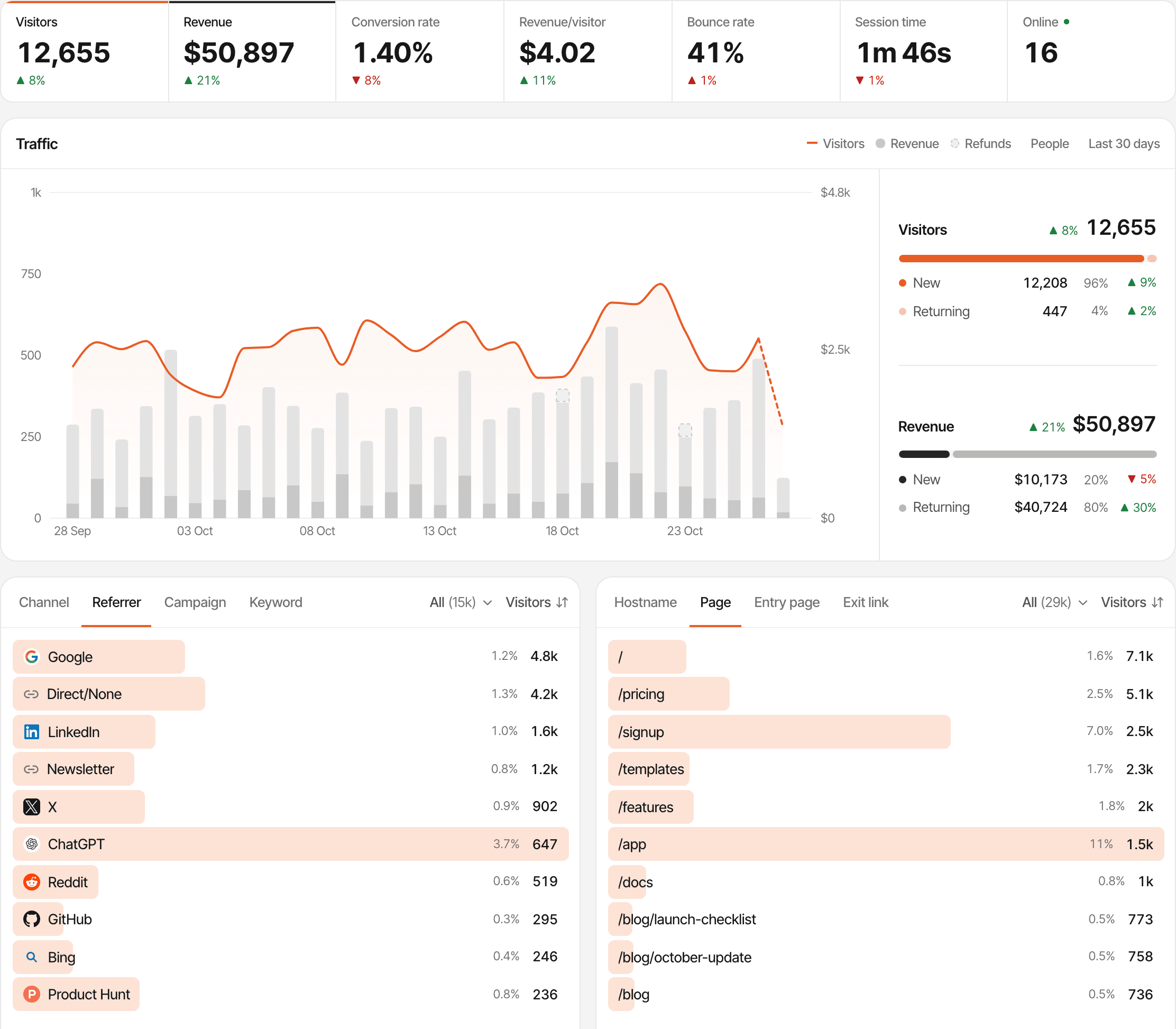
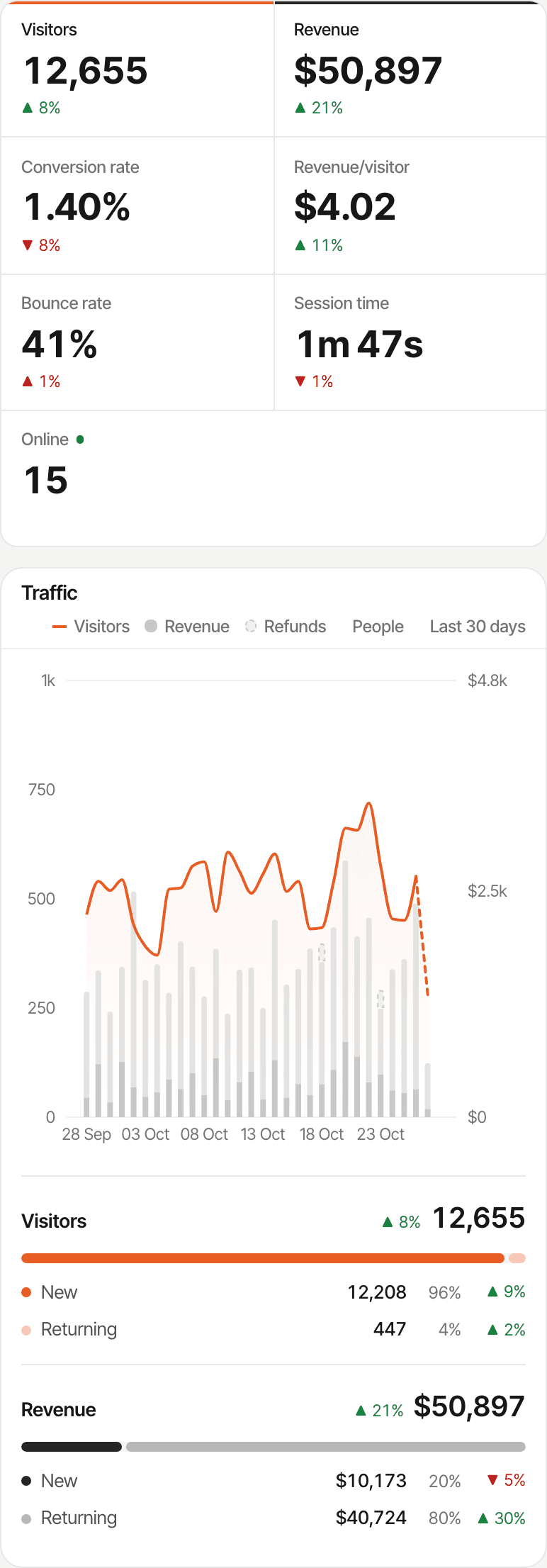
Understand the journey before someone becomes a customer
A Dodo payment is the last line of a story: a search, a few pages, a goal completed, maybe a question in the chat. SuprAnalytics keeps the whole of it, for every website you run, in one account.
- The visits, pages and goals before the payment, on one timeline, and funnels that end at the payment
- A chat conversation beside the visitor's analytics, so you know who's asking before you reply (live chat)
- Revenue by source, campaign and page across every provider you connect (revenue attribution)
Chat and payment meet on one journey when they come from the same tracked visitor, which is the same browser. A payment from elsewhere joins by the email Dodo sends, when SuprAnalytics has seen it before.
Start tracking Dodo Payments revenue
The Dodo Payments integration is part of every plan, for every website. The plans differ only in monthly analytics events, storage and how long data is kept.
- Payments never count as events: only pageviews, goals and outbound clicks do
- Unlimited websites, each with its own Dodo webhook, attribution model and reporting currency
- Every plan starts with a 14-day free trial, with no card. One trial per person.
Plans start at
$9 / month
100,000 analytics events a month, unlimited websites, every feature. Bigger allowances up to 5 million.
14-day free trial · No card required
Questions, answered.
How do I track Dodo Payments revenue by traffic source?
Does SuprAnalytics integrate with Dodo Payments?
How does Dodo Payments checkout attribution work?
Do I need to pass visitor metadata to Dodo?
Can I track Dodo subscription renewals?
Can I track refunds?
How does first-touch vs last-touch attribution work?
Does every Dodo payment automatically have an attributed source?
More payment integrations
- StripeStripe payments and renewals, credited to the source that brought each customer.Open
- Polar.shPolar checkouts tagged automatically, with revenue by channel and campaign.Open
- Lemon SqueezyLemon Squeezy orders and subscriptions, tied to the visit that sold them.Open
- PaddlePaddle.js checkouts tagged automatically, with revenue by source.Open
Know where your Dodo Payments revenue comes from
Connect your Dodo payments with website analytics and understand which channels bring paying customers.
14-day free trial · No card requiredHow revenue attribution worksAlso selling through Polar?Every feature