
Someone asks ChatGPT for a tool like yours. Your website is in the answer, they click through, look around and sign up. A week later they pay. How do you know ChatGPT sent that customer?
Website analytics can often tell you, because the visit carries a referrer or a campaign tag that names ChatGPT. Often, but not always: some AI-driven visits arrive with no source information at all, and no tool can recover it afterwards. This guide shows how to measure the part you can see, and how to read the numbers knowing the rest exists.
The quick answer
- Visits from ChatGPT usually arrive with the referrer
chatgpt.com, the tagutm_source=chatgpt.com, or both. - Any analytics tool that reads referrers and UTM parameters can count them. SuprAnalytics puts them under the source ChatGPT in its AI search channel automatically; GA4 shows them as a source and, since May 2026, in an AI Assistant channel.
- To know what those visitors are worth, track goals (signups, demo requests) and connect your payment provider so payments are tied to visits.
- Treat the result as a floor: visits that lose their referrer and tag are counted as Direct.
What counts as ChatGPT referral traffic?
ChatGPT referral traffic is people who click a link in a ChatGPT response and land on your website. The browser may tell your website where the click came from (the referrer), and the link may carry a campaign parameter. When neither survives, the visit still happens, but it is recorded as Direct.
It is easy to mix this up with other AI signals that are not visits at all:
| Signal | What it is | A person on your site? | Can it convert? |
|---|---|---|---|
| ChatGPT referral visit | Someone clicked a link in a ChatGPT answer | Yes | Yes: goals and payments |
| AI crawler request | Software such as GPTBot or ChatGPT-User fetching a page | No | No |
| AI search visibility | Whether assistants include your site in answers | No | Not by itself |
| Brand mention in an AI answer | Your name appears in a response, linked or not | No | Only if someone then visits |
| AI citation nobody clicks | A source link that is shown but never opened | No | No |
Website analytics measures the first row. The others need different tools, or can't be measured from your website at all.
How ChatGPT referral tracking works
A ChatGPT referral reaches your reports in a few hops:
- Step 1: ChatGPT answerA link to your website appears in a response.Where it can fail: The prompt and the answer stay inside ChatGPT.
- Step 2: Website visitThe person clicks, and their browser opens your page.Where it can fail: If neither a referrer nor a tag arrives, the visit is Direct.
- Step 3: Source classificationA
chatgpt.comreferrer orutm_source=chatgpt.commakes the source ChatGPT. - Step 4: Goal or paymentYour goals fire; a connected payment provider reports the payment.Where it can fail: A payment that matches no visitor has no source.
- Step 5: Analytics reportVisitors, goals and revenue appear under ChatGPT.
When the person clicks, their browser requests your page. Depending on the app, the browser and the link, that request can include a referrer. Under the default browser policy (strict-origin-when-cross-origin), a cross-site referrer is only the origin, such as https://chatgpt.com/, never the conversation's path, and nothing is sent when a link opens with noreferrer.
The link itself can also carry a campaign tag. OpenAI's publisher FAQ says ChatGPT adds utm_source=chatgpt.com to referral URLs. Independent tests have found that not every link gets it, and in October 2026 analysts reported about a week when ChatGPT links arrived with neither a tag nor a referrer, until OpenAI fixed what was described as a bug. Treat both signals as useful but not guaranteed, and expect the details to change.
Your analytics tool then classifies the visit from whatever arrived. It never sees the conversation that produced the click.
Step 1: Install website analytics
Referrers and tags are only recorded if analytics runs on the page the visitor lands on, so the script has to be on every page, not just the homepage. In SuprAnalytics, add your website from the dashboard, then paste the snippet from Settings → General into the <head> of every page:
<script
  defer
  supr-website-id="YOUR_WEBSITE_ID"
  supr-domain="yourdomain.com"
  src="https://supranalytics.app/js/script.js"
></script>
Your snippet comes with its own website id and domain filled in. There are installation guides for Next.js, React, WordPress, Webflow, Shopify and other platforms, and a setup prompt you can hand to a coding agent. To check it works, open your website in a normal browser window: the visit shows on the dashboard within seconds. There is no separate AI setup; AI classification comes with the script.
Step 2: Find ChatGPT traffic
On the dashboard, the sources card has four tabs. Three of them answer "did ChatGPT send this visit?":
- Channel groups every visit by channel. Visits from AI assistants form the AI search row. Click it and every report on the page, from pages to goals, filters to AI visits.
- Referrer lists each source by name, so ChatGPT has its own row beside Perplexity, Claude and the others.
- Campaign shows the landing page's campaign parameters, such as
?utm_source=chatgpt.com, when the link carried them.
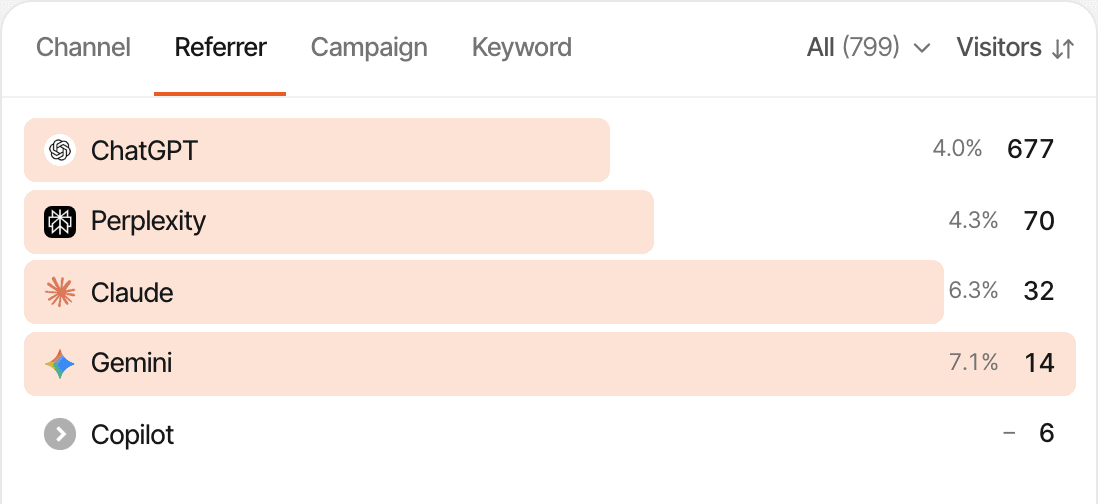
A visit counts as ChatGPT when either of these is true:
- Its referrer is
chatgpt.com(or one of its subdomains) or the olderchat.openai.com. - Its landing page has
utm_source,ref,viaorsourceset tochatgpt,openaiorchatgpt.com, in any letter case.
A tag wins over the referrer, and both are read on the first page of a visit only. The source belongs to that whole visit; a visit ends after 30 minutes without activity, and the next one gets its own source.
Then look at what those visitors did. With ChatGPT as a filter, the Entry page tab shows which pages AI visitors land on, the New vs returning tab splits first-time visitors from people who had been before, and the Users and Journeys pages show individual visitors. Each visitor's journey lists their visits with the source of each, every page and goal, and any payment, in order. Realtime analytics shows visits as they arrive, with their source.
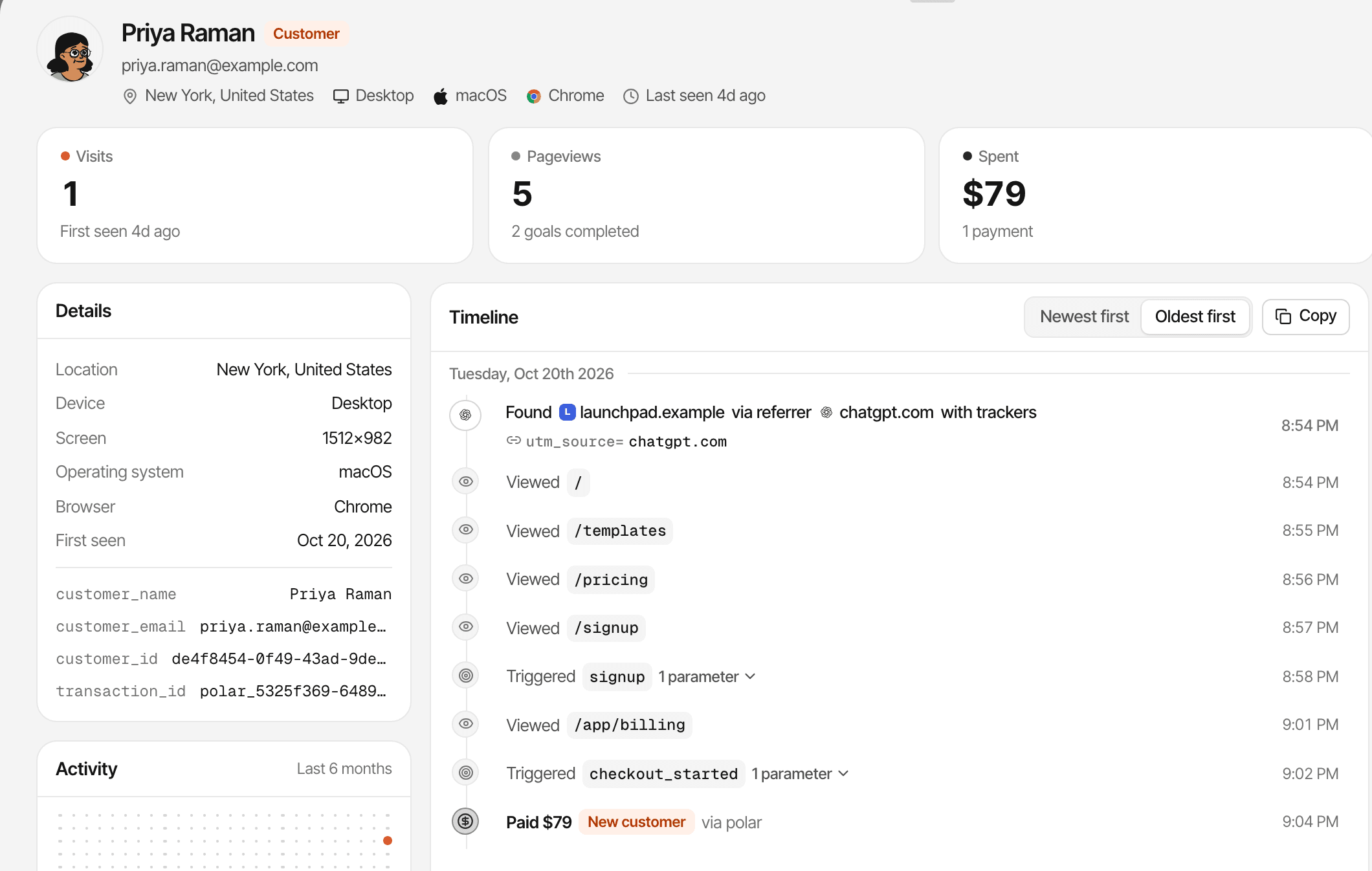
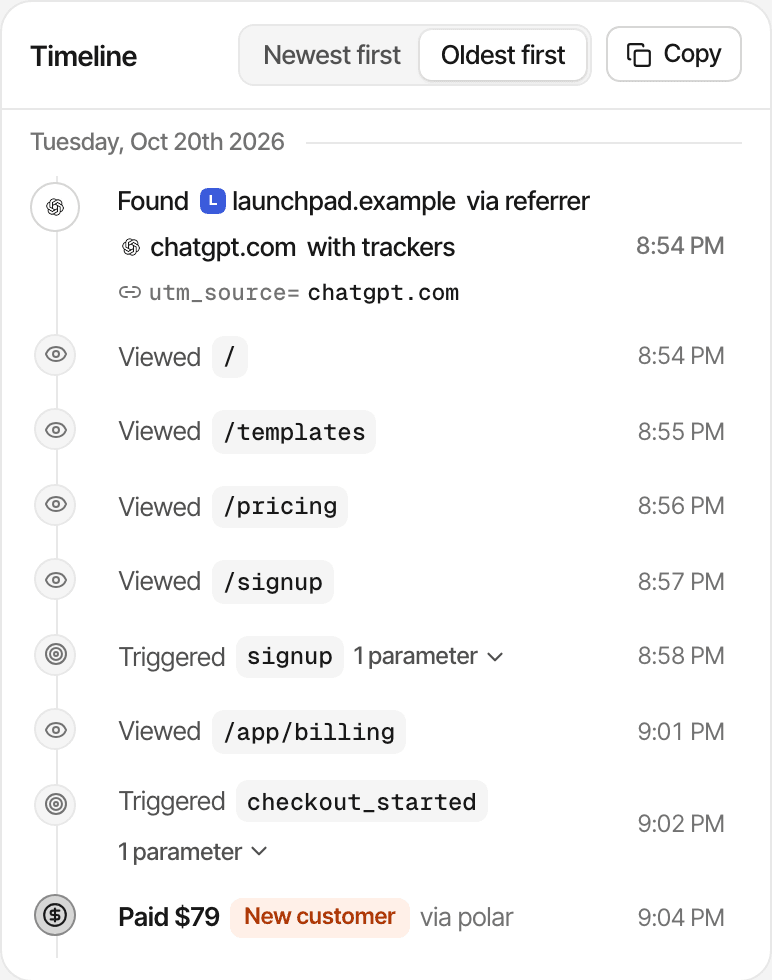
Visits are classified once, when they're recorded.
AI visits appear in your reports from the day the script went in, for as long as your plan keeps data. Old visits aren't reclassified later, so a Direct visit stays Direct.
Step 3: Compare AI sources
ChatGPT is rarely the only assistant sending traffic. SuprAnalytics recognises these assistants by their referrer, and puts each in the AI search channel under its own name:
| Assistant | Referrer domains | Tag values also recognised |
|---|---|---|
| ChatGPT | chatgpt.com, chat.openai.com | chatgpt, openai |
| Perplexity | perplexity.ai | perplexity |
| Claude | claude.ai | claude |
| Gemini | gemini.google.com, bard.google.com | gemini |
| Copilot | copilot.microsoft.com | — |
| Grok | grok.com | — |
| DeepSeek | deepseek.com | — |
| Meta AI | meta.ai | — |
| Phind | phind.com | — |
| You.com | you.com | — |
A domain is also accepted as a tag value, so ?utm_source=perplexity.ai counts as Perplexity. Some sources can't be separated: Google's AI Overviews and AI Mode send visitors from google.com, so they count as Google in organic search, and Copilot answers inside Bing count as Bing. An assistant that isn't on the list appears under its own domain in the Referral channel.
To compare them, expand the Referrer tab with the AI search channel as a filter. Each assistant gets its visitors, bounce rate and visit duration, and, once payments are connected, its customers, conversion rate, revenue and revenue per visitor. The Channel tab puts AI search beside organic search, social, email, paid and referral traffic.
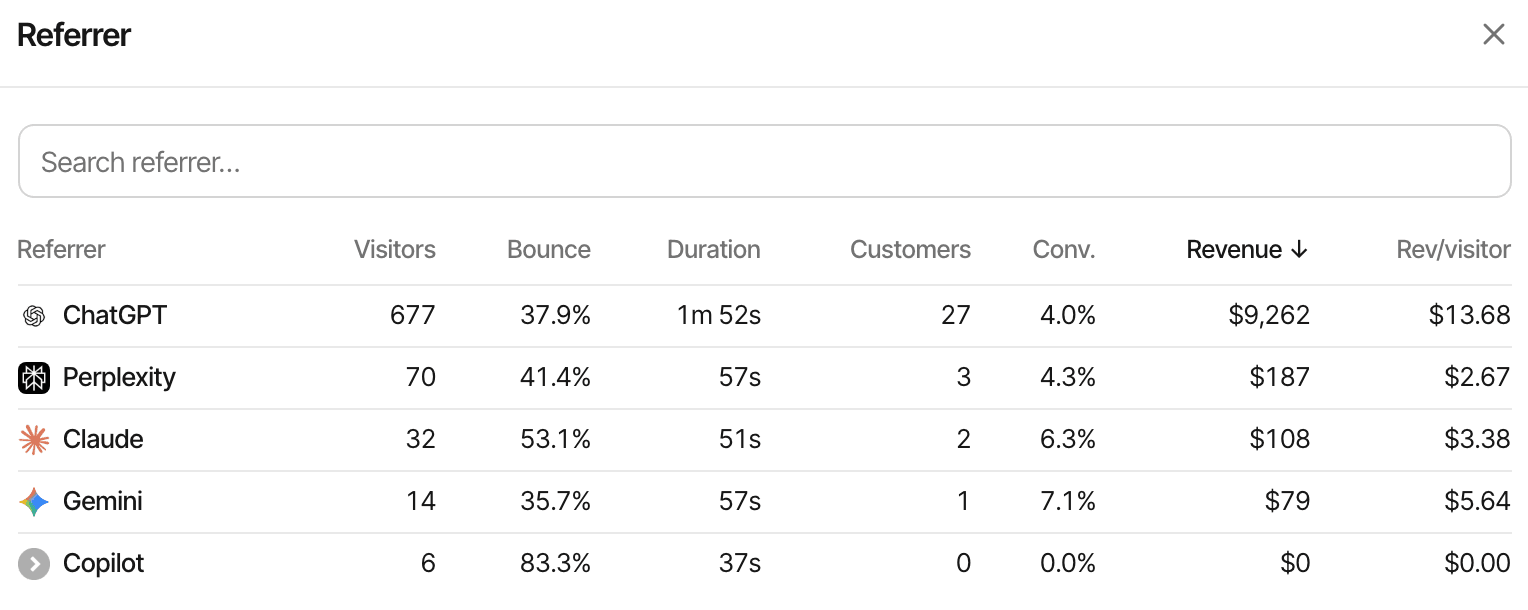
Small numbers swing a lot. Twenty visitors and one customer from Perplexity says little about Perplexity; compare channels over a few months before moving effort between them.
Step 4: Track conversions
Visits alone don't tell you whether ChatGPT traffic matters. Goals do. Nothing counts as a signup until you say what a signup is, in one of four ways:
window.supr("signup", { plan: "pro" });
window.supr("demo_requested");
window.supr("newsletter_subscribed");<a href="/pricing" supr-goal="pricing_cta_clicked">See pricing</a> <button supr-goal="contact_submitted" supr-goal-form="sales">Send</button>
curl -X POST https://supranalytics.app/api/v1/goals \
  -H "Authorization: Bearer YOUR_API_KEY" \
  -H "Content-Type: application/json" \
  -d '{"visitor_id": "<supr_visitor_id cookie>", "name": "signup"}'
The fourth needs no code: a page-visit goal counts everyone who reached a page such as /thanks, including past visits. Goal names are lowercased with spaces turned into underscores, so pick one spelling. Fire a goal when the action has actually happened, such as a completed signup rather than a click on the signup button, unless the click is what you want to measure. Full details are in the custom goals guide.
With ChatGPT as a filter, the Goals page shows how many ChatGPT visitors completed each goal and at what rate, and funnels show where they drop off. For example (illustrative numbers, not customer data): 120 identifiable ChatGPT visitors in a month, 8 of whom completed the signup goal, is a 6.7% conversion rate you can set against search or social. More on goal tracking.
Step 5: Attribute revenue
Signups are a proxy. Payments are the answer. To credit revenue to ChatGPT, connect your payment provider in Settings → Revenue: Stripe, Polar, Lemon Squeezy, Paddle or Dodo Payments by webhook, or any other provider through the payments API. Then pass the visitor's id to your checkout, so the payment can be tied to their visits. Here is how a payment travels, in a fictional example:
- A visitor arrives from ChatGPT, tagged
utm_source=chatgpt.com. - They read your pricing page and leave.
- Four days later they come back by typing your address: a Direct visit.
- They buy a $29 monthly subscription.
- Stripe sends the payment to SuprAnalytics, carrying the visitor id your checkout passed along.
- SuprAnalytics matches the payment to the visitor, and so to both of their visits.
- The attribution model decides which visit gets the $29.
Each website picks its model in Settings → Revenue, and every report follows it:
- Last touch, the default, credits the visit the payment came from. In the example, Direct gets the $29.
- First touch credits the visitor's first visit. In the example, ChatGPT gets the $29.
Neither is wrong; they answer different questions. Last touch tells you what closes sales, first touch what finds new customers. Renewals stay with the customer's original source.
When a payment can't be matched
A payment without the visitor id is matched another way, through a customer id from an earlier payment or an email SuprAnalytics has already seen. If nothing matches, it still counts in your revenue, but without a source. And recognising the same visitor depends on the browser: someone who reads ChatGPT on their phone and pays on a laptop is two visitors.
Setup guides: Stripe, every provider, and how revenue attribution works.
Why ChatGPT traffic sometimes appears as Direct
Direct means a visit arrived without a referrer and without a source tag. For AI traffic, the likely causes are:
- App behaviour. Links opened from mobile or desktop apps, AI assistants included, often arrive without a referrer. Behaviour varies by app, version and platform.
- Links opened without a referrer. A link opened with
noreferrersends none; the October 2026 incident above was this, plus missing tags. - Browser and privacy settings that trim or remove referrers.
- Copied links and later visits. Someone copies your address from an answer, or types it in tomorrow.
- Redirects through a link shortener or tracker that drops the original referrer and parameters.
- Cross-device journeys. The click happens on a phone, the visit that counts on a laptop.
A tag survives when the referrer doesn't, which is why utm_source=chatgpt.com is the more dependable signal. Two settings can still move a tagged visit: a utm_medium such as cpc, email or referral changes its channel (the source stays ChatGPT), and in cookieless mode a visitor is only recognised within one day. And some apps send their own referrer: on Android, a few apps such as Google and Reddit are mapped to their websites, while other app referrers appear under the app's package name as a referral.
No tool can tell which Direct visits started in ChatGPT, and SuprAnalytics doesn't estimate them: a visit is AI only when its referrer or tag says so.
ChatGPT visitors vs AI crawlers
OpenAI runs several automated agents. GPTBot collects content for training, OAI-SearchBot indexes pages for ChatGPT search, and ChatGPT-User fetches a page when a ChatGPT user asks for it. None of them is a visitor:
| Dimension | ChatGPT referral visitor | AI crawler |
|---|---|---|
| What it represents | A person visiting after a link click | An automated request |
| Typical evidence | A page view with a chatgpt.com referrer or tag | A bot user agent such as GPTBot in your server logs |
| Conversion potential | Can complete a goal or a payment | Not a human conversion |
| Measurement | Website analytics | Bot or crawler monitoring on your server |
Crawlers don't run JavaScript, so a script-based tool never sees most of them, and SuprAnalytics drops bots that do reach the script. To see crawler activity, your server forwards each crawler request's user agent and path to the crawler API. The dashboard's crawler card then sorts them into AI answers (ChatGPT-User, Claude-User, Perplexity-User), indexing (OAI-SearchBot, PerplexityBot, Googlebot) and training (GPTBot, ClaudeBot, CCBot), kept apart from visitors. See crawler tracking.
Classification is by user agent, which anyone can fake, and unknown bots aren't listed. A ChatGPT-User request tells you someone's conversation fetched the page, not that your link was shown or clicked.
Can Google Analytics 4 track ChatGPT traffic?
Yes, with the same limits as any other tool: it can only report the referrer and campaign information it receives.
- Traffic acquisition report. Under Reports → Acquisition → Traffic acquisition, change the primary dimension to Session source / medium and look for
chatgpt.com. Session dimensions describe where each session came from; First user source describes where new users first came from. - The AI Assistant channel. Since May 2026, GA4's default channel group has an AI Assistant channel for visits from assistants such as ChatGPT, Gemini, DeepSeek, Copilot and Grok, matched by referrer. Google's AI Overviews and AI Mode are excluded; they stay in Organic Search.
- Custom channel groups. Under Admin → Data display → Channel groups you can build your own AI channel with a regular expression on the source, if you want rules you control.
GA4 attributes conversions to sources too, but its revenue comes from ecommerce events you send it, not from your payment provider. If you're comparing tools, see SuprAnalytics vs Google Analytics.
What ChatGPT traffic analytics cannot tell you
Be explicit about these with anyone reading your reports:
- The prompt. ChatGPT doesn't share what the person asked, or its answer.
- Every mention. Analytics sees clicks, not the responses that named you without a click.
- Every citation or link impression. How often your link was shown is invisible to your website.
- Every AI-driven visit. Visits that lose their referrer and tag count as Direct.
- Which prompt caused a purchase. At best you know the visit came from ChatGPT and the payment followed.
- The same person across devices. A phone and a laptop are two visitors unless a payment or your app identifies them.
SuprAnalytics measures the visits assistants send. It doesn't monitor what assistants say about you or report a share of AI answers.
Common tracking mistakes
- Treating all Direct traffic as AI traffic. Some of it started in ChatGPT; you can't know which part.
- Counting crawler requests as visitors. A GPTBot hit is not a reader.
- Confusing AI mentions with visits. Being named in an answer is not traffic until someone clicks.
- Assuming every ChatGPT link has a UTM tag. Many don't, and behaviour changes without notice.
- Counting pageviews as conversions. Define goals for the actions that matter.
- Claiming revenue without matched payments. Only payments tied to a visitor have a source.
- Ignoring the attribution model. Under last touch, a returning ChatGPT visitor who pays on a Direct visit credits Direct.
- Assuming all assistants behave alike. Each sends referrers and tags differently, and Google's AI features arrive as Google.
Frequently asked questions
Can I track visitors coming from ChatGPT?
How does ChatGPT appear in website analytics?
Why is ChatGPT traffic sometimes shown as Direct?
Can Google Analytics 4 track ChatGPT referrals?
Can I see the exact ChatGPT prompt that sent a visitor?
Can I track conversions from ChatGPT traffic?
Can I attribute Stripe revenue to ChatGPT referrals?
What is the difference between ChatGPT referrals and AI crawler traffic?
Sources
External behaviour described above, checked on October 27, 2026:
- OpenAI: Publishers and developers FAQ (utm_source=chatgpt.com on referral URLs)
- OpenAI: Overview of OpenAI crawlers (GPTBot, OAI-SearchBot, ChatGPT-User)
- MDN: Referrer-Policy (the default strict-origin-when-cross-origin)
- Google Analytics: Default channel group (the AI Assistant channel)
- Google Analytics: Traffic acquisition report
- Google Analytics: Custom channel groups
- Search Engine Roundtable: ChatGPT links missing UTM parameters (October 2026)