
Lemon Squeezy + SuprAnalytics
See which traffic sources bring your Lemon Squeezy sales
Lemon Squeezy handles your payments. SuprAnalytics shows where your customers came from: connect the two and every source, campaign and page shows the Lemon Squeezy revenue it brought, with each customer's journey from first visit to purchase.
14-day free trial · No card required · From $9/monthExplore the live demo
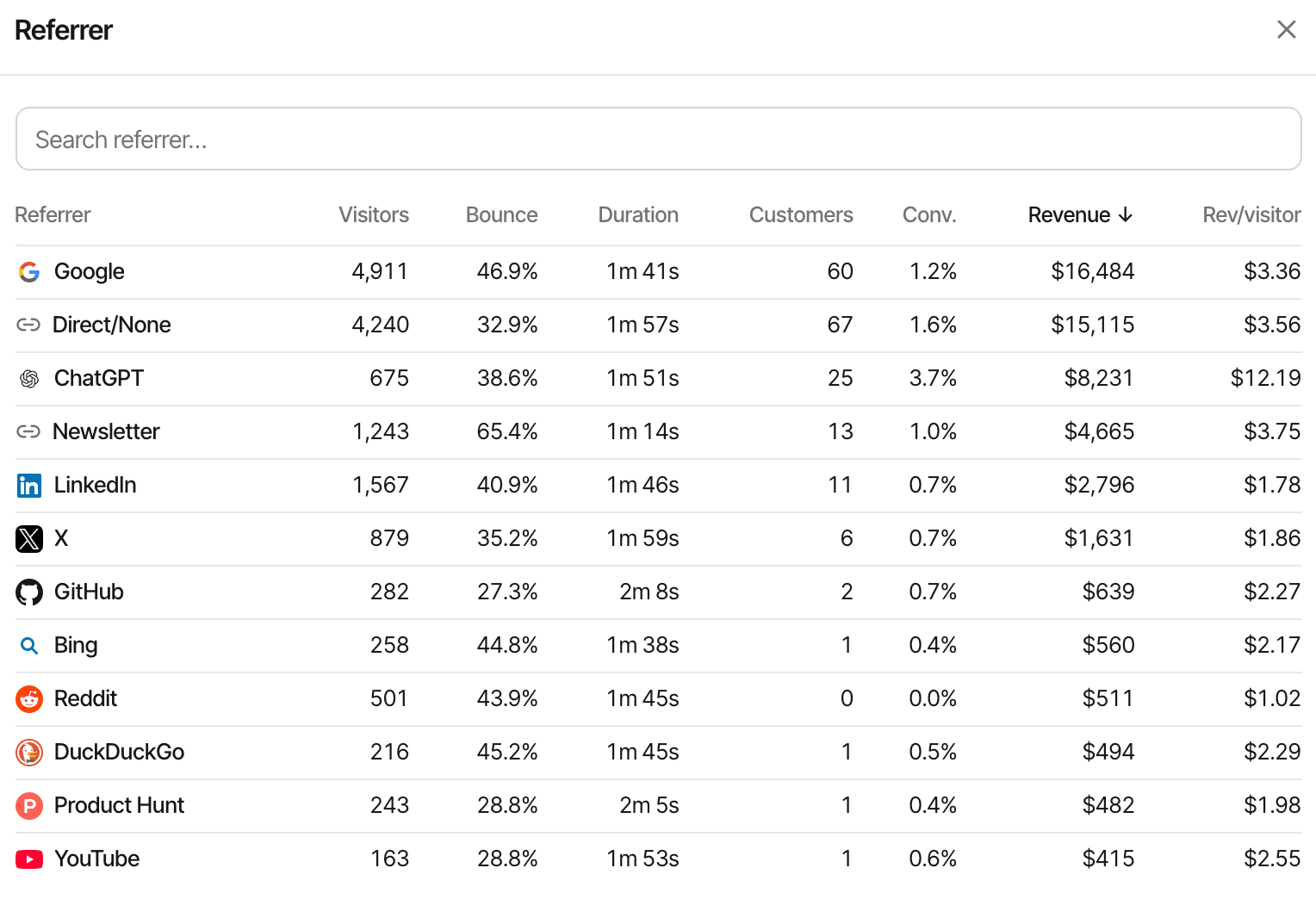
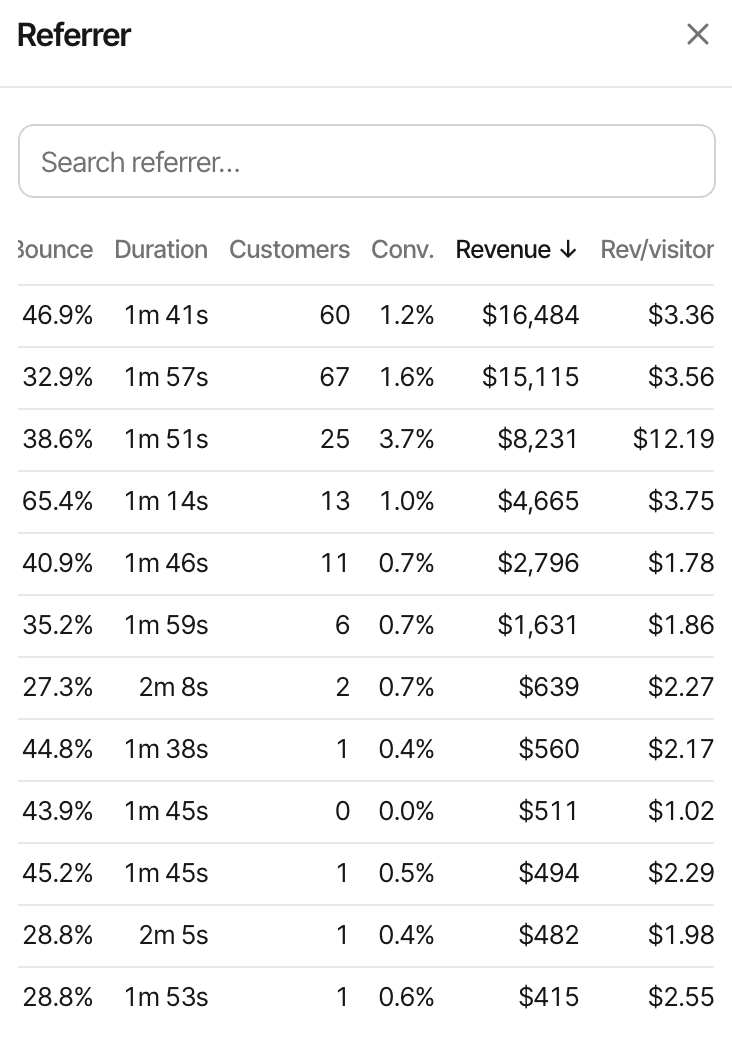
See which visitors become customers
Traffic analytics tells you where visitors came from. Lemon Squeezy tells you what sold. Payment attribution joins the two: which visits turned into which orders, so every source shows the revenue it brought, not just the people.
The channel with the most visitors is often not the one that pays. Attribution shows where paying customers came from; it doesn't cover a payment that can't be tied to a visit, and it doesn't prove a channel caused a sale on its own.
| Source | Visitors | Lemon Squeezy revenue |
|---|---|---|
| 1,400 | $240 | |
| 520 | $480 | |
| X | 360 | $120 |
| Direct | 780 | $160 |
Connect website visits to Lemon Squeezy payments
One webhook in Lemon Squeezy, its secret in SuprAnalytics, and the visitor id carried through checkout as custom data.
- Visitor arrives
- Checkout opens
- Payment completes
- Revenue is attributed
Install the SuprAnalytics script
One line in the
<head>of your pages, or the guide for your platform. Every visit is then recorded with its source, campaign and landing page, and each visitor gets an id.Add a webhook in Lemon Squeezy
In Lemon Squeezy, Settings → Webhooks, add the URL SuprAnalytics shows for your website with a signing secret of your choice, and select
order_created,subscription_payment_success,order_refundedandsubscription_payment_refunded.Paste the same secret in SuprAnalytics
In Settings → Revenue, with Lemon Squeezy selected. Every delivery's
X-Signatureis checked against it, so nothing but your Lemon Squeezy store can report a payment.Pass the visitor id as checkout custom data
Add
checkout[custom][supr_visitor_id]to your checkout links, orcheckout_data.custom.supr_visitor_idwhen your server creates checkouts with the API. Both are below.See attributed revenue
Each paid order arrives through the webhook, is tied to the visitor and their visits, and shows up on the dashboard, the live view and the customer's journey within seconds.
When the checkout carries no visitor id. The script keeps a random id in the visitor's browser, the supr_visitor_id cookie. Lemon Squeezy returns whatever custom data the checkout had in the webhook's meta.custom_data, and SuprAnalytics reads the id from there. Without it, the order is matched through Lemon Squeezy's customer id to that customer's earlier payment with a visitor, or by an email SuprAnalytics has already seen. Failing both, the payment is still recorded and counts in your revenue, without a source.
Keep visitor attribution connected through checkout
Lemon Squeezy carries custom data from the checkout to the webhook. Put the visitor id in it one of two ways, depending on how your checkouts are made.
Checkout links
A small script in the browser
The SuprAnalytics script doesn't change Lemon Squeezy links on its own. Add this snippet after it: when a visitor clicks a link to .lemonsqueezy.com/checkout, it sets checkout[custom][supr_visitor_id] on the link.
<script>
  document.addEventListener("click", function (e) {
    var link = e.target.closest && e.target.closest('a[href*=".lemonsqueezy.com/checkout"]');
    if (!link || !window.supr || !window.supr.visitorId) return;
    var url = new URL(link.href);
    url.searchParams.set("checkout[custom][supr_visitor_id]", window.supr.visitorId());
    link.href = url.toString();
  }, true);
</script>
Browser-side code from the guide, with no keys in it. It sets the id at the click, so links added later are covered too. Optionally, checkout[custom][supr_session_id] from window.supr.sessionId() credits the order to that exact visit.
Checkouts created with the API
On your server
When your server creates a checkout through Lemon Squeezy's API, read the supr_visitor_id cookie from the visitor's request and put it in checkout_data.custom.supr_visitor_id. Your API key stays on the server.
- The same custom-data keys as links:
supr_visitor_id, and optionallysupr_session_id - Nothing to change on your products or prices in Lemon Squeezy: the id rides on each checkout
Know which channels bring paying customers
Are Google visitors buying? Are your Reddit posts making sales? Which newsletter issue sold, and which sources bring customers who keep paying? Every breakdown shows revenue beside the visitors.
By channel and referrer
Search, social, AI assistants, email, referrals and direct visits, and the websites behind them, each with its customers and revenue.
By campaign
UTM tags and ref links read on arrival, so a sponsored post or a newsletter issue gets its own revenue line.
By landing page, page and country
Which pages people arrive on and read before they pay, and where in the world they pay from.
Over time
Revenue on the traffic chart as its own series, new and renewals apart, with the period before to compare.
Conversion rate and revenue per visitor
The two numbers that rank channels fairly, on every row, so a small source that pays well stands out.
Lifetime value
What customers from each source have paid in total, renewals included and refunds left out.
Understand where customers first came from and where they converted
Most customers don't pay on their first visit. Choose, per website, which visit gets the credit.
- Mon · visit 1
Finds you on Google
Reads the pricing page, leaves
- Thu · visit 2
Comes back directly
Types your address in
- Thu · visit 2
Opens a Lemon Squeezy checkout
Pays $49
First touch
The $49 is credited to
Revenue goes to the first visit SuprAnalytics recorded for this visitor, however long ago. It answers which channels find new customers.
Last touch
The $49 is credited to
Direct
Revenue goes to the visit the payment belongs to. This is plain last touch, and the default: a direct return gets the credit, it isn't skipped for an earlier source. It answers which visits close.
With supr_session_id in the custom data, the last touch is that exact visit; without it, the visitor's most recent visit before the order. Both models need the returning visitor to be recognised: someone who browses on one device and pays on another is two visitors until an email or your app's identify call joins them, and in cookieless mode the visitor id changes daily, so earlier days' visits can't be linked. More on attribution models
Follow revenue beyond the first purchase
One-time purchases, subscription renewals and refunds stay on the customer's record, so their second month and a refund in their third belong to the same story.
| Lemon Squeezy event | What SuprAnalytics does |
|---|---|
order_createdPaid orders | Recorded as a new payment for the order's total, credited through the custom data, the customer id or the email. Orders that aren't paid, and free ones, are skipped. |
subscription_payment_successRenewals | Recorded as a renewal when the billing reason is renewal, and credited to the customer's original visit. The first payment is skipped (the order already counts it), and so are charges for a plan change mid-cycle. |
order_refundedOrder refunds, full or partial | The whole order is marked refunded, even for a partial refund: SuprAnalytics doesn't lower it by the refunded amount. |
subscription_payment_refundedRenewal refunds | The renewal payment is marked refunded, in full. |
| Other eventsSubscription created, updated or cancelled, failed payments, license keys | Acknowledged and ignored: they aren't revenue. |
- Each order and each renewal is stored once, by its Lemon Squeezy id, so webhook retries don't double your revenue
- Refunded payments drop out of revenue, conversion and lifetime value, and the chart shows them on top of the revenue bars
- Renewals are counted apart from new revenue, and conversion rate counts new customers only
- Payments in other currencies are converted to your website's reporting currency with daily rates
Amounts are Lemon Squeezy's total, which includes any tax it charged, and a partial refund removes the whole payment, so SuprAnalytics' totals won't always match Lemon Squeezy's. This is attribution, not accounting: Lemon Squeezy stays the record for tax, invoices and payouts, and it remains your merchant of record and subscription manager.
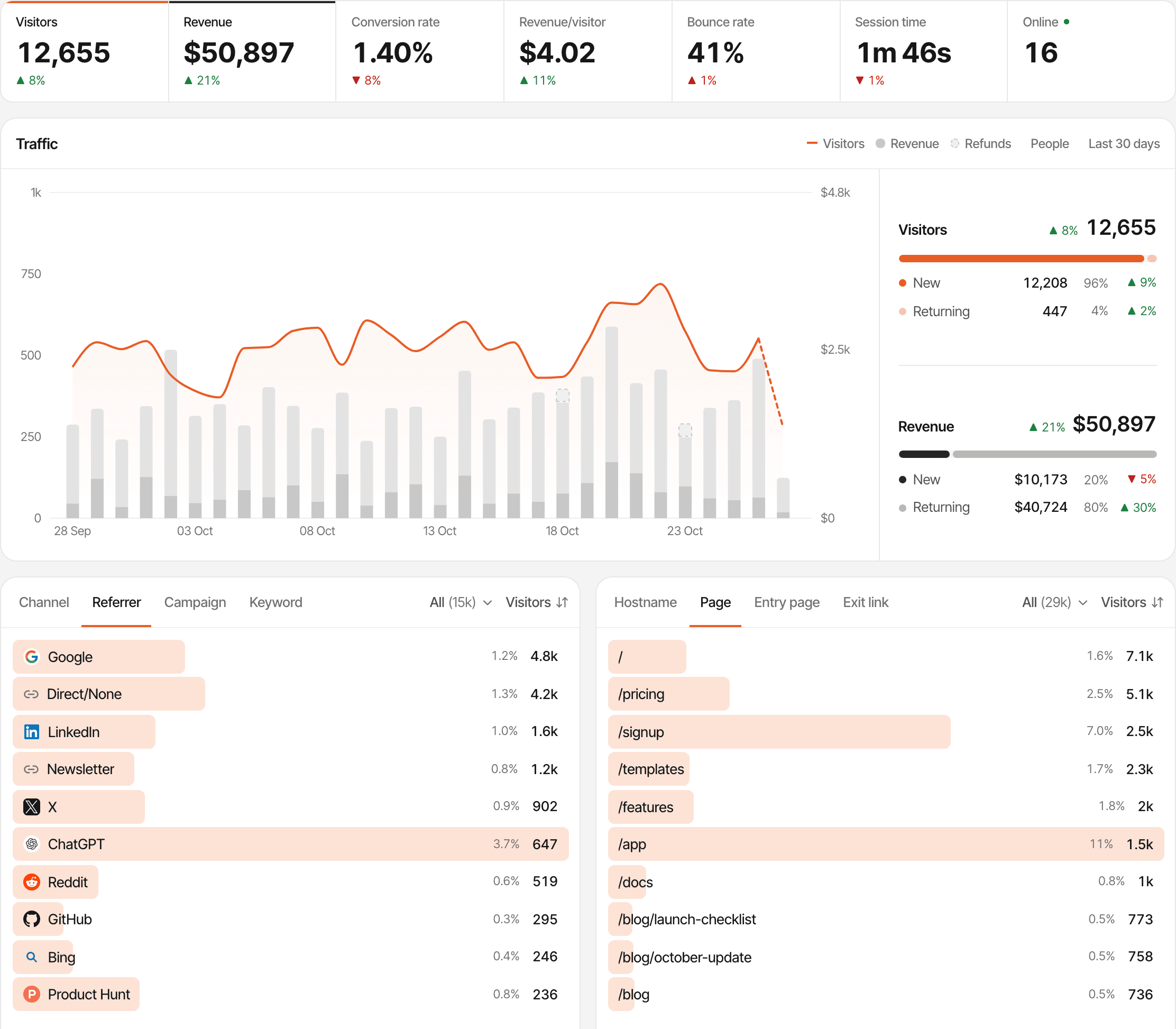
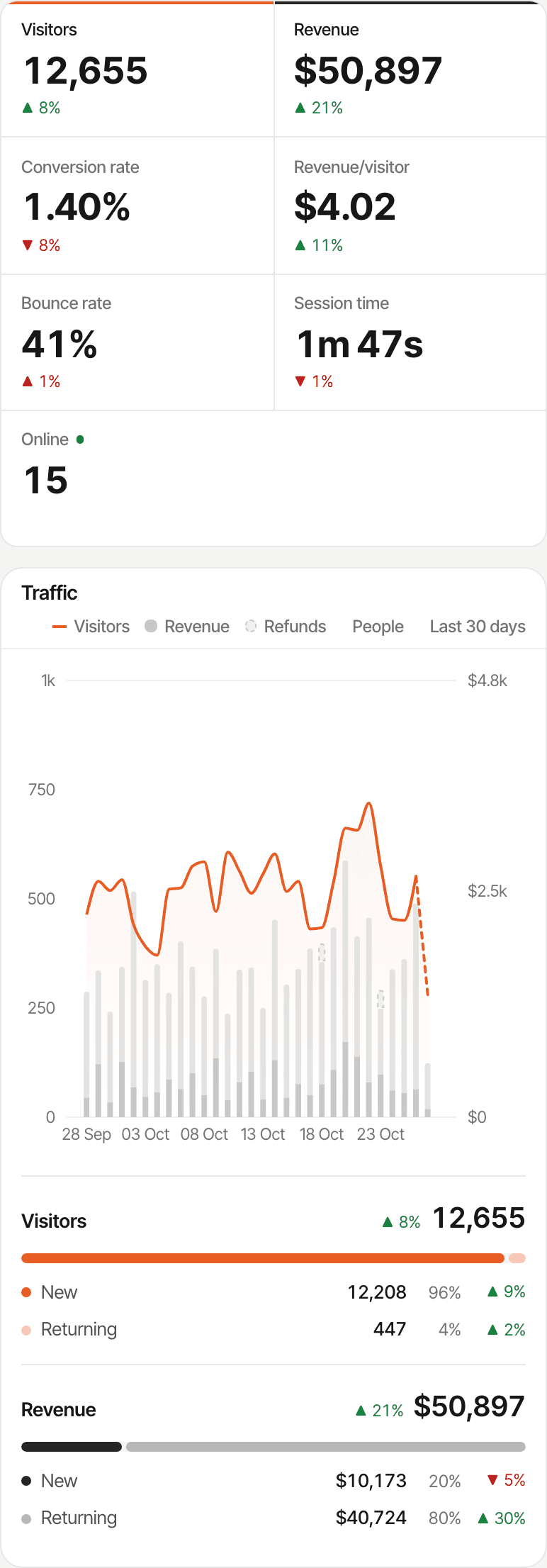
Understand what happened before the purchase
A Lemon Squeezy order is the last line of a story: how someone found you, the pages they read, the goals they completed, maybe a question in the chat. SuprAnalytics keeps all of it, for every website you run, in one account.
- Traffic analytics, the visitor's journey and funnels that end at the payment, on the same dashboard
- Built-in live chat, to answer questions before someone buys, beside that visitor's analytics
- Revenue by source and campaign across every provider you connect (revenue attribution)
A chat and a payment meet on one journey when they come from the same tracked visitor, which means the same browser, or when the email Lemon Squeezy sends matches one SuprAnalytics has already seen.
Start tracking Lemon Squeezy revenue
The Lemon Squeezy integration is part of every plan, for every website. Plans differ only in monthly analytics events, storage and how long data is kept.
- Payments never count as events: only pageviews, goals and outbound clicks do
- Unlimited websites, each with its own Lemon Squeezy webhook, attribution model and reporting currency
- Every plan starts with a 14-day free trial, with no card. One trial per person.
Plans start at
$9 / month
100,000 analytics events a month, unlimited websites, every feature. Bigger allowances up to 5 million.
14-day free trial · No card required
Questions, answered.
How do I connect Lemon Squeezy to SuprAnalytics?
Can I track Lemon Squeezy sales by traffic source?
How does Lemon Squeezy checkout attribution work?
Do I need to pass visitor information through checkout?
Can I track subscription renewals?
Can I track Lemon Squeezy refunds?
How does first-touch vs last-touch attribution work?
What happens if a payment cannot be linked to a visitor?
More payment integrations
- StripeStripe payments and renewals, credited to the source that brought each customer.Open
- Polar.shPolar checkouts tagged automatically, with revenue by channel and campaign.Open
- Dodo PaymentsDodo Payments revenue by traffic source, with renewals and refunds.Open
- PaddlePaddle.js checkouts tagged automatically, with revenue by source.Open
Find out where your Lemon Squeezy customers come from
Connect your website traffic to Lemon Squeezy revenue and discover which channels bring paying customers.
14-day free trial · No card requiredHow revenue attribution worksPolarDodo PaymentsEvery feature