
Revenue attribution
See which traffic sources actually bring revenue
Pageviews tell you who's visiting. Revenue attribution tells you which channels bring paying customers. Connect Stripe, Polar, Lemon Squeezy, Paddle and Dodo Payments, and see traffic, conversions and revenue together.
14-day free trial · No card required · From $9/month
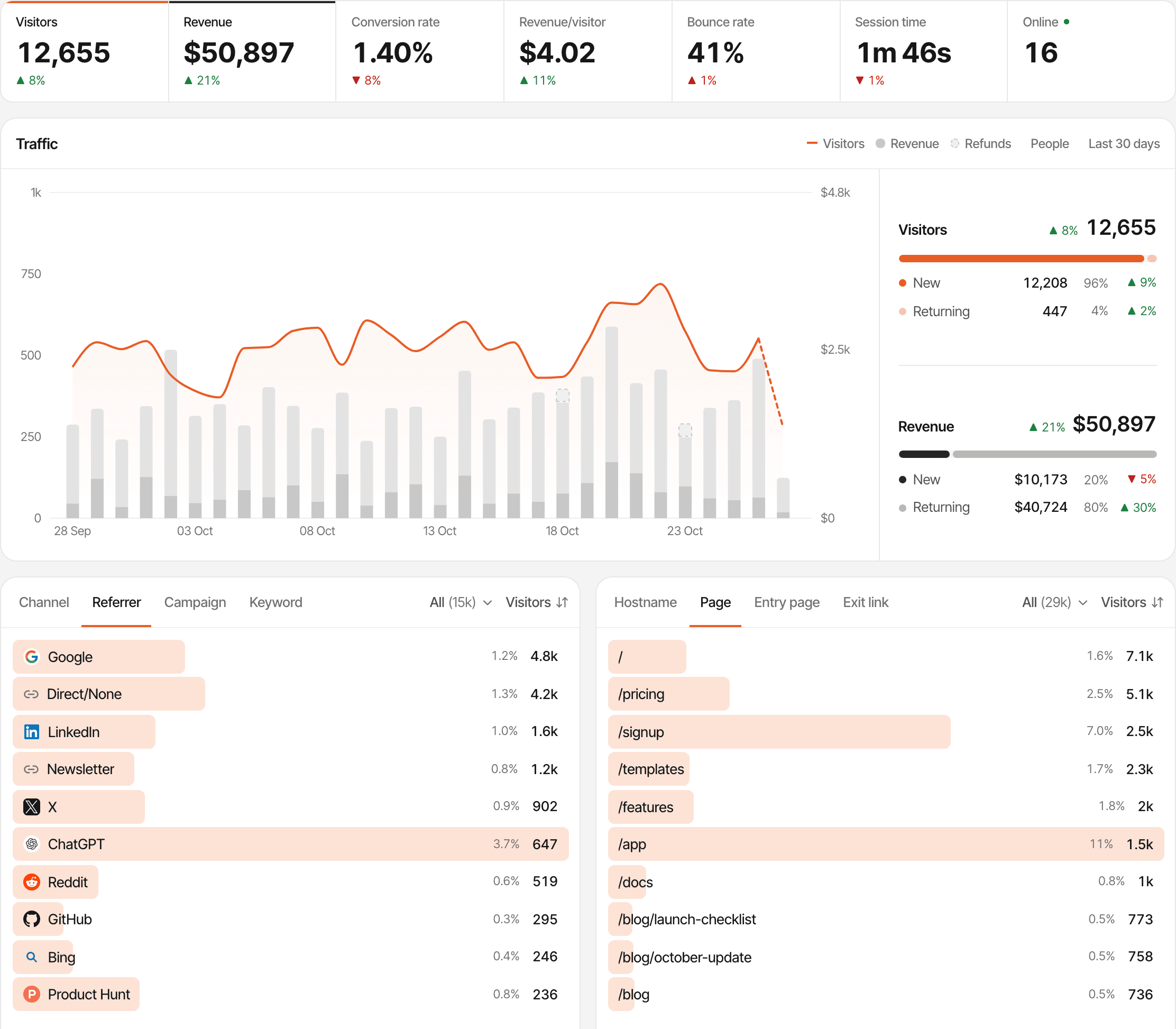
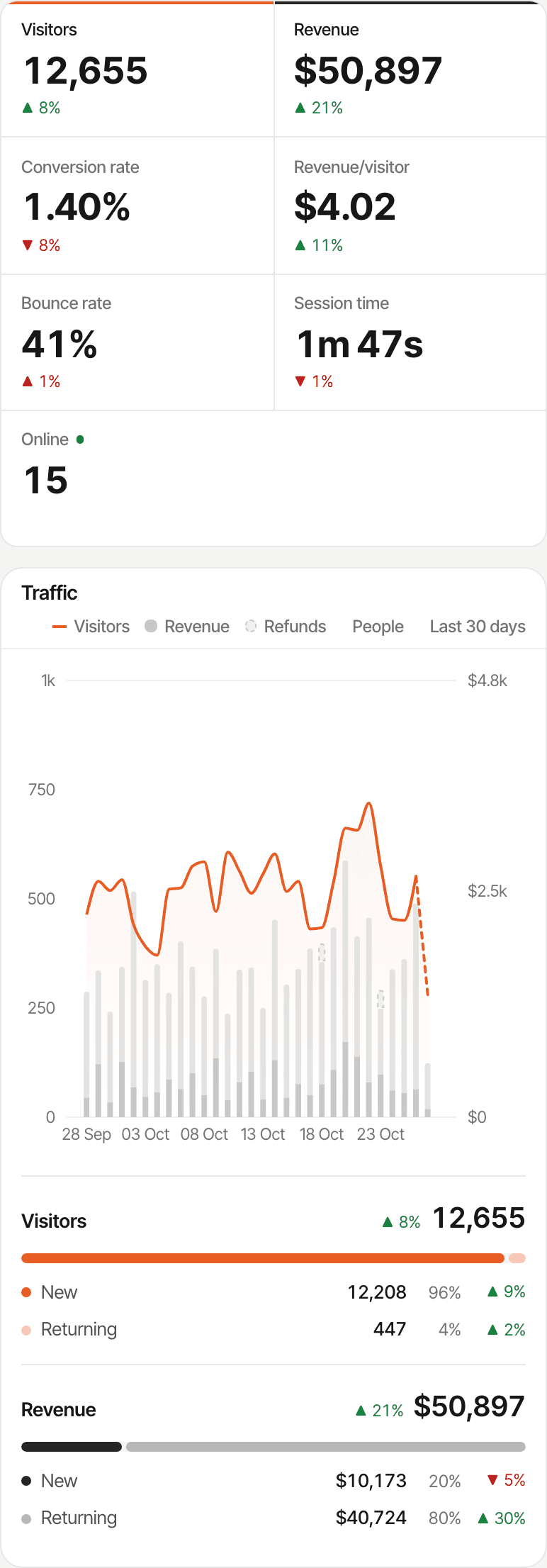
More visitors don't always mean more customers
A traffic report ranks sources by visitors. A revenue report ranks them by what those visitors paid, and the two lists are often in a different order. SuprAnalytics keeps both, side by side, by tying each payment to the visits that led to it.
Attribution tells you where paying customers came from. It doesn't prove a channel caused the sale on its own, but it shows which ones are worth more of your time.
- Google2,400$180
- Direct950$90
- Reddit600$420
- X350$260
From first visit to payment
Three steps, and the third is where most tools stop short: the payment has to find its way back to the visit.
- Visitor
- Checkout
- Payment
- Attributed revenue
- Step 1
Track the visit
The script records each visit as it happens: the channel and referrer, the campaign (UTM tags, ref and via links), the landing page and the pages after it, the country and device, and a visitor id kept in the browser.
- Step 2
Connect the checkout
The visitor id has to travel to the checkout. Polar checkout links, Dodo Payments links and Paddle.js buttons are tagged by the script when a visitor clicks; Stripe Checkout Sessions take it as metadata from your server; Lemon Squeezy checkouts take it as custom data, on the checkout link or through the API; Stripe Payment Links take it as client_reference_id. Each provider's guide shows its way.
- Step 3
Receive the payment
The provider's webhook sends the payment to SuprAnalytics, signed with a secret you paste into Settings → Revenue. The payment is tied to the visitor whose id it carries, or failing that to a known customer id or email, and through them to that visitor's first and most recent visit.
What attribution can't do. A payment is credited to a source only when the visitor id reaches the webhook, or the payment carries an email or customer id SuprAnalytics has already seen. A payment with none of those still counts in your revenue, without a source. Someone who browses on their phone and pays on a laptop is two visitors until an email or your app's identify call joins them. In cookieless mode the visitor id changes every day, so a payment is tied to that day's visit.
Know which channels bring paying customers
See whether Google, Reddit, X, a newsletter or direct visits are bringing customers, not just traffic, and put your next month where the customers came from.
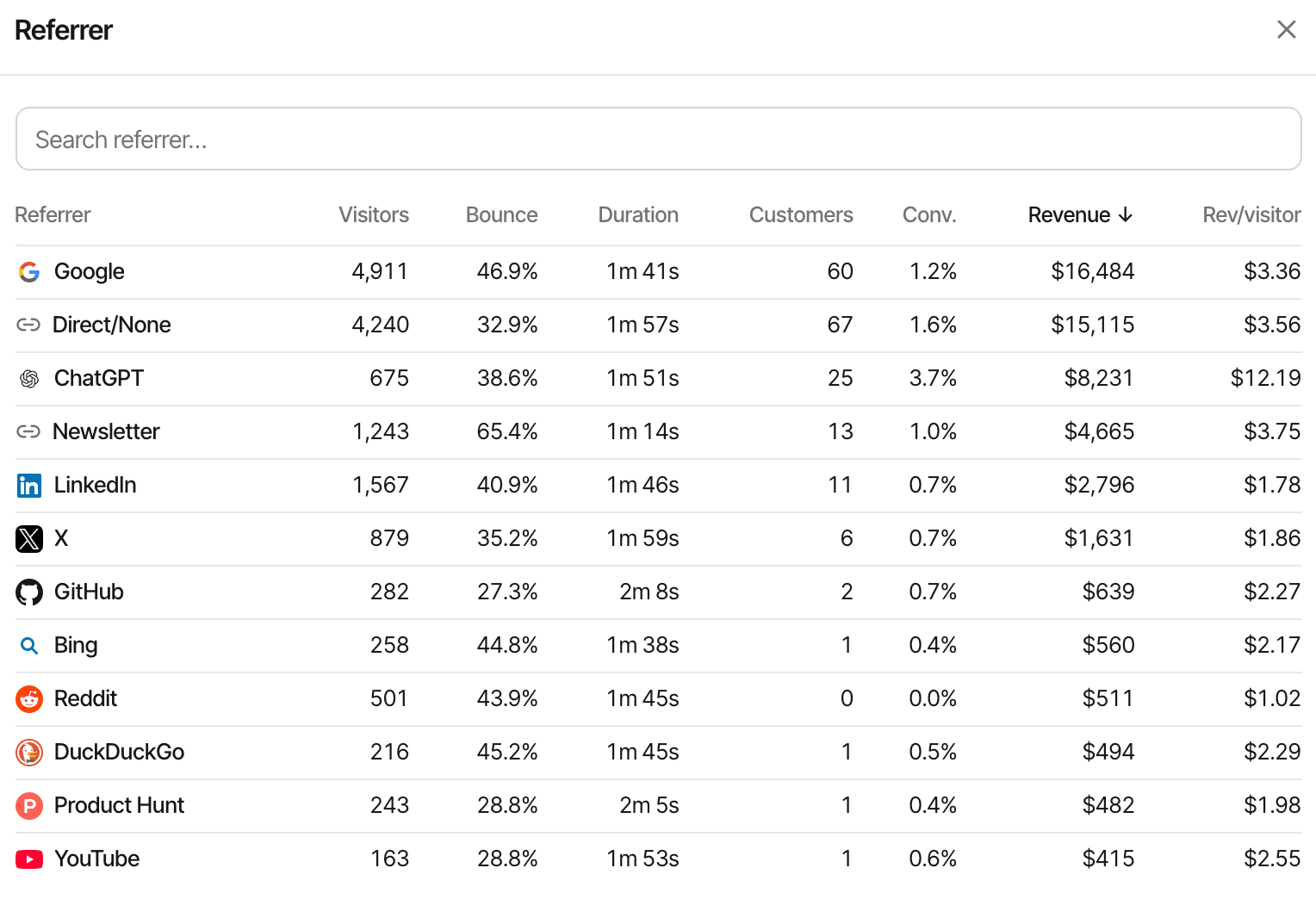
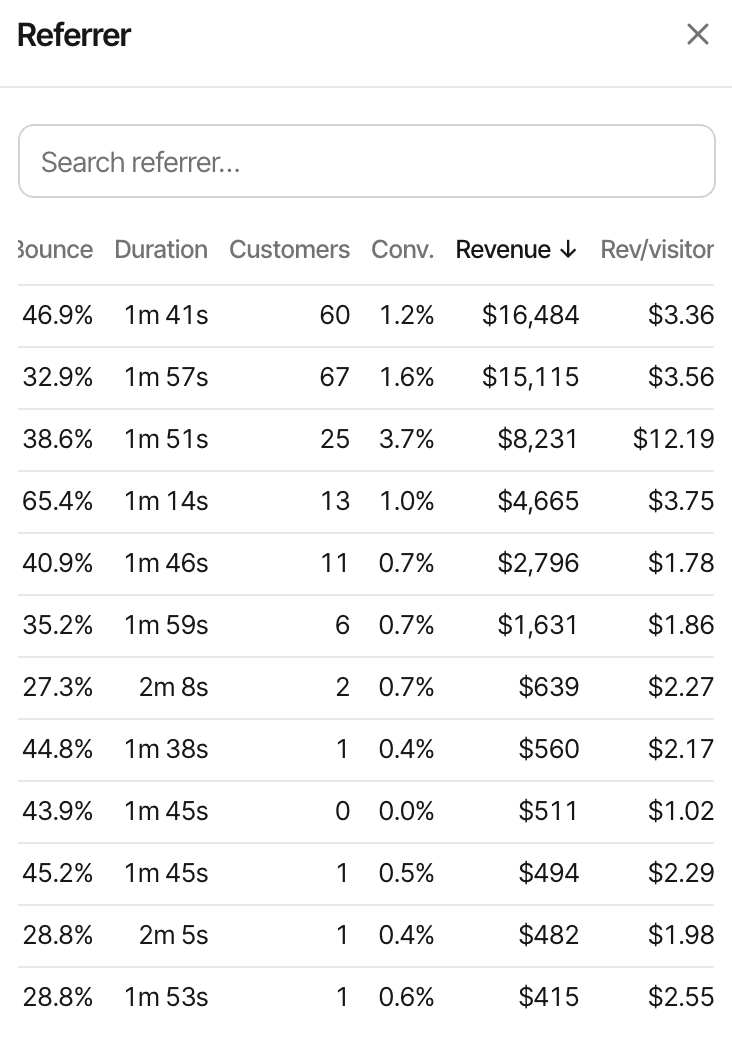
Every breakdown, with revenue
Channel, referrer, campaign, landing page, page and country each show the visitors, customers, conversion rate and revenue they brought. Sort any of them by revenue.
Revenue per visitor
The number that ranks channels fairly: a small source with a high revenue per visitor deserves more attention than a large one that doesn't convert.
Revenue over time
Revenue sits on the traffic chart as its own series, so a spike in visitors that brought nothing stands out, and so does the quiet day that paid.
Filter and compare
Click a country, a campaign or a page and the whole dashboard, revenue included, narrows to it. Compare with the period before.
Campaigns you tag
UTM parameters and ref links are read on arrival, so a newsletter issue or a sponsored post gets its own revenue line.
Your #1 KPI
Prefer a goal to revenue at the centre of the dashboard? Set it per website; the breakdowns follow.
Connect the payment provider you already use
Five providers, each through its own webhook. The setup differs a little between them: some checkouts are tagged by the script on their own, others take the visitor id from your server.
Stripe
- Webhook, signed with your endpoint secret
- Checkout Sessions: the visitor id as metadata
- Payment Links: the visitor id as client_reference_id
- Later invoices count as renewals; full refunds only
Polar
- Webhook (Standard Webhooks)
- Checkout links: tagged by the script, nothing to change
- Checkout API: the visitor id as metadata
- Renewals and refunds, full or partial
Lemon Squeezy
- Webhook, signed with your signing secret
- The visitor id as checkout custom data
- Subscription renewals as renewals
- Refunded orders marked refunded
Paddle
- Webhook (Paddle-Signature)
- Paddle.js buttons: tagged by the script with custom data
- Renewals carry the custom data Paddle copies to the subscription
- Refunds and chargebacks once Paddle approves them
Dodo Payments
- Webhook (Standard Webhooks)
- Payment links: tagged by the script, nothing to change
- Checkout sessions: the visitor id as metadata
- Renewals and refunds, full or partial
Anything else
Gumroad, your own billing, or a provider not listed: send each payment from your server with the visitor id, and it's attributed the same way.
Polar, Paddle and Dodo Payments revenue is counted after discounts and before tax: they are merchants of record, so their tax isn't your revenue. Stripe and Lemon Squeezy payments are counted at the total the provider reports.
Choose how revenue is attributed
Most customers don't pay on their first visit. Two models decide which visit gets the credit; pick one per website in Settings, and every report recalculates.
- Mon · visit 1
Finds you on Google
Reads two pages, leaves
- Thu · visit 2
Types your address in
Direct visit
- Thu · visit 2
Pays
$79 through Polar
First touch
In the journey above, the $79 is credited to
Which channels find new customers?
The payment goes to the visit that first brought this person to your website, however long ago. The model for judging acquisition: content, search, launches.
Last touch
In the journey above, the $79 is credited to
Direct
Which visits turn into payments?
The payment goes to the visit it happened in. A direct return counts as direct: SuprAnalytics doesn't skip it in favour of an earlier source. The model for judging what closes: pricing changes, offers, reminders.
Last touch is the default. When a checkout carries a visit id as well as a visitor id, that visit is the last touch; otherwise it's the visitor's most recent visit before the payment.
Revenue doesn't stop at the first payment
A subscription pays again next month, a refund takes some of it back, and a customer's worth is the sum of all of it. Each payment is kept with the visitor it belongs to.
- Renewals are marked as renewals and credited to the customer's original visit, through the checkout's metadata or the provider's customer id. Stripe's later invoices, Polar's billing cycles, Paddle's and Dodo's subscription charges and Lemon Squeezy's renewal payments all count.
- A full refund marks the payment refunded with every provider. Partial refunds lower the amount with Polar, Paddle and Dodo Payments; Stripe's are left alone, and Lemon Squeezy's mark the whole payment refunded.
- Payments in other currencies are converted to your website's reporting currency with daily rates, so a dashboard in USD adds up EUR and INR payments correctly.
- Lifetime value per customer and per segment, renewals and refunds included, and a customers list with the name and email the provider sent.
This is attribution, not accounting: your provider's dashboard stays the record for taxes, invoices and payouts.
- Landing page1,000
- Signed up180 · 18%
- Started checkout64 · 36%
- Paid41 · 64%
See where visitors drop off before they pay
A funnel is up to eight steps in order, each a page, a goal or a payment, counted across visits. It shows how many people reached each step, how many were lost between steps, and how long the steps took.
- The payment step comes from your provider's webhook, so the funnel ends at real revenue, not at a thank-you page.
- A checkout hosted by your provider is on its domain, not yours, so track the step before it with a goal (
checkout_startedwhen the button is clicked) and let the payment step close the funnel. - Where the drop is biggest is where to work: the signup form, the plan page, or the checkout itself.
A payment step shows how many visitors made a payment after completing the previous step, along with the revenue from those payments. Refunded payments are excluded. About conversion funnelsHow funnels work
Built for founders who care about customers, not just clicks
Traffic in one tool, revenue in another, support in a third, and a spreadsheet to join them. SuprAnalytics keeps the pieces that matter to a small team in one place, so a question like "did that Reddit post pay for itself?" has one answer.
Website analytics
Visitors, sources, pages, countries and devices, in real time.
Revenue attribution
Every payment tied to the visits that produced it.
Conversion funnels
From the landing page to the payment, with the drop-off between.
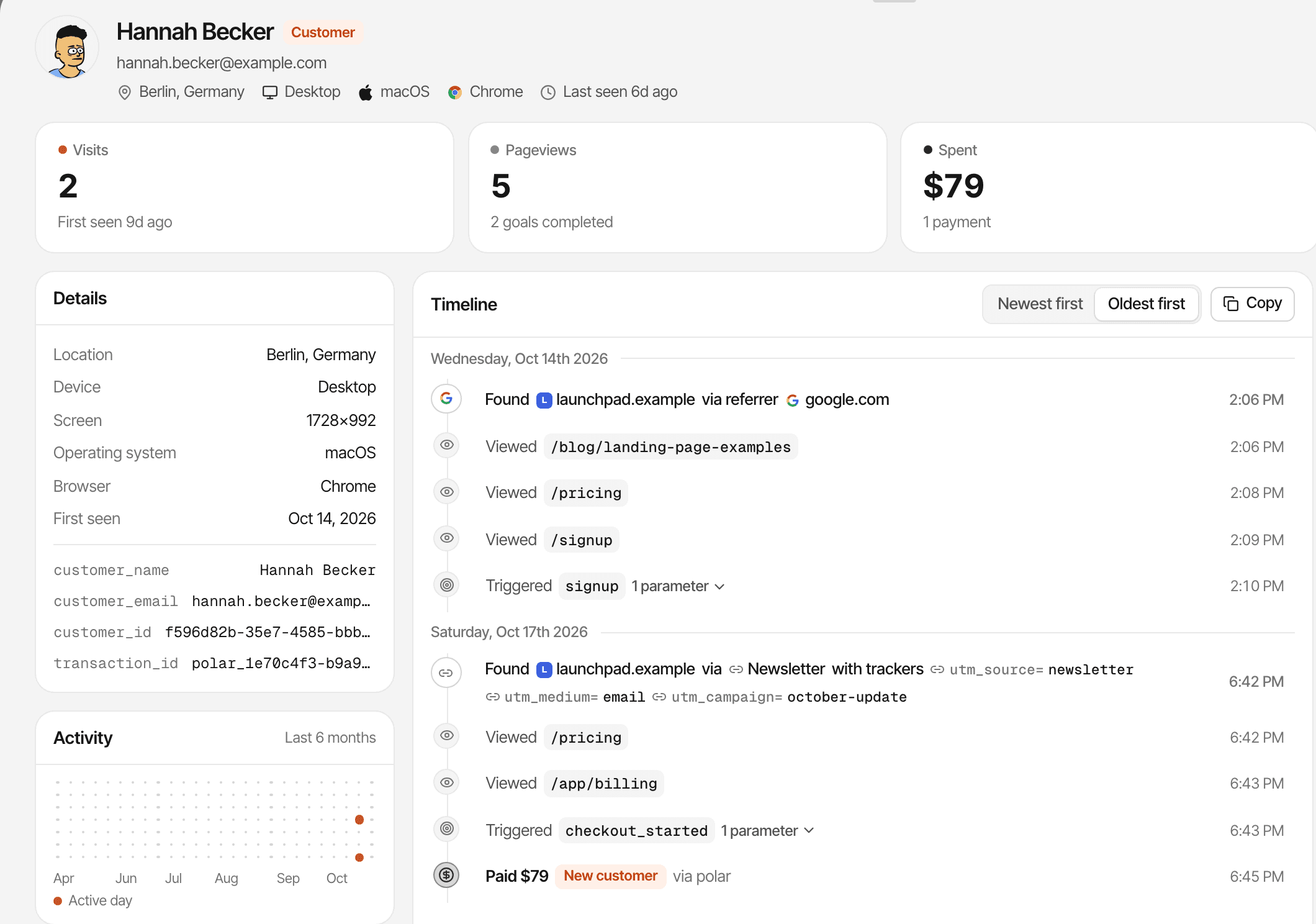
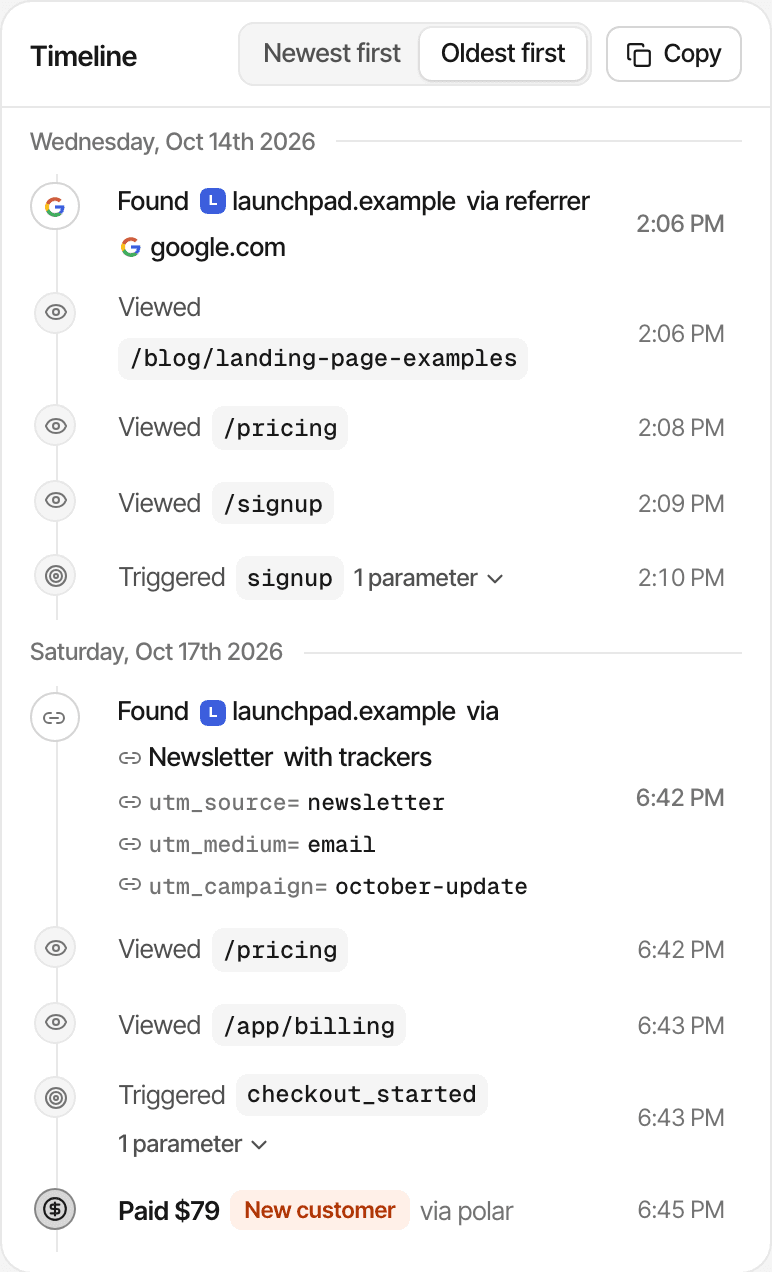
Visitor journeys
One person's visits, pages, goals and payments on a timeline.
Live chat
Talk to visitors with their analytics beside the conversation.
All your websites
Unlimited websites on one account, with one view across them.
It isn't a product analytics suite or a finance tool, and doesn't try to be: no invoices, no ad-spend import. To work out what each customer cost, bring your costs to the free CAC calculator.
Start tracking revenue with your existing plan
Revenue attribution is part of every plan, for every website. The plans differ only in monthly analytics events, storage and how long data is kept.
- Payments never count as events: only pageviews, goals and outbound clicks do
- Unlimited websites, each with its own payment providers and attribution model
- Every plan starts with a 14-day free trial, with no card. One trial per person.
- Setup: paste the script, then connect each provider's webhook in Settings → Revenue
Plans start at
$9 / month
100,000 analytics events a month, unlimited websites, every feature. Bigger allowances up to 5 million.
14-day free trial · No card required
Questions, answered.
What is revenue attribution analytics?
How does SuprAnalytics connect website visits to payments?
Which payment providers are supported?
Can I track revenue from Stripe?
Can I track Polar and Dodo Payments revenue?
What is the difference between first-touch and last-touch attribution?
Can I track subscription renewals and refunds?
Does revenue attribution work across multiple websites?
More features
- Live chatTalk to visitors with their source, pages and journey beside the chat.Open
- Traffic analysisVisitors, sources, pages, locations and devices, with filters and the change against the period before.Open
- Realtime analyticsWho's on your website right now, where they came from and what they're reading.Open
- Visitor journeysEach visitor's visits, pages, goals, payments and chats on one timeline.Open
- Conversion funnelsWhere visitors drop off between landing, signup and payment.Open
- Goal trackingCount signups, clicks and pages reached, with conversion rates by source.Open
- UTM trackingCampaign tags read automatically, with visitors, conversions and revenue per campaign.Open
- AI trafficVisits from ChatGPT, Perplexity, Claude and other AI assistants, as their own channel.Open
- Subscription revenueRenewals, refunds and lifetime value, by where customers first came from.Open
- Multiple websitesEvery website in one account, with an all-websites view.Open
- Public dashboardsShare a read-only dashboard by link, without names or payments.Open
- Cookieless trackingAn optional mode that sets no cookies, and what it changes.Open
Stop counting visits. Start understanding revenue.
Connect your website and your payment provider, and see which marketing channels bring paying customers.
14-day free trial · No card required · Revenue attribution on every planConnect a payment providerComing from DataFast?