
UTM tracking
Know which campaigns bring more than clicks.
Track UTM-tagged visits, see which campaigns lead to conversions, and connect marketing traffic to attributed revenue in one clear dashboard.
14-day free trial · No card required · From $9/month
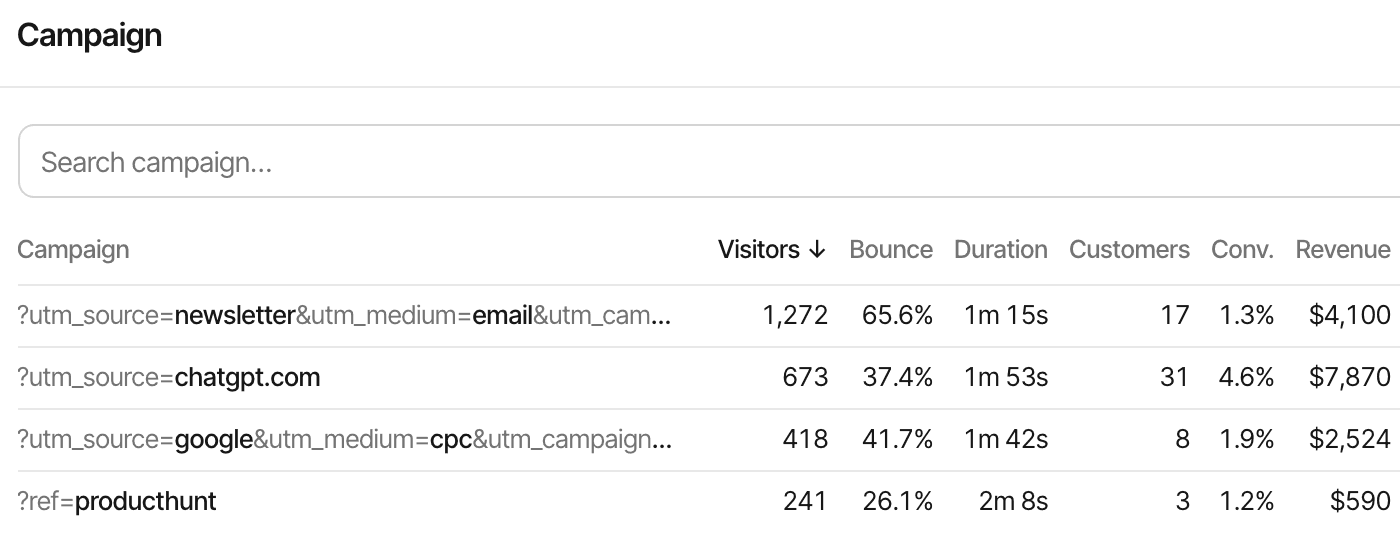
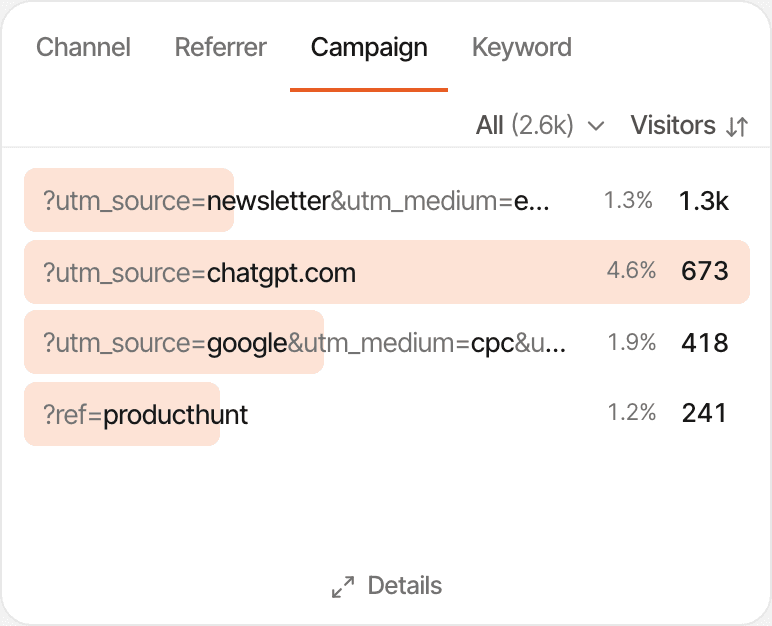
- Campaign
- Each combination of tags a visit arrived with, such as utm_source, utm_medium and utm_campaign together.
- Visitors and customers
- How many visitors each campaign brought, and how many of them became paying customers.
- Revenue
- The revenue credited to each campaign, under your website's first- or last-touch setting.
Understand where campaign traffic comes from.
UTM parameters are tags you add to the end of a link you share, so your analytics can tell which newsletter, post or ad brought a visitor. The visitor sees the same page; the tags only label the visit.
https://example.com/?utm_source=newsletter&utm_medium=email&utm_campaign=launchThis link says the visitor came from your newsletter, by email, for the launch campaign. Without tags, a click from an email app often arrives with no referrer at all and shows up as Direct.
Tag your links. SuprAnalytics tracks the visits.
With the script on your website, there's nothing to set up per campaign. When someone lands from a tagged link, the tags are saved with their visit.
What happens to the tags
- They're read from the first page of the visit and kept with the whole visit, so every page and goal in it belongs to the campaign.
- The tag names must be lowercase, as written above. Values are kept as typed, so Launch and launch are two campaigns.
- Common source names are tidied up: newsletter becomes Newsletter, and fb becomes Facebook.
- A tagged source wins over the referring website. Ad click ids such as gclid mark the visit as Paid.
- Clicking another tagged link during the same visit doesn't change it; the next visit, after 30 minutes away, gets its own source.
Write the tags into the links you share, by hand or with the free UTM builder, which builds them in your browser.
See which campaigns bring visitors.
The dashboard's Sources panel has four tabs. Click any row to filter the whole dashboard to it.
- Channel
- Direct, Organic Search, Paid, Social, AI, Email or Referral, worked out from the tags and the referrer.
- Referrer
- The source: from the link's utm_source (or ref) when it has one, else the referring website, else Direct.
- Campaign
- Each set of tags together, with its visitors and conversion rate. Details adds bounce, duration, customers, revenue and revenue per visitor.
- Keyword
- The utm_term of your search ads.
To look at one tag on its own, filter by UTM source, UTM medium, UTM campaign, UTM content or Keyword: is, is not, contains or doesn't contain. Campaigns show on public dashboards and across all your websites too. There's no ad spend, cost per click or return on ad spend: SuprAnalytics doesn't connect to ad accounts. To work out ROAS from your own spend and a campaign's revenue, use the free ROAS calculator.
See which campaigns lead to conversions.
Filter the dashboard by a campaign, and its Goal panel counts the goals completed in that campaign's visits.
- A goal belongs to the visit it was completed in, and each goal's top sources come from those visits
- With a goal as your #1 KPI, the Campaign details count the visitors who completed it
- Funnels take the same filters, applied to the visit where someone reached the first step
So a sign-up on a later, untagged visit counts under that visit, not under the campaign that first brought the person. Goals don't use the revenue attribution setting. Track goalsAbout conversion funnels
Connect marketing traffic to attributed revenue.
With a payment provider connected, each payment matched to a visitor is credited to one of their visits. Each website picks which one.
- Newsletter link (tagged)
- Returns directly
- Pays
First touch
The first visit gets the credit: the newsletter campaign.
Last touch (the default)
The visit before the payment gets it: here, the direct return, so the revenue shows as Direct and not under any campaign.
Last touch doesn't skip direct visits. Switch the setting at any time and the reports follow. A payment is matched through the visitor id passed at checkout, a customer id or an email seen before; one that can't be matched still counts in your revenue, without a source. How revenue attribution works
Understand the visits between the click and conversion.
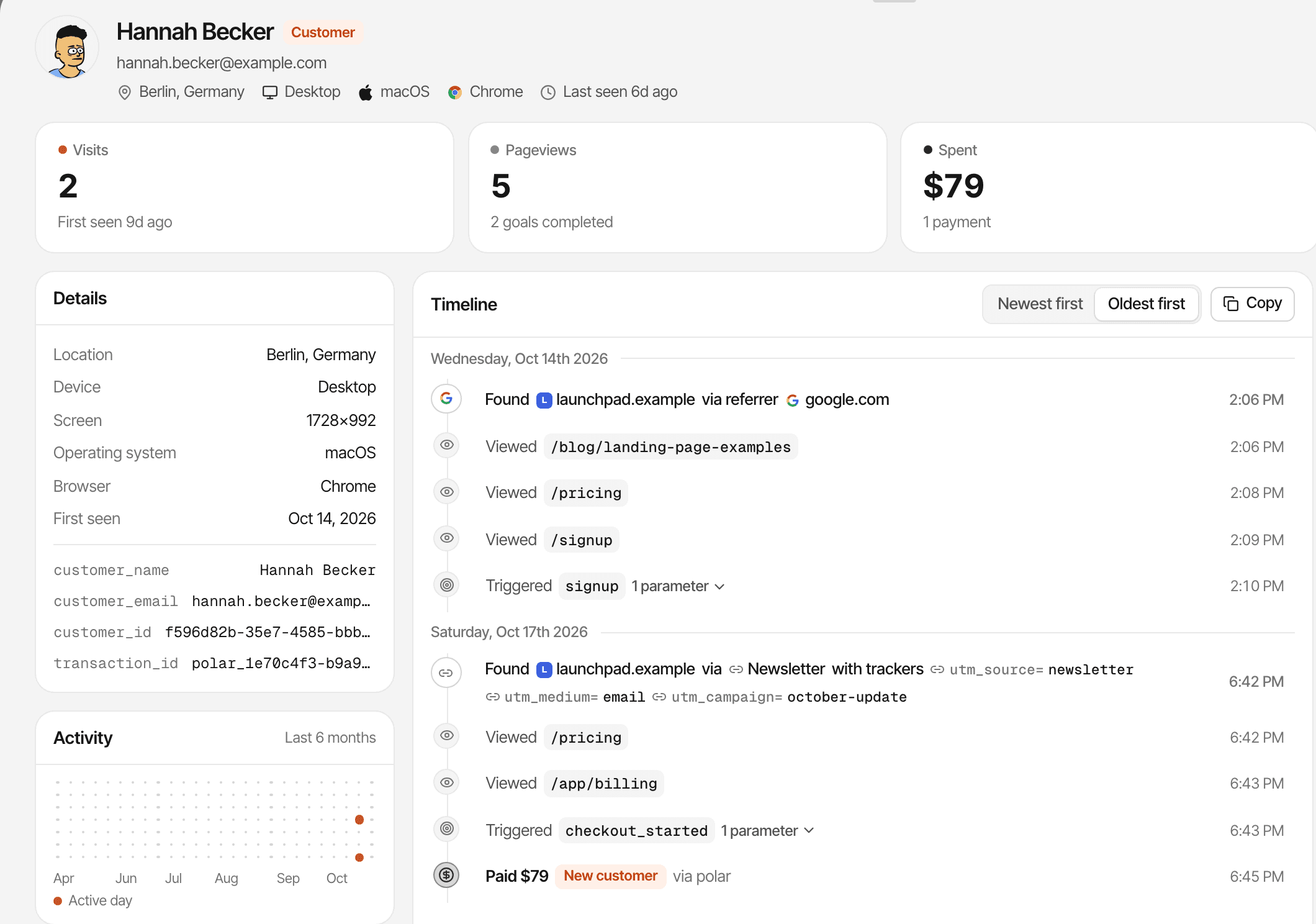
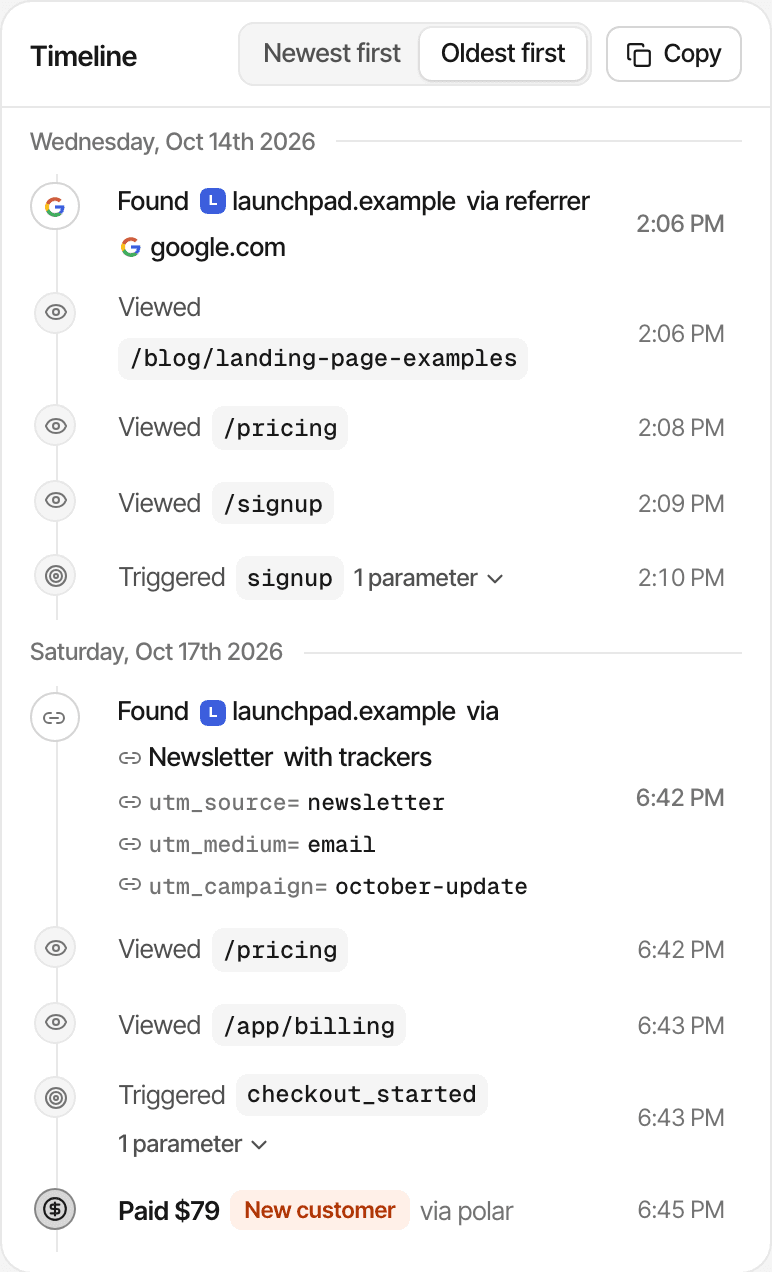
A visitor's journey lists every visit, each with where it came from and the tags it carried.
- Each visit shows its referrer or source, and its utm_source, utm_medium, utm_campaign, utm_term and utm_content
- Then the pages, goals and payments of that visit, in order
- So you can see a newsletter visit, a direct return and the payment one after another
A journey is one browser's history; a visit from a phone and one from a laptop are two visitors. Links between your own domains can keep the same visitor and visit. About visitor journeys
Separate AI referrals from campaign traffic.
Visits from AI assistants get their own channel, AI, whether the assistant sent a referrer or tagged the link.
- A referrer from ChatGPT, Perplexity, Claude, Gemini, Copilot, Grok, DeepSeek, Phind, Meta AI or You.com
- Or a tag such as utm_source=chatgpt.com, or ref=perplexity
- Your own tags win: a link tagged utm_source=newsletter counts as Newsletter, wherever it was clicked
- An assistant that sends neither shows up as Direct
Practical ways to use UTM tracking.
Product launches
Tag the link you post on each channel and compare which one brought visitors who stayed.
Email newsletters
Tag each issue, and see its visits, sign-ups and the revenue credited to it.
Paid marketing
Compare tagged ad traffic and its outcomes. Costs stay in your ad account.
SaaS founders
Follow a campaign from the first visit to sign-ups and matched payments.
Limits worth knowing
- Untagged links carry no campaign details
- Visits with no referrer and no tags show as Direct
- Visitors who block the script aren't counted
- Goals belong to the visit they happened in; revenue follows first or last touch
- Payments that can't be matched to a visitor have no source
- In cookieless mode a visitor is recognised for a day, so first touch can't reach back further
- A phone and a laptop are two visitors; devices aren't merged
- Ad spend and return on ad spend need your ad platform's numbers
- Tags add no cost of their own: the visit's pageviews count toward your plan as usual
- Data is kept for your plan's history: 2 years to 5 years
Whether you need consent depends on your setup and where your visitors are; this isn't legal advice. Cookies and cookieless modeFor indie hackers
Questions, answered.
What is UTM tracking?
Which UTM parameters does SuprAnalytics track?
Do I need to install anything to track UTMs?
Can I see conversions from a UTM campaign?
Can I track revenue from UTM-tagged traffic?
What's the difference between UTM tracking and revenue attribution?
Does UTM tracking work without cookies?
Does SuprAnalytics include a UTM link builder?
More features
- Revenue attributionPayments from your provider, credited to the source that brought each customer.Open
- Live chatTalk to visitors with their source, pages and journey beside the chat.Open
- Traffic analysisVisitors, sources, pages, locations and devices, with filters and the change against the period before.Open
- Realtime analyticsWho's on your website right now, where they came from and what they're reading.Open
- Visitor journeysEach visitor's visits, pages, goals, payments and chats on one timeline.Open
- Conversion funnelsWhere visitors drop off between landing, signup and payment.Open
- Goal trackingCount signups, clicks and pages reached, with conversion rates by source.Open
- AI trafficVisits from ChatGPT, Perplexity, Claude and other AI assistants, as their own channel.Open
- Subscription revenueRenewals, refunds and lifetime value, by where customers first came from.Open
- Multiple websitesEvery website in one account, with an all-websites view.Open
- Public dashboardsShare a read-only dashboard by link, without names or payments.Open
- Cookieless trackingAn optional mode that sets no cookies, and what it changes.Open
Know which campaigns are worth repeating.
See where visitors come from, what they do, and which campaigns contribute to conversions and attributed revenue.
14-day free trial · No card requiredPricingAll features