
Stripe + SuprAnalytics
See which traffic sources bring your Stripe revenue
Stripe processes your payments. SuprAnalytics connects them to the visitors and campaigns that brought each customer to your website, so every source, campaign and page shows the Stripe revenue it led to.
14-day free trial · No card required · From $9/monthExplore the live demo
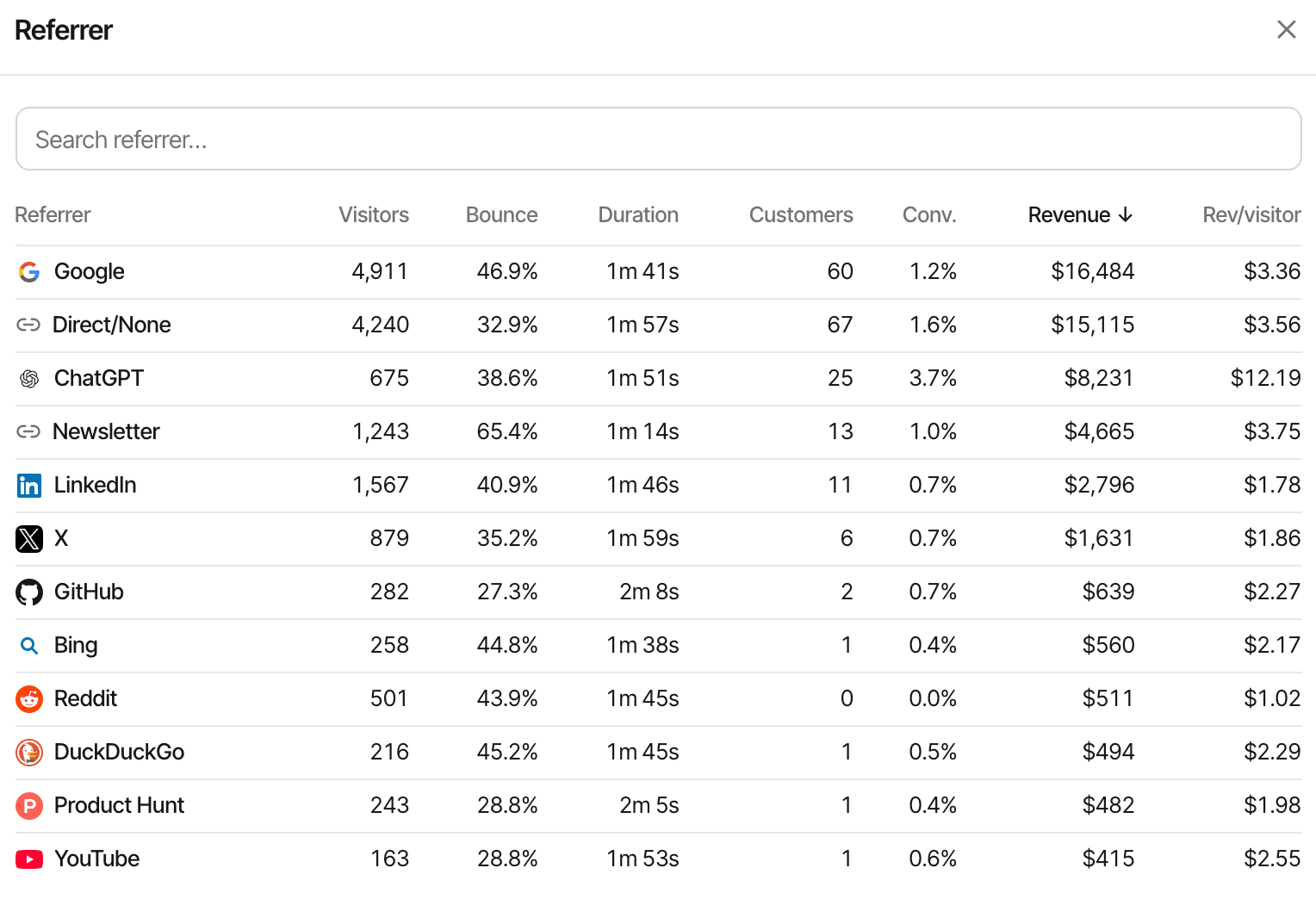
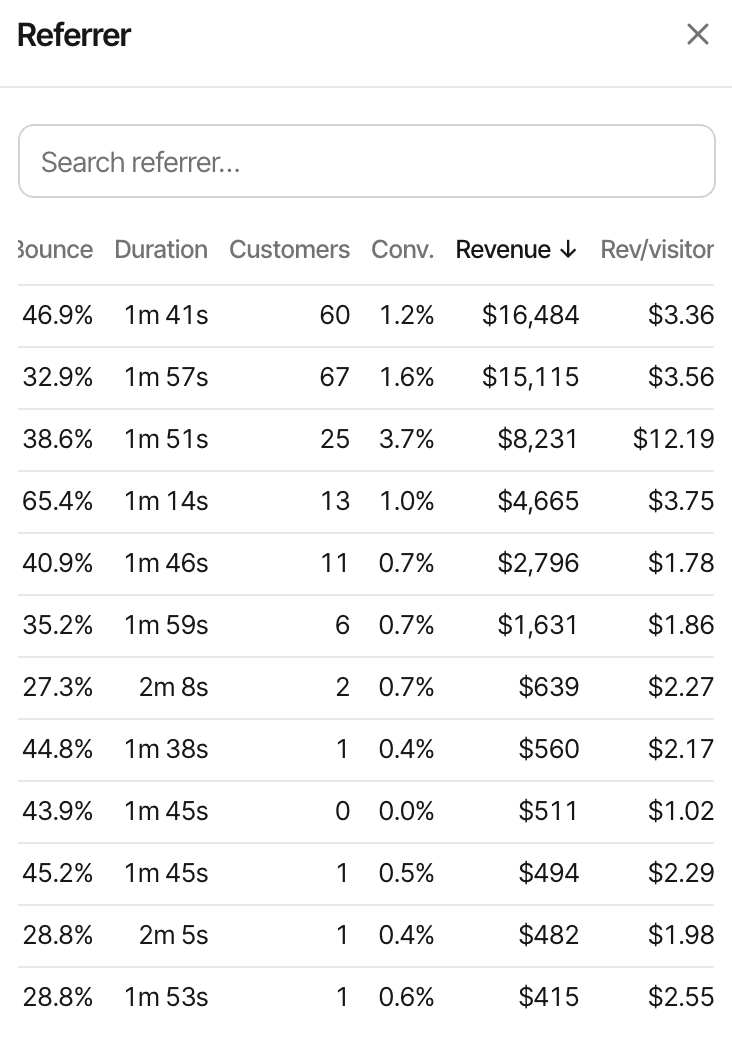
Your most popular channel isn't always your most profitable
Stripe shows what you were paid. Website analytics shows who visited and from where. Revenue attribution joins the two, so each source is judged by the payments it led to, not just the traffic it sent.
That changes where you spend time: a channel with a fraction of the visitors can bring more customers. Attribution shows where paying customers came from; it doesn't prove a channel caused a sale, and it can't credit a payment it can't tie to a visit.
| Source | Visitors | Stripe revenue |
|---|---|---|
| 1,600 | $290 | |
| 540 | $520 | |
| X | 420 | $140 |
| Direct | 900 | $180 |
Connect website visits to Stripe payments
One webhook endpoint in Stripe, its signing secret in SuprAnalytics, and the visitor id handed to the checkout.
- Website visit
- Stripe checkout
- Payment event
- Revenue attribution
Install the SuprAnalytics script
One line in the
<head>of your pages, or the guide for your platform. Each visit is recorded with its source, campaign and landing page, and each visitor gets an id.Add a webhook endpoint in Stripe
In the Stripe Dashboard, Developers → Webhooks → Add endpoint, with the URL SuprAnalytics shows for your website, and select
checkout.session.completed,checkout.session.async_payment_succeeded,invoice.paidandcharge.refunded.Paste the signing secret in SuprAnalytics
Copy the endpoint's signing secret (
whsec_…) into Settings → Revenue with Stripe selected. Every delivery'sStripe-Signatureis checked against it.Pass the visitor id to the checkout
As metadata when your server creates a Checkout Session, or as
client_reference_idon a Payment Link. Both are below.See attributed revenue
Each paid checkout arrives through the webhook, is tied to the visitor and their visits, and shows up on the dashboard, the live view and the customer's journey within seconds.
What attribution needs, in plain English. The script keeps a random id in the visitor's browser, the supr_visitor_id cookie. When that id reaches Stripe with the checkout, the webhook brings it back and the payment joins that visitor's journey. Without it, SuprAnalytics tries Stripe's customer id (an earlier payment from the same customer) and then the email. If nothing matches, the payment still counts in your revenue, without a source. Someone who browses on a phone and pays on a laptop is two visitors until an email or your app's identify call joins them, and in cookieless mode the visitor id changes daily.
Keep visitor attribution connected through checkout
SuprAnalytics reads Stripe Checkout. Hand it the visitor id one of two ways, depending on whether your server creates the Checkout Session or you share a Payment Link.
Checkout Sessions
On your server
When your server creates the session, read the supr_visitor_id cookie from the request and pass it as metadata. supr_session_id is optional and credits the payment to that exact visit. For subscriptions, put the visitor id in subscription_data.metadata as well.
const session = await stripe.checkout.sessions.create({
  mode: "subscription", // or "payment"
  line_items: [{ price: "price_123", quantity: 1 }],
  success_url: "https://yourdomain.com/thanks",
  metadata: {
    supr_visitor_id: req.cookies.supr_visitor_id,
    supr_session_id: req.cookies.supr_session_id,
  },
  // Subscriptions: renewals' invoices read the subscription's metadata.
  subscription_data: {
    metadata: { supr_visitor_id: req.cookies.supr_visitor_id },
  },
});
res.redirect(303, session.url);
Server-side Node.js from the guide, which also has Python and PHP. Your secret key never reaches the browser.
Payment Links
A small script in the browser
Payment Links take a client_reference_id in the URL, and Stripe puts it on the Checkout Session. The SuprAnalytics script doesn't change Stripe links on its own; add this snippet after it to set the visitor id when a buy.stripe.com link is clicked.
<script>
  document.addEventListener("click", function (e) {
    var link = e.target.closest && e.target.closest('a[href^="https://buy.stripe.com/"]');
    if (!link || !window.supr || !window.supr.visitorId) return;
    var url = new URL(link.href);
    url.searchParams.set("client_reference_id", window.supr.visitorId());
    link.href = url.toString();
  }, true);
</script>
Browser-side code from the guide, with no keys in it. A Payment Link carries the visitor, not the visit, so the last touch is the visitor's most recent visit before checkout. Subscription renewals from a Payment Link are credited through the Stripe customer id.
Where the visitor id has to be
Stripe keeps metadata on each object separately. SuprAnalytics reads it from these places, in this order of preference:
| Where | When it's used |
|---|---|
| Checkout Session metadatametadata.supr_visitor_id | Read from the checkout.session.completed event. Credits the checkout itself: a one-time payment, or a subscription's first payment. |
| Subscription metadatasubscription_data.metadata.supr_visitor_id | Read from each invoice.paid event. Stripe doesn't copy a Checkout Session's metadata to the subscription, so set this too if you sell subscriptions. |
| client_reference_idPayment Links, or a Checkout Session | Read from the Checkout Session when metadata has no visitor id, if it's 8 to 64 letters, digits, - or _. |
| Stripe customer id, then emailFallback | A payment with no visitor id is matched to the same customer's earlier payment that had one, or to a visitor with that email. |
Not supported from the webhook: one-time payments made with Payment Intents directly, such as a custom Stripe Elements form without Checkout. SuprAnalytics doesn't listen for payment_intent.succeeded; send those payments with the Payment API instead.
Know which channels generate Stripe sales
Are Google visitors buying? Do your Reddit posts bring revenue? Which newsletter issue sold, and which sources bring customers who renew? Each report shows revenue beside the visitors.
By channel and referrer
Search, social, AI assistants, email, referrals and direct visits, and the websites behind them, each with its customers and revenue.
By UTM campaign
UTM tags and ref links read on arrival, so a sponsored post or a newsletter issue gets its own revenue line.
By landing page, page and country
Which pages people arrive on and read before they pay, and where in the world they pay from.
Over time
Revenue on the traffic chart as its own series, new and renewals apart, with the period before to compare.
Conversion rate and revenue per visitor
On every row, so a small source that pays well stands out from a big one that doesn't.
Lifetime value
What customers from each source have paid in total, renewals included and refunded payments left out.
See where customers discovered you and where they converted
Most customers don't pay on their first visit. Choose, per website, which visit gets the credit; every report recalculates when you switch.
- Mon · visit 1
Google
Finds you, reads the pricing page
- Thu · visit 2
Direct return
Types your address in
- Thu · visit 2
Stripe checkout
Pays $49
First touch
The $49 is credited to
Revenue goes to the first visit SuprAnalytics recorded for this visitor, however long ago. It answers which channels find new customers.
Last touch
The $49 is credited to
Direct
Revenue goes to the visit the payment belongs to. This is plain last touch, and the default: a direct return gets the credit, it isn't skipped for an earlier source. It answers which visits close.
With supr_session_id in a Checkout Session's metadata, the last touch is that exact visit; otherwise it's the visitor's most recent visit before the payment. Both models depend on recognising the returning visitor: across devices that takes an email or an identify call, and in cookieless mode the visitor id changes daily, so earlier days' visits can't be linked. More on attribution models
Understand revenue after the first payment
Renewals, plan changes and refunds stay on the customer's record, so the second month of a subscription is part of the same journey as the first.
| Stripe event or scenario | What SuprAnalytics does |
|---|---|
| Paid checkoutcheckout.session.completed | Recorded once, for the session's amount_total. A session that isn't paid yet (a bank debit, say) waits for checkout.session.async_payment_succeeded; $0 sessions are skipped. |
| First subscription paymentinvoice.paid, subscription_create | Merged with its Checkout Session, whichever event arrives first, so it's counted once. A subscription created outside Checkout is counted from this invoice, credited through the subscription's metadata. |
| Subscription renewalinvoice.paid, subscription_cycle | Recorded as a renewal and credited to the customer's original visit, through the subscription's metadata, the Stripe customer id or the email. With a Stripe free trial, the first charge after the trial arrives this way, so it's counted as a renewal. |
| Other paid invoicesPlan changes, one-off invoices | Counted as payments, not renewals, for the amount paid, prorations included. |
| Failed paymentinvoice.payment_failed | Not counted. Nothing is recorded until an invoice is paid. |
| Full refundcharge.refunded | The payment is marked refunded and drops out of revenue and lifetime value. It's matched through the charge's payment intent or invoice; see below. |
| Partial refundcharge.refunded | Ignored: the payment keeps its full amount. Only when refunds add up to the whole charge is the payment marked refunded. |
| Retries and duplicatesSame event twice, invoice.payment_succeeded | Each checkout and invoice is stored once, by its Stripe id, so retries and overlapping events don't double your revenue. |
Refunds: what isn't tracked
Partial refunds are ignored, so after one, SuprAnalytics shows more revenue than Stripe. And a full refund is only applied when it can be matched: one-time Checkout payments are matched through their payment intent, but subscription payments through the links between charges, invoices and payment intents that Stripe removed in API version 2025-03-31. On a webhook endpoint with that API version or newer, refunds of subscription payments may not be applied.
Amounts include tax
Stripe payments are counted at amount_total (checkouts) and amount_paid (invoices): after discounts, and including any tax Stripe collected for you. Polar, Paddle and Dodo Payments revenue is counted before tax, so mixed providers aren't on exactly the same basis, and SuprAnalytics' totals won't always match Stripe's reports.
- Revenue is split into new and renewals, and conversion rate counts new customers only
- Lifetime value per customer and per source, renewals included and refunded payments left out
- Payments in other currencies converted to your website's reporting currency with daily rates
This is attribution, not accounting. Stripe stays the record for payments, Billing, tax and payouts; SuprAnalytics doesn't replace Stripe's financial reports.
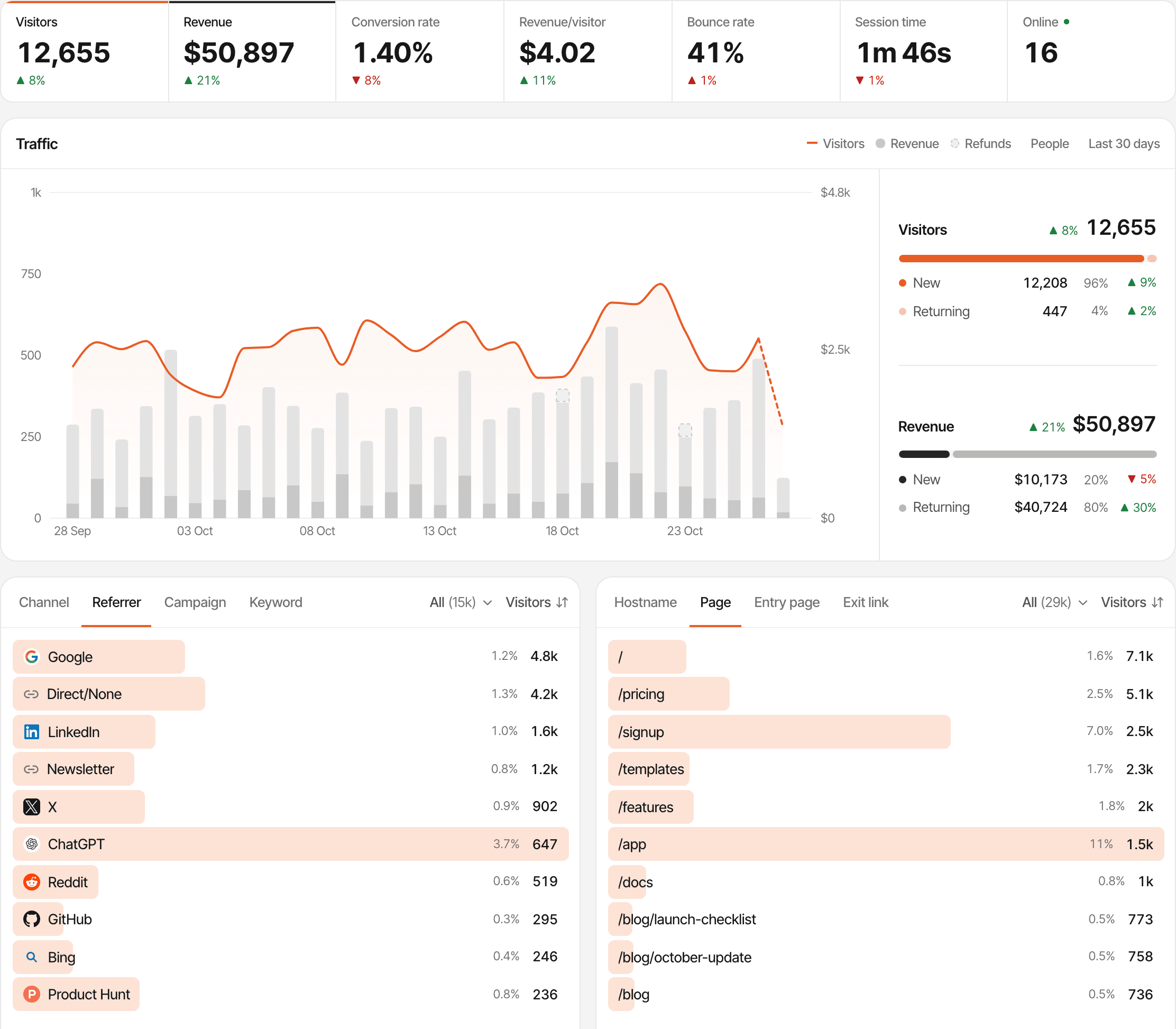
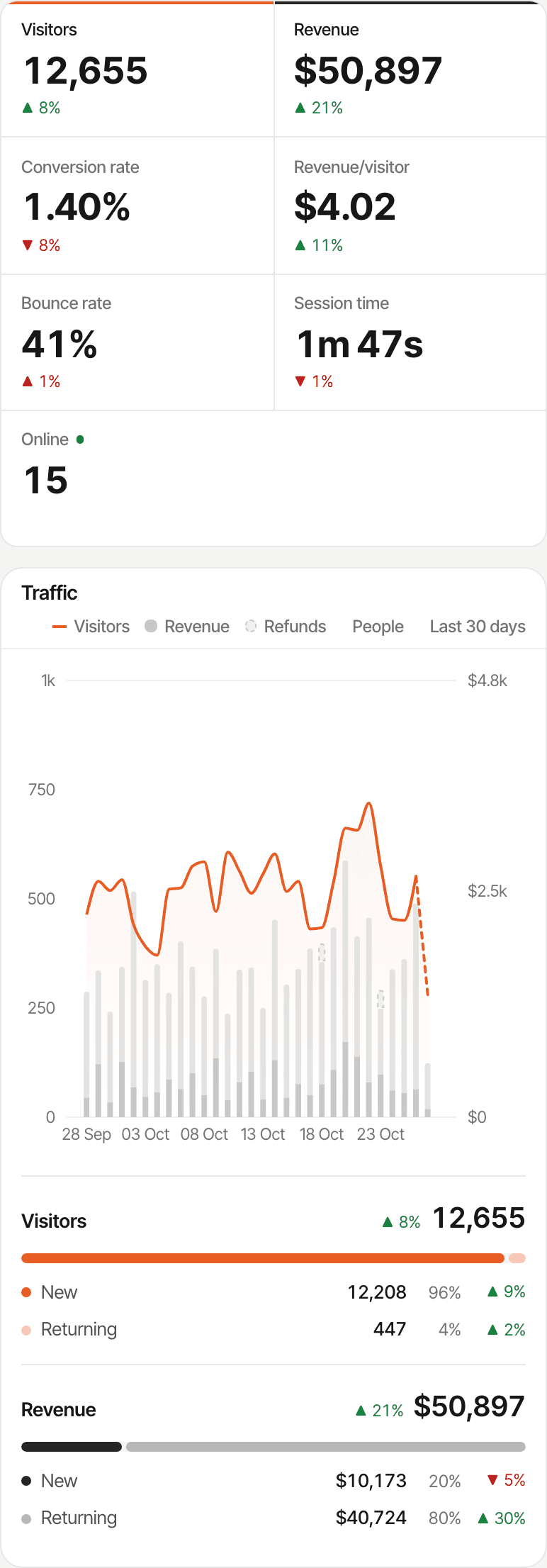
Understand what happens before someone pays
A Stripe payment is the end of a story: how someone found you, what they read, the goals they completed, maybe a question in the chat. SuprAnalytics keeps all of it, for every website you run, in one account.
- Traffic analytics, each visitor's journey and funnels that end at the payment, on the same dashboard
- Built-in live chat: each conversation shows the visitor's source, the pages they viewed, their device and approximate location, so you can answer a question before someone buys
- Revenue by source and campaign across every provider you connect (revenue attribution)
A name or email appears in the chat when the visitor gives one or your app identifies them. A chat and a Stripe payment meet on one journey when they come from the same tracked visitor, or when the email Stripe sends matches one SuprAnalytics has already seen.
Start tracking Stripe revenue
The Stripe integration is part of every plan, for every website. Plans differ only in monthly analytics events, storage and how long data is kept.
- Payments never count as events: only pageviews, goals and outbound clicks do
- Unlimited websites, each with its own Stripe webhook, attribution model and reporting currency
- Every plan starts with a 14-day free trial, with no card. One trial per person.
Plans start at
$9 / month
100,000 analytics events a month, unlimited websites, every feature. Bigger allowances up to 5 million.
14-day free trial · No card required
Questions, answered.
How do I connect Stripe to SuprAnalytics?
Can I track Stripe revenue by traffic source?
How does Stripe Checkout attribution work?
Do I need to pass visitor metadata to Stripe?
Can I track Stripe subscription renewals?
How are Stripe refunds handled?
Does SuprAnalytics support first-touch and last-touch attribution?
What happens when a Stripe payment cannot be linked to a visitor?
More payment integrations
- Polar.shPolar checkouts tagged automatically, with revenue by channel and campaign.Open
- Dodo PaymentsDodo Payments revenue by traffic source, with renewals and refunds.Open
- Lemon SqueezyLemon Squeezy orders and subscriptions, tied to the visit that sold them.Open
- PaddlePaddle.js checkouts tagged automatically, with revenue by source.Open
Find out where your Stripe customers come from
Connect your website traffic to Stripe revenue and discover which channels bring paying customers.
14-day free trial · No card requiredHow revenue attribution worksEvery feature