
SuprAnalytics vs Google Analytics
Looking for a Google Analytics alternative?
Compare Google Analytics 4 and SuprAnalytics for website traffic, revenue attribution, visitor journeys, privacy, live chat, and pricing.
Google Analytics 4 is a broad, powerful and free analytics platform. SuprAnalytics focuses on website traffic, payment-provider attribution, visitor journeys and live chat in one hosted workspace.
14-day free trial · No card required · From $9/month
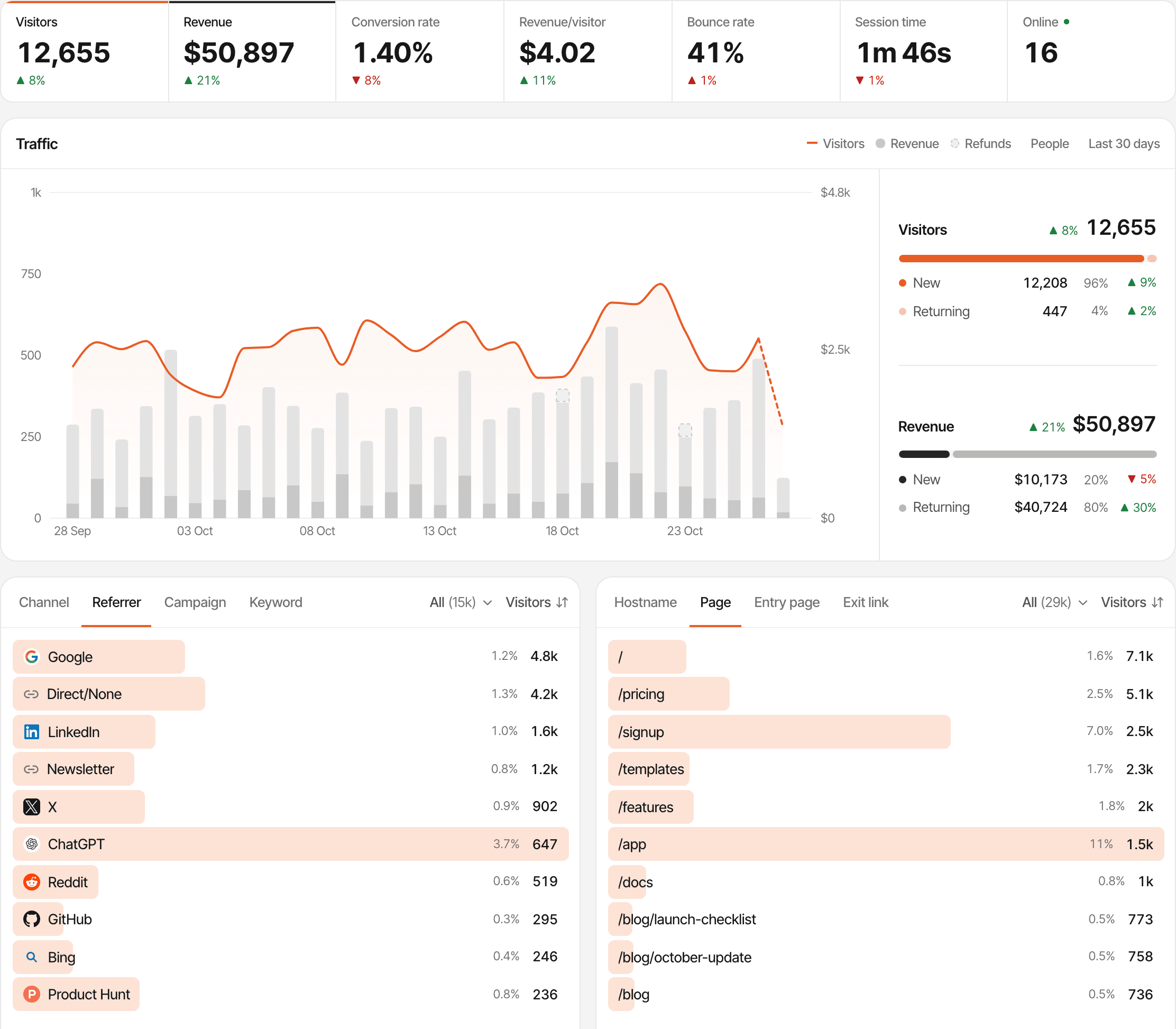
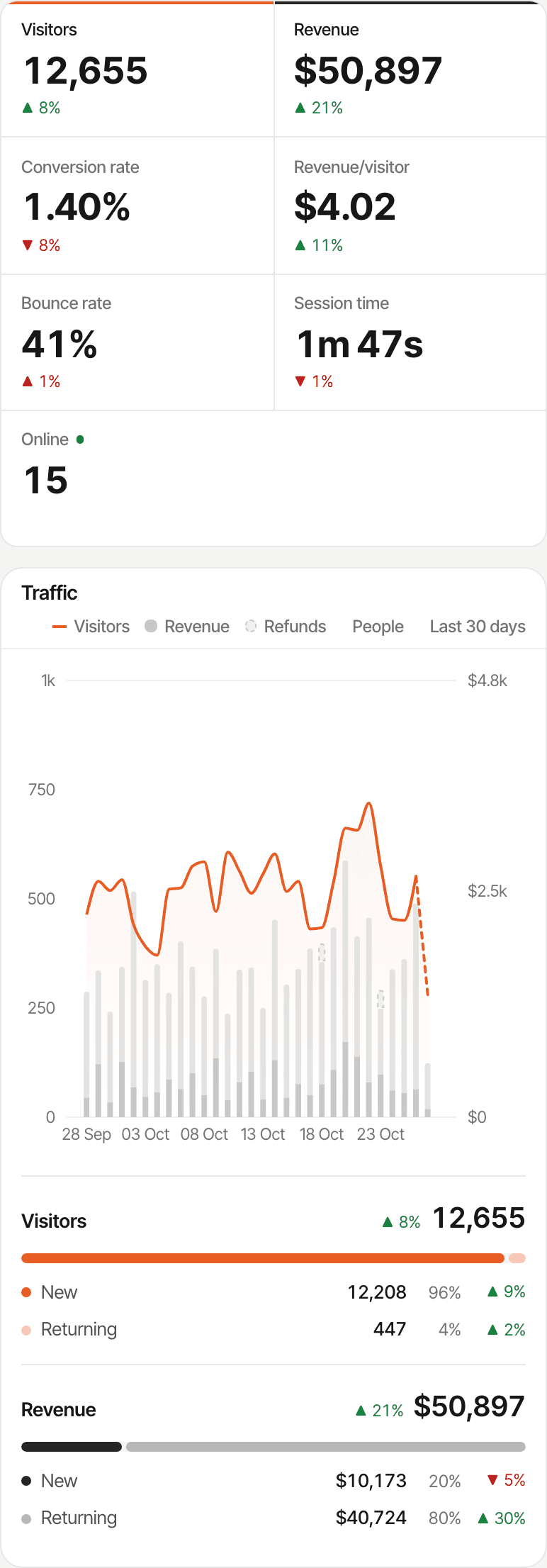
At a glance
GA4 covers far more ground; some of it, like ecommerce, needs events you add. SuprAnalytics covers less, and connects your payments and visitor chats from the same script.
| Capability | SuprAnalytics | Google Analytics 4 |
|---|---|---|
| Website traffic analytics | IncludedPageviews, visitors, pages, countries, devices, realtime | IncludedPage views, users, sessions and engagement; scrolls, outbound clicks and more with enhanced measurement |
| Referrer and acquisition reporting | IncludedChannels, referrers, campaigns, entry pages | IncludedTraffic and user acquisition reports, channel groups, landing pages |
| UTM tracking | Included | Included |
| AI referral classification | IncludedAn AI search channel | IncludedAn AI Assistant channel; Google's AI Overviews count as organic search |
| Custom events | IncludedCustom goals and outbound link clicks | IncludedAny event, with parameters; custom dimensions to report them |
| Conversion goals | Included | IncludedKey events: any event can become one |
| Funnels | IncludedA funnel step can be a payment | IncludedFunnel explorations, open or closed |
| Visitor journeys | IncludedEach visitor's visits, pages, goals, payments and chats | IncludedPath explorations and a user explorer |
| New versus returning visitors | Included | Included |
| User identity | LimitedOne profile per browser; a name and email when identified | Depends on configurationUser-ID and Google signals can link a user's devices |
| Ecommerce revenue | LimitedRevenue from your provider's payments; no product reports | Requires setupPurchases, items and refunds, sent by your code or Tag Manager |
| Payment-provider integrations | IncludedStripe, Polar, Lemon Squeezy, Paddle and Dodo Payments webhooks | Not listedServer-side purchases go through the Measurement Protocol |
| Subscription renewals | IncludedCredited to the customer's original visit | LimitedApp-store subscription events; no web subscription feature listed |
| Refund reporting | IncludedFrom the provider; partial refunds vary by provider | Requires setupA refund event, full or partial, from your code |
| Attribution models | IncludedFirst or last touch, per website | IncludedData-driven, and two last-click models |
| Built-in visitor live chat | IncludedWidget and inbox | Not listed |
| Consent and cookie controls | Depends on configurationA first-party cookie by default; an opt-in cookieless mode | Depends on configurationConsent mode with a banner you add; cookieless pings when consent is denied |
| Multi-site reporting | IncludedUnlimited websites, and an All websites view | LimitedRoll-up properties are Analytics 360 only |
| Data export and APIs | LimitedIts API accepts data; stats come through MCP | IncludedData API, Admin API, and report downloads |
| BigQuery and Google ecosystem | LimitedA Search Console page once you connect Google; no Ads, BigQuery or Looker Studio | Requires setupBigQuery export, Looker Studio, Google Ads and Search Console links |
| Team permissions | Not availableNot released yet | IncludedFive roles and two data restrictions |
| Pricing and retention | From $9 a month by events; 2 years to 5 years of data | Standard is free; 360 priced by Google's sales team. Event-level data kept 2 or 14 months (up to 50 months on 360) |
Last verified: , from Google's Analytics help center, developer docs and Marketing Platform pages. GA4's cells describe the free, standard GA4 unless they name Analytics 360. “Requires setup” is code, Tag Manager, a link or a server integration you add; “Not listed” means Google's pages don't describe it. Product details change: see Google Analytics and its help center.
A powerful analytics platform, or a focused website workspace?
GA4 can be shaped to almost any reporting need, from a blog to a large store, and it's free. SuprAnalytics does fewer things, built around your website: where visitors come from, what they pay, and talking to them.
Google Analytics 4
A broad, free analytics platform with deep reporting and the Google ecosystem.
- Acquisition, engagement, ecommerce and attribution reports, and explorations for funnels, paths, users and cohorts
- Events and parameters you shape, through the Google tag, Tag Manager or a server
- BigQuery, Looker Studio, Google Ads and Search Console, with APIs and audiences
- Free as standard; Analytics 360 for higher limits and service levels
SuprAnalytics
A focused, hosted workspace for your website.
- Traffic, sources, journeys and funnels from one script
- Payments from your payment provider, with renewals and refunds, tied to the visitor and the source
- A live chat with visitors, beside their visit
- One monthly plan by events, with everything included
Understand where your visitors come from.
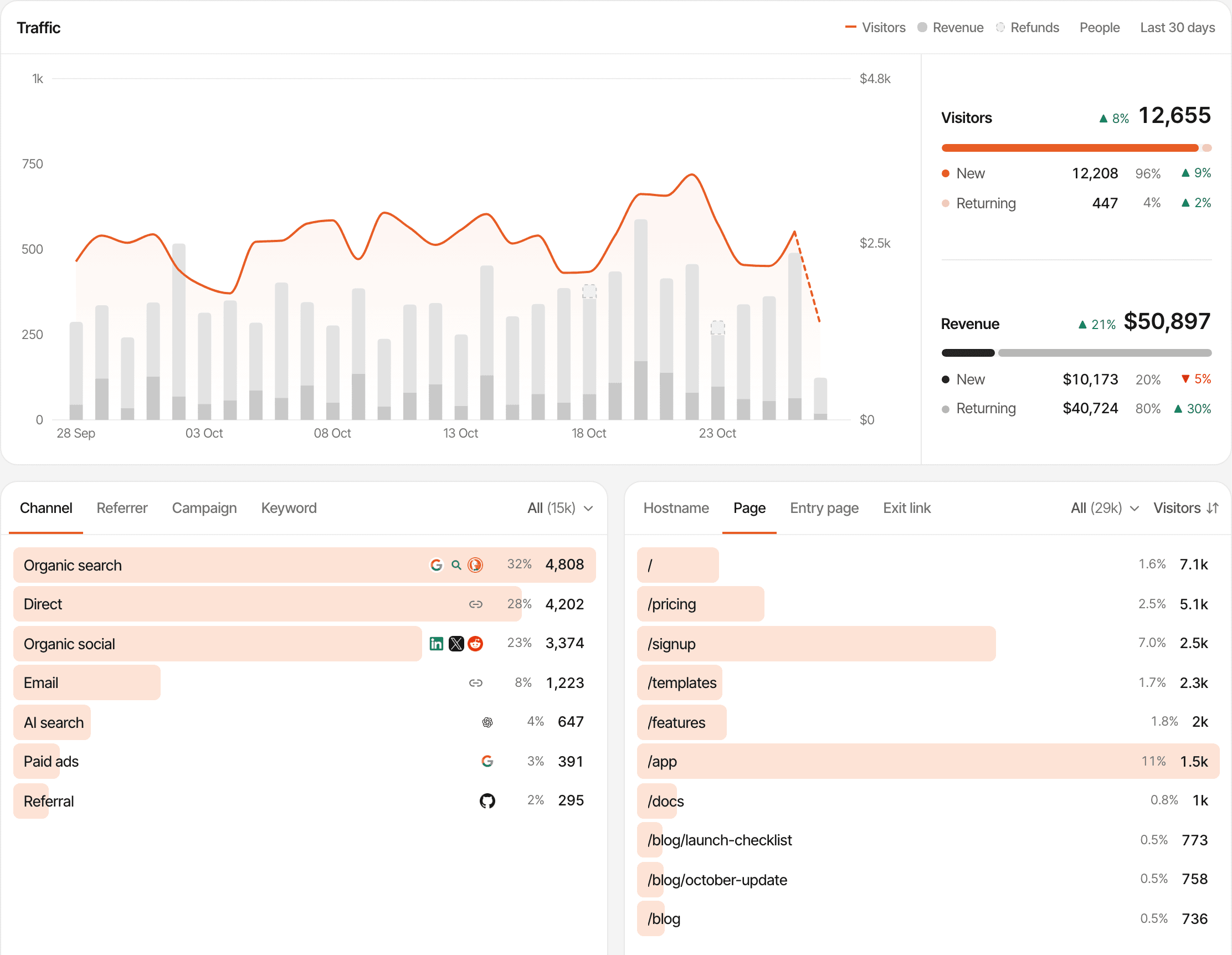
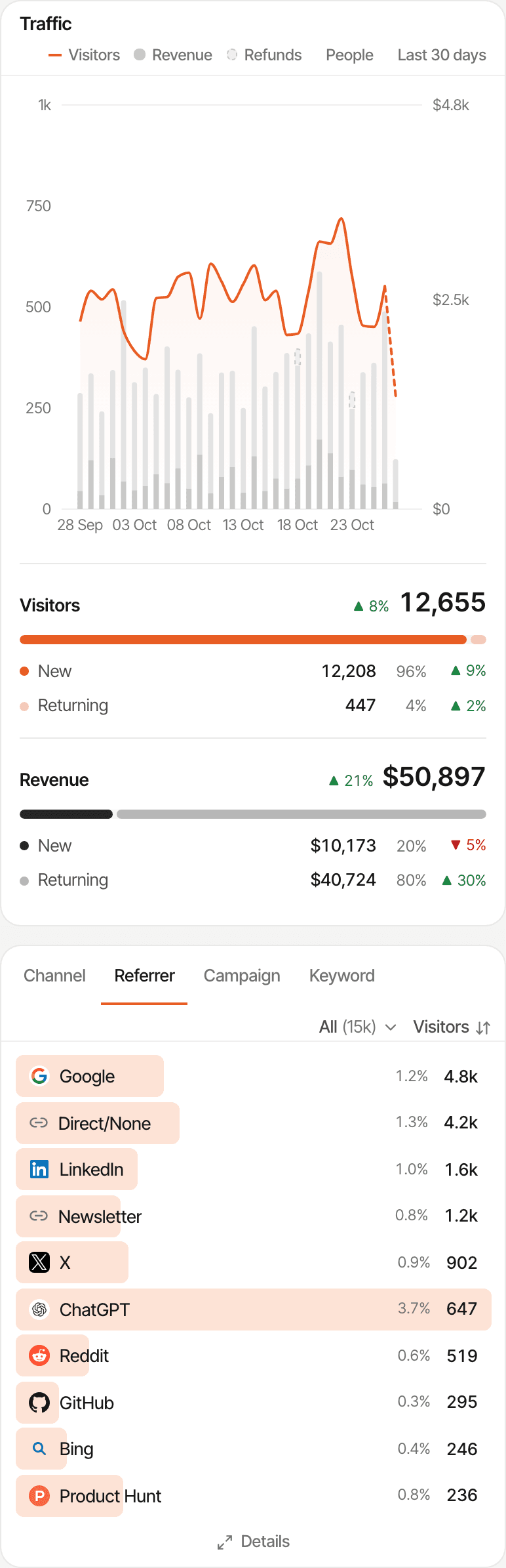
Add one script and every visit is counted with its source, its entry page and what it led to, payments included.
- Channels: organic search, direct, social, email, paid, referral and AI search
- Referrers, and campaigns and keywords from UTM tags
- Entry pages, the pages read, and the links clicked out
- New and returning visitors, with the revenue each day brought
The AI search channel counts a visit from a known assistant, such as ChatGPT, Perplexity, Claude, Gemini or Copilot, when its referrer or a utm_source or ref tag names one. An assistant that sends neither shows up as Direct. About AI traffic
GA4 reports acquisition in depth too: traffic and user acquisition, a default channel group with an AI Assistant channel for referrals from assistants such as ChatGPT, Gemini and Copilot (Google's own AI Overviews count as organic search), UTM campaigns, landing pages and realtime.
Connect traffic sources to actual payments.
Each payment your provider reports is tied to the visitor who made it, so every source shows the customers and revenue it brought.
- Step 1
A visitor arrives
The visit is recorded with its channel, referrer or campaign
- Step 2
They reach a supported checkout
Which carries their visitor id
- Step 3
The payment is received
From your payment provider's webhook
- Step 4
It's matched when possible
By visitor id, a customer id it has seen, or an email
- Step 5
Revenue is attributed
To the source, by first or last touch
- Step 6
Revenue by source
Customers and revenue for each channel, referrer, campaign and page
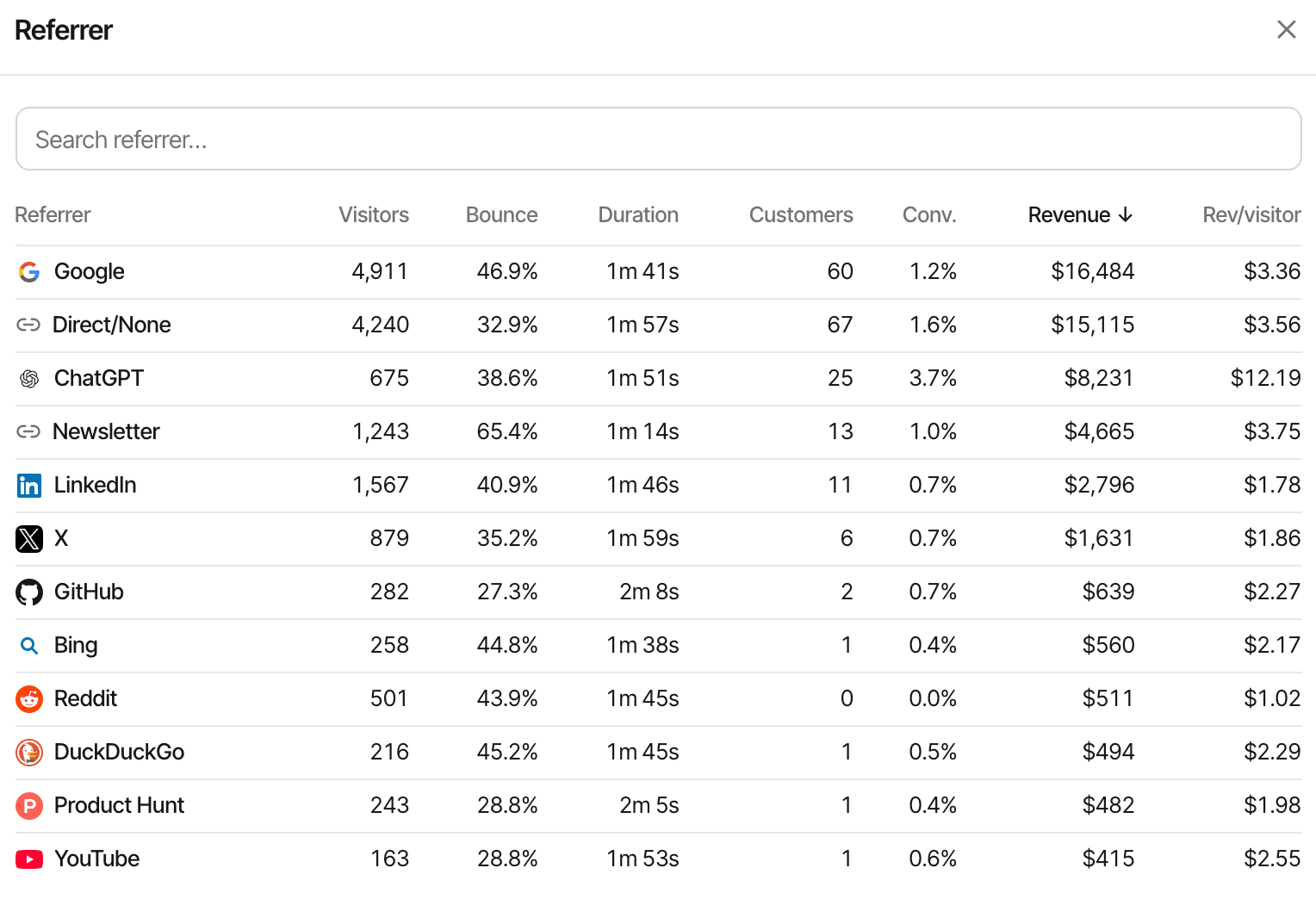
One website's referrers, sorted by the revenue each brought.
First touch
Credits the visit that first brought the customer. Good for “what finds new customers?”
Last touch, the default
Credits the visit the payment happened in. When a customer comes back directly to pay, Direct gets the credit.
Unmatched payments
A payment that can't be matched to a visitor still counts in your revenue, without a source.
Each website picks first or last touch and one reporting currency; payments in other currencies are converted with daily exchange rates. It's attribution, not subscription finance: no MRR, ARR or churn. How revenue attribution works
How GA4 does it
GA4 attributes revenue to sources well: its attribution reports credit key events and purchase revenue to channels, with a data-driven model or one of two last-click models. The revenue arrives as ecommerce events, which GA4 doesn't collect on its own: your code or Tag Manager sends each purchase with a transaction id and its items, and a refund event for full or partial refunds. A payment confirmed on your server can be sent with the Measurement Protocol, which Google describes as a way to add to tag-based collection, tied to the visitor's GA client id. Google's docs don't list integrations with Stripe, Polar, Lemon Squeezy, Paddle or Dodo Payments.
Payment provider integrations
You connect each provider's webhook once. What else it takes depends on the provider.
- StripePass the visitor id in your Checkout Session or Payment Link
- PolarCheckout links are tagged by the script
- Lemon SqueezyPass the visitor id as checkout custom data
- PaddlePaddle.js checkout buttons are tagged by the script
- Dodo PaymentsPayment links are tagged by the script
Anything else can send payments through the payments API. Checkouts the script can't see, such as one opened from your own server, need the visitor id passed in your code.
- Renewals are credited to the customer's original visit
- A full refund marks a payment refunded with every provider
- Partial refunds lower a payment with Polar, Paddle (once approved) and Dodo Payments; Stripe's are ignored, with Lemon Squeezy the whole payment is marked refunded, and the payments API refunds a whole payment
What it doesn't do: join visitors across devices on its own, skip direct visits to find an earlier source, report products, import past payments, or report MRR, ARR or churn.
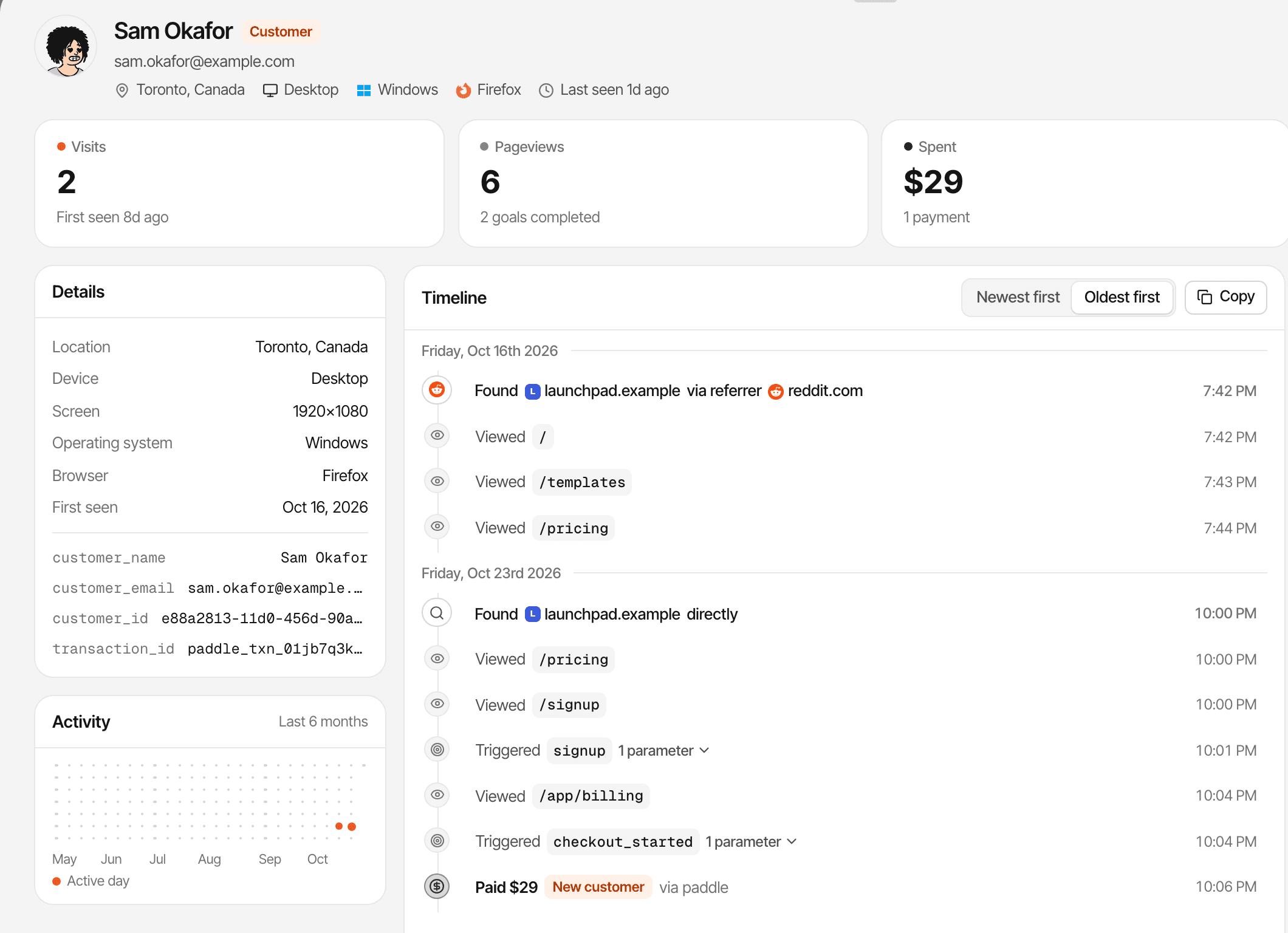
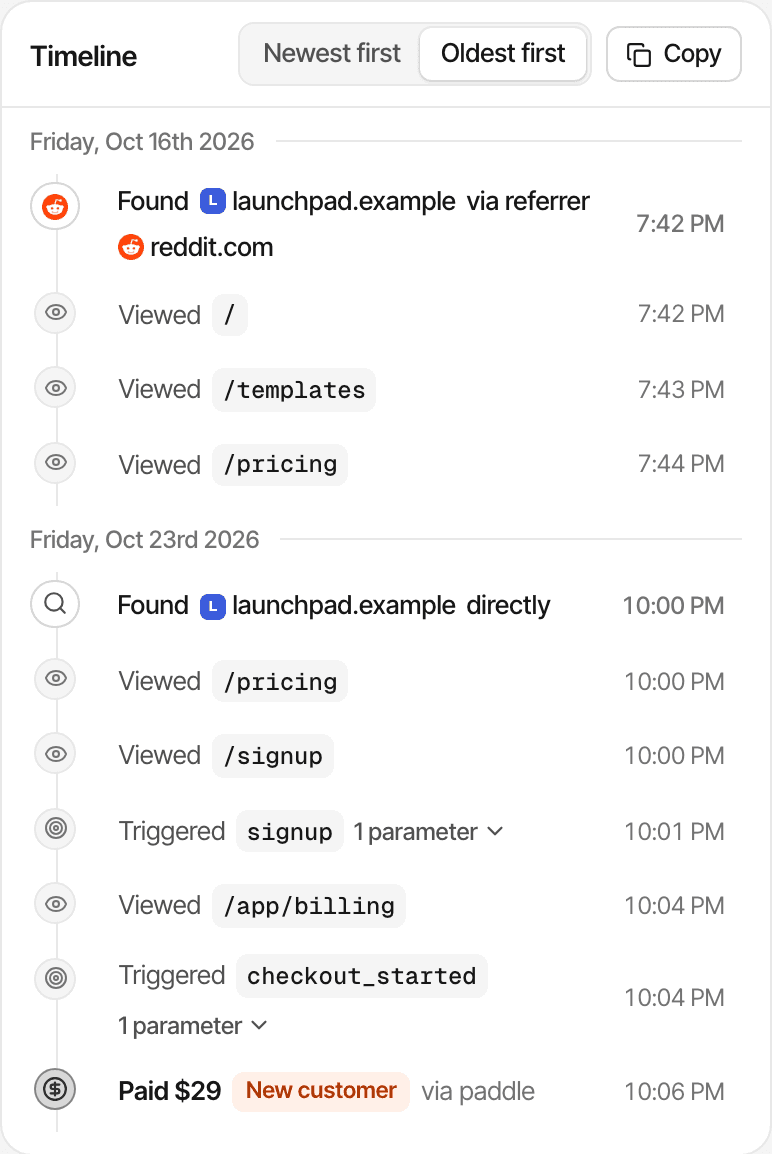
Reddit first, a direct visit to pay through a Paddle button: first touch credits Reddit, last touch credits Direct.
Follow the path from first visit to conversion.
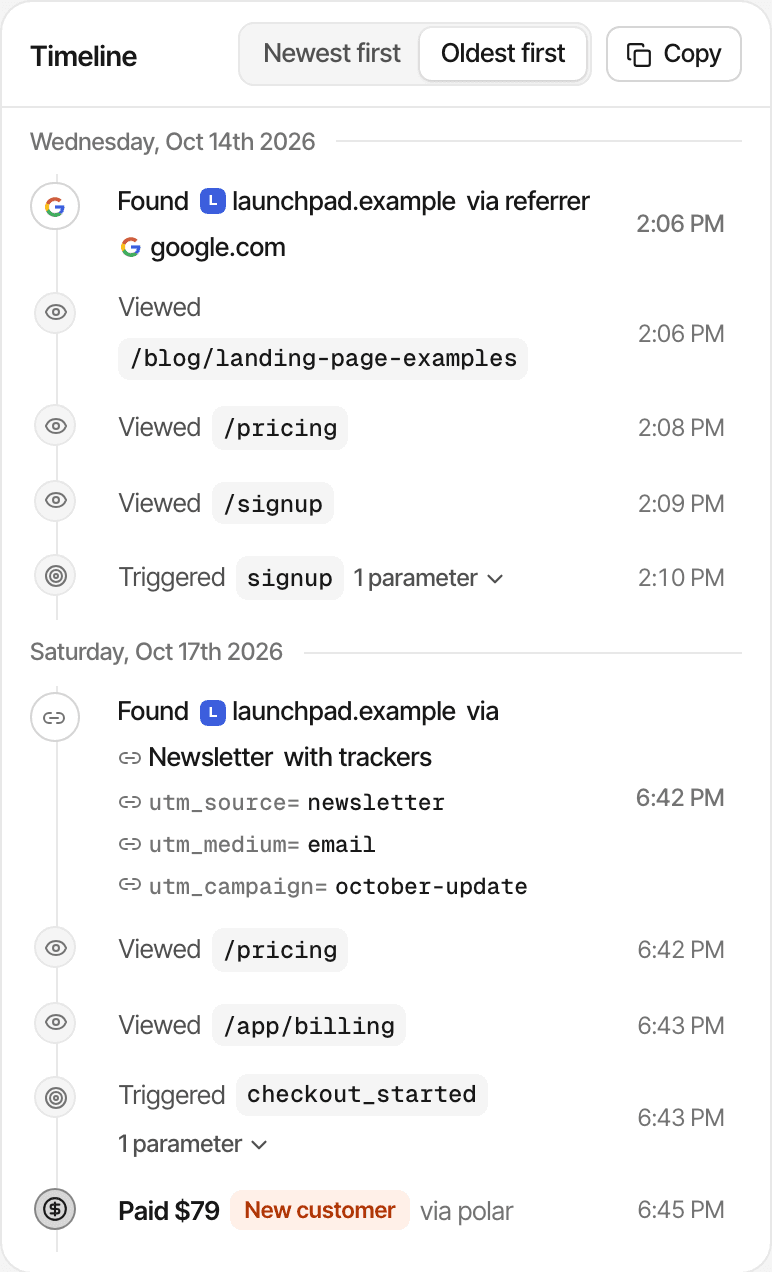
A journey shows one visitor's path on your website. A funnel shows how everyone moved through the steps you care about, up to the payment.
- The entry source of each visit, with its referrer or UTM tags
- Every page visited, and the goals completed
- Recorded payments, in the same timeline
- The conversation, if they chatted with you
- A name and email only if they give them in chat or your app identifies them
A journey follows one browser: a phone and a laptop are two visitors, and naming them with identify doesn't merge their journeys. In cookieless mode a visitor is recognised for a day. About visitor journeys
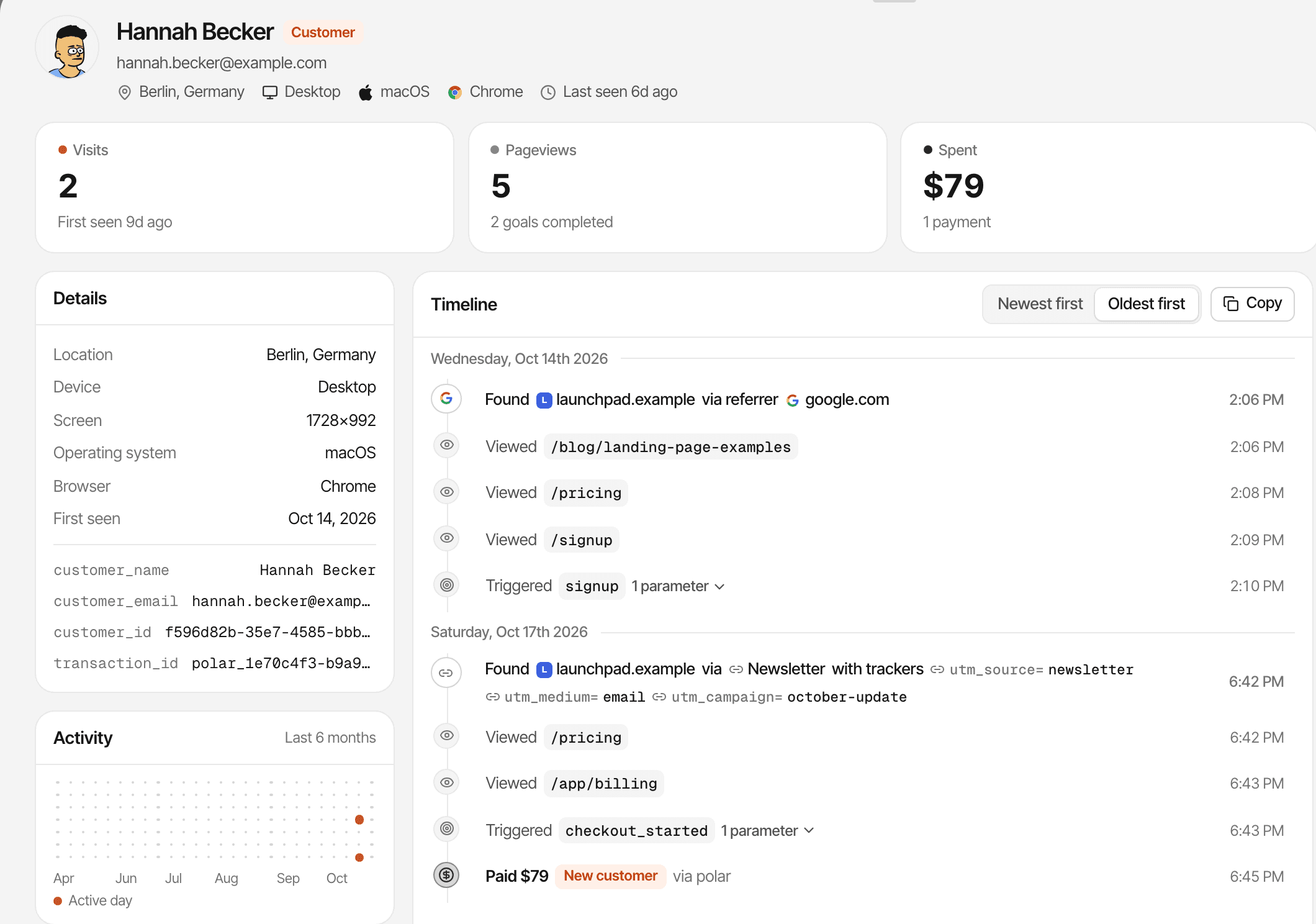
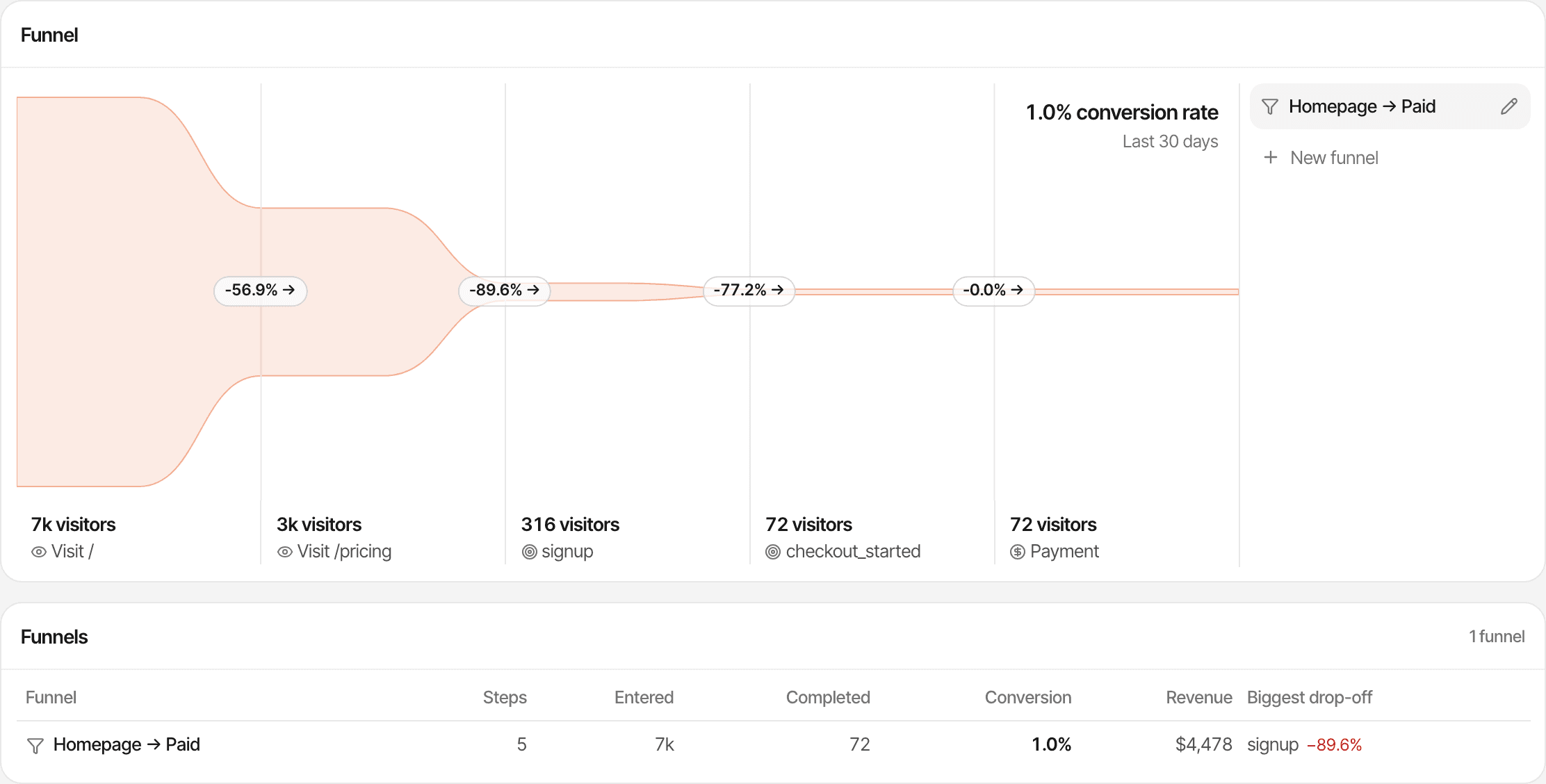
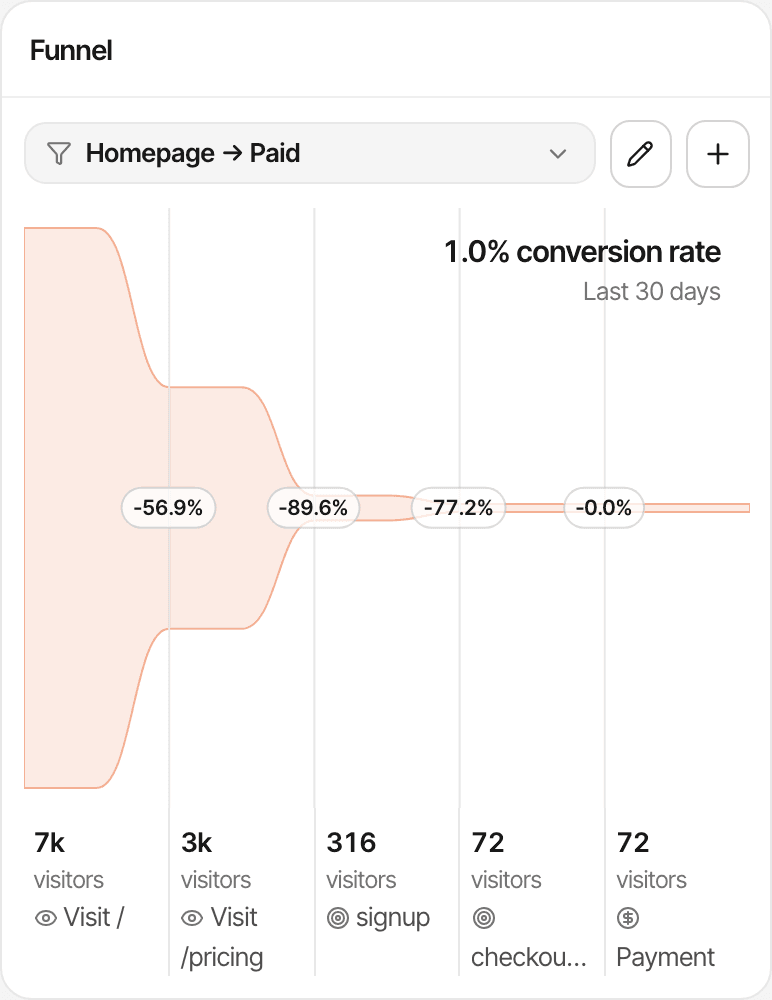
A funnel's last step can be a payment. How funnels work
GA4 goes further: funnel and path explorations, a user explorer, cohort and segment-overlap explorations, a retention report, audiences, and User-ID or Google signals to link a user's devices. SuprAnalytics' funnels and journeys are simpler, and stay on your website.
Turn visitor insights into conversations.
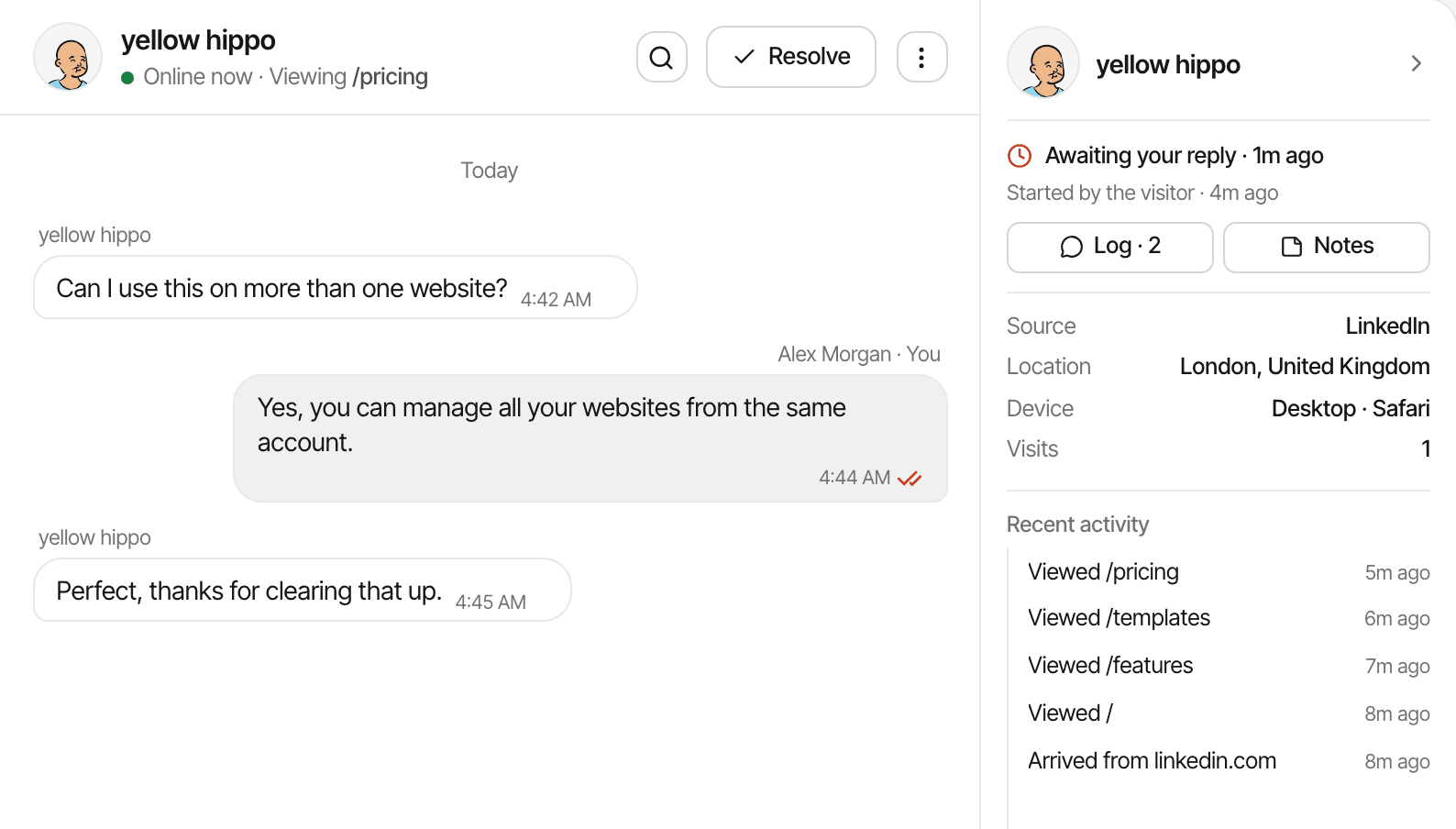
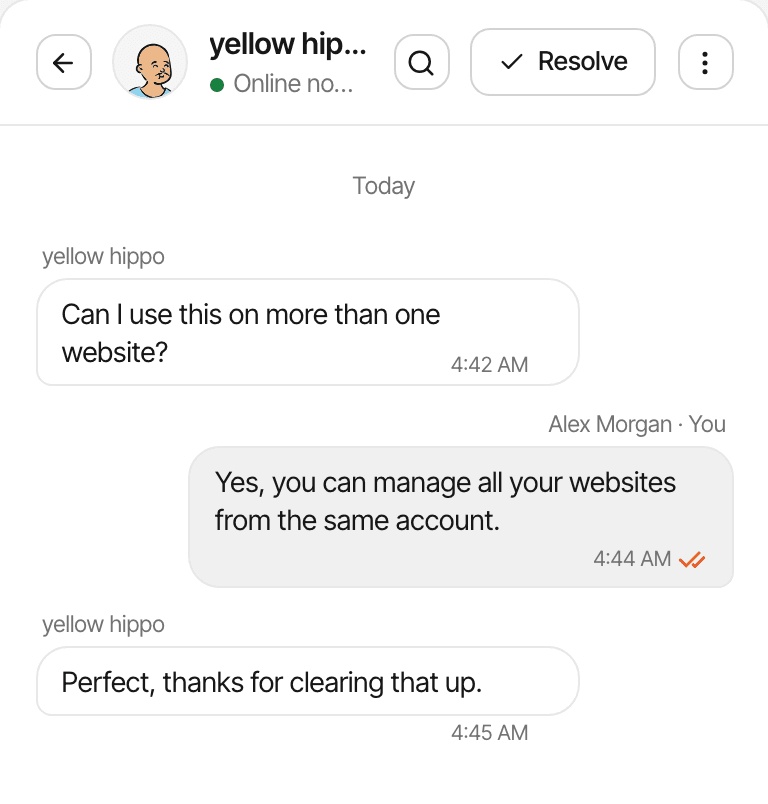
Visitors can message you from a chat bubble that comes with the analytics script, and each conversation opens beside the visit it belongs to.
- A chat widget and one inbox for every website, on every plan
- The visitor's source, the pages they read, their device and location beside each conversation
- The conversation on the visitor's profile, next to their journey and payments
- Messages sent automatically when a visitor opens a page you choose
Visitors stay anonymous unless they type a name or email, or your app identifies them; you still see their visit. More about live chat
Built-in visitor live chat was not listed in the reviewed GA4 documentation. Its chat-style features, such as Ask Advisor, are for analysts asking about their data. A third-party chat tool can run alongside GA4.
Where Google Analytics is stronger
GA4 is a mature, capable analytics platform. If one of these is what you need, it's probably the better fit.
Free, at large scale
Standard GA4 is free, with no event-volume limit stated in its terms. SuprAnalytics costs from $9 a month, and has a trial, not a free plan.
Explorations
Funnel, path, user, cohort and segment-overlap explorations, with segments and comparisons you build. SuprAnalytics' reports are fixed and simpler.
Ecommerce reporting
Purchases with items, product revenue, and full and partial refunds, once your store sends the ecommerce events. SuprAnalytics has no product reports.
Attribution
A data-driven attribution model, lookback windows you set, and key event attribution paths. SuprAnalytics has first and last touch.
The Google ecosystem
Google Ads and Search Console links, audiences for Google's ad products, Looker Studio, and BigQuery export. SuprAnalytics has none of these, apart from a Search Console page once you connect Google.
Identity and audiences
User-ID and Google signals to link a user's devices, and audiences built from behaviour. A SuprAnalytics journey follows one browser.
APIs and teams
A Data API and an Admin API, five user roles with data restrictions, and scheduled email reports. SuprAnalytics' API only accepts data, and team access isn't released yet.
Enterprise options
Analytics 360 adds higher limits, retention up to 50 months, roll-up properties and service levels, with support from Google or a partner.
On privacy, both set a first-party cookie by default. GA4 doesn't store IP addresses and has consent mode for use with a consent banner; SuprAnalytics has an opt-in cookieless mode. Neither makes analytics compliant by itself: what you collect, how you configure it, and where your visitors are still matter.
Which should you choose?
Three honest paths. They aren't mutually exclusive.
Choose SuprAnalytics when
- Your main needs are website acquisition: where visitors come from and which pages convert.
- You want payments from Stripe, Polar, Lemon Squeezy, Paddle or Dodo Payments attributed to sources, with renewals and refunds, without building ecommerce events.
- You want to chat with visitors, with their source, journey and payments beside the conversation.
- You want one plan with everything included, across all your websites.
Choose GA4 when
- You need deep, customisable reporting and explorations.
- You rely on Google Ads, Search Console, BigQuery or Looker Studio.
- You run a store and want product-level ecommerce analysis.
- You want a free tool, or Analytics 360's limits and service levels.
Use both when
- You want GA4 for advanced reporting and Google's ad tools, and SuprAnalytics for payments and visitor conversations.
- Two scripts mean more on each page, and two consent decisions to configure.
- Their numbers won't match exactly: decide which tool answers which question.
How does the pricing compare?
Standard GA4 is free. SuprAnalytics is a paid plan. What differs is what's included, and what you set up yourself.
SuprAnalytics
- 6 monthly plans, from $9 for 100,000 events to $149 for 5 million
- Every feature, live chat and payment attribution included, and unlimited websites on every plan
- Counts pageviews, custom goals and outbound link clicks; never chat messages or payments
- 2 years to 5 years of data history, by plan, for every report
- Past the allowance, recording continues to 20% over, then pauses; no overage charges
- 14-day free trial, no card. No free plan. Monthly billing only
GA4 standard
- Free; no event-volume limit stated in its terms
- Event-level data for explorations and funnel reports kept 2 or 14 months; standard reports aren't affected
- Explorations sample above 10 million events per query
- BigQuery daily export up to 1 million events a day; BigQuery itself is charged by Google Cloud past its free tier
- Data processing can take 24 to 48 hours; realtime is separate
- Setup is yours: ecommerce events, consent banner, Tag Manager or server code, as needed
Google Analytics 360
- Price from Google's sales team; not published
- Higher limits, event-level data kept up to 50 months
- Roll-up properties and subproperties
- Service levels for collection, processing and reporting
- Support from Google or a Google partner
Pricing checked: . SuprAnalytics costs more than standard GA4, which is free; from $9 a month, you pay for the payment-provider connection, live chat and a hosted workspace where those come set up. With GA4, the costs to weigh are the time spent setting it up and any BigQuery use beyond Google Cloud's free tier.
Questions, answered.
What is the difference between GA4 and SuprAnalytics?
Is SuprAnalytics a Google Analytics alternative?
Is Google Analytics 4 free?
Can GA4 track ecommerce revenue?
Can GA4 attribute revenue to traffic sources?
Does SuprAnalytics integrate with Stripe?
Does SuprAnalytics support cookieless tracking?
Does SuprAnalytics include live chat?
Can I import historical GA4 data?
Can I use GA4 and SuprAnalytics together?
Google Analytics sources, read on : Google Analytics · Analytics 360 · 360 limits · Channel groups · Enhanced measurement · Ecommerce · Attribution models · Measurement Protocol · Consent mode · Cookies · Data retention · BigQuery export · Roles
More comparisons
- vs PlausibleSimple cookieless stats, or revenue attribution and visitor chat on top.Open
- vs PostHogA product engineering platform, or a focused website workspace.Open
- vs FathomPrivacy-first website stats, or traffic tied to payments and conversations.Open
- vs RybbitOpen-source, cookieless analytics, or payments by source and live chat.Open
- vs DataFastTwo revenue-first tools: live chat and unlimited websites set them apart.Open
- vs SelineLightweight analytics, or revenue from five payment providers and chat.Open
- vs Simple AnalyticsPrivacy-first simplicity, or payments credited to each traffic source.Open
- vs UmamiOpen-source, self-hostable stats, or hosted revenue attribution and chat.Open
- vs MatomoA full GA alternative you can host, or a focused revenue and chat workspace.Open
- vs MixpanelEvent-based product analytics, or website traffic tied to payments.Open
- When not to use SuprAnalyticsThe cases where another tool fits better, and which one.Open
Understand traffic. Connect payments. Talk to visitors.
Bring website analytics, revenue attribution, and visitor conversations together in one workspace.
14-day free trial · No card requiredvs Plausiblevs Rybbit