
You open Stripe and see $500 in new payments this week. Then the obvious question: where did those customers come from? The Google search you've been ranking for, the Reddit thread you posted on Tuesday, Thursday's newsletter, or something else?
Stripe can't answer that by itself, and that isn't a flaw in Stripe. Stripe sees the payment; your website analytics sees the visits. Nothing joins the two unless a shared identifier travels between them. This guide explains how that join works in general, then how to set it up with SuprAnalytics, including where it can't find a source.
The quick answer
To attribute Stripe payments to traffic sources, four things have to happen:
- Record where each visit came from: the referrer and any UTM tags.
- Give each visitor an id that stays the same when they come back.
- Carry that id into the Stripe checkout.
- Receive the payment through a verified webhook and match it to that visitor.
Matching isn't always possible. When the id is missing, a payment can sometimes still be matched by customer id or email. Some payments will have no source at all, and an honest report says so.
Why Stripe alone doesn't tell you where customers came from
Stripe's records are built around payments. For each one it knows the amount and currency, the customer and their email, the product or price, the invoice and subscription it belongs to, and any refunds. It also keeps references you give it: metadata (Stripe documentation, opens in a new tab) on objects you create, and a client_reference_id on Checkout Sessions. Stripe even accepts UTM codes on Payment Links (Stripe documentation, opens in a new tab) and passes them on to your redirect URL.
What Stripe doesn't see is everything before the checkout page: the search three days earlier, the referring site, the landing page, the second visit. That history lives in your website analytics, which in turn has never seen a card payment.
Stripe knows
- Amount, currency and tax
- Customer id and email
- Invoices, subscriptions, refunds
- References you attach (metadata)
Website analytics knows
- Referrer and UTM tags
- Landing page and pages viewed
- Every visit, with its date
- Device and approximate location
The missing piece is an identifier both sides share. Analytics gives every visitor an id; the checkout carries that id into Stripe; Stripe sends it back with the payment. With it, a payment can be traced to the visits that came before it.
How Stripe revenue attribution works
Whatever tool you use, the chain has the same seven links. A break anywhere means a payment without a source.
Traffic source
Where a visit came from: the referring site, or the tags on the link.
In SuprAnalytics: Read on the first page of each visit:
utm_source,ref,via,source, or the referrer.Website visit
A session: a run of activity on your site.
In SuprAnalytics: A visit ends after 30 minutes without activity.
Visitor identity
An id that stays the same when the person comes back.
In SuprAnalytics: A first-party cookie,
supr_visitor_id, kept for a year. In cookieless mode, a hash that changes daily.Checkout
The id travels with the purchase.
In SuprAnalytics: Your server puts it in the Checkout Session's
metadata, or a snippet adds it to Payment Links asclient_reference_id.Stripe payment
The payment provider takes the money.
In SuprAnalytics: Stripe, as usual. Nothing changes for your customer.
Verified webhook
The provider tells the analytics tool, with a signature.
In SuprAnalytics: Stripe posts to your website's webhook URL; the
Stripe-Signatureheader is checked against your signing secret.Revenue attribution
The payment is joined to the visitor's visits.
In SuprAnalytics: Stored with the visitor's first visit and last visit before paying. Your attribution model picks which one gets the credit.
Attribution is decided before the payment: if the visit wasn't recorded or the id didn't reach checkout, nothing later can recover the source. A webhook says a payment happened, not where the customer came from. And the payment joins a visitor, whose visits carry the sources, so which visit gets the credit is a separate choice (see first vs last touch).
Step 1: Track website visitors and their sources
Start by recording visits. With SuprAnalytics that's one script tag in the <head> of every page (see the installation guides). From then on, each visit records:
- Referrer: the site the visitor clicked through from, such as google.com or reddit.com.
- UTM parameters: tags you add to links you share, which name the source, medium and campaign.
- Landing page: the first page of the visit.
- Visitor id: kept in a first-party cookie for a year, so a return visit is recognised as the same visitor.
- Session: one visit. It ends after 30 minutes without activity; the next one is a new visit with its own source.
A tagged link looks like this (a fictional example):
https://example.com/?utm_source=reddit&utm_medium=social&utm_campaign=launchUTM tags make sources more reliable, but only when they're on the link. SuprAnalytics reads utm_source, utm_medium, utm_campaign, utm_content and utm_term, plus the shorter ref, via and source, on a visit's first page. Without tags, the source is the referrer. Links opened from apps (Reddit, X, Slack or Discord on a phone, for example) often arrive with no referrer, and a visit with neither a referrer nor a tag counts as Direct. The tracking parameters guide lists every rule, and UTM tracking shows the reports.
Step 2: Carry the visitor into checkout
Stripe Checkout and Payment Links run on Stripe's pages, and the payment notice comes from Stripe's servers, not the customer's browser. So the visitor id has to travel inside the Stripe objects themselves. The SuprAnalytics script doesn't add it to Stripe links or checkouts on its own; you add it in one of two ways.
Checkout Sessions: pass the id as metadata
When your server creates the Checkout Session, read the supr_visitor_id cookie and pass it as metadata. Stripe returns the session's metadata in the checkout.session.completed webhook. Stripe doesn't copy metadata between related objects, so for subscriptions also set subscription_data.metadata: renewal invoices carry the subscription's metadata, not the session's (Stripe: metadata (Stripe documentation, opens in a new tab)).
const session = await stripe.checkout.sessions.create({
  mode: "subscription",
  line_items: [{ price: "price_123", quantity: 1 }],
  success_url: "https://yourdomain.com/thanks",
  metadata: {
    supr_visitor_id: req.cookies.supr_visitor_id,
    supr_session_id: req.cookies.supr_session_id,
  },
  // Subscriptions: renewals' invoices read the subscription's metadata.
  subscription_data: {
    metadata: { supr_visitor_id: req.cookies.supr_visitor_id },
  },
});
res.redirect(303, session.url);
Runs on your server; your Stripe secret key never goes in browser code. req.cookies is Express with cookie-parser. subscription_data applies to subscription-mode sessions only, so leave it out with mode: "payment". Python and PHP versions are in the Checkout Sessions guide.
Payment Links: add the id as client_reference_id
Payment Links (buy.stripe.com/…) accept a client_reference_id in the URL, and Stripe puts it on the Checkout Session and sends it in checkout.session.completed (Stripe: Payment Link parameters (Stripe documentation, opens in a new tab)). Add this after the SuprAnalytics script to set it when a visitor clicks:
<script>
  document.addEventListener("click", function (e) {
    var link = e.target.closest && e.target.closest('a[href^="https://buy.stripe.com/"]');
    if (!link || !window.supr || !window.supr.visitorId) return;
    var url = new URL(link.href);
    url.searchParams.set("client_reference_id", window.supr.visitorId());
    link.href = url.toString();
  }, true);
</script>
SuprAnalytics accepts a client_reference_id of 8 to 64 letters, digits, - and _ as the visitor id, and reads metadata first if both are present. Details in the Payment Links guide.
When there's no id: customer id and email
A payment without a visitor id isn't lost. SuprAnalytics then tries the Stripe customer id on an earlier payment that was matched, then a visitor with the same email, known from an earlier payment or from the identify call your app makes at sign-up or sign-in:
window.supr("identify", {
  user_id: "usr_123",   // your own id (optional)
  email: "ada@example.com",
  name: "Ada Lovelace",
});visitor = checkout.metadata.supr_visitor_id
?? checkout.client_reference_id // 8–64 safe characters
?? visitorOfEarlierPayment(stripe_customer_id)
?? visitorWithEmail(customer_email)
?? none // revenue without a sourceThe identify call has to happen before the payment arrives. Identifying someone afterwards doesn't re-match payments already recorded.
Step 3: Connect Stripe to SuprAnalytics
The connection is a Stripe webhook endpoint and its signing secret, one per website. There's no OAuth and no API key to share, and past payments aren't imported: SuprAnalytics records payments from the moment the webhook is set up.
Copy your webhook URL
In SuprAnalytics, open the website's Settings → Revenue and pick Stripe as the payment provider. Copy the URL it shows, which looks like
https://supranalytics.app/api/webhooks/stripe/YOUR_WEBSITE_ID.Create an event destination in Stripe
In the Stripe Dashboard, open Workbench → Webhooks and click Create an event destination. Choose Your account and the Snapshot payload (Stripe: webhooks (Stripe documentation, opens in a new tab)).
Select the four events
Select
checkout.session.completed,checkout.session.async_payment_succeeded,invoice.paidandcharge.refunded. Then pick Webhook endpoint and paste the URL from step 1.Paste the signing secret
On the endpoint's page, reveal the signing secret (
whsec_…), paste it into Settings → Revenue and click Connect. The green Connected badge means the secret is saved; it doesn't test a delivery. Step 4 does that.Pass the visitor id
If you haven't yet, add the metadata or the Payment Links snippet from step 2.
| Stripe event | What SuprAnalytics does |
|---|---|
checkout.session.completed | What SuprAnalytics does: Records a paid session for its amount_total, which Stripe defines as the total after discounts and taxes (Stripe: Checkout Session (Stripe documentation, opens in a new tab)). Sessions not yet paid are skipped. |
checkout.session.async_payment_succeeded | What SuprAnalytics does: Records a delayed payment, such as a bank debit, once it succeeds. |
invoice.paid | What SuprAnalytics does: Records subscription invoices. The first one is merged with its Checkout Session, so it isn't counted twice; later ones with the billing reason subscription_cycle are renewals. |
charge.refunded | What SuprAnalytics does: Marks the payment refunded when the whole charge is refunded. Partial refunds are ignored. |
What happens on every delivery
- Signature check. Each request's
Stripe-Signatureheader is verified against your secret: an HMAC-SHA256 over its timestamp and the exact body, with a 5-minute limit on the timestamp, as Stripe describes (Stripe documentation, opens in a new tab). A wrong secret is answered with 400 "Invalid signature" and nothing is recorded. - Retries. Stripe retries failed live deliveries for up to three days (sandbox ones three times in a few hours), so fixing a wrong secret in time still records them.
- Duplicates. Each Checkout Session or invoice is stored once, so a delivery that arrives twice doesn't count twice.
- Order. Stripe doesn't guarantee event order; a subscription's checkout and first invoice become one payment either way.
Step 4: Verify with a test payment
Test in a Stripe sandbox (Stripe documentation, opens in a new tab), where payments aren't processed by card networks. Never make a real charge just to test attribution. A sandbox endpoint has its own signing secret, different from the live one.
- In the sandbox, create an event destination for the test website's URL with the four events, and paste its secret into that website's Settings → Revenue.
- Open your staging site in a fresh browser window with a tagged link, such as
?utm_source=test&utm_medium=email&utm_campaign=attribution_check. - Check out through your normal flow, so the visitor id goes along, and pay with one of Stripe's test cards (Stripe documentation, opens in a new tab), such as 4242 4242 4242 4242.
- In Stripe, open the endpoint's Event deliveries tab.
checkout.session.completedshould show status 200. - Open the delivery. Where Stripe shows the response body, look for
"attributed": true. - In SuprAnalytics, the payment appears in the live view, the visitor's journey shows the tagged visit and the payment, and the Campaign report credits
attribution_check.
{
  "received": true,
  "result": { "visitorId": "…", "attributed": true, "duplicate": false }
}
"attributed": false means the payment was recorded without a source: check that the checkout carries the visitor id. A retried delivery answers "duplicate": true.
When it works, create a second event destination in live mode for your real website, with its own secret.
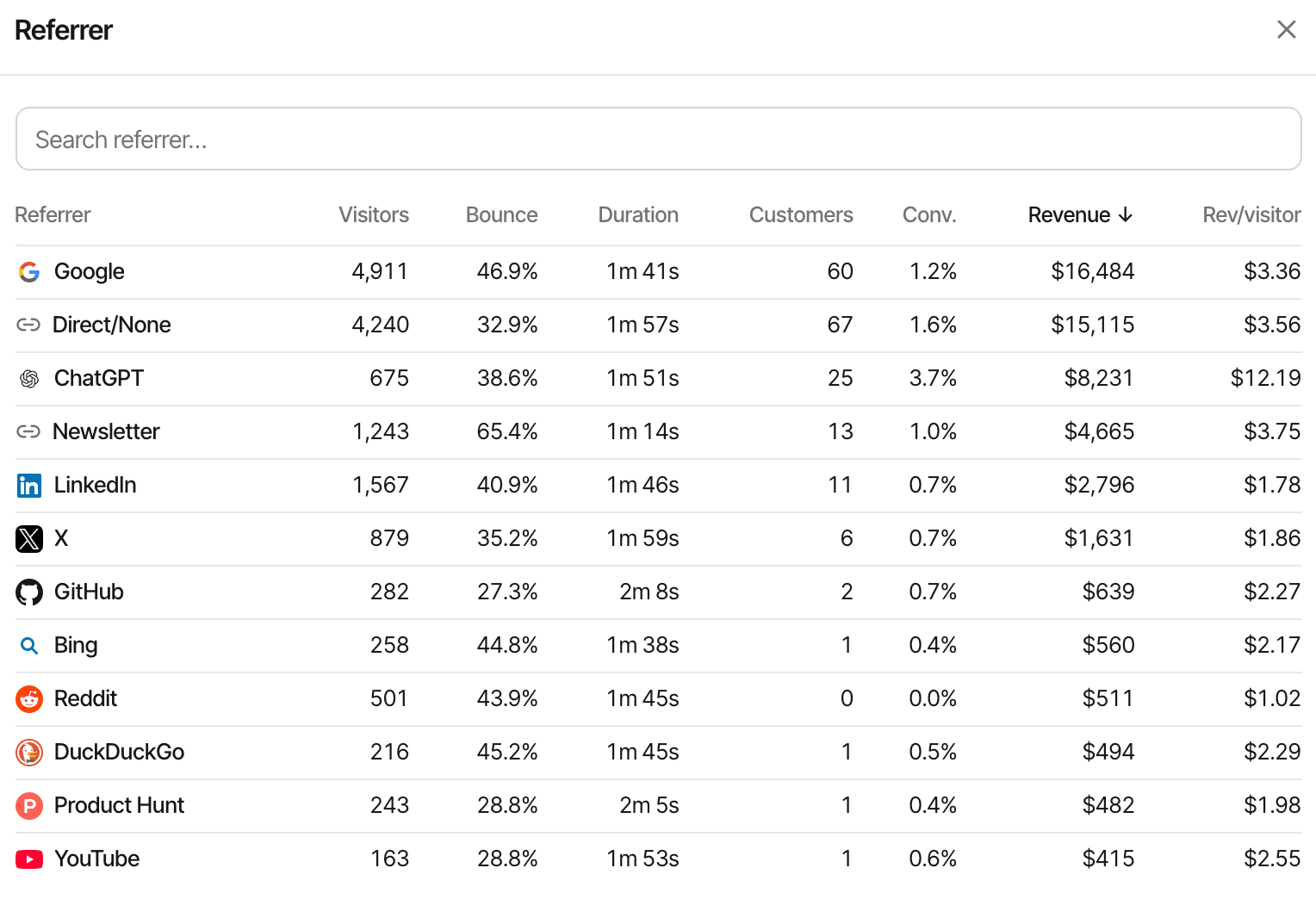
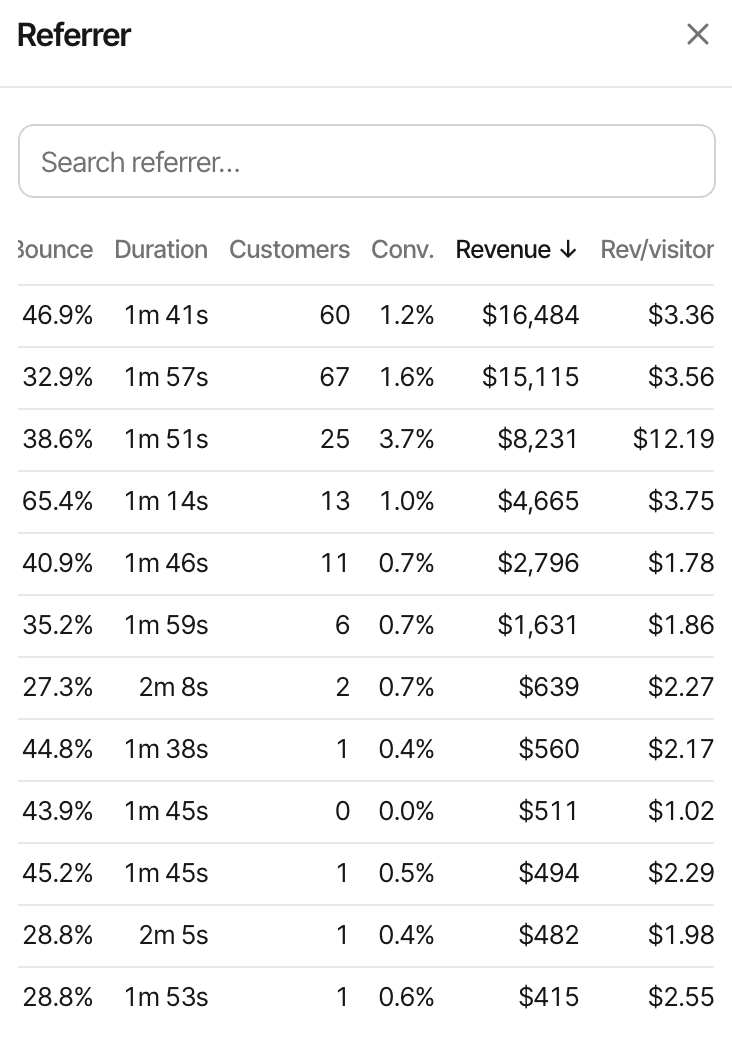
With real payments flowing, every source report gains Customers and Revenue columns, and the source with the most visitors often isn't the one that pays.
First-touch vs last-touch attribution
Most customers visit more than once before paying. The attribution model decides which visit's source gets the revenue. SuprAnalytics stores two visits with every payment: the visitor's first visit ever, and their last visit before paying. Your setting picks one, in every report.
Day 1
Finds you through a Reddit thread
Source: Reddit
Day 5
Types your address into the browser
Source: Direct
Day 5
Buys a $49 subscription in the same visit
Payment: $49
| Model | Revenue by source shows | Good for |
|---|---|---|
| First touch | Revenue by source shows: $49 from Reddit | Good for: Which channels find new customers |
| Last touch (the default) | Revenue by source shows: $49 from Direct | Good for: Which visits close the sale |
SuprAnalytics uses last touch unless you change it in Settings → Revenue → Attribution model. Last touch here is plain last touch: a direct return gets the credit. It isn't last non-direct touch, which would skip Direct and credit Reddit. If you'd rather see what brings customers in, switch to first touch. The choice is applied when reports are read, so switching re-credits past payments as well as new ones.
The example only works if the Day 5 visit is recognised as the same visitor. On another device, or in cookieless mode a day later, Day 5 is a new visitor, and both models credit Direct.
How to track revenue from UTM campaigns
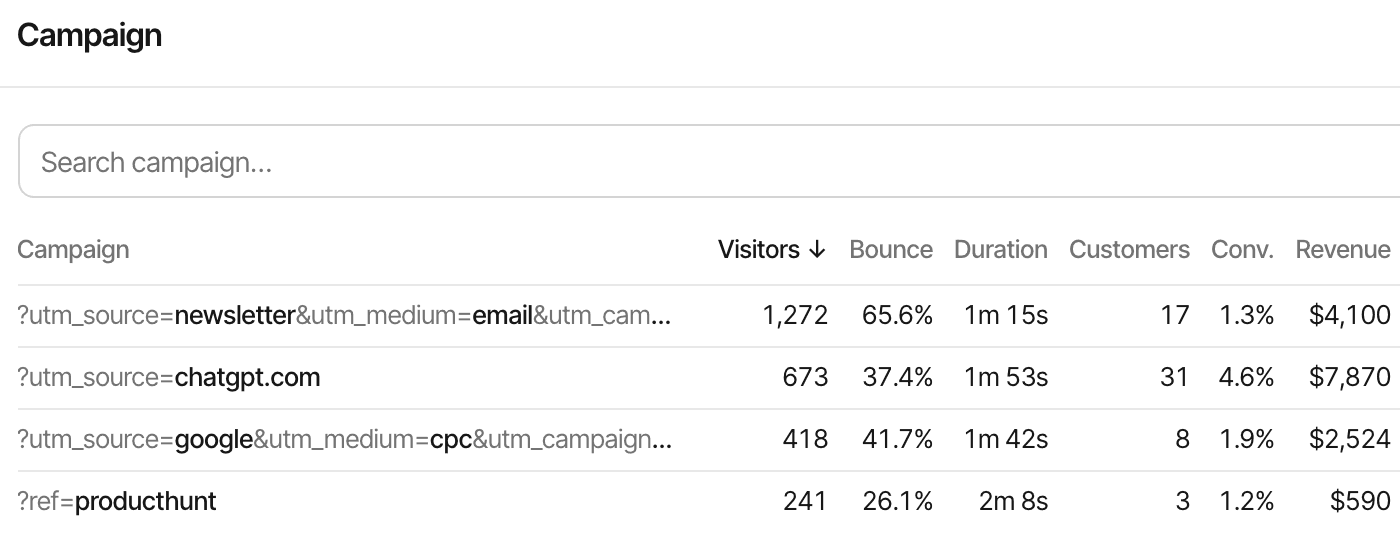
Campaign revenue is the same mechanism with tags. Put UTM parameters on the links you control, and each matched payment is credited to the campaign of the visit your model picks. For a newsletter, that might be:
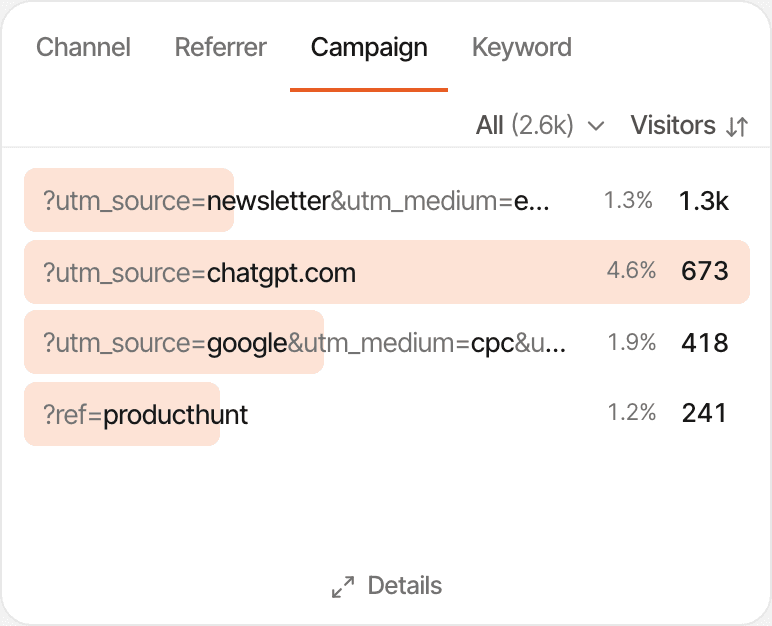
https://example.com/?utm_source=newsletter&utm_medium=email&utm_campaign=october_launchThe Campaign report then lists each tag combination with its visitors, customers, conversion rate and revenue, so october_launch can be compared with a launch post or a paid ad. utm_medium=email also puts those visits in the Email channel.
A few habits make campaign numbers trustworthy:
- Use the same lowercase names every time:
newsletterandNewsletterare two rows. - Remember the model. Under last touch, a subscriber who reads the email and comes back directly a week later credits Direct, not the campaign.
- Revenue isn't return on spend. SuprAnalytics doesn't import ad or email costs, so it doesn't calculate ROAS; divide your own spend by the campaign's revenue.
Renewals, refunds and subscription revenue
Stripe subscriptions produce several kinds of money movement. SuprAnalytics treats them differently:
| Payment | How it's counted |
|---|---|
| Initial payment | How it's counted: The paid Checkout Session. Counts toward new customers and conversion rate. |
| Renewal | How it's counted: A paid invoice with the billing reason subscription_cycle. Revenue, but not a new customer, so it doesn't inflate conversion rate. Credited to the same visitor through the subscription's metadata, the Stripe customer id or the email. Under last touch, that's the visitor's latest visit before the renewal. |
| Other paid invoices | How it's counted: Plan changes and other invoices count as payments, but not renewals. |
| Full refund | How it's counted: Marks the payment refunded; it drops out of revenue. One-time payments are matched through their payment intent. Stripe API 2025-03-31 removed the links between charges and invoices (Stripe changelog (Stripe documentation, opens in a new tab)), so on endpoints with that version or newer, refunds of subscription payments may not be matched. |
| Partial refund | How it's counted: Ignored. The payment keeps its full amount. |
Because of that, and because Stripe amounts include any tax Stripe collected and payments in other currencies are converted to your website's currency with daily rates, SuprAnalytics' totals won't always match Stripe's reports. The renewals and refunds guide has the details.
Payment tracking also isn't subscription analytics. SuprAnalytics doesn't calculate MRR, ARR or churn, or track cancellations, upgrades and failed payments; Stripe Billing's own reports are the place for those. What it adds is where paying and renewing customers came from (see subscription revenue).
Common attribution problems and how to fix them
| Problem | Likely cause and fix |
|---|---|
| No Stripe payments show up | Likely cause and fix: Open Stripe's Event deliveries. A 400 "Stripe is not configured for this website" means no secret is saved for that website; "Invalid signature" means the secret is from another endpoint, or sandbox and live are mixed up. A 200 that records nothing usually means a Thin payload, or events SuprAnalytics doesn't use. |
| Payments have no source | Likely cause and fix: The checkout carried no visitor id, and neither the customer id nor the email matched. Check the metadata or the Payment Links snippet, and identify signed-in users before checkout. |
| Too much Direct revenue | Likely cause and fix: Untagged links, apps that drop the referrer, or last touch crediting direct returns. Tag the links you share, or compare with first touch. |
| One person, two visitors | Likely cause and fix: Different browsers or devices aren't joined. An email match can still link a payment without an id to a visitor identified with that email. |
| Visits missing entirely | Likely cause and fix: Ad blockers can stop the script. Use the proxy guide to serve it from your own domain. |
| Cookieless payments unmatched | Likely cause and fix: The visitor hash changes daily (UTC), so a payment on a later day can't find the earlier visit. |
| A payment counted twice | Likely cause and fix: Retries never double count. Two routes for one sale do, such as a webhook and the Payment API, or two websites sharing an endpoint. See duplicate payments. |
| Revenue doesn't match Stripe's | Likely cause and fix: Partial refunds are ignored, subscription refunds may not match on new API versions, amounts include tax, and test payments sent to a real website stay in its revenue. |
More on this: Stripe revenue attribution · How revenue attribution works · Visitor journeys · Stripe setup guide · Pricing