
You launched a product, a landing page or a service website. People are visiting. What you actually want to know is simpler than any analytics dashboard: are they signing up, getting in touch, or paying? And you'd rather not spend an afternoon configuring Google Analytics 4 to find out.
Conversion tracking doesn't need GA4. Any website analytics tool that can record a named action, match it to a visit and count it can do the job. In SuprAnalytics that means goals (named events or page visits), funnels built from them, and payments confirmed by your payment provider.
The quick answer
- Install one analytics script on every page.
- Decide which actions count, and keep them apart: a click, a successful submission or signup, and a confirmed payment are different things.
- Count clicks with a
supr-goalattribute, and successes withwindow.supr("goal_name")only after your server says the action worked. - Use a thank-you page as a no-code goal when you have one, knowing a pageview isn't proof of a backend transaction.
- Count purchases from your payment provider (Stripe, Polar, Lemon Squeezy, Paddle, Dodo Payments) or the Payment API, never from a checkout button.
- Put the steps in a funnel, read the conversion rate with its denominator in mind, and test every goal before you trust it.
What counts as a website conversion?
A conversion is any action you decide matters to your business. Google Analytics 4 calls these key events; other tools call them goals. The name matters less than being precise about what each one proves.
| Action | What kind of signal | What it proves |
|---|---|---|
| Clicked “Start free trial” | Intent | Someone clicked. Not that they finished signing up. |
| Viewed the pricing or contact page | Intent | Interest, nothing more. |
| Contact or quote form accepted by your server | Completed action | An enquiry reached you. |
| Account created | Completed action | A new user exists in your database. |
| Newsletter subscription confirmed | Completed action | An address was added to your list. |
| Demo request saved | Completed action | A request is waiting for you. |
| Payment confirmed by Stripe, Paddle… | Verified payment | Money changed hands (until a refund). |
| Subscription renewal | Verified payment | A customer paid again. |
All three kinds are worth tracking. The mistake is mixing them up: reporting 120 “signups” that are really 120 clicks on a signup button, of which 70 became accounts.
How conversion tracking works
Most conversions follow the same path: something happens on your website, a tracking event is sent, it's counted as a goal, and it shows up in a report.
Goals: actions on your website
- Visitor
- Action on your website
- Tracking event
- Goal
- Conversion report
Payments: confirmed by the provider
- Visitor
- Checkout
- Payment provider
- Verified payment event
- Revenue report
Payments take a different road. The browser can tell you someone reached checkout, but only the payment provider knows whether the card went through, was declined or was later refunded. So revenue comes from the provider, through a webhook or an API call from your server, and is then matched to the visitor who paid. Most conversions don't need any of that: a signup or an enquiry is fully tracked with goals.
Step 1: Install website analytics
Add your website in SuprAnalytics and paste its script into the <head> of every page. Only supr-website-id is required; your website's id is under Settings → General.
<script
  defer
  supr-website-id="YOUR_WEBSITE_ID"
  supr-domain="yourdomain.com"
  src="https://supranalytics.app/js/script.js"
></script>
- There are step-by-step guides for Next.js, React, Vue, WordPress, Webflow, Shopify, Wix, Squarespace, Google Tag Manager and more in the installation docs.
- Single-page apps are covered: route changes made with the History API count as pageviews. Hash routers (
/#/pricing) needsupr-hash="true". - To check it works, open your website with the browser's developer tools on the Network tab:
script.jsloads and a request goes to/api/event. The dashboard's Online count, which refreshes every 15 seconds, picks up the visit.
Step 3: Track successful form submissions
The submit button is clicked by people whose form then fails validation, whose network drops, or whose request your server rejects. SuprAnalytics doesn't watch forms on its own, which is deliberate: only your code knows whether a submission succeeded. So send the goal from the success branch, after the server has answered.
// Your own form and endpoint: /api/contact, showError and showThanks
// are placeholders.
const form = document.querySelector("#contact-form");

form.addEventListener("submit", async (event) => {
  event.preventDefault();

  let res;
  try {
    res = await fetch("/api/contact", {
      method: "POST",
      body: new FormData(form),
    });
  } catch {
    showError("We couldn't send your message. Please try again.");
    return; // network error: no goal
  }
  if (!res.ok) {
    showError("We couldn't send your message. Please try again.");
    return; // the server refused it: no goal
  }

  // Only now has the enquiry arrived.
  window.supr?.("contact_form_submitted", { form: "contact" });
  form.reset();
  showThanks();
});The same pattern works for a quote request, a demo request or a newsletter signup: wait for the confirmation, then call window.supr() once.
window.supr?.()with the?.means nothing breaks when an ad blocker stopped the script from loading.- The call returns nothing and never throws, so there's no need to await it or catch its errors. It also never tells you whether the goal was recorded; check that in the dashboard (see verification).
- If your code may run before the script has loaded, add the documented queue stub first. Calls made earlier are sent once the script is ready:
<script>window.supr=window.supr||function(){(supr.q=supr.q||[]).push(arguments)}</script>Step 4: Track SaaS signups
Three things are often called a signup, and only one is a new user:
- A visit to
/signup: someone looked at the form. - A click on “Create account”: someone tried.
- An account created by your backend: the conversion.
Here's a fictional Next.js form that records the goal only once /api/signup has created the account:
"use client";
// A Next.js signup form. /api/signup is your own endpoint:
// it creates the account.
import { useState } from "react";
import { useRouter } from "next/navigation";

export default function SignupForm() {
  const router = useRouter();
  const [error, setError] = useState(null);
  const [sending, setSending] = useState(false);

  async function onSubmit(event) {
    event.preventDefault();
    if (sending) return; // one submission at a time: no double goals
    setSending(true);
    const res = await fetch("/api/signup", {
      method: "POST",
      body: new FormData(event.currentTarget),
    });
    if (!res.ok) {
      setError("That didn't work. Please check your details.");
      setSending(false);
      return; // no account: no goal
    }
    const { userId, email, plan } = await res.json();
    window.supr?.("signup", { plan });
    // Optional: lets a later payment with this email be matched
    // to this visitor.
    window.supr?.("identify", { user_id: userId, email });
    router.push("/onboarding");
  }

  return (
    <form onSubmit={onSubmit}>
      {/* email, password… */}
      <button type="submit" disabled={sending}>Create account</button>
      {error && <p role="alert">{error}</p>}
    </form>
  );
}The identify call is optional. It attaches your user id and email to this visitor, which lets a later payment carrying the same email be credited to them. It doesn't merge visitors across devices: the same person on a phone and a laptop is still two visitors. See user identification.
From your server instead
If the account is created in a background job, after an email confirmation, or anywhere the browser can't see, record the goal from your server with the goals API. It needs a website API key (Settings → API, starting with pk_) and the visitor's id from the supr_visitor_id cookie the script sets on your domain.
// Node.js, on your server, right after the account has been created.
// The API key stays on the server: never put it in browser code.
// The supr_visitor_id cookie is set by the tracking script on your domain.
const visitorId = req.cookies.supr_visitor_id;

if (visitorId) {
  const res = await fetch("https://supranalytics.app/api/v1/goals", {
    method: "POST",
    headers: {
      Authorization: `Bearer ${process.env.SUPRANALYTICS_API_KEY}`,
      "Content-Type": "application/json",
    },
    body: JSON.stringify({
      visitor_id: visitorId,
      name: "signup",
      props: { plan: "pro" },
    }),
  });
  // 200 { ok: true }. 404 "Visitor has no sessions yet": this id has no
  // tracked visit, so nothing was recorded.
}- The visitor must already have a tracked visit: an id with no visits gets
404 Visitor has no sessions yetand nothing is recorded. - The goal is attached to their latest visit, at the time your request arrives; it can't be backdated.
- In cookieless mode there's no cookie: pass
window.supr.visitorId()from the page to your server instead. - The API allows 3,000 requests a minute per key and has no CORS, on purpose: it's not meant to be called from browsers.
- Send each signup from one place. A browser goal and a server goal with the same name for the same signup count twice.
Step 5: Track conversions with thank-you pages
If a successful action always lands on its own page, such as /thank-you, /signup/success or /contact/received, you can count that page as a goal with no code at all.
- Open the dashboard's Goal panel (or the Goals page) and click +.
- In Add a goal, give it a name (optional), choose Pageview, and enter the path.
- Click Add goal.

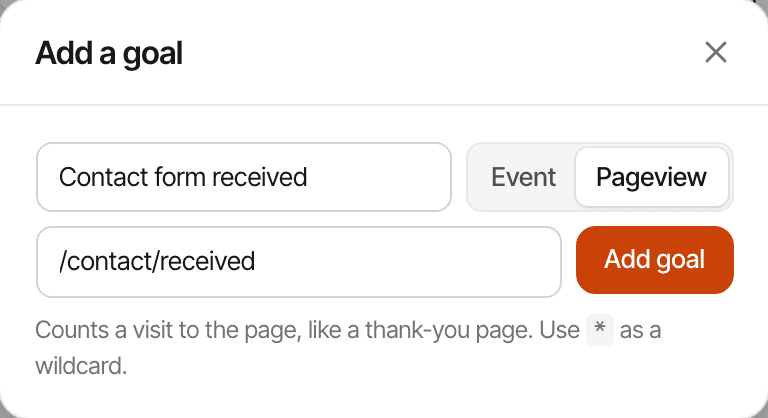
- The path matches exactly, or with
*as a wildcard that matches anything:/signup/*/success,/thanks*. - Visits are stored without their query string or trailing slash, so a visit to
/thank-you?plan=procounts as/thank-you. The goal's path is used as you type it: enter it without a query string or trailing slash, or it will never match. - Page goals count past visits too, so the numbers appear straight away.
Step 6: Track purchases and payments
A click on “Buy now” or a visit to the checkout page is not a purchase. Cards get declined, people abandon checkout, and some payments are refunded. The reliable record is the one your payment provider sends after it has taken the money.
SuprAnalytics doesn't process payments; it reads them from the provider you already use:
- Stripe, Polar, Lemon Squeezy, Paddle and Dodo Payments, through a signed webhook (set up in Settings → Revenue);
- anything else through the Payment API, called from your server once your system has confirmed the payment.
To credit a payment to the visits that led to it, the provider needs to know who the visitor was. With Stripe, pass the supr_visitor_id cookie as metadata on the Checkout Session (Polar checkout links, Dodo payment links and Paddle checkout buttons are tagged by the script itself):
// Node.js: pass the visitor's id to Stripe when you create the Checkout Session.
const session = await stripe.checkout.sessions.create({
  mode: "subscription", // or "payment"
  line_items: [{ price: "price_123", quantity: 1 }],
  success_url: "https://yourdomain.com/thanks",
  metadata: {
    supr_visitor_id: req.cookies.supr_visitor_id,
    supr_session_id: req.cookies.supr_session_id,
  },
  // Subscriptions: renewals' invoices read the subscription's metadata.
  subscription_data: {
    metadata: { supr_visitor_id: req.cookies.supr_visitor_id },
  },
});
res.redirect(303, session.url);- Matching: by the visitor id in the payment's metadata, then by your customer id, then by email. A payment that matches no visitor still counts in your revenue, without a source.
- Renewals are marked as renewals and credited to the customer's original visitor.
- Refunds: a full refund marks the payment refunded with every provider. Partial refunds differ: ignored for Stripe, lowering the amount for Polar, Paddle and Dodo Payments, and marking the whole payment refunded for Lemon Squeezy.
- Goals and payments are separate. A goal never carries revenue and never becomes a payment. To compare, each goal shows the revenue of visitors who completed it before paying.
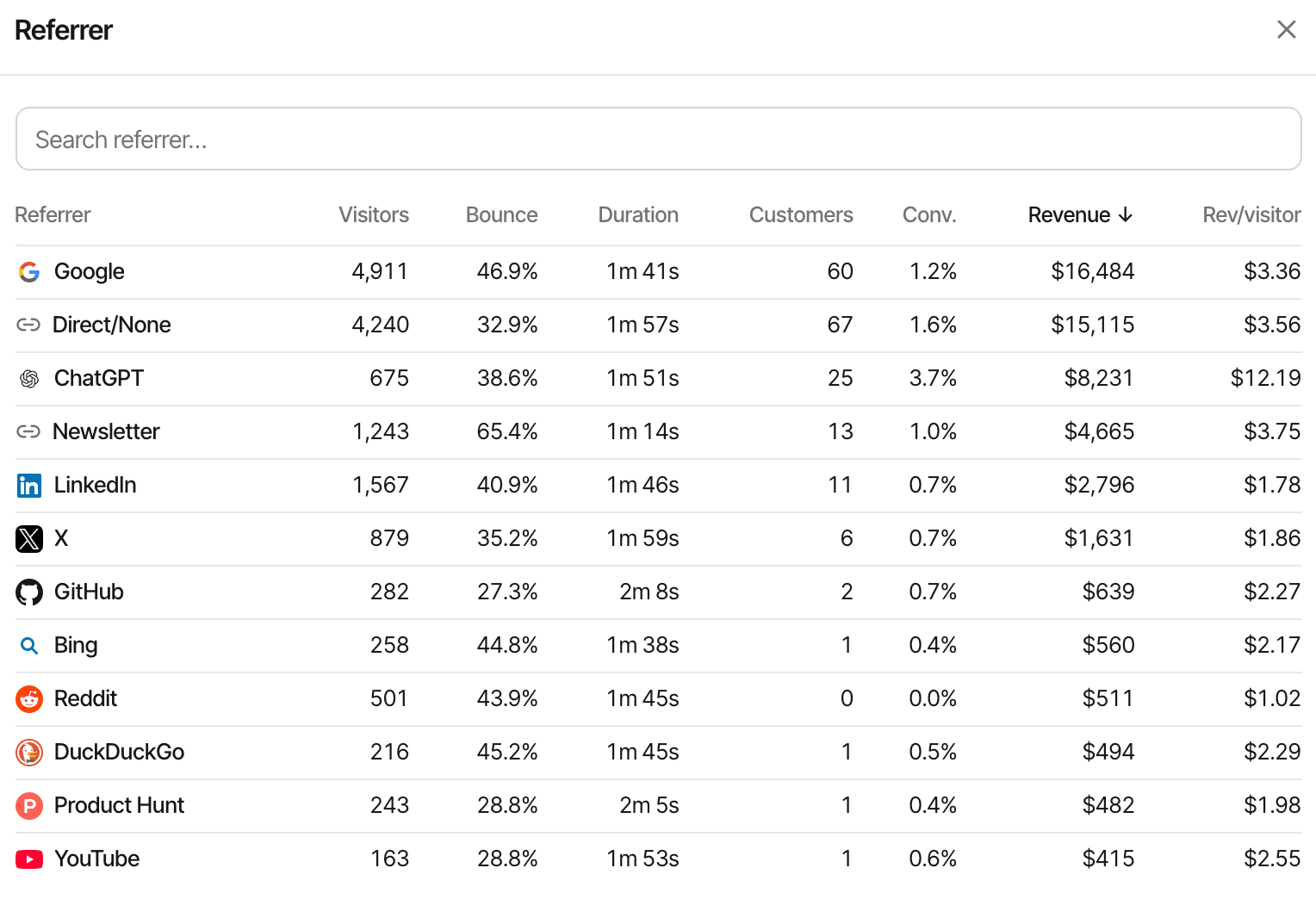
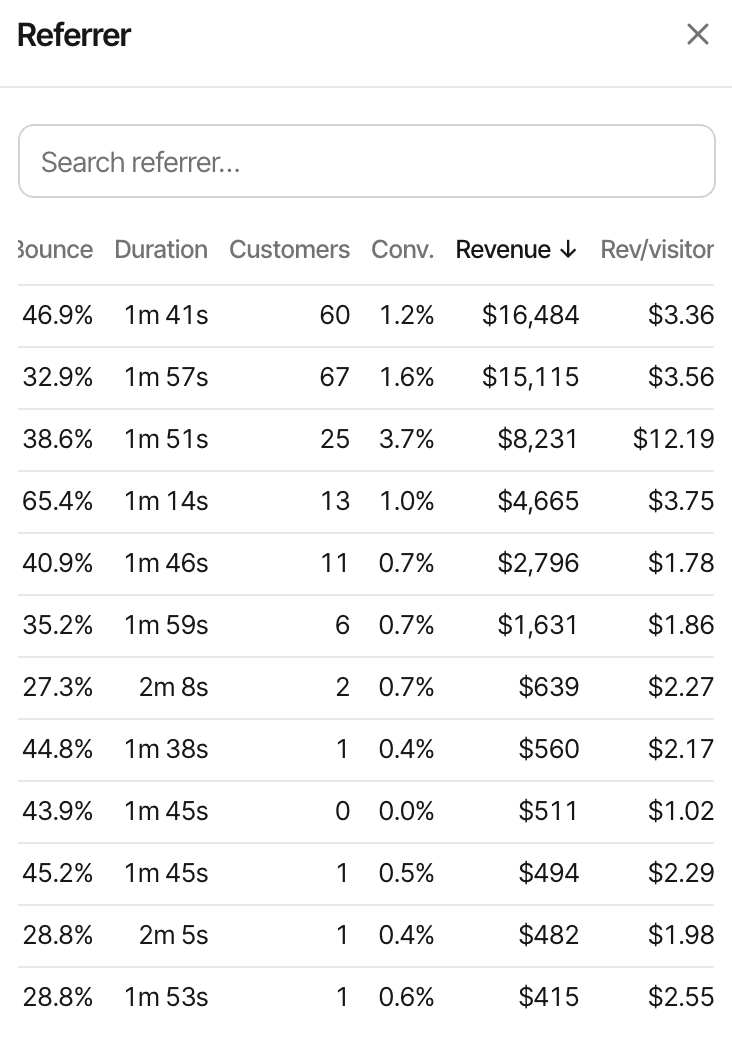
Step 7: Build a conversion funnel
A goal tells you how many people converted. A funnel tells you where the others stopped. Take a fictional SaaS:
Example funnel
- Landing page
- Pricing page
- Signup goal
- Payment
In SuprAnalytics, open the Goal panel's Funnel tab, click New funnel, and add 2 to 8 steps. Each step is one of:
- Page visit: the path equals, contains, starts with, ends with, doesn't equal or doesn't contain a value, or matches a wildcard; optionally on one hostname.
- Goal: the visitor completes a goal, or does NOT complete it (to ask “who saw pricing but didn't sign up?”).
- Payment: the visitor paid, refunds excluded.
How the numbers are worked out changes what they mean:
- Funnels count unique visitors, not visits or events.
- Steps happen in order, and can span several visits: each step counts the visitor's first match at or after the previous step.
- The first step has to happen in the dashboard's date range; later steps can happen up to the end of it. A visitor who saw pricing on the last day may simply not have paid yet. There's no separate conversion window to set.
- The dashboard's filters apply, so you can compare the same funnel for Google visitors and newsletter visitors.
- The headline conversion rate is the last step's visitors divided by the first step's.
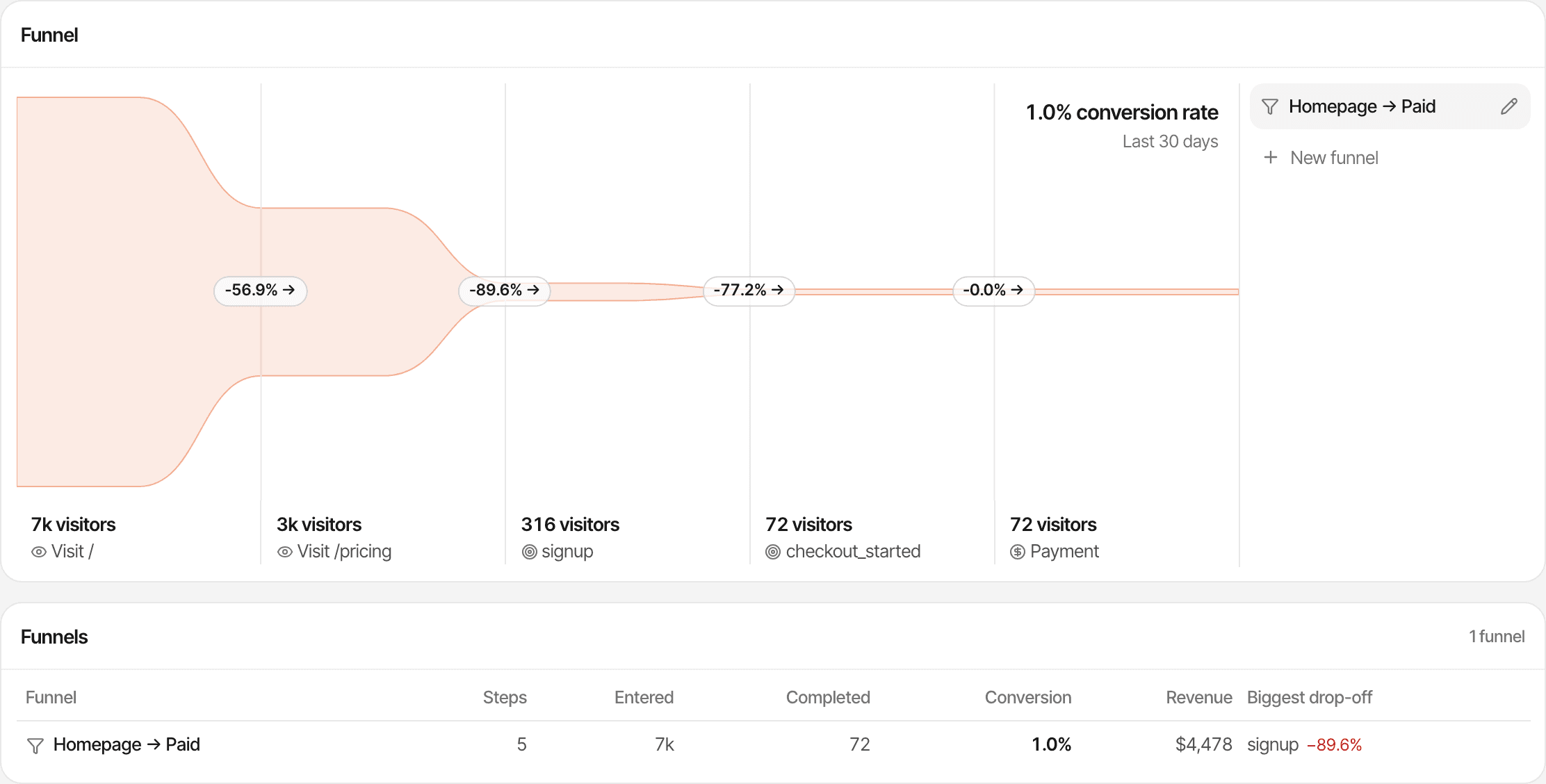
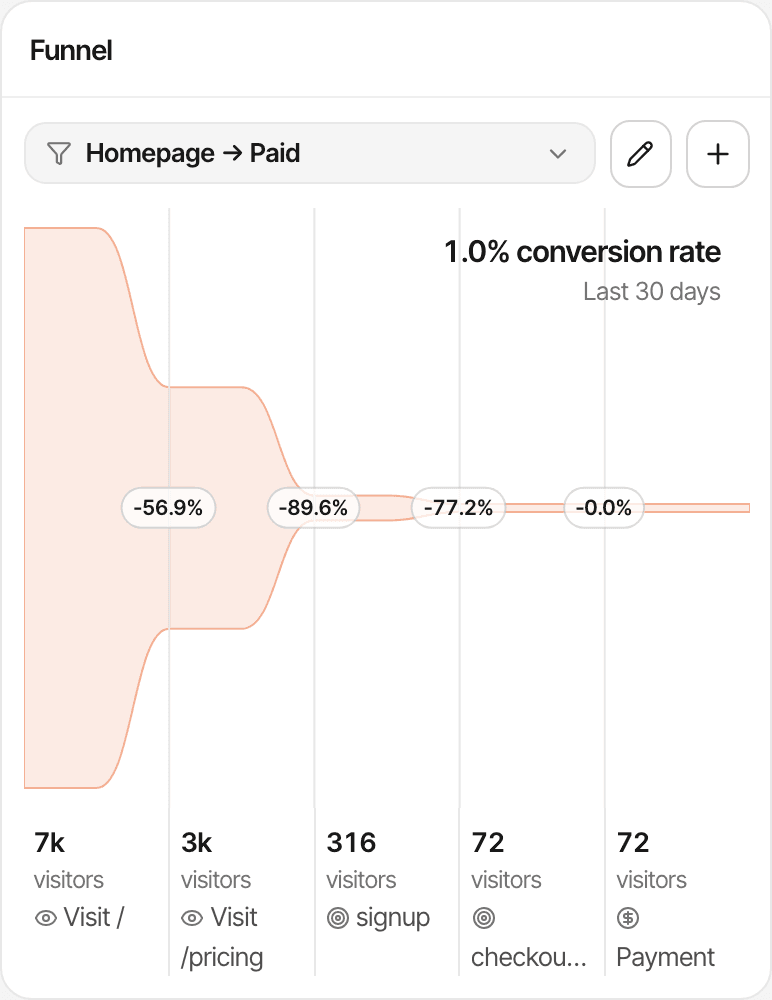
Funnels show where people drop off; they don't show why. Pair them with visitor journeys to read the pages individual visitors opened before stopping. More detail on the conversion funnels page.
How to calculate conversion rate
Conversion rate = conversions ÷ eligible visitors × 100
A fictional example: 1,000 visitors in a month, 40 of whom completed the signup goal. 40 ÷ 1,000 × 100 = 4% visitor conversion rate.
The answer depends on what you divide by, and products don't all divide by the same thing:
| Denominator | Same month, fictional numbers | Rate |
|---|---|---|
| Unique visitors | 40 converting visitors ÷ 1,000 visitors | 4.0% |
| Visits (sessions) | 40 ÷ 1,450 visits | 2.8% |
| Funnel entrants | 40 ÷ 320 visitors who reached pricing | 12.5% |
In SuprAnalytics:
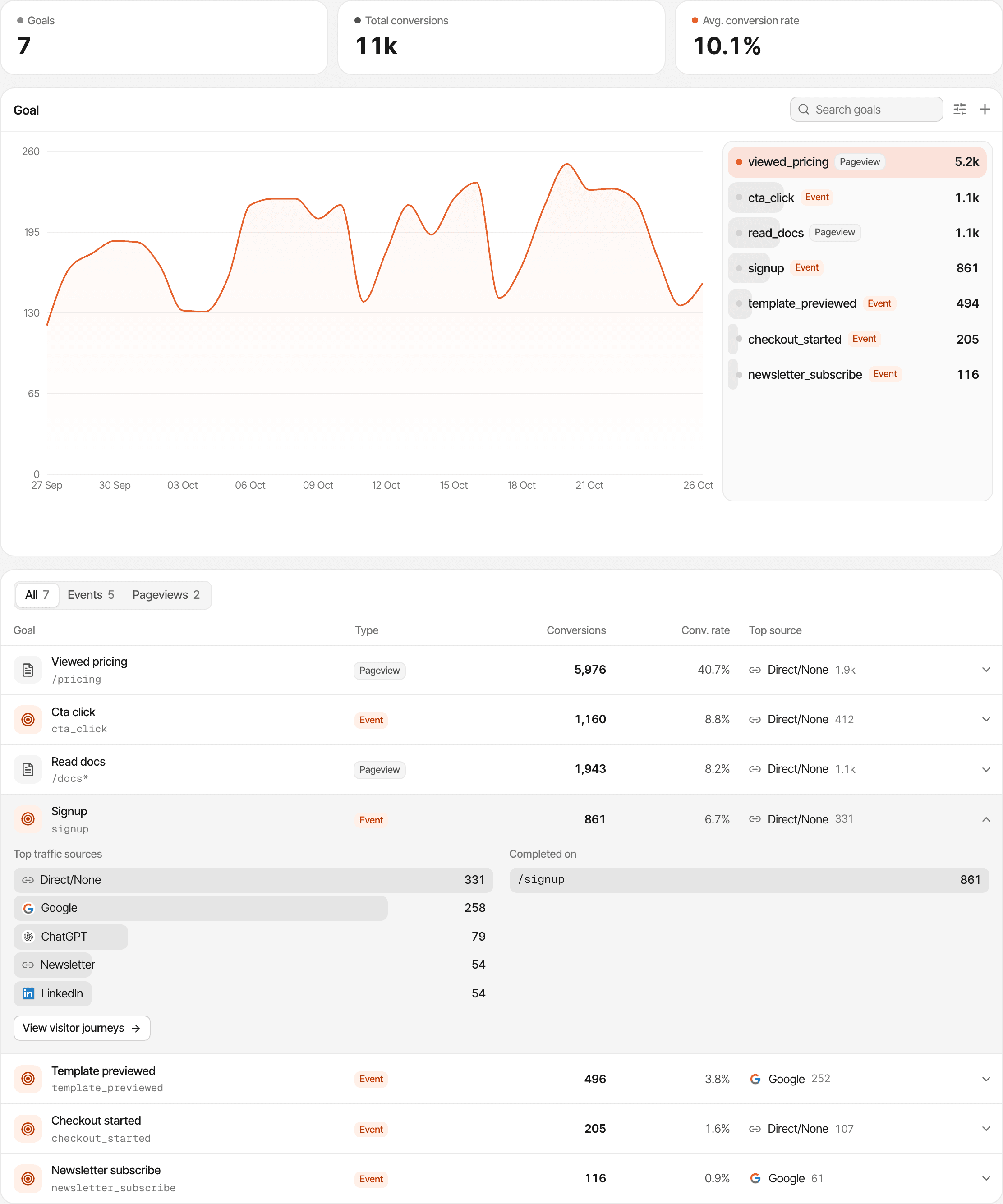
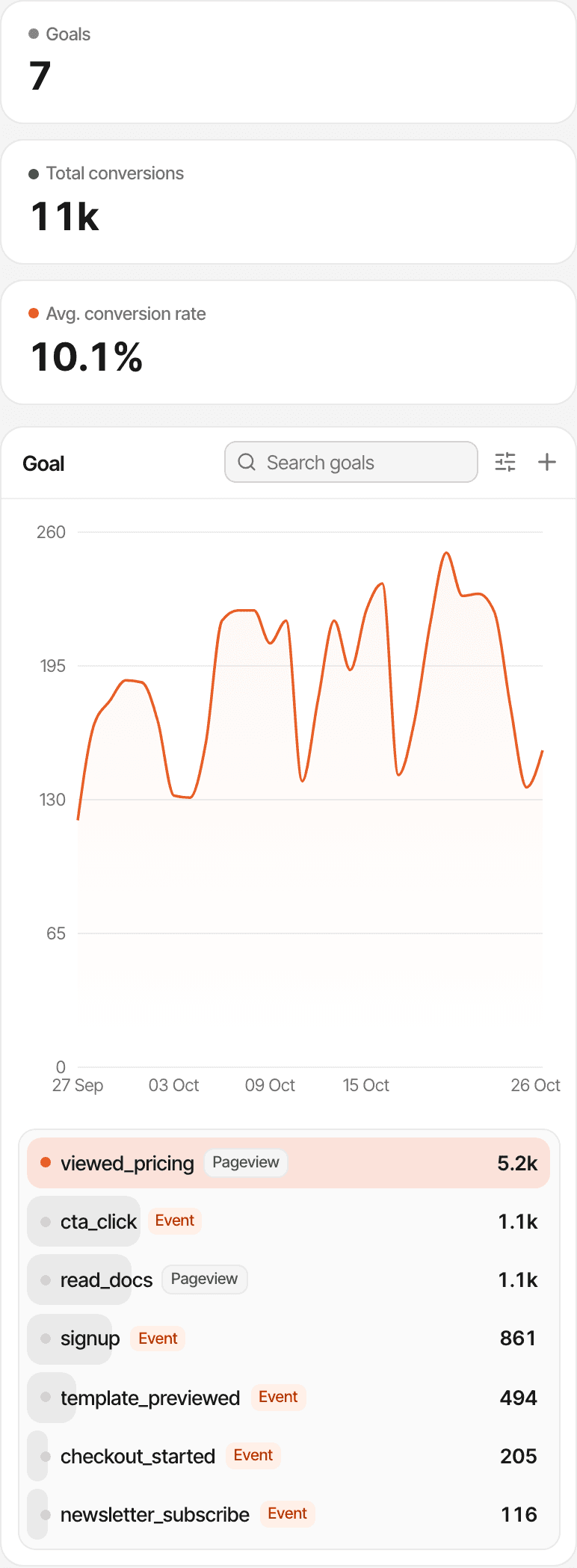
- A goal's conversion rate is the visitors who completed it ÷ all unique visitors in the period, under the same filters. Per visitor, not per visit.
- A goal shows two counts: conversions (every completion, so one visitor can add several) and visitors (each person once).
- The dashboard's own Conversion rate figure is something else: new paying customers ÷ visitors.
- A funnel's rate uses its first step as the denominator.
How to attribute conversions to traffic sources
Every visit gets a source when it starts:
- Referrer: the website that sent the visitor, grouped into channels such as Organic Search, Social, AI, Email, Referral and Paid.
- UTM parameters:
utm_source,utm_medium,utm_campaign,utm_content,utm_term(andref), read on the first page of a visit. A tag wins over the referrer. See UTM tracking. - Landing page: the entry page of the visit.
- Direct: no referrer and no tag. Many visits that aren't really direct end up here: links in apps and messages, bookmarks of a page first found elsewhere, browsers that hide the referrer.
Goals and payments are attributed differently, and it's worth knowing which you're looking at:
| Goals | Payments | |
|---|---|---|
| Credited to | The visit the goal was completed in | The visitor's first visit or the last one before paying, set per website |
| Where to see it | Each goal's top sources and pages; or filter any report by a source and read the Goal tab | Revenue on every source, campaign, page and country row |
| Can it be Direct? | Yes, if that visit was direct | Yes: last touch doesn't skip a direct return visit |
| Needs | The tracking script | A matched visitor (metadata, customer id or email) |
Attribution follows a browser, not a person. The script's cookie lasts a year; in cookieless mode a visitor is recognised for a day. Different devices are different visitors, and a payment that can't be matched has no source at all. See revenue attribution for first and last touch in detail.
How to verify conversion tracking
Never trust a goal you haven't watched arrive. Work through this list for each one:
Confirm the script loads
Network tab:
script.jsand a request to/api/event. Not onlocalhostwithoutsupr-allow-localhost, not in an automated browser.Create or confirm the goal
Event goals appear when the first event arrives; page goals are added with + → Pageview.
Trigger the action yourself
Submit the real form or create a test account, in a normal browser window.
See the event arrive
Click Online on the dashboard: the activity feed streams pageviews, goals and payments as they happen. In the Network tab, the request to
/api/eventshould answer 200 or 202, but excluded traffic gets a 202 too, so the dashboard is the real check.Check the right report
The goal shows in the Goal panel under the name you expect (lowercased, spaces as
_), with its properties.Test failures
Submit an invalid form, or block
/api/contactin the developer tools. No goal should arrive.Check for duplicates
Submit once, reload the success page, press back. Count what arrived: one completion, or several?
Check attribution separately
Open your site from a tagged link (
?utm_source=test) in a private window and convert: the goal's top sources should show it. For payments, make a test purchase in your provider's test mode and check it's attributed.
Your own visits count like anyone's. Once you're done testing, exclude your browser (open your site with #supr-ignore at the end of the address) or your IP under Settings → Exclusions, so tests don't inflate the numbers.
Common conversion tracking mistakes
- Counting clicks as completed signups
- Name click goals as clicks and track the created account separately.
- Tracking failed submissions
- Send the goal from the success branch only, after the server answers.
- Duplicate events
- The browser API doesn't de-duplicate: every call is a completion. Disable the button while submitting, and send each conversion from either the browser or the server, not both.
- Inconsistent goal names
- Names are lowercased and spaces become underscores, so “Signup” and “signup” are one goal, but “Sign up” (sign_up), “sign-up” and “signup” are three. Pick a convention and keep a list.
- A missing script
- A page without the script records nothing, including the goal you call on it. Check every template, including the success page.
- Misconfigured pageview goals
- A trailing slash, or a path that includes the query string, never matches. Use the stored form: /thank-you.
- Treating checkout visits as purchases
- Count payments from your provider; a checkout page view is intent.
- Ignoring visitor matching
- Without the visitor id in the checkout's metadata, or an email to fall back on, revenue has no source.
- Confusing events with converting visitors
- 1,200 conversions might be 800 people. Read the visitors count when you mean people.
- Assuming Direct means no prior source
- Many Direct visits came from an app, a message or a bookmark. With first touch, the original source may still be credited for revenue.
Related: goal tracking, custom goals docs, scroll goals, and how SuprAnalytics compares with Google Analytics.