
SuprAnalytics vs PostHog
Looking for a PostHog alternative?
Compare PostHog and SuprAnalytics for website analytics, payment attribution, visitor journeys, live chat, product analytics, and pricing.
PostHog is a broad product engineering platform. SuprAnalytics focuses on website traffic, payment-provider attribution, visitor journeys and live chat in one hosted workspace. Some teams use both.
14-day free trial · No card required · From $9/month
At a glance
Much of the website analytics is shared. PostHog adds a long list of product tools; SuprAnalytics adds payments from your provider, tied to each visitor's source.
| Capability | SuprAnalytics | PostHog |
|---|---|---|
| Website traffic analytics | IncludedPageviews, visitors, pages, countries, devices, realtime, from one script | IncludedA web analytics dashboard: visitors, views, sessions, bounce rate, paths, devices, locations |
| Referrer and acquisition reporting | IncludedChannels, referrers, campaigns, entry pages | IncludedReferrers, channel types, UTMs, entry paths |
| UTM tracking | Included | Included |
| AI referral traffic | IncludedAn AI search channel | IncludedAn AI channel type |
| Custom events | IncludedCustom goals and outbound link clicks | IncludedAutocapture, and events from web, mobile and server SDKs |
| Conversion goals | Included | IncludedConversion goals in web analytics |
| Funnels | IncludedA funnel step can be a payment | IncludedCorrelation analysis on the paid plan |
| Visitor journeys | IncludedEach visitor's visits, pages, goals, payments and chats | IncludedUser paths, person profiles and session replays |
| User profiles | LimitedOne per browser; a name and email when identified | IncludedPerson profiles; identify links a user's devices |
| Cohorts and retention | Not availableNew and returning visitors only | IncludedRetention, stickiness, lifecycle; advanced cohort criteria on the paid plan |
| Revenue events | IncludedPayments from your provider, or the payments API | IncludedEvents with revenue and currency properties |
| Payment-provider integrations | IncludedStripe, Polar, Lemon Squeezy, Paddle and Dodo Payments webhooks, tied to visitors | Needs setupWarehouse sources for all five; revenue analytics reads Stripe, in beta |
| Subscription renewals | IncludedCredited to the customer's original visit | Needs setupMRR and subscription metrics from Stripe data |
| Refund handling | IncludedFrom the provider; partial refunds vary by provider | Needs setupRefunds netted in revenue from Stripe data |
| Built-in visitor live chat | IncludedWidget and inbox, with the visit beside each chat | Separate productSupport: a chat widget and inbox; its core is free |
| Session recordings | IncludedOff by default; 1,000 to 50,000 recorded sessions a month, by plan | Separate product5,000 web recordings a month free |
| Heatmaps | IncludedClicks, rage clicks and scroll depth; off by default | Depends on planUp to 3 pages on the free plan |
| Feature flags | Not available | Separate product1 million requests a month free |
| Experiments | Not available | Separate productBilled as feature flag requests |
| Surveys | Not available | Separate product1,500 responses a month free |
| Warehouse and API capabilities | LimitedNo warehouse or SQL; its API accepts data, stats come through MCP | IncludedSQL, a data warehouse, data pipelines, APIs and an MCP server |
| Pricing model | One monthly plan by events, from $9; everything included; no free plan | A free tier on every product; past it, each product priced by its own usage |
Last verified: , from PostHog's website, docs and code. PostHog's cells describe PostHog Cloud on its free and pay-as-you-go plans unless they say otherwise. “Separate product” has its own free allowance and its own price past it; “Needs setup” is something you connect or build; “Not listed” means its pages don't describe it. Product details change: see posthog.com and PostHog's pricing.
A product engineering platform, or a focused website workspace?
PostHog brings many tools together for teams building a product, website analytics among them. SuprAnalytics does fewer things, built around your website: where visitors come from, what they pay, and talking to them.
PostHog
A product engineering platform, with web analytics among its tools.
- Product and web analytics, session replay, heatmaps, feature flags, experiments, surveys and error tracking
- SQL, a data warehouse and data pipelines, with SDKs for web, mobile and servers
- A Support inbox with a chat widget, email, Slack and more
- A free tier on every product, then each priced by its own usage
SuprAnalytics
A focused, hosted workspace for your website.
- Website traffic, sources, journeys and funnels, from one script
- Payments from your payment provider, with renewals and refunds, tied to the visitor and the source
- A live chat with visitors, beside their visit
- One monthly plan by events, with everything included
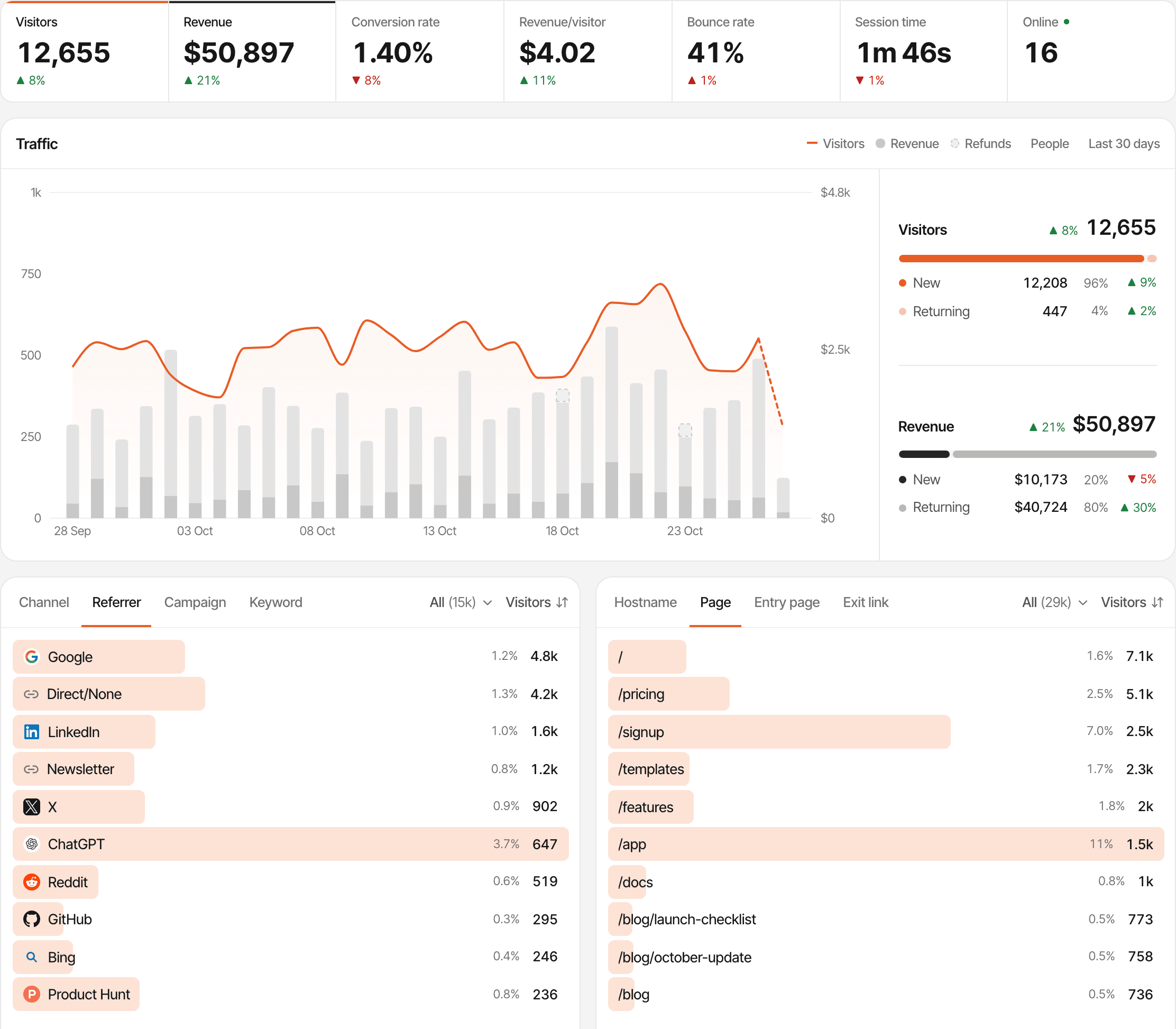
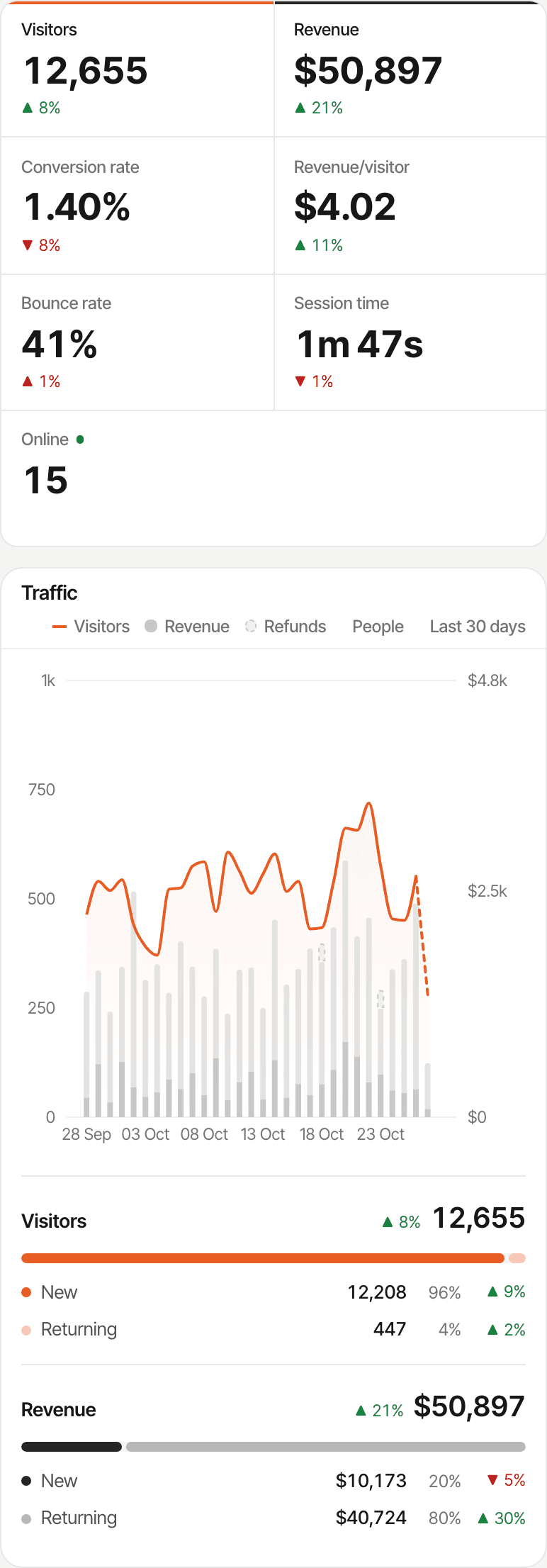
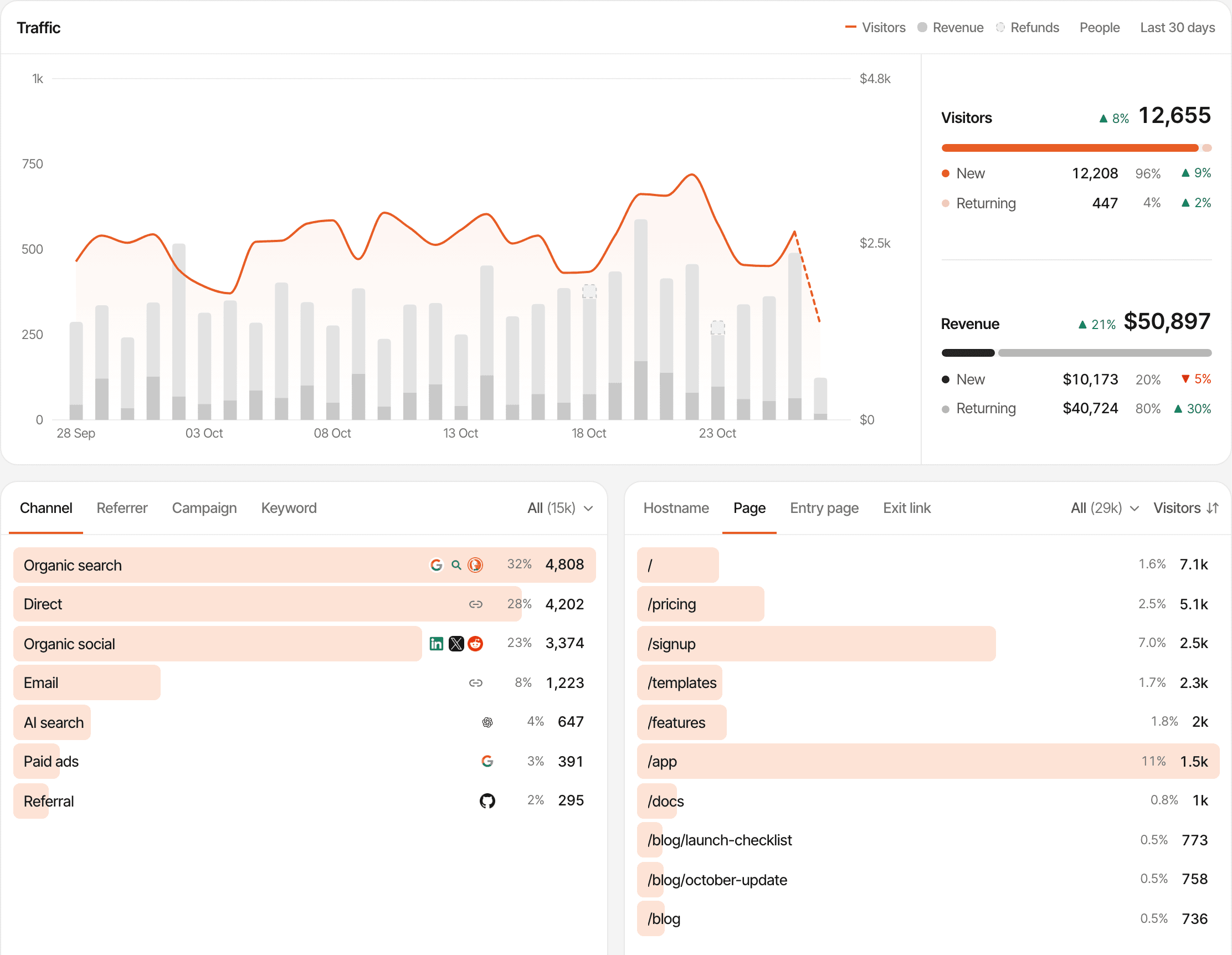
Understand how people find your website.
Add one script and every visit is counted with its source, its entry page and what it led to.
- Channels: organic search, direct, social, email, paid, referral and AI search
- Referrers, and campaigns and keywords from UTM tags
- Entry pages, the pages read, and the links clicked out
- New and returning visitors, with the revenue each day brought
The AI search channel counts a visit from a known assistant, such as ChatGPT, Perplexity, Claude, Gemini or Copilot, when its referrer or a utm_source or ref tag names one. An assistant that sends neither shows up as Direct. About AI traffic
PostHog has a web analytics dashboard too: visitors, views, sessions and bounce rate, referrers, channel types (an AI one among them), UTMs, entry paths, devices and locations, with conversion goals. It's billed as product analytics events.
See which traffic sources bring paying customers.
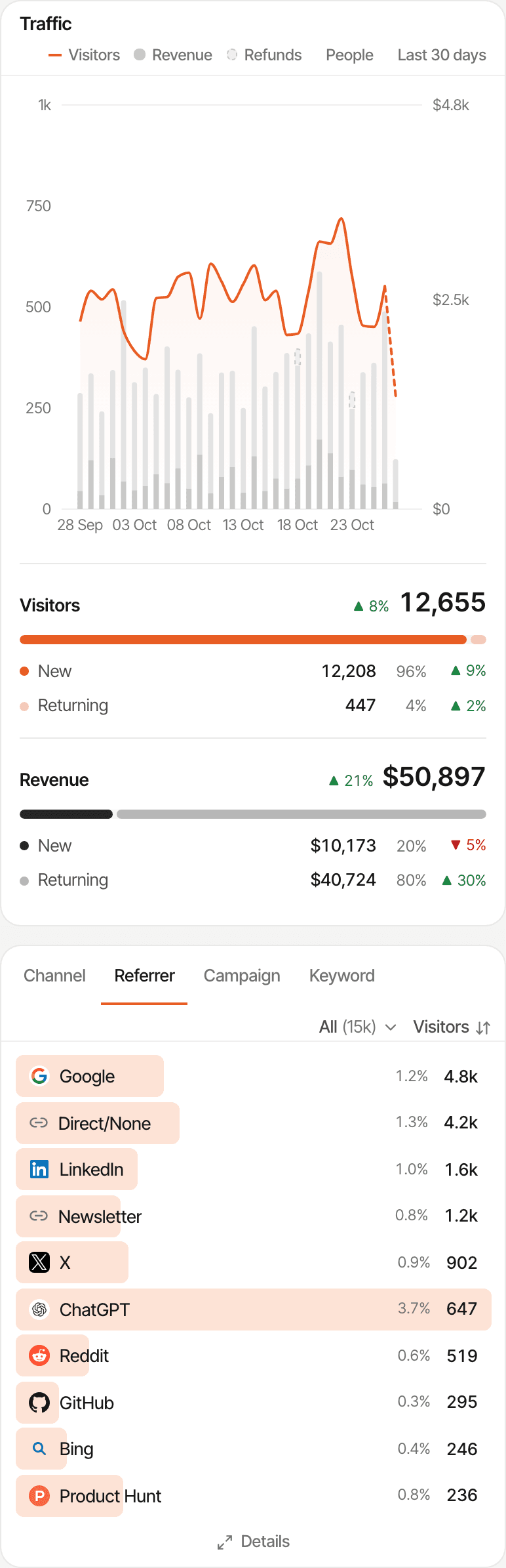
Each payment your provider reports is tied to the visitor who made it, so every source shows the customers and revenue it brought.
- Step 1
A visitor arrives
The visit is recorded with its channel, referrer or campaign
- Step 2
They reach a supported checkout
Which carries their visitor id
- Step 3
The payment is received
From your payment provider's webhook
- Step 4
It's matched when possible
By visitor id, a customer id it has seen, or an email
- Step 5
Revenue is attributed
To the source, by first or last touch
- Step 6
Revenue by source
Customers and revenue for each channel, referrer, campaign and page
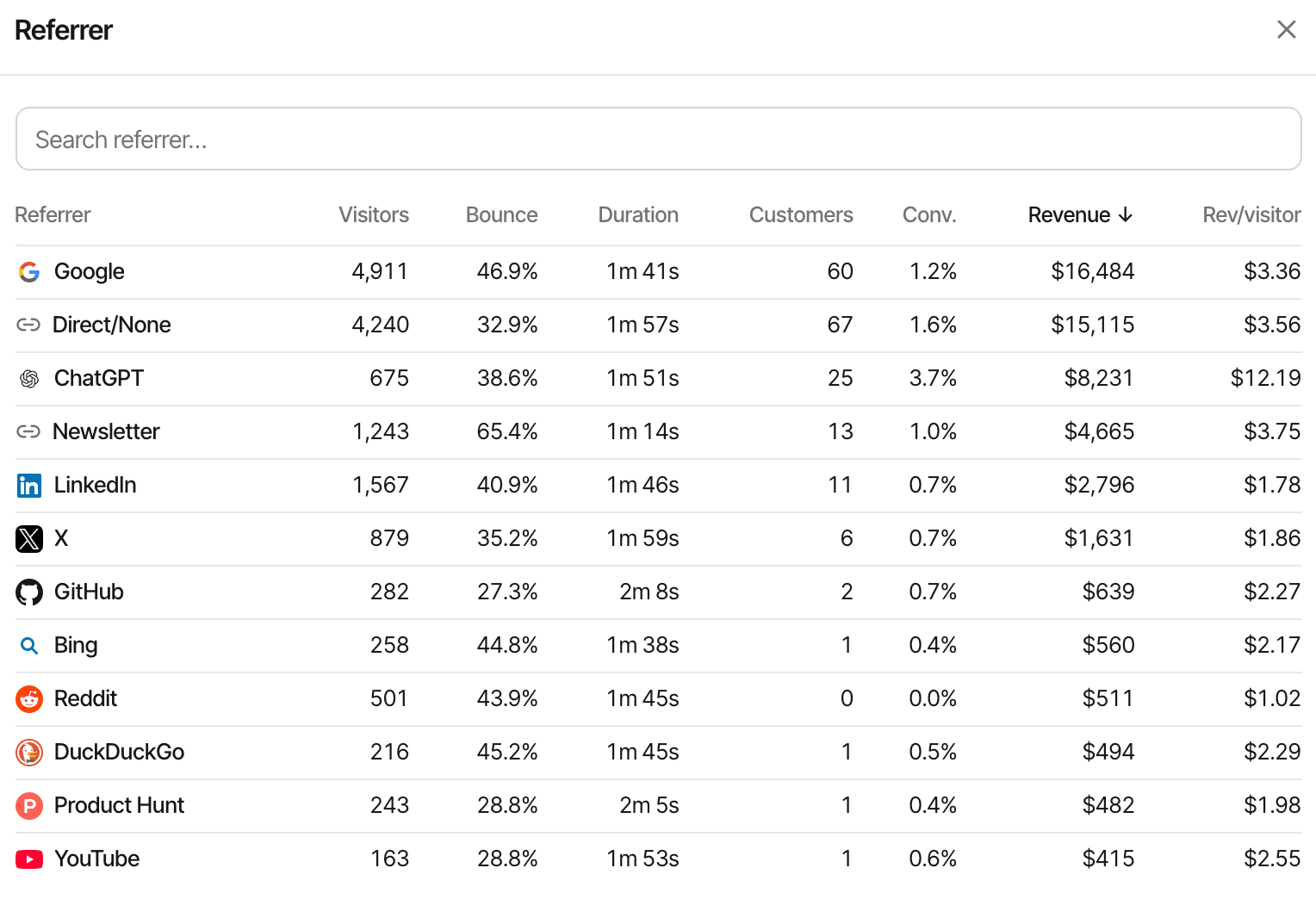
One website's referrers, sorted by the revenue each brought.
First touch
Credits the visit that first brought the customer. Good for “what finds new customers?”
Last touch, the default
Credits the visit the payment happened in. When a customer comes back directly to pay, Direct gets the credit.
Unmatched payments
A payment that can't be matched to a visitor still counts in your revenue, without a source.
Each website picks first or last touch and one reporting currency; payments in other currencies are converted with daily exchange rates. It's attribution, not subscription finance: no MRR, ARR, churn or lifetime value. How revenue attribution works
How PostHog does it
PostHog takes revenue two ways. Revenue events carry an amount and a currency your code sends. And its data warehouse syncs payment data from Stripe, Polar, Lemon Squeezy, Paddle and Dodo Payments, to query with SQL alongside your events. Its revenue analytics, in beta, reads Stripe and reports MRR, ARR, churn and lifetime value; a Stripe customer is linked to a person by a metadata field you add. Its docs don't list a report of revenue by traffic source.
Payment provider integrations
You connect each provider's webhook once. What else it takes depends on the provider.
- StripePass the visitor id in your Checkout Session or Payment Link
- PolarCheckout links are tagged by the script
- Lemon SqueezyPass the visitor id as checkout custom data
- PaddlePaddle.js checkout buttons are tagged by the script
- Dodo PaymentsPayment links are tagged by the script
Anything else can send payments through the payments API. Checkouts the script can't see, such as one opened from your own server, need the visitor id passed in your code.
- Renewals are credited to the customer's original visit
- A full refund marks a payment refunded with every provider
- Partial refunds lower a payment with Polar, Paddle (once approved) and Dodo Payments; Stripe's are ignored, with Lemon Squeezy the whole payment is marked refunded, and the payments API refunds a whole payment
What it doesn't do: join visitors across devices on its own, skip direct visits to find an earlier source, import past payments, or report MRR, ARR, churn or lifetime value.
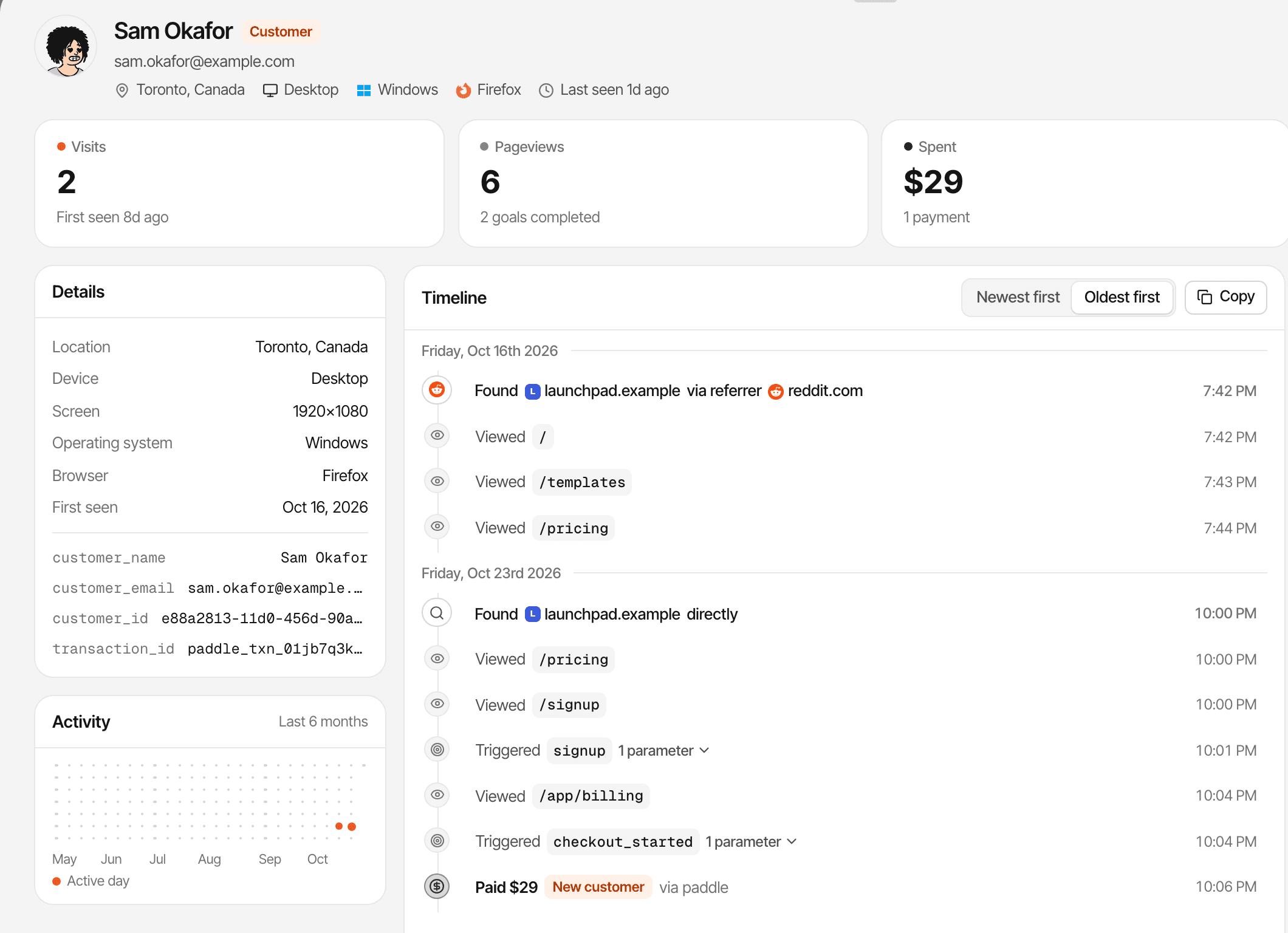
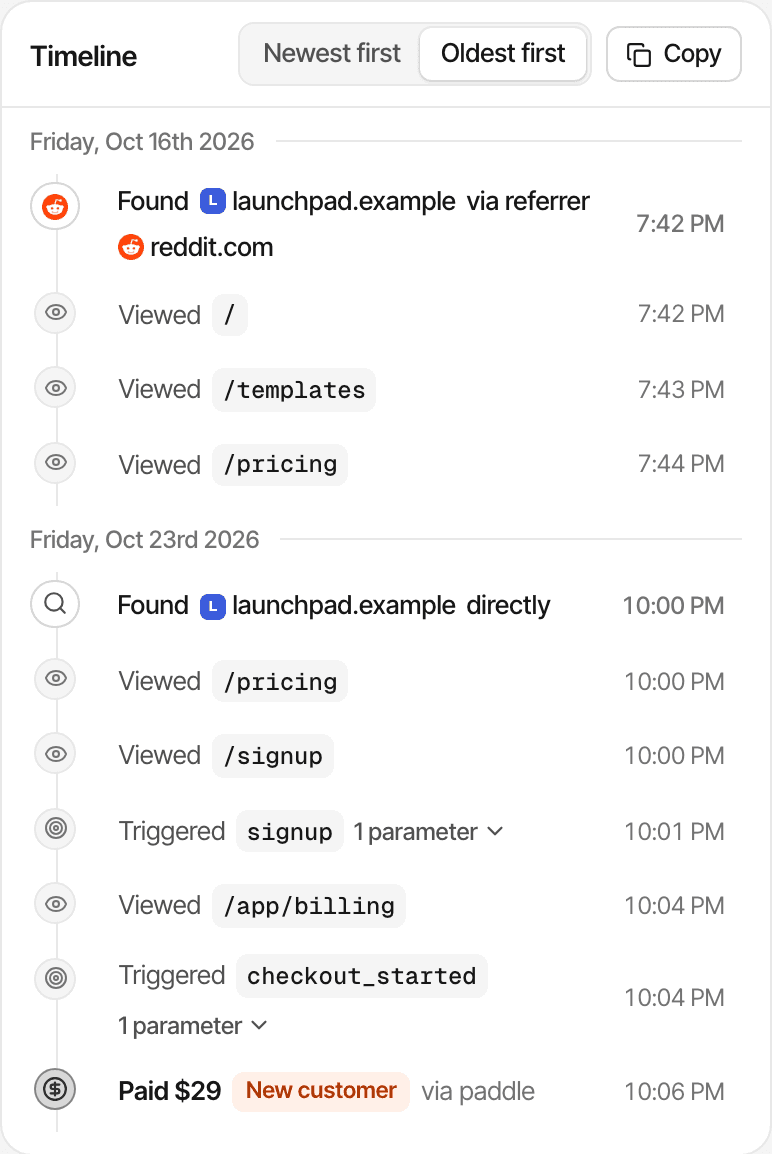
Reddit first, a direct visit to pay through a Paddle button: first touch credits Reddit, last touch credits Direct.
Follow the journey from visit to conversion.
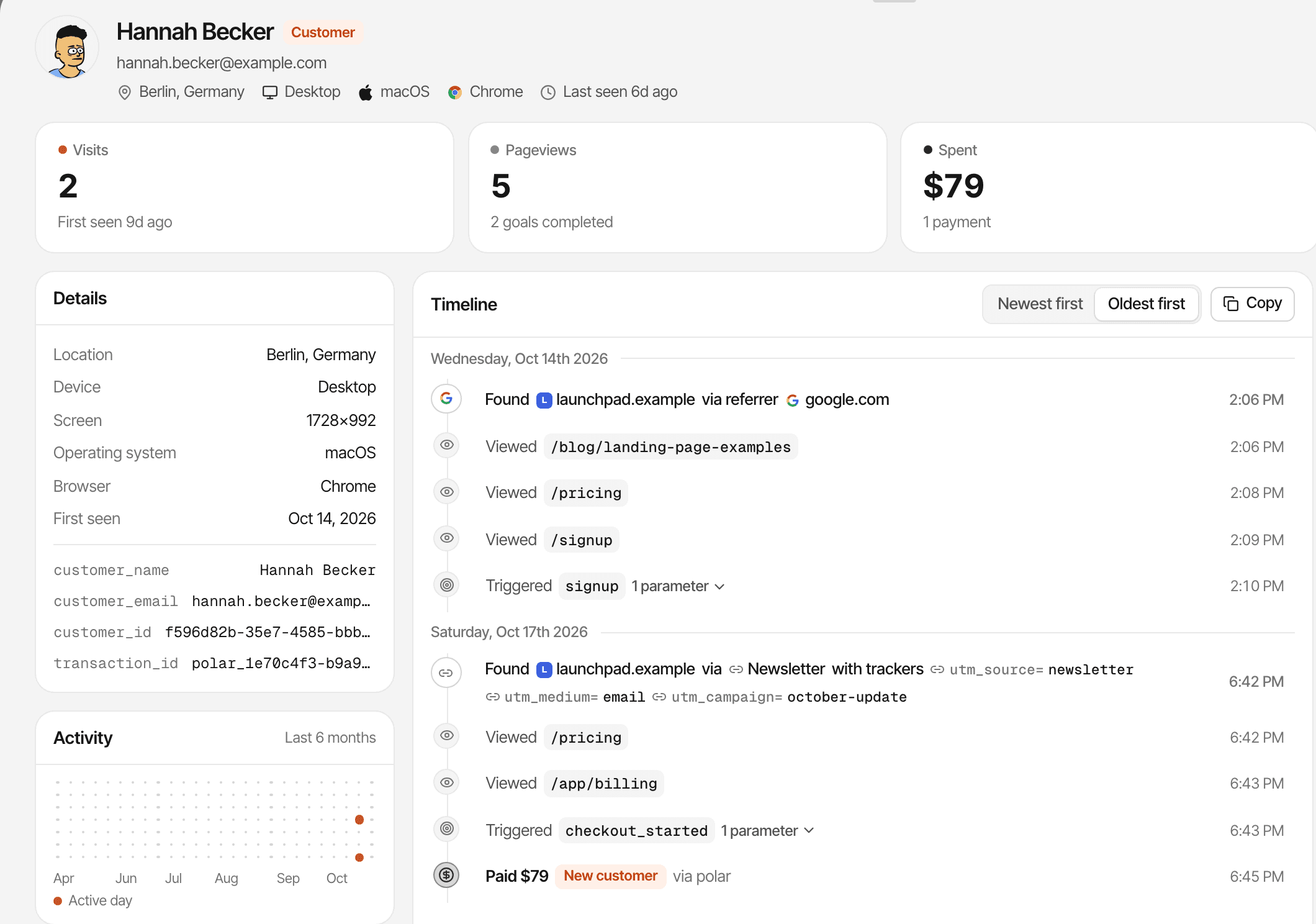
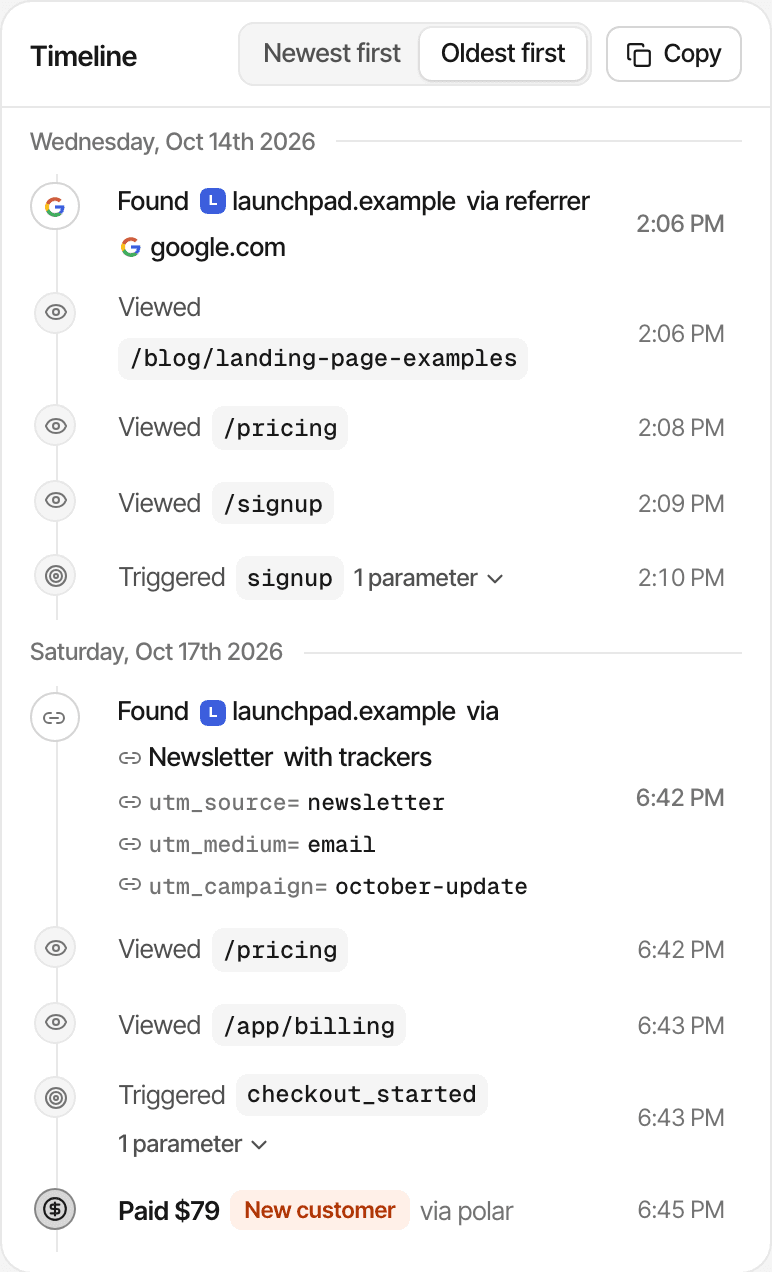
A journey shows one visitor's path on your website. A funnel shows how everyone moved through the steps you care about, up to the payment.
- The entry source of each visit, with its referrer or UTM tags
- Every page visited, and the goals completed
- Recorded payments, in the same timeline
- The conversation, if they chatted with you
- A name and email only if they give them in chat or your app identifies them
A journey follows one browser: a phone and a laptop are two visitors, and naming them with identify doesn't merge their journeys. In cookieless mode a visitor is recognised for a day. About visitor journeys
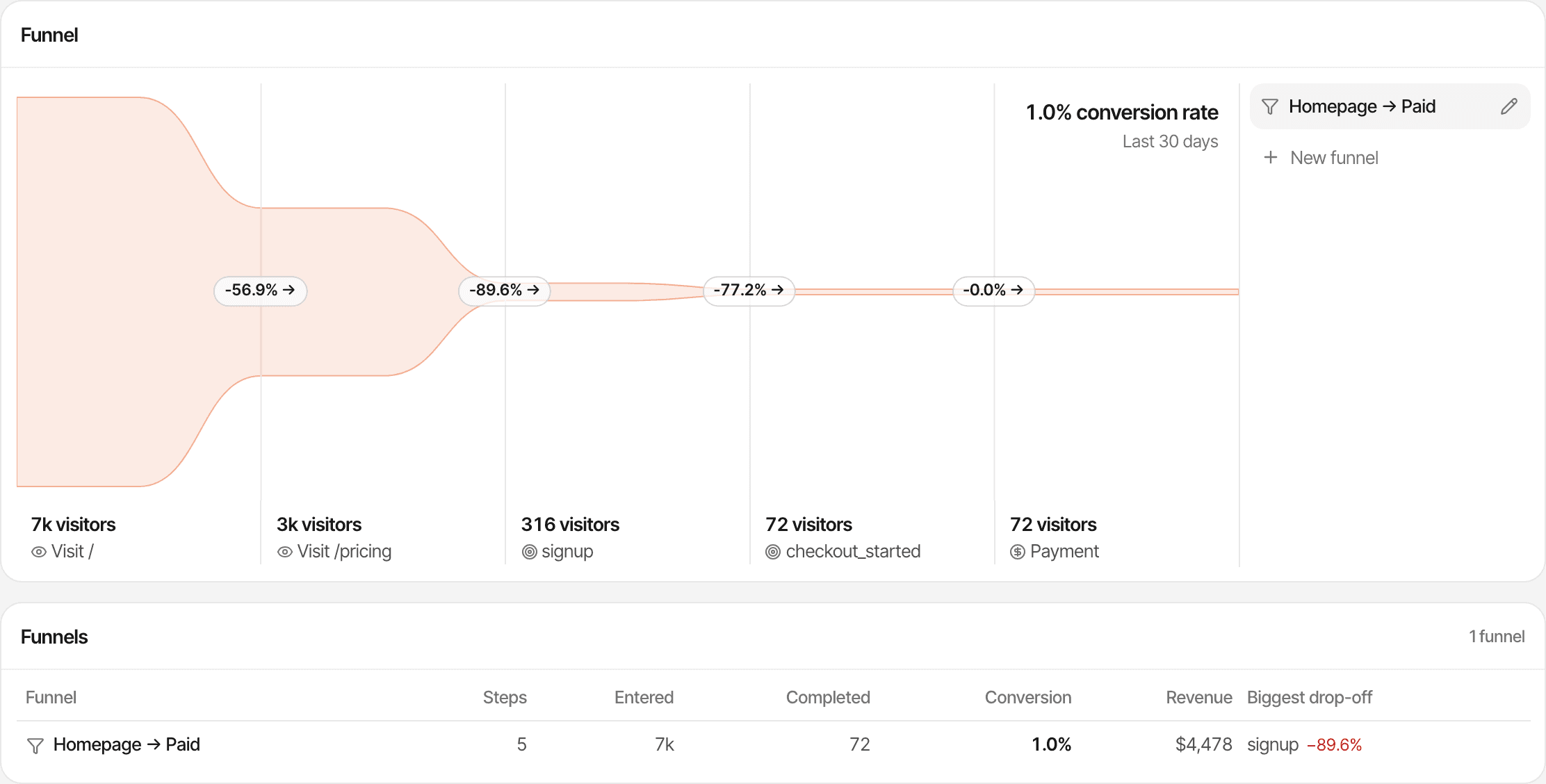
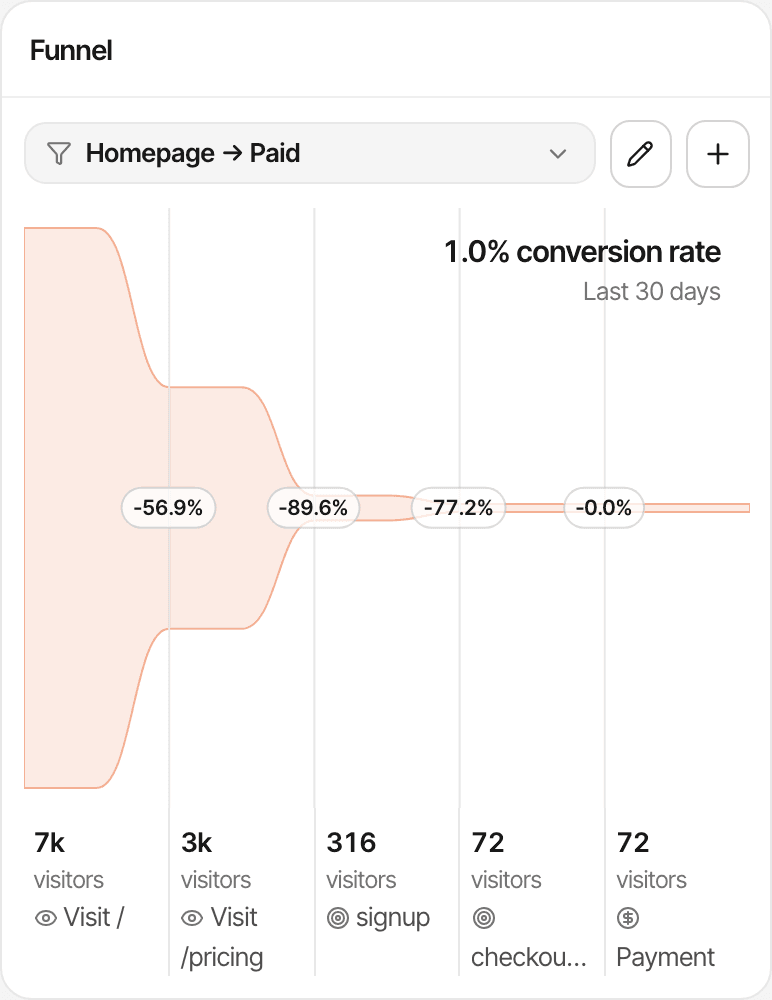
A funnel's last step can be a payment. How funnels work
PostHog goes further into behaviour: funnels with correlation analysis, user paths, retention, stickiness and lifecycle reports, cohorts, and person profiles that identify links across devices. SuprAnalytics' funnels and journeys stay on your website.
Turn visitor insights into conversations.
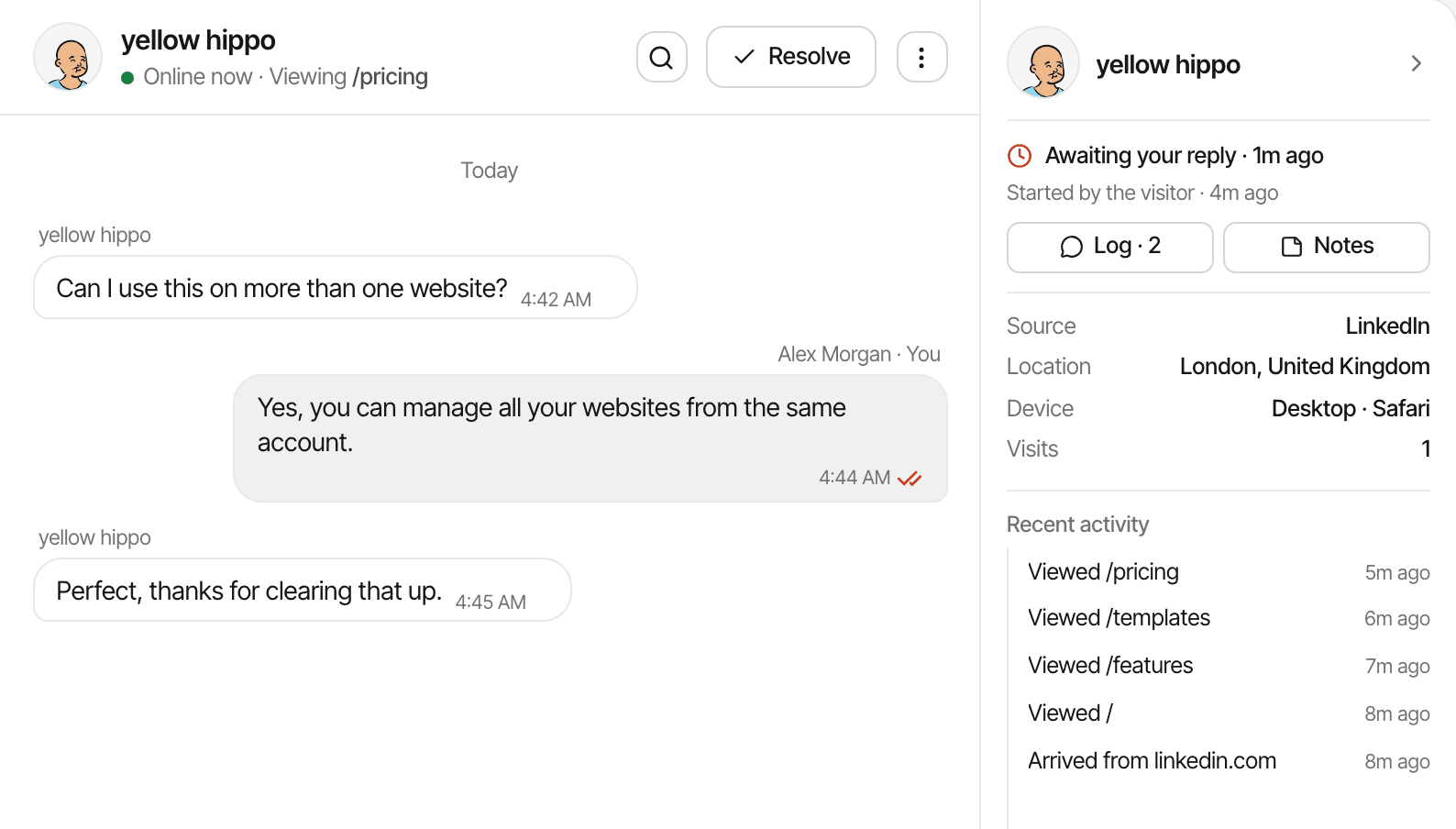
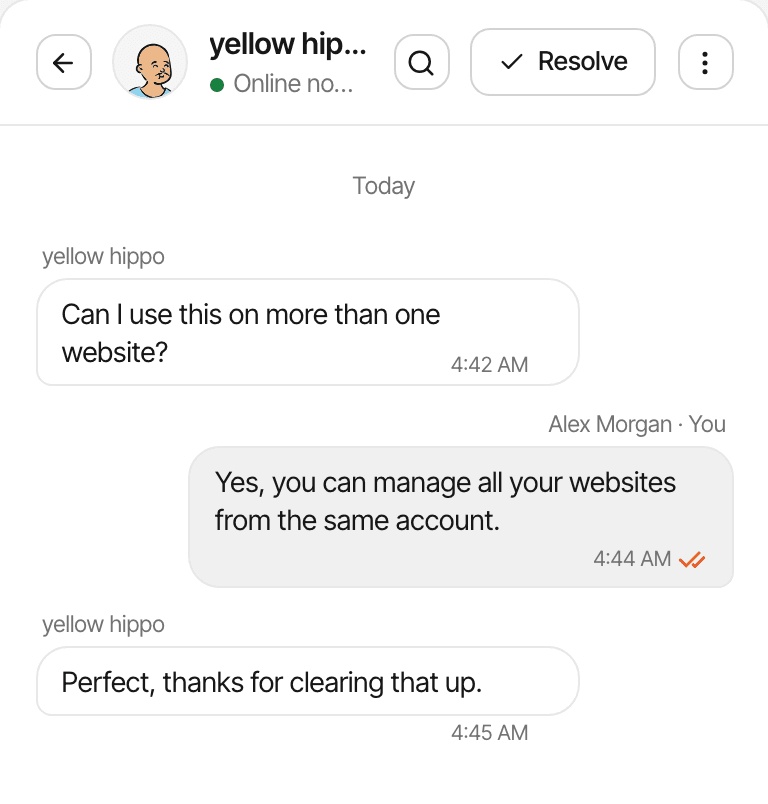
Visitors can message you from a chat bubble that comes with the analytics script, and each conversation opens beside the visit it belongs to.
- A chat widget and one inbox for every website, on every plan
- The visitor's source, the pages they read, their device and location beside each conversation
- The conversation on the visitor's profile, next to their journey and payments
- Messages sent automatically when a visitor opens a page you choose
Visitors stay anonymous unless they type a name or email, or your app identifies them; you still see their visit. More about live chat
PostHog has a chat too. Its Support product puts a chat widget on your website and gathers conversations from it, email, Slack, Microsoft Teams and GitHub into one inbox, with the sender's session replay, events and errors attached; its core is free. Surveys are a separate product, for questions you ask.
Where PostHog is stronger
PostHog is a broad, actively built platform. If one of these is what you need, it's probably the better fit.
Product analytics
Autocapture, events from web, mobile and server SDKs, funnels with correlation analysis, user paths, and person profiles that identify links across devices. SuprAnalytics records pageviews, goals and outbound clicks on websites.
Cohorts and retention
Retention, stickiness and lifecycle reports on the free plan, and cohorts, with advanced criteria on the paid plan. SuprAnalytics shows new and returning visitors, and no cohorts.
Replay and heatmaps
Session replay for web and mobile, 5,000 web recordings a month free, and heatmaps. SuprAnalytics' session recordings and heatmaps cover websites only, with a monthly quota by plan and 60 days of history.
Flags, experiments and surveys
Feature flags and experiments, 1 million flag requests a month free, and surveys, 1,500 responses free. SuprAnalytics has none of these.
Error tracking and more
Error tracking (100,000 exceptions a month free), web vitals, logs and AI observability, in the same place as your analytics.
SQL, a warehouse and pipelines
SQL over your events, a data warehouse with sources such as Stripe, Postgres and HubSpot, and pipelines to send data on. SuprAnalytics has no warehouse or SQL, and its API only accepts data.
A support inbox with more channels
Its Support inbox takes conversations from the website widget, email, Slack, Microsoft Teams and GitHub, with the sender's replay and errors attached. SuprAnalytics' chat is the website widget and its inbox.
A generous free tier and open code
A free plan with no card and a free tier on every product, unlimited team members, US or EU hosting, a cookieless mode, and MIT-licensed core code. Self-hosting it is officially unsupported, and paid features are Cloud-only.
Both store an id in the browser by default and offer a cookieless mode. Neither makes analytics compliant by itself: what you collect and how you configure it still matter.
Which should you choose?
Three honest paths. They aren't mutually exclusive.
Choose SuprAnalytics when
- Your main needs are website acquisition: where visitors come from and which pages convert.
- You want payments from Stripe, Polar, Lemon Squeezy, Paddle or Dodo Payments attributed to sources, with renewals and refunds, without writing SQL.
- You want to chat with visitors, with their source, journey and payments beside the conversation.
- You want one plan with everything included, across all your websites.
Choose PostHog when
- You're building a product and want analytics, replay, flags, experiments and surveys together.
- You need retention, cohorts, user paths or SQL over your data.
- You want error tracking and a warehouse next to your analytics.
- Your usage fits its free tiers, or you want to pay per product.
Use both when
- You want SuprAnalytics for website acquisition, payments and conversations, and PostHog for deeper product analytics.
- Expect some duplicate tracking: two scripts, two sets of numbers that won't match exactly.
- Decide which tool owns which question, and which chat widget your visitors see, so you don't run two.
How does the pricing compare?
Different models. SuprAnalytics is one plan by events, with everything in it. PostHog gives every product its own free allowance, then bills each product by its own unit: events, recordings, requests, responses.
SuprAnalytics
- 6 monthly plans, from $9 for 100,000 events to $149 for 5 million
- Every feature, live chat and payment attribution included, and unlimited websites on every plan
- Counts pageviews, custom goals and outbound link clicks; never chat messages or payments
- 2 years to 5 years of data history, by plan
- Past the allowance, recording continues to 20% over, then pauses; no overage charges
- 14-day free trial, no card. No free plan. Monthly billing only
PostHog free plan
- No card, and not a trial
- Each month: 1 million events (web and product analytics), 5,000 recordings, 1 million flag requests, 1,500 survey responses, 100,000 exceptions, 1 million warehouse rows
- Unlimited team members; 1 project; 1 year of data
- Usage stops at the free limits; events past them are dropped
PostHog pay-as-you-go
- The same free allowances every month, then each product billed by usage; card required
- Events past 1 million from $0.00005 each, lower at volume; events with person profiles cost more
- Recordings, flag requests, survey responses and exceptions each priced on their own
- A billing limit per product; 6 projects; 7 years of data
- Packages for SSO enforcement, access control and more, from $250 a month
Pricing checked: . PostHog's prices are in US dollars, excluding taxes. For a website with 1 million events a month, PostHog's free tier may cost nothing, where SuprAnalytics is $49. At 2 million anonymous events and nothing else, PostHog is about $50 (the first million free, the next at $0.00005 each); SuprAnalytics' 2 million plan is $79. The units differ: PostHog counts autocaptured and custom events as well as pageviews, and identified events cost more; SuprAnalytics counts pageviews, goals and outbound clicks. For many websites PostHog may be cheaper; add replay, flags or other products and each adds its own line.
Questions, answered.
What is the difference between PostHog and SuprAnalytics?
Is SuprAnalytics a PostHog alternative?
Does PostHog include web analytics?
Is PostHog free?
Does PostHog support revenue tracking?
Does SuprAnalytics integrate with Stripe?
Does SuprAnalytics include session recordings and heatmaps?
Does SuprAnalytics support funnels and visitor journeys?
Does SuprAnalytics include live chat?
Can I use PostHog and SuprAnalytics together?
PostHog sources, read on : Homepage · Pricing · Web analytics · Channel types · Identify · Revenue analytics · Payment platforms · Warehouse sources · Support · Heatmaps · Cookieless mode · Self-hosting · GitHub
More comparisons
- vs Google AnalyticsFree, deep acquisition reports and Google Ads, or payments tied to each visit and a live chat.Open
- vs PlausibleSimple cookieless stats, or revenue attribution and visitor chat on top.Open
- vs FathomPrivacy-first website stats, or traffic tied to payments and conversations.Open
- vs RybbitOpen-source, cookieless analytics, or payments by source and live chat.Open
- vs DataFastTwo revenue-first tools: live chat and unlimited websites set them apart.Open
- vs SelineLightweight analytics, or revenue from five payment providers and chat.Open
- vs Simple AnalyticsPrivacy-first simplicity, or payments credited to each traffic source.Open
- vs UmamiOpen-source, self-hostable stats, or hosted revenue attribution and chat.Open
- vs MatomoA full GA alternative you can host, or a focused revenue and chat workspace.Open
- vs MixpanelEvent-based product analytics, or website traffic tied to payments.Open
- When not to use SuprAnalyticsThe cases where another tool fits better, and which one.Open
Understand traffic. Connect payments. Talk to visitors.
Bring website analytics, revenue attribution, and visitor conversations together in one workspace.
14-day free trial · No card requiredvs Plausiblevs Rybbit