
SuprAnalytics vs Umami
Looking for an Umami alternative?
Compare Umami and SuprAnalytics for website analytics, revenue attribution, visitor journeys, live chat, privacy, hosting, and pricing.
Umami gives developers control: open-source, self-hostable analytics without cookies, with a cloud option too. SuprAnalytics is hosted, and connects your analytics to payments from your provider and to live chat with your visitors.
14-day free trial · No card required · From $9/month
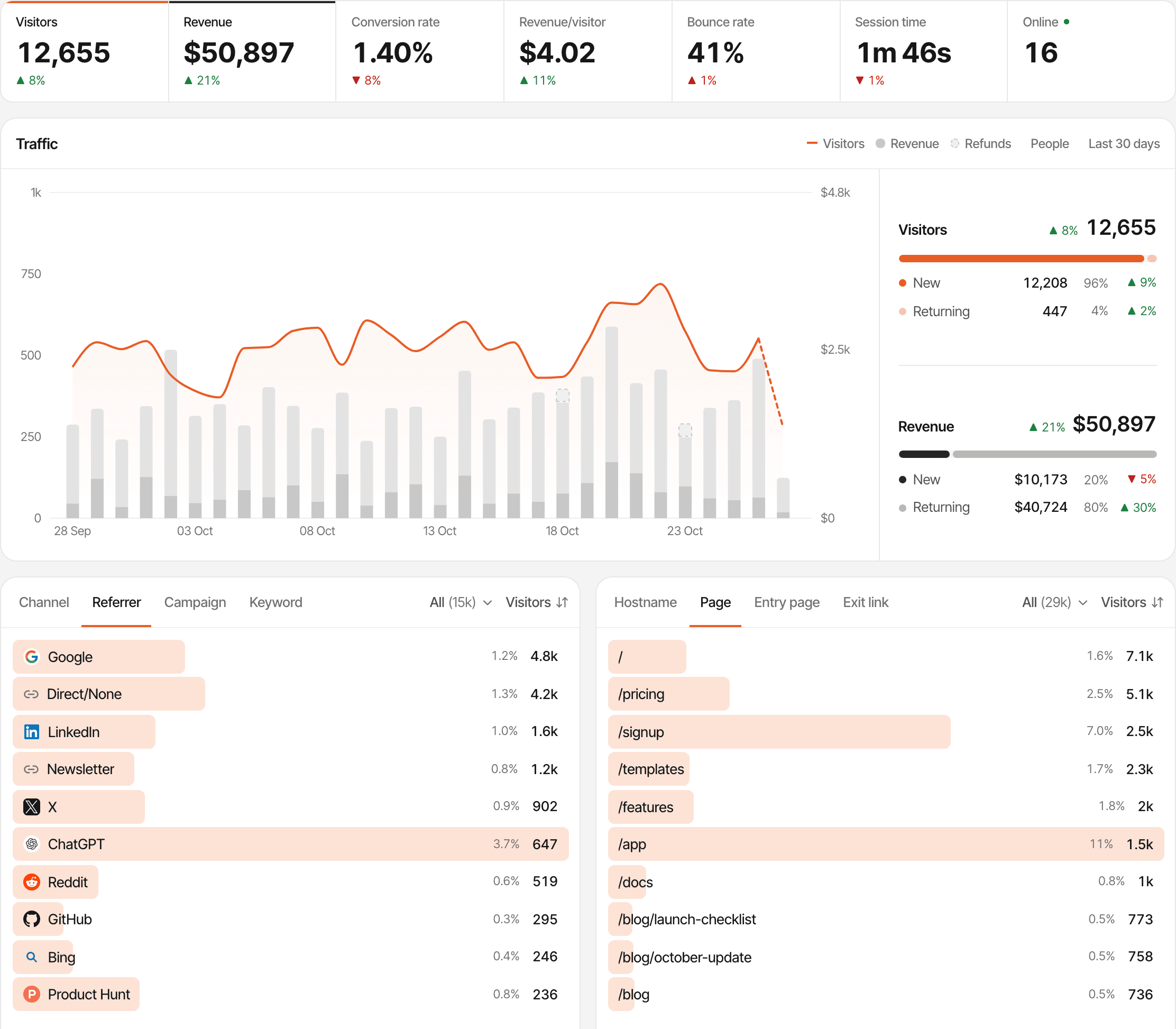
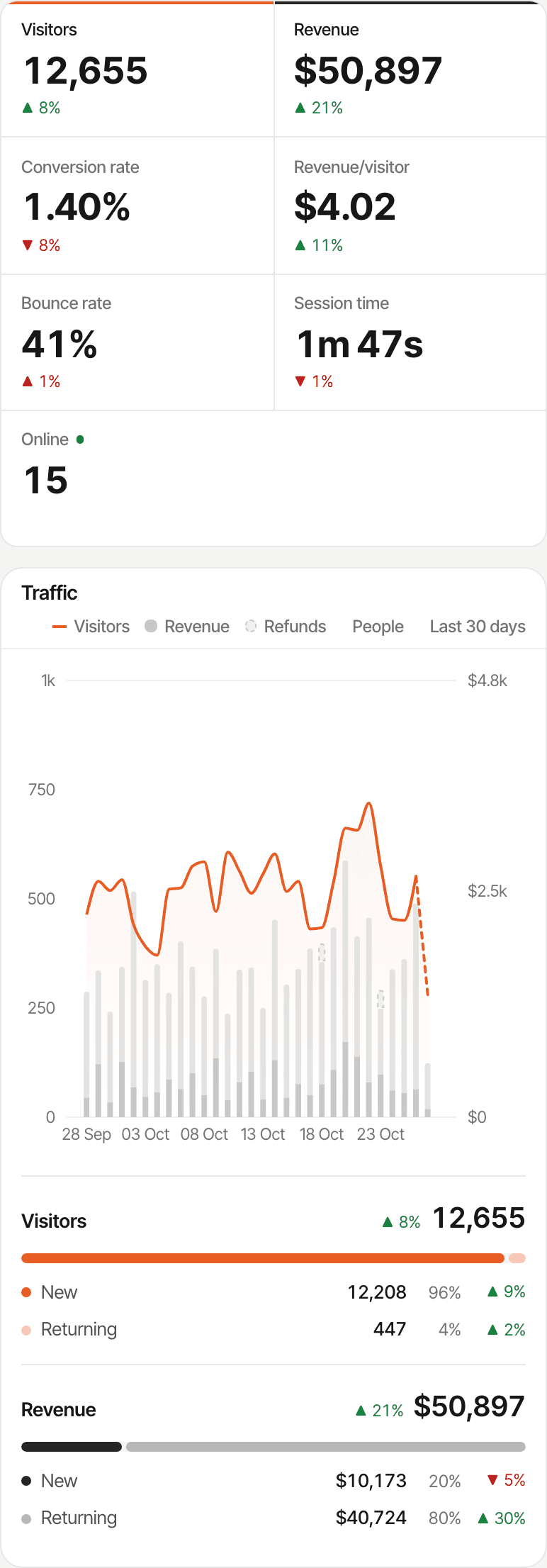
At a glance
Much of the analytics is a match. The differences: payments from your provider and live chat on one side; open source, self-hosting, no cookies and teams on the other.
| Capability | SuprAnalytics | Umami |
|---|---|---|
| Website traffic analytics | AvailablePages, countries, cities, devices, realtime | AvailablePages, countries, regions, cities, devices, realtime |
| Referrer reporting | AvailableChannels and referrers | AvailableReferrers, grouped referrers and channels |
| UTM tracking | Available | AvailableWith a UTM report |
| Custom events | AvailableCustom goals and outbound link clicks | AvailableWith up to 50 properties each |
| Goals | Available | Available |
| Funnels | AvailableA funnel step can be a payment | AvailableWith a time window between steps |
| Visitor journeys | AvailableEach visitor's visits, pages, goals, payments and chats | AvailableSession profiles, linked across devices by your distinct ID; a Journey report |
| AI referral traffic | AvailableAn AI search channel | AvailableAn “LLM” channel, in its code |
| Revenue tracking | AvailableFrom your payment provider's webhooks | AvailableEvents with a revenue and currency your code sends; a Revenue report |
| Payment-provider attribution | AvailableStripe, Polar, Lemon Squeezy, Paddle, Dodo Payments, and an API | Not listedIts docs show forwarding payment webhooks yourself |
| Subscription renewals | AvailableCredited to the customer's original visit | Not listed |
| Built-in live chat | AvailableWidget and inbox | Not listed |
| Multiple websites | AvailableUnlimited on every plan | Depends on planCloud: 1 on Hobby, 20 on Pro, unlimited on Business; self-hosted: unlimited |
| Cookie behavior | OptionalA cookie by default; cookieless mode is opt-in | AvailableNo cookies; a hash whose salt rotates monthly |
| Self-hosting | Not availableHosted only | AvailableOn your own server, with PostgreSQL; the software is free |
| Open source | Not available | AvailableMIT licence |
| Read API | Not availableIts API accepts data; stats come through MCP | AvailableA REST API; on Cloud, keys from Pro |
| Public dashboards | AvailableOne read-only link per website, no password | AvailableShare links; no password option listed |
| Team collaboration | Not availableNot released yet | Depends on planRoles; Cloud Pro up to 10 members; included self-hosted |
| Pricing and retention | Monthly from $9, by events; 2 years to 5 years of data | Cloud: free to $200/month, 6 months to 5 years; self-hosted: free software, kept until you delete it |
Last verified: , from Umami's website, docs and code (v3.4.1). Umami's cells cover Umami Cloud and self-hosted Umami unless they say otherwise. “Not listed” means its pages and code don't describe it. Product details change: see umami.is and Umami's pricing.
Own your analytics, or have it wired to your payments.
Both can tell you which sources bring revenue. With Umami you own the stack and send the revenue in yourself; with SuprAnalytics the payment connection and the chat come built in.
Umami
Open-source analytics you can run yourself, or use in its cloud.
- MIT-licensed code you can host on your own server, or Umami Cloud in the US or the EU
- No cookies; visitors counted from a hash whose salt rotates monthly
- A wide set of reports, from funnels and journeys to attribution, retention and revenue
- Revenue comes from events your own code sends, from the page or from your server
SuprAnalytics
Hosted analytics wired to your payments and your visitors.
- Nothing to run: one script, hosted for you
- Payments arrive from your payment provider, with renewals and refunds, and are tied to the visitor and the source
- Each visitor's pages, goals, payments and chats, in order
- A live chat with visitors, from the same script
See which sources bring paying customers.
Each payment your provider reports is tied to the visitor who made it, so every source shows the customers and revenue it brought.
- Step 1
A visitor arrives
From a search, a referrer, a campaign or an AI assistant
- Step 2
The visit is recorded
With its source, remembered by a first-party cookie
- Step 3
They reach a supported checkout
Which carries their visitor id
- Step 4
The payment is received
From your payment provider's webhook
- Step 5
It's matched when possible
By visitor id, a customer id it has seen, or an email
- Step 6
Revenue is attributed
To the source, by the model you chose
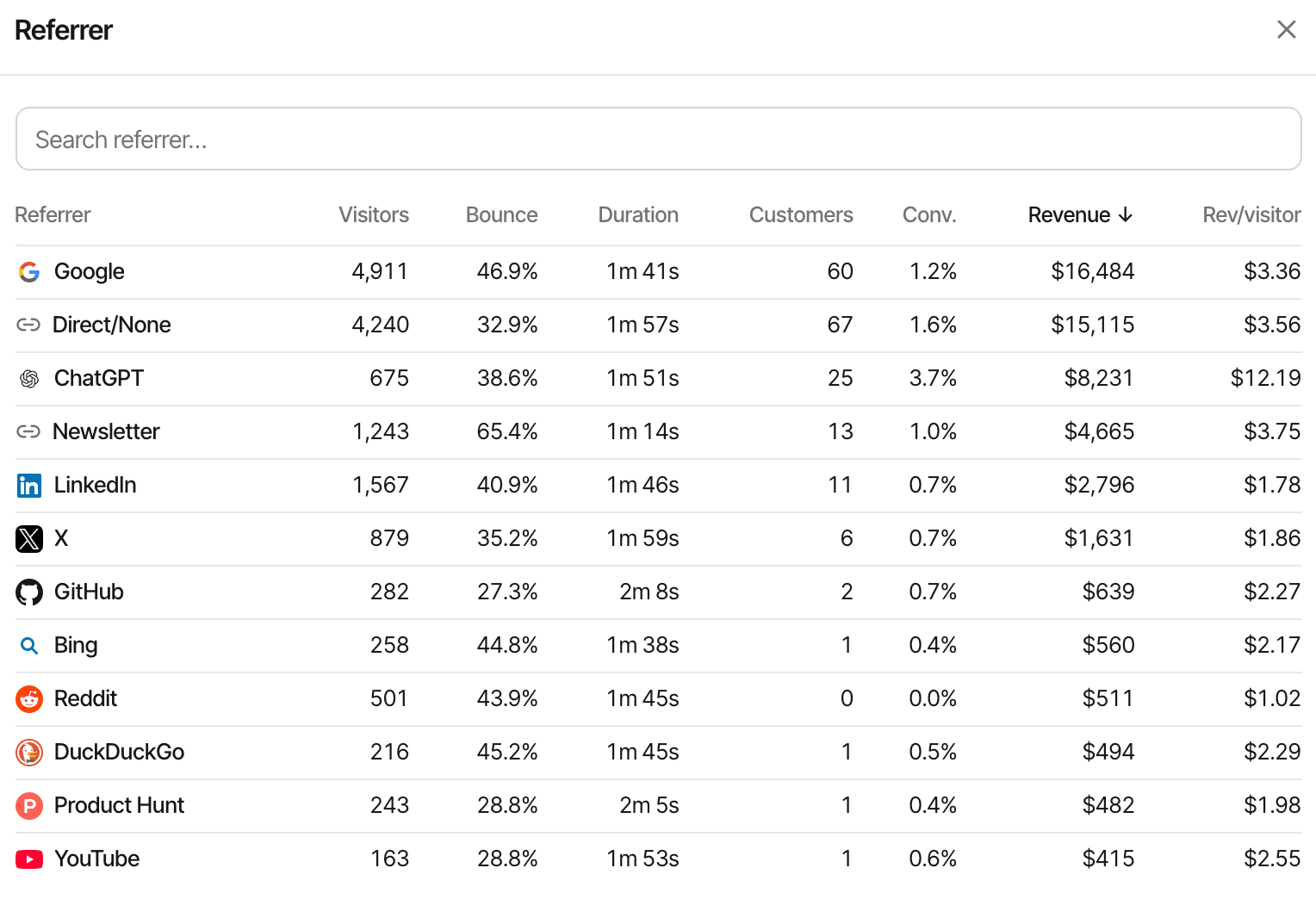
One website's referrers, sorted by the revenue each brought.
First touch
Credits the visit that first brought the customer. Good for “what finds new customers?”
Last touch, the default
Credits the visit the payment happened in. When a customer comes back directly to pay, Direct gets the credit.
Unmatched payments
A payment that can't be matched to a visitor still counts in your revenue, without a source.
Each website picks first or last touch and one reporting currency; payments in other currencies are converted with daily exchange rates. How revenue attribution works
Payment integrations
A purchase event says a checkout happened and what your code thought it was worth. A payment from your provider says what was actually paid, renewed or refunded.
- StripePass the visitor id in your Checkout Session or Payment Link
- PolarCheckout links are tagged by the script
- Lemon SqueezyPass the visitor id as checkout custom data
- PaddlePaddle.js checkout buttons are tagged by the script
- Dodo PaymentsPayment links are tagged by the script
Anything else can send payments through the payments API. Checkouts the script can't see, such as one opened from your own server, need the visitor id passed in your code.
- Renewals are credited to the customer's original visit
- A full refund marks a payment refunded with every provider
- Partial refunds lower a payment with Polar, Paddle (once approved) and Dodo Payments; Stripe's are ignored, with Lemon Squeezy the whole payment is marked refunded, and the payments API refunds a whole payment
What it doesn't do: join visitors across devices on its own, skip direct visits to find an earlier source, import past payments, or report MRR, ARR or churn. Umami tracks revenue from events with a revenue and currency, sent from your page or your server; its docs suggest forwarding your payment provider's webhooks to it with your own code. Its pages don't list built-in payment integrations, renewals or refunds.
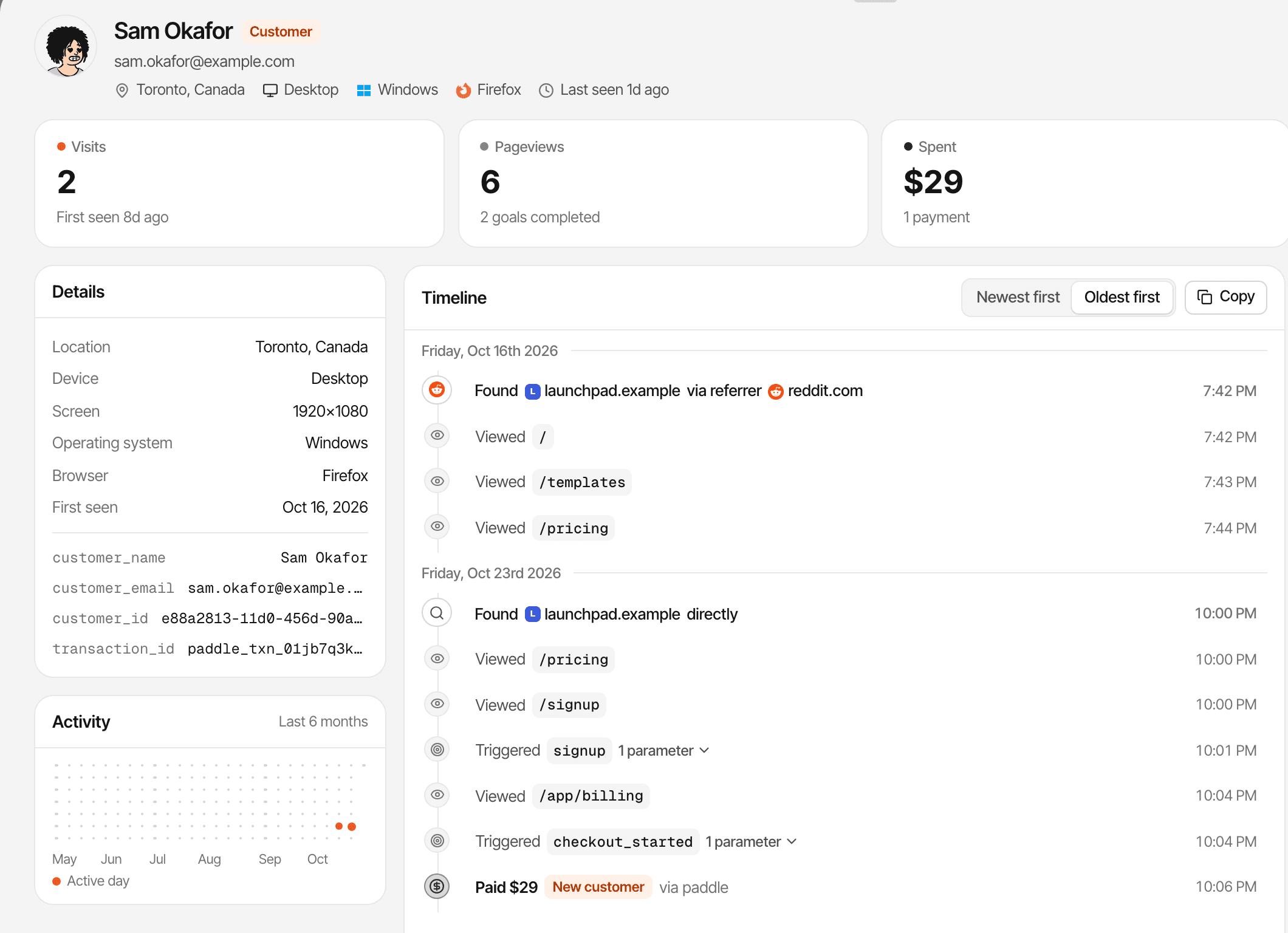
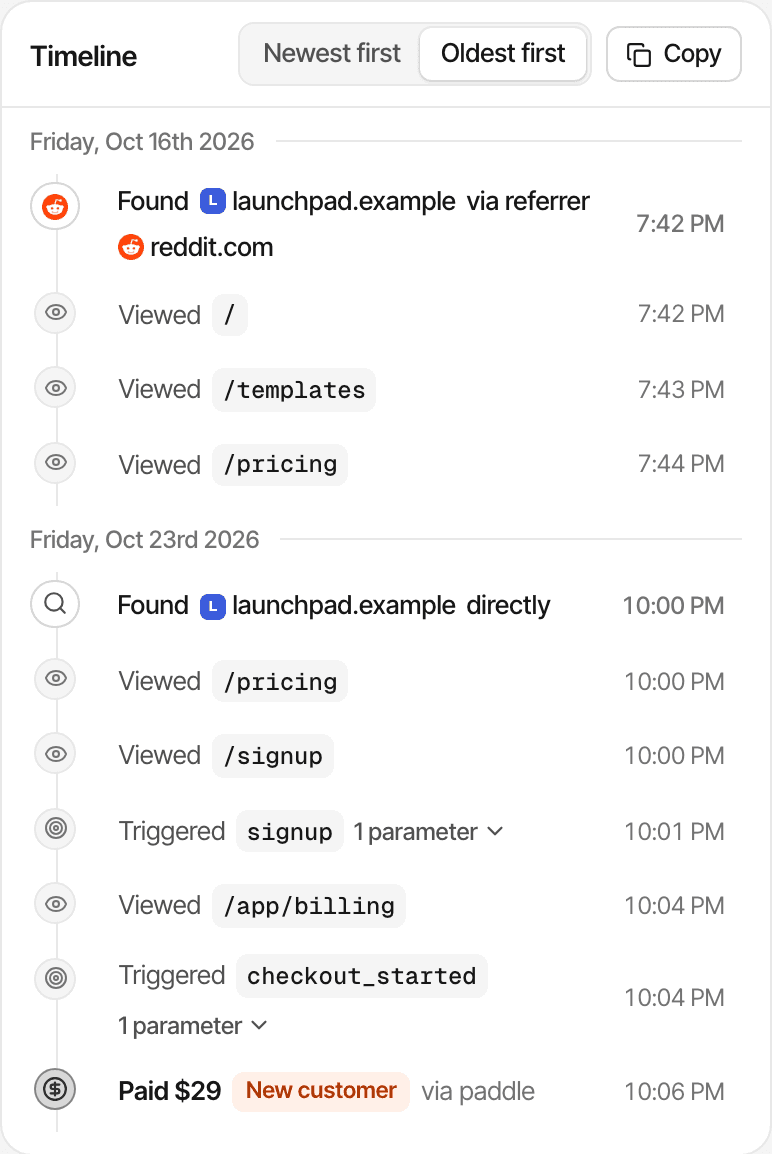
Reddit first, a direct visit to pay through a Paddle button: first touch credits Reddit, last touch credits Direct.
Understand the path from first visit to conversion.
A journey shows one visitor's path. A funnel shows how everyone moved through the steps you care about, up to the payment.
- The entry source of each visit, with its referrer or UTM tags
- Every page visited, and the goals completed
- Recorded payments, in the same timeline
- The conversation, if they chatted with you
- A name and email only if they give them in chat or your app identifies them
A journey follows one browser: a phone and a laptop are two visitors, and naming them with identify doesn't merge their journeys. In cookieless mode a visitor is recognised for a day. A payment without a visitor id is matched by customer id or email when it can be. About visitor journeys
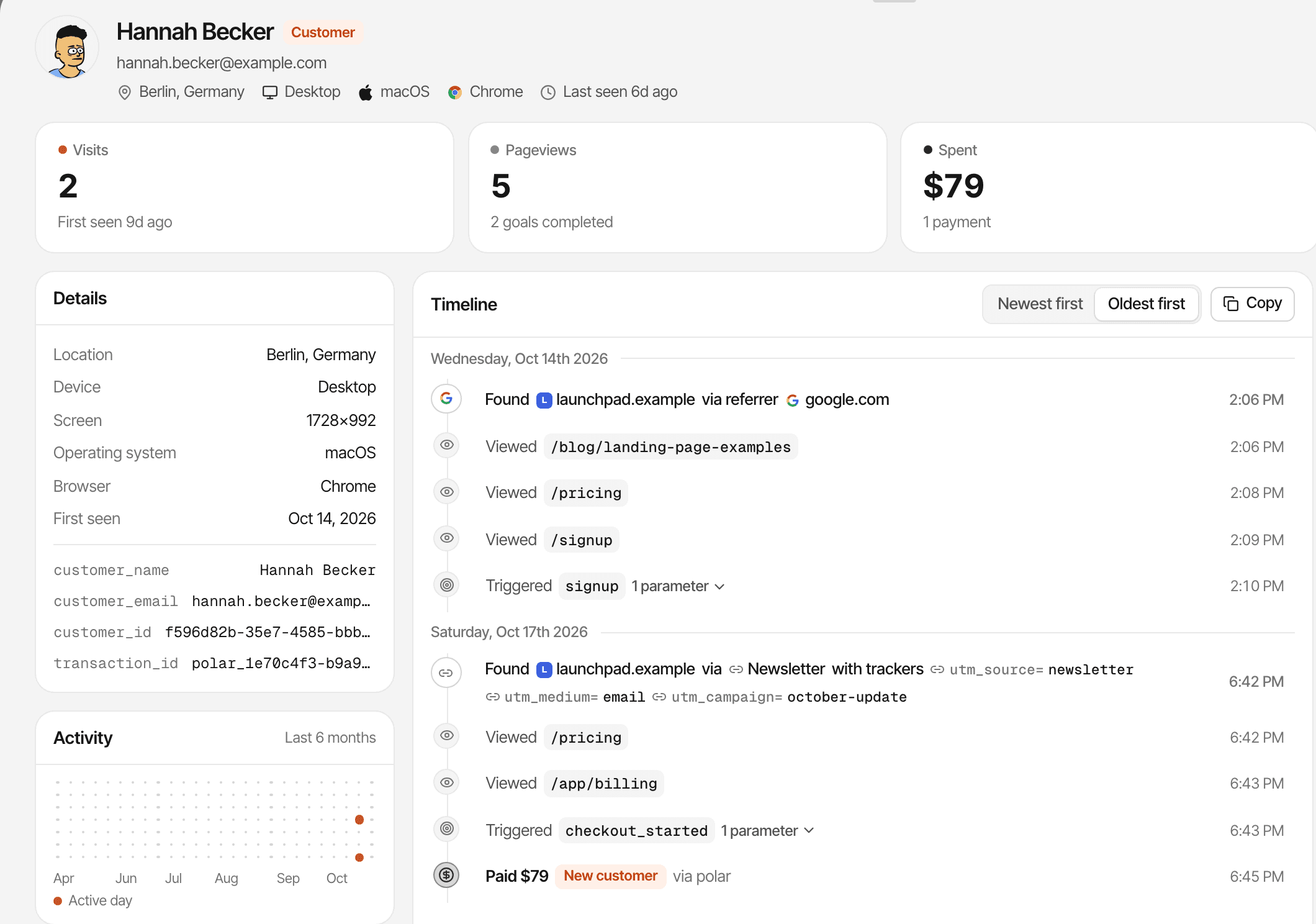
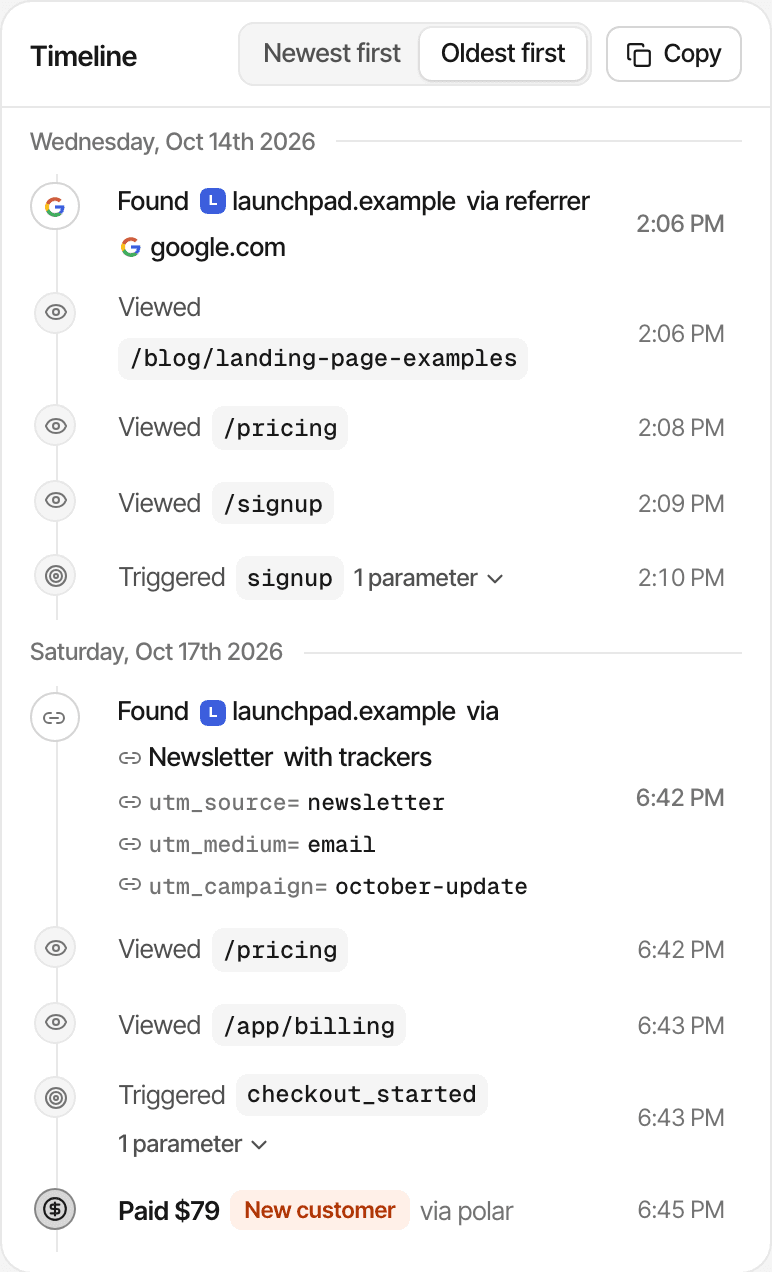
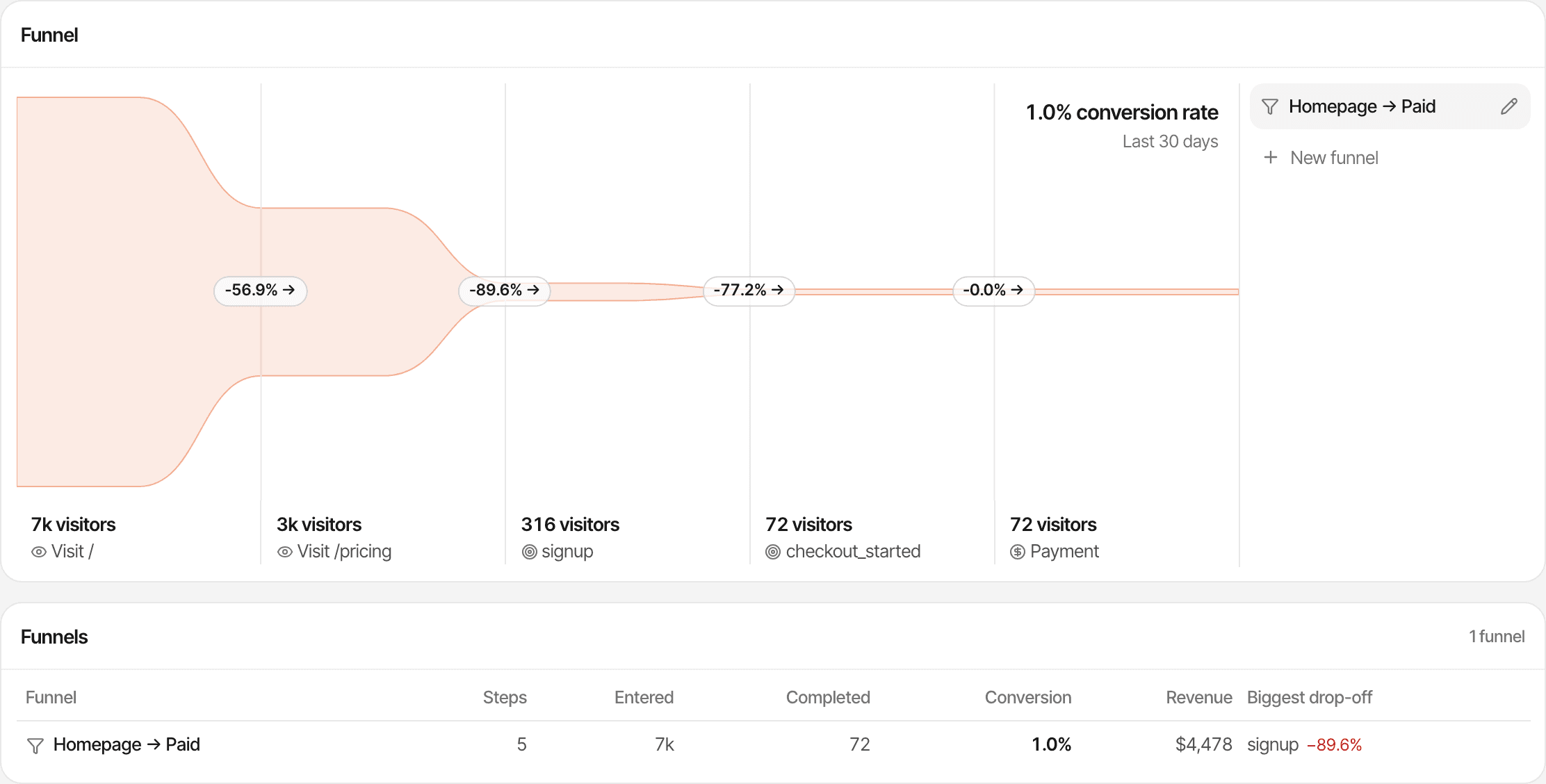
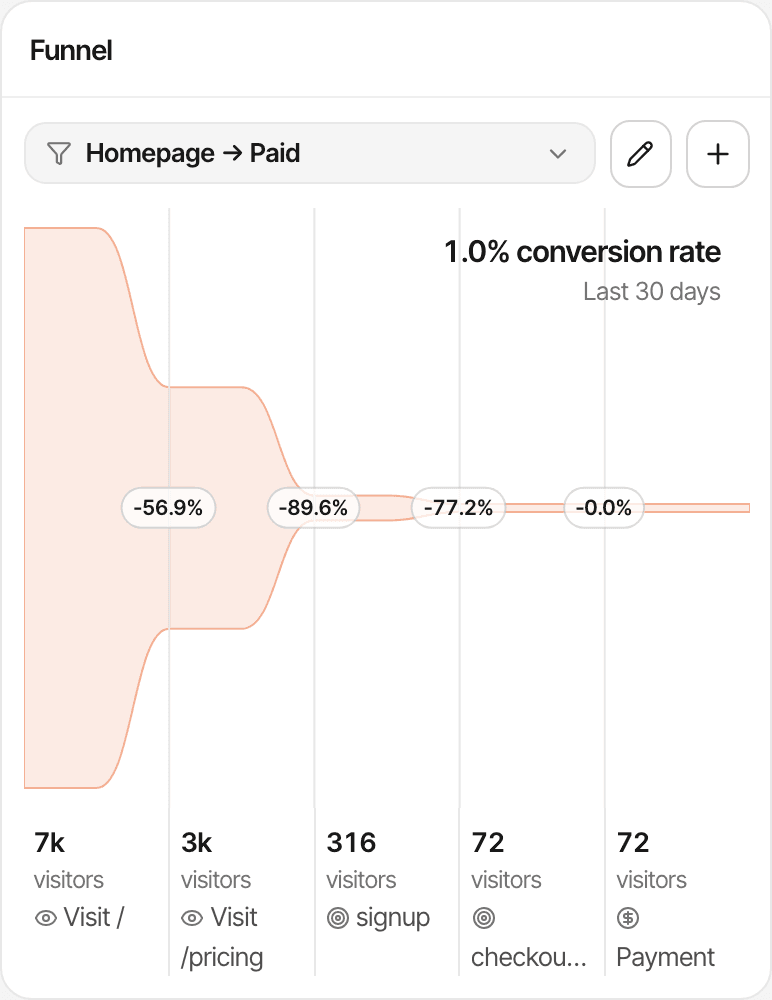
A funnel's last step can be a payment. How funnels work
Umami has these too: session profiles, a Journey report of common paths, and funnels. When your code gives it a distinct ID, it links one person's sessions across devices into one profile.
Analytics shows the journey. Live chat starts the conversation.
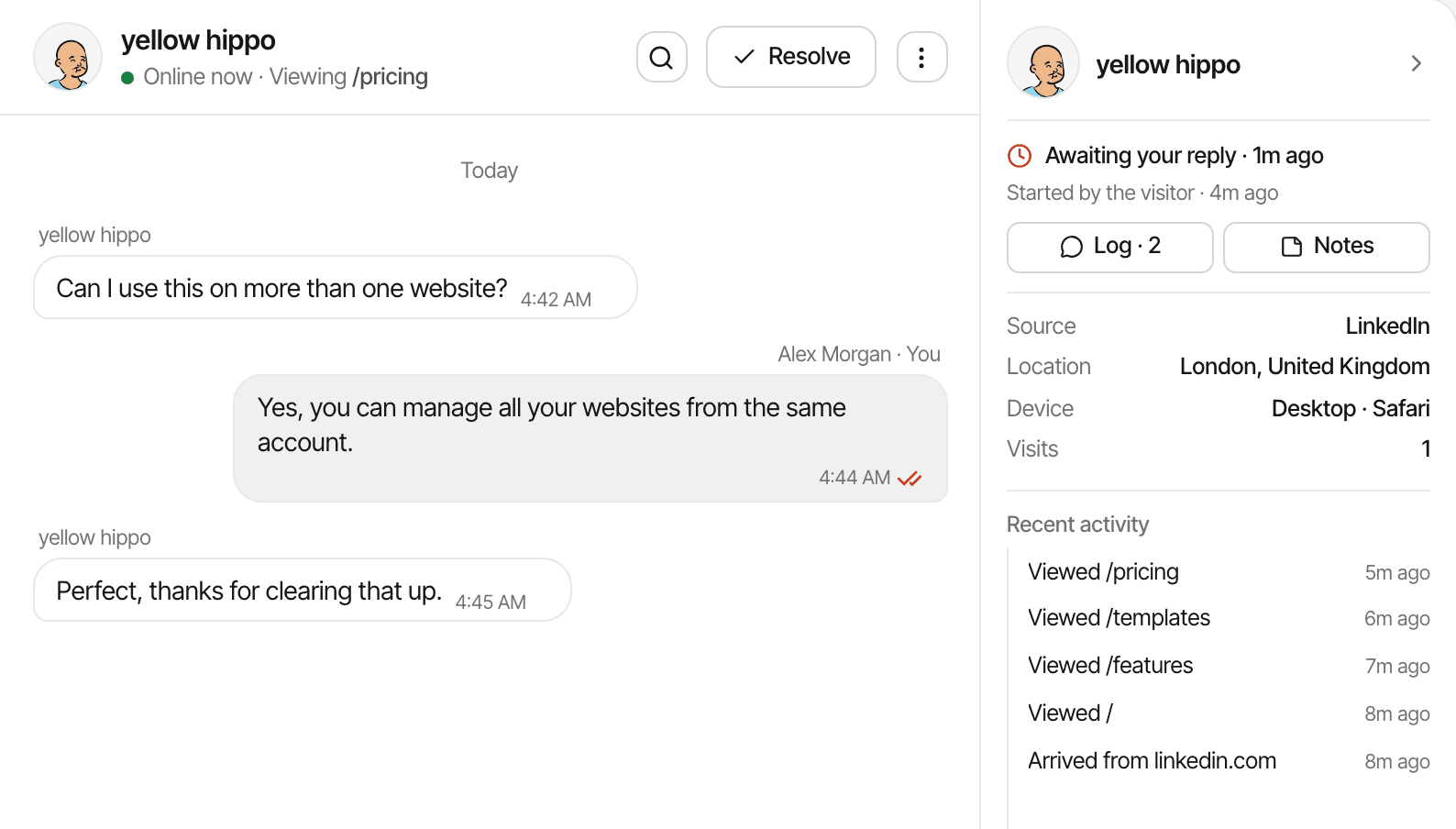
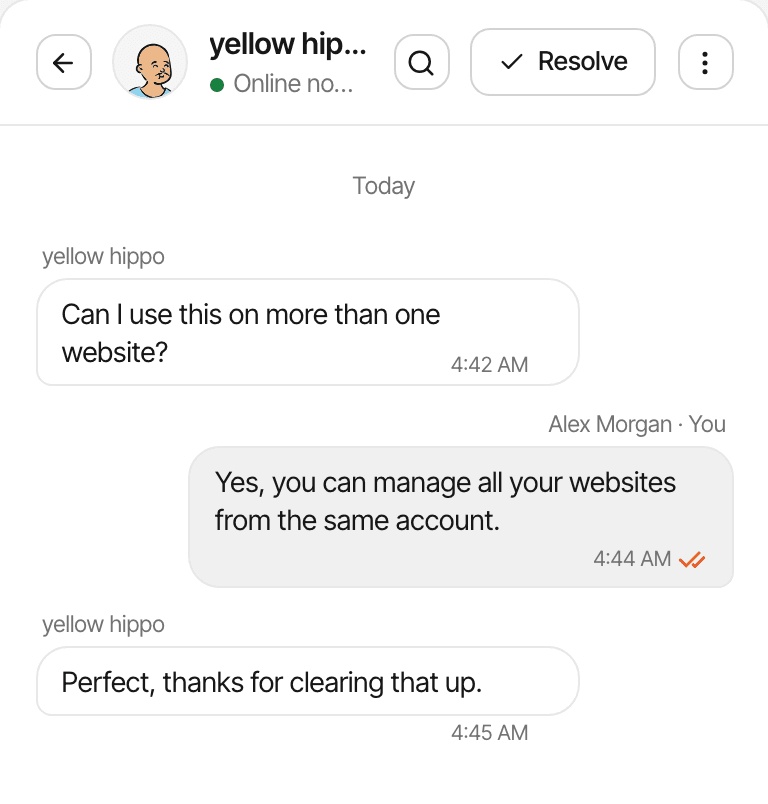
Visitors can message you from a chat bubble that comes with the analytics script, and each conversation opens beside the visit it belongs to.
- A chat widget and one inbox for every website, on every plan
- The visitor's source, the pages they read, their device and location beside each conversation
- The conversation on the visitor's profile, next to their journey
- Messages sent automatically when a visitor opens a page you choose
Visitors stay anonymous unless they type a name or email, or your app identifies them; you still see their visit. Umami's pages and code don't describe a visitor live chat. More about live chat
Where Umami may be better
Umami is a capable, actively developed analytics product. If one of these matters most to you, it's probably the better fit.
Open source, and yours to run
Umami is MIT-licensed and free to self-host with PostgreSQL, so the data never leaves your servers. You also take on the hosting, updates, backups and security, and their cost. SuprAnalytics is hosted only, and not open source.
No cookies, and a US or EU cloud
Umami sets no cookies and doesn't store the IP address in its analytics records. Umami Cloud stores data in the US or the EU, your choice at sign-up. SuprAnalytics sets a first-party cookie unless you turn cookieless mode on, and offers no EU hosting option.
Replays, heatmaps and web vitals
Umami records sessions to replay, draws click and scroll heatmaps, and measures Core Web Vitals: replays and heatmaps from Cloud Business, all three when self-hosted. SuprAnalytics has session recordings and heatmaps too, with a monthly quota by plan, but no web vitals.
One profile across devices
When your code sets a distinct ID, Umami joins one person's sessions from different devices into one profile. A SuprAnalytics journey follows one browser.
A free plan, an API and teams
Umami Cloud's Hobby plan is free for 100K events a month on 1 website. Its REST API reads your stats, and its teams have roles: both from Pro on Cloud, and included when self-hosted. SuprAnalytics has a 14-day trial, an API that only accepts data, and no team access yet.
More reports, less money at volume
Umami adds retention and cohort reports, short links and email pixels, and its Pro plan covers 1 million events for $20 a month, where SuprAnalytics charges $49.
Both have an MCP server for AI assistants (Umami's from Pro on Cloud), an AI referral channel, public share links without passwords, and first and last touch attribution. Self-hosting doesn't make analytics compliant by itself: what you collect and how you configure it still matter.
Which product should you choose?
Two honest lists. Pick the one that reads like your situation.
Choose SuprAnalytics if
- You want payments from Stripe, Polar, Lemon Squeezy, Paddle or Dodo Payments attributed without writing a webhook handler.
- You want renewals and refunds counted as your provider reports them.
- You want to chat with visitors, with their visit beside the conversation.
- You'd rather not run servers, databases or backups for your analytics.
- You run many websites and want them all on one plan, from $9 a month.
Choose Umami if
- You want open-source analytics you can self-host and inspect.
- You need no cookies by default, or a choice of US or EU cloud.
- You want Core Web Vitals beside your analytics.
- You want a free plan, a read API, team roles or cross-device profiles today.
- You're comfortable sending revenue events from your own code.
How does the pricing compare?
Three ways to pay: SuprAnalytics' monthly plans, Umami Cloud's monthly plans, and self-hosted Umami, where the software is free and the running costs are yours. Prices are monthly.
SuprAnalytics
- 6 monthly plans, from $9 for 100,000 events to $149 for 5 million
- Every feature and unlimited websites on every plan
- Counts pageviews, custom goals and outbound link clicks; never chat messages or payments
- 2 years to 5 years of data history, by plan
- Past the allowance, recording continues to 20% over, then pauses; no overage charges
- 14-day free trial, no card. No free plan. Monthly billing only
Umami Cloud
- Hobby: free for up to 100K events a month, 1 website, 6 months of data, no team
- Pro: $20/month for 1 million events, then $0.00003 per event; 20 websites, 10 members, 2 years of data
- Business: $200/month for 10 million events, then $0.00002 per event; unlimited websites, 5 years of data, replays and heatmaps
- Enterprise at a custom price
- Each event property stored counts as an event
- Over the allowance, collection isn't interrupted
- 14-day free trial on paid plans, billed when it ends. No annual price is published
Self-hosted Umami
- Free software under the MIT licence
- You provide the server and a PostgreSQL database, and pay for them
- You handle updates, backups, security and uptime
- Data is kept until you delete it
- Replays and heatmaps included; email reports and some other Cloud features aren't
Last verified: . At 1 million events a month: $49 for SuprAnalytics, $20 for Umami Pro. At 100,000 on one website, Umami's Hobby plan is free. The allowances count differently: Umami counts pageviews, events and each stored event property; SuprAnalytics counts pageviews, goals and outbound clicks.
Switching from Umami
There's no automatic migration. Here is what moving involves.
Create a SuprAnalytics account
The 14-day trial needs no card. Keep Umami running for now: SuprAnalytics can't import its data, so your history stays in your Umami installation or Cloud account.
Install the tracking script
One tag in the
<head>, next to Umami's while you compare, or the guide for your platform. Need no cookies? Turn on cookieless mode.Check that events arrive
Open your website and watch the visit appear in the realtime view.
Connect your payment provider
Instead of sending revenue events, let the payments come from your provider. How to connect one
Compare before you switch off
Run both for a few weeks. Expect different visitor numbers: Umami counts visitors from a monthly hash, SuprAnalytics counts browsers by a cookie. Compare trends, not exact counts, and keep or export what you need from Umami before you retire it.
Questions, answered.
What is the difference between Umami and SuprAnalytics?
Is SuprAnalytics an Umami alternative?
Is Umami open source?
Can I self-host Umami?
Does Umami support conversion or revenue tracking?
Can SuprAnalytics attribute Stripe payments to traffic sources?
Does SuprAnalytics include live chat?
Is SuprAnalytics cookieless?
Can I import my historical Umami data?
Which product is better for SaaS founders?
Umami sources, read on (its code at v3.4.1): Homepage · Pricing · GitHub · FAQ · Metric definitions · Revenue · Server-side events · Sessions · Attribution · Replays · Cloud FAQ · Data import · API
More comparisons
- vs Google AnalyticsFree, deep acquisition reports and Google Ads, or payments tied to each visit and a live chat.Open
- vs PlausibleSimple cookieless stats, or revenue attribution and visitor chat on top.Open
- vs PostHogA product engineering platform, or a focused website workspace.Open
- vs FathomPrivacy-first website stats, or traffic tied to payments and conversations.Open
- vs RybbitOpen-source, cookieless analytics, or payments by source and live chat.Open
- vs DataFastTwo revenue-first tools: live chat and unlimited websites set them apart.Open
- vs SelineLightweight analytics, or revenue from five payment providers and chat.Open
- vs Simple AnalyticsPrivacy-first simplicity, or payments credited to each traffic source.Open
- vs MatomoA full GA alternative you can host, or a focused revenue and chat workspace.Open
- vs MixpanelEvent-based product analytics, or website traffic tied to payments.Open
- When not to use SuprAnalyticsThe cases where another tool fits better, and which one.Open
Understand your traffic. Connect it to revenue.
See where visitors come from, what they do, and which sources bring paying customers, with live chat in the same workspace.
14-day free trial · No card requiredvs Plausiblevs Rybbit