
Subscription revenue
Know where your subscription revenue comes from.
Connect payments and renewals to website visitors, see which acquisition sources bring paying customers, and understand the revenue behind your traffic.
14-day free trial · No card required · From $9/month
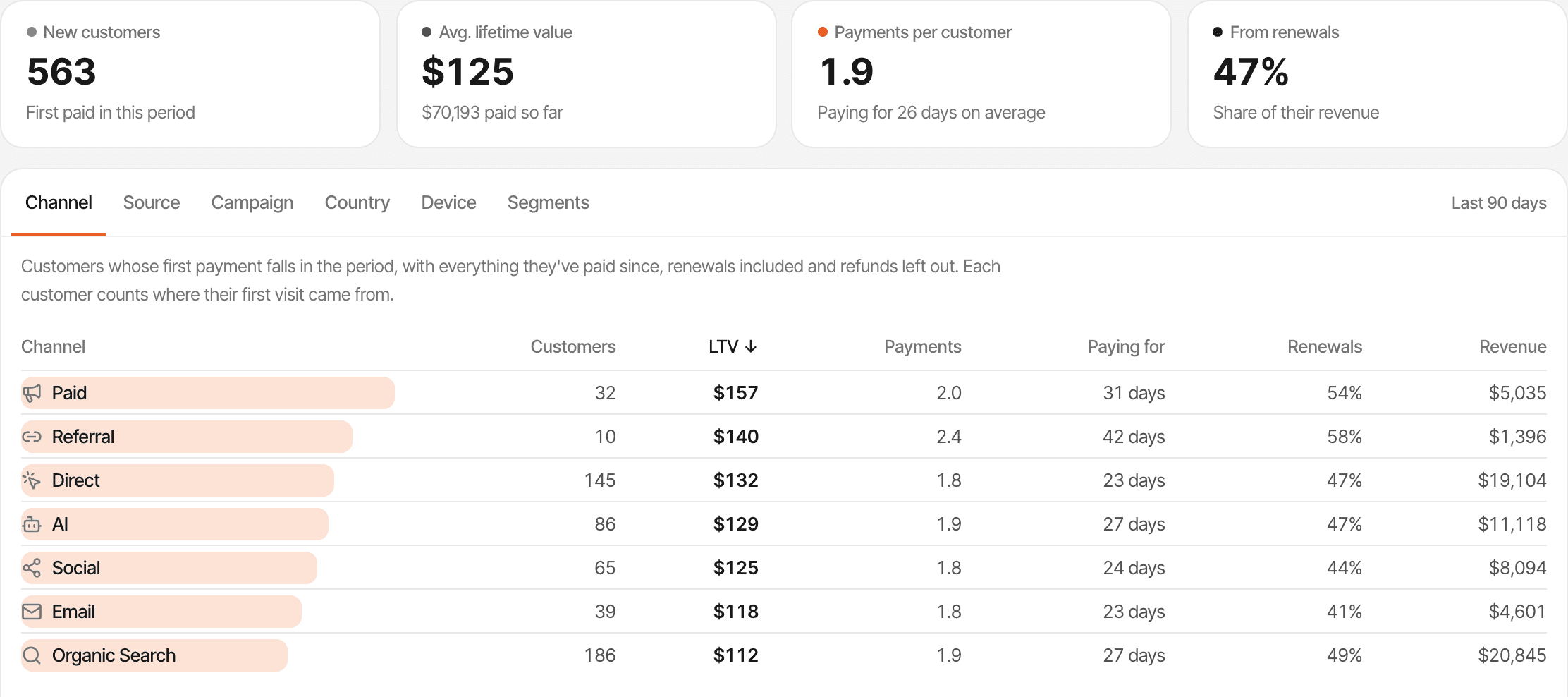
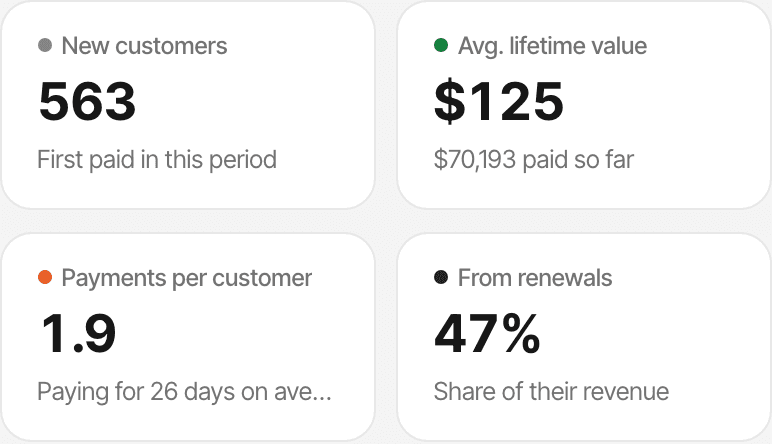
- New customers
- The customers whose first payment falls in the period, grouped by where their first visit came from.
- Lifetime value
- Everything those customers have paid since, renewals included and refunds left out, per customer.
- Renewals
- The share of their revenue that came from subscription renewals, and how long they've been paying.
Understand the payments behind your SaaS growth.
A subscription business is paid twice over: a first payment when someone subscribes, then a renewal every billing period they stay. Subscription revenue analytics looks at those payments and asks where the customers came from.
SuprAnalytics is website analytics that records the payments your provider reports and connects them to the visits before them. It doesn't bill anyone, manage subscriptions or forecast revenue; your payment provider keeps doing that.
See new payments and returning revenue.
Every payment is one of three things. The dashboard's revenue bars stack new revenue and renewals, and the chart's tooltip gives both amounts.
- First payment
- A new customer's first purchase. It counts toward new revenue and the conversion rate.
- Renewal
- A later payment of the same subscription, marked from what your provider reports. Revenue, but not a new customer.
- Refund
- Taken out of revenue, and shown on top of the chart's revenue bars.
A payment is a renewal when the provider says so: Stripe's subscription_cycle invoices, Lemon Squeezy's renewal payments, Polar's subscription cycles and updates, Paddle's subscription transactions, Dodo Payments' later subscription charges, or renewal: true from the Payment API. The conversion rate counts new paying customers only, so renewals don't inflate it. Renewals and refunds
Bring payment data into your website analytics.
Connect Stripe, Polar, Lemon Squeezy, Paddle or Dodo Payments with a webhook, or send payments from your own server with the Payment API.
Two steps for each provider
- Add a webhook in your provider and paste its signing secret into Settings → Revenue.
- Pass the visitor id to your checkout, so each payment can be matched to the visits before it. For Polar and Dodo Payments links and Paddle.js buttons, the script adds it for you.
Refunds differ by provider
- Stripe
- Full refund: Marked refunded
- Partial refund: Ignored
- Polar
- Full refund: Marked refunded
- Partial refund: The amount is lowered
- Paddle
- Full refund: Marked refunded once approved
- Partial refund: The amount is lowered once approved
- Dodo Payments
- Full refund: Marked refunded
- Partial refund: The amount is lowered
- Lemon Squeezy
- Full refund: Marked refunded
- Partial refund: The whole payment is marked refunded
- Payment API
- Full refund: Send refunded: true
- Partial refund: Send refunded: true for the whole payment
Payments are recorded from the moment you connect; there's no import of past payments from your provider. Failed payments aren't recorded. Payments don't count toward your plan's monthly events. Connect a payment provider
Find the channels bringing paying customers.
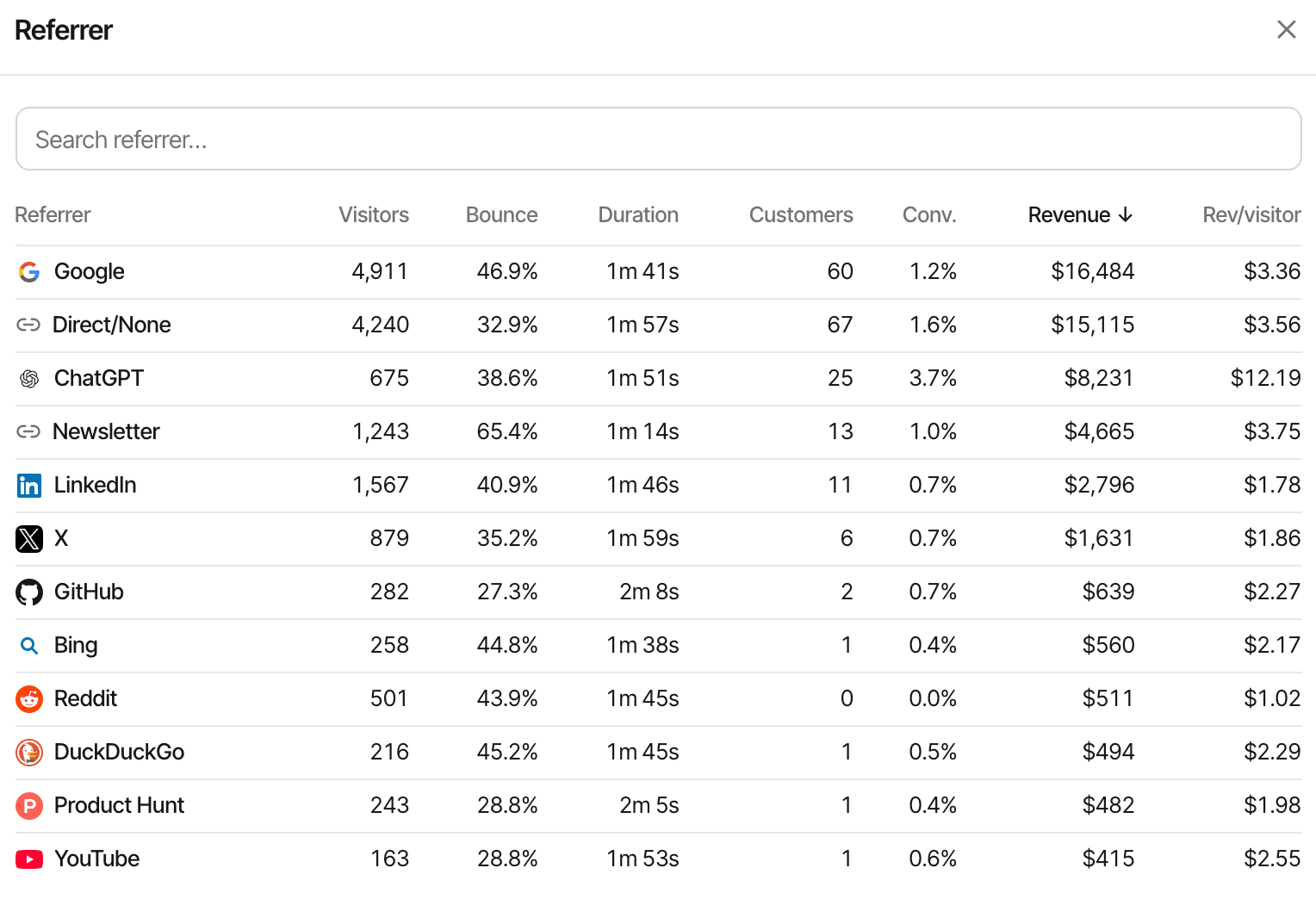
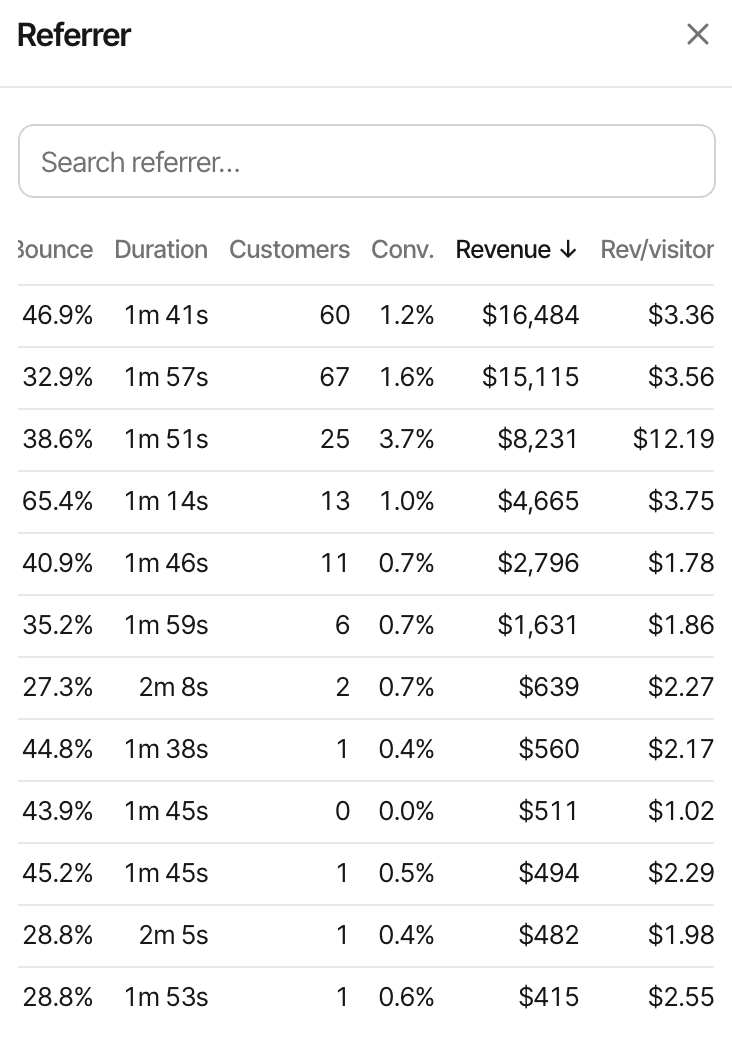
Every breakdown on the dashboard carries revenue: channel (search, social, referral, email, paid, AI, Direct), referrer, campaign and keyword, pages, countries and devices.
- Each row shows its customers, conversion rate, revenue and revenue per visitor
- Click a row to filter the whole dashboard to it
- AI assistants such as ChatGPT and Perplexity are a channel of their own
Only payments matched to a visitor can be credited to a source. The rest still count in your total revenue. About UTM trackingAbout AI traffic
Choose how revenue gets attributed.
Each payment remembers the customer's first visit and their last visit before paying. Each website chooses which one gets the credit.
- Finds you through a newsletter
- Returns directly
- Subscribes
First touch
The newsletter gets the credit: the visit that brought them in.
Last touch (the default)
Direct gets the credit: the visit before the payment.
Last touch doesn't skip direct visits, and there's no last non-direct option. Renewals follow the same setting. Under last touch, a renewal goes to the visit where the customer checked out when the provider carries it into the subscription (Polar, Paddle, Dodo Payments), and otherwise to their latest visit before the renewal. Switch at any time; past payments are credited again under the new setting. How revenue attribution works
Understand what customers bring over time.
The Lifetime value page follows the customers acquired in a period, with everything they've paid since.
- A payment
- One charge, as your provider reported it.
- A customer's revenue
- Everything one customer has paid, renewals included and refunds left out, matched by visitor id, customer id or email.
- Lifetime value
- The average of that, for the customers acquired in a period: what they've actually paid so far.
It groups customers by where their first visit came from (channel, source, campaign, country or device) or by your saved segments, whatever the attribution setting. Customers who paid without being matched to a visit are grouped as Unknown. It's revenue already received, not a prediction of what customers will pay. The Users page adds paying customers, revenue and the average spend per customer for any period.
See the journey from first visit to payment.
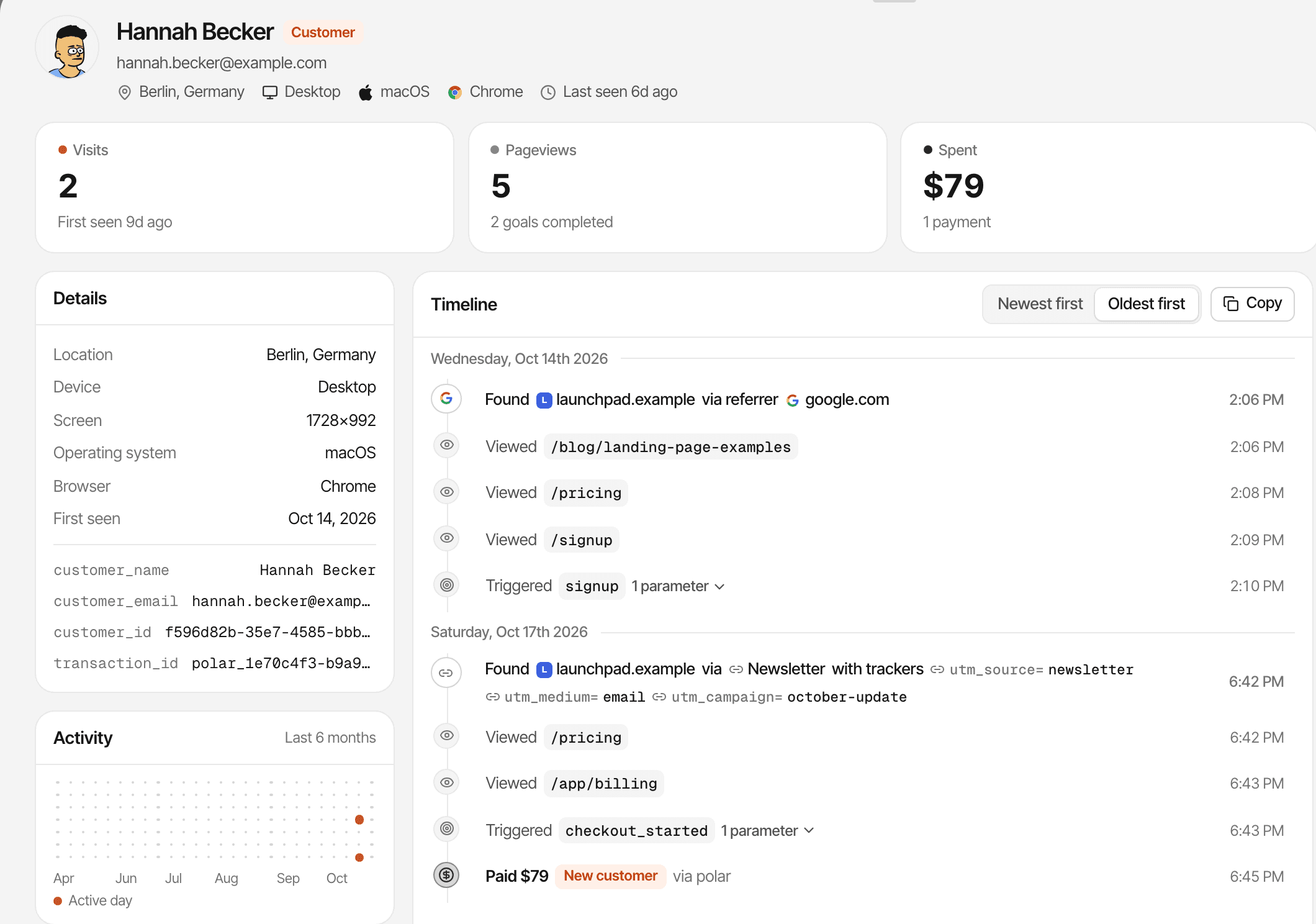
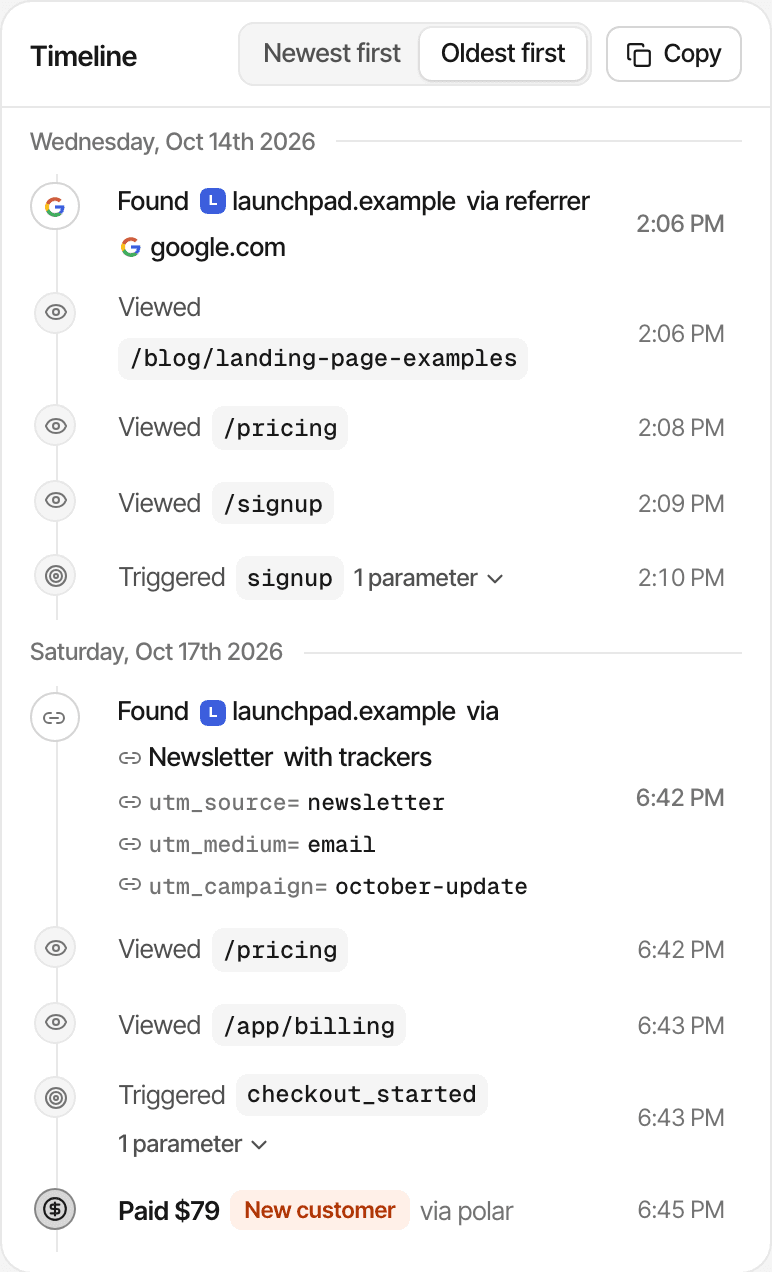
A customer's journey lists every visit, then the payments matched to them, in order.
- Each visit with its source and campaign tags, its pages, goals and clicks
- Each payment labelled New customer, Renewal or Refunded
- Their name or email when your provider or your website supplies one
A payment that wasn't matched to a visitor has no journey. A journey is one browser's history; a phone and a laptop are two visitors. About visitor journeys
Payment revenue isn't the same as MRR.
They answer different questions, so they can disagree for the same month.
- Payment revenue
- What SuprAnalytics reports: the payments recorded in a period, less refunds.
- MRR
- Monthly recurring revenue: every active subscription normalised to a monthly amount. An annual plan paid once counts as a twelfth each month.
- Churn
- The customers or revenue lost over a period, as subscriptions end.
SuprAnalytics doesn't calculate MRR, ARR or churn, and doesn't track cancellations, upgrades or downgrades. Use it to see where paying customers come from; use your billing provider for subscription metrics. To model lifetime value from churn and margin yourself, try the free LTV calculator.
Practical ways to use subscription revenue analytics.
SaaS founders
See which channels and campaigns bring customers who keep paying.
Indie hackers
Connect a launch's traffic to the payments that followed.
Growth marketers
Compare the revenue credited to each campaign, under first or last touch.
Small SaaS teams
Read a customer's payments, renewals and refunds next to their visits.
Limits worth knowing
- Each provider needs a webhook, and checkouts need the visitor id for matching
- A payment is credited to a source only when it's matched to a visitor
- Last touch can credit Direct
- Unmatched payments count in revenue without a source
- In cookieless mode a visitor is recognised for a day, so a payment days later can't reach back to the first visit
- A phone and a laptop are two visitors; devices aren't merged
- Refunds follow each provider's rules (see above)
- No MRR, ARR or churn
- No import of past payments from providers
- Data is kept for your plan's history: 2 years to 5 years
Payments in another currency are converted to your website's currency with daily exchange rates. Revenue attribution docsFor indie hackers
Questions, answered.
What is subscription revenue analytics?
Can SuprAnalytics track recurring subscription payments?
Which payment providers are supported?
Can I see which traffic sources bring paying customers?
How does first-touch versus last-touch attribution work?
Can I track customer lifetime revenue?
Does SuprAnalytics calculate MRR, ARR, and churn?
What happens when a payment can't be matched to a visitor?
More features
- Revenue attributionPayments from your provider, credited to the source that brought each customer.Open
- Live chatTalk to visitors with their source, pages and journey beside the chat.Open
- Traffic analysisVisitors, sources, pages, locations and devices, with filters and the change against the period before.Open
- Realtime analyticsWho's on your website right now, where they came from and what they're reading.Open
- Visitor journeysEach visitor's visits, pages, goals, payments and chats on one timeline.Open
- Conversion funnelsWhere visitors drop off between landing, signup and payment.Open
- Goal trackingCount signups, clicks and pages reached, with conversion rates by source.Open
- UTM trackingCampaign tags read automatically, with visitors, conversions and revenue per campaign.Open
- AI trafficVisits from ChatGPT, Perplexity, Claude and other AI assistants, as their own channel.Open
- Multiple websitesEvery website in one account, with an all-websites view.Open
- Public dashboardsShare a read-only dashboard by link, without names or payments.Open
- Cookieless trackingAn optional mode that sets no cookies, and what it changes.Open
Connect your traffic to the revenue it brings.
See recorded payments, understand paying customers, and discover which acquisition sources contribute to revenue.
14-day free trial · No card requiredPricingAll features