
Paddle shows you every transaction. It doesn't show you which post, search or newsletter sent the customer. To see that, a visitor id from your website analytics has to ride along with the checkout and come back with the transaction.
Paddle has the right place for it: custom data, which it keeps on the transaction and copies to the subscription and its renewals. This guide covers the three ways to open a Paddle checkout, the webhook that reports each payment, how renewals, refunds and chargebacks count, and where attribution can't find a source.
The quick answer
To attribute Paddle revenue to traffic sources:
- Record each visit and its source with an analytics script on every page.
- Carry the visitor id into checkout as custom data. Paddle.js checkout buttons get it automatically;
Paddle.Checkout.open()and the API take it from you. - Add a Paddle notification destination for
transaction.completed,adjustment.createdandadjustment.updated. - Each completed transaction is matched to the visitor, and your attribution model picks which of their visits gets the credit.
Why Paddle alone can't tell you where customers came from
Paddle knows the transaction: the items, the totals and the tax, the customer and their email, and the subscription it created or belongs to. It also keeps custom data, your own JSON on the transaction, and Paddle's own guide suggests it for UTM tags (Paddle: custom data (Paddle documentation, opens in a new tab)).
UTM tags in custom data describe the checkout that was opened, not the visits before it. If a customer read your post on Reddit, came back two days later through Google and clicked the same buy button, the tags on that button are the same either way. The referrer, the landing page and the earlier visits live in your website analytics, which has never seen the transaction. Joining the two needs an id both sides share.
Step 1: Track website visitors and their sources
Add the SuprAnalytics script to the <head> of every page (installation guides). Each visit then records its referrer, its UTM tags, its landing page and a visitor id kept in a first-party cookie for a year. A visit with no referrer and no tags counts as Direct. The tracking parameters guide lists the tags it reads, and the Stripe guide explains sources and sessions in more depth; it all applies to Paddle too.
Step 2: Carry the visitor into Paddle checkout
| How the checkout opens | What carries the visitor id |
|---|---|
Checkout buttons, class="paddle_button" | What carries the visitor id: Automatic. The script adds it to the button's data-custom-data on load and on click. |
Paddle.Checkout.open() | What carries the visitor id: One line: pass it as customData. |
| Transactions created through the API | What carries the visitor id: Server code: put it in the transaction's custom_data. |
| A hosted checkout link without it | What carries the visitor id: Nothing. The script doesn't change links; the payment counts and is matched only through a known customer id or email. |
Checkout buttons: nothing to add
Paddle.js turns any element with class="paddle_button" into a checkout launcher, and its data-custom-data attribute becomes the transaction's custom data (Paddle: HTML data attributes (Paddle documentation, opens in a new tab)). When the page loads, and again when a visitor clicks, the SuprAnalytics script adds supr_visitor_id and supr_session_id to that attribute, keeping any keys you already set.
<a href="#" class="paddle_button" data-items='[{"priceId":"pri_123","quantity":1}]'>Buy now</a>
<!-- after load: data-custom-data='{"supr_visitor_id":"6f1c…","supr_session_id":"a83d…"}' -->- A button whose custom data already has a
supr_visitor_idis left alone. - To stop the script changing buttons, add
supr-paddle="false"to the SuprAnalytics script tag. - Buttons are also left alone where the script doesn't track: in a browser you've excluded from your stats, and for bots.
Paddle.Checkout.open(): pass customData
If you open checkouts from your own code, read the ids from the SuprAnalytics script and pass them as customData.
Paddle.Checkout.open({
  items: [{ priceId: "pri_123", quantity: 1 }],
  customData: {
    supr_visitor_id: window.supr.visitorId(),
    supr_session_id: window.supr.sessionId(),
  },
});
Browser code with no keys in it. Creating transactions on your server instead? Put the same two keys in the transaction's custom_data, reading supr_visitor_id from the request's cookie. The rest of the setup is in the Paddle guide.
Paddle copies a transaction's custom data to the subscription it creates, and a subscription's custom data to every transaction it creates later: renewals, upgrades and downgrades, and one-time charges (Paddle: custom data (Paddle documentation, opens in a new tab)). So the visitor id set at checkout comes back with each renewal.
When there's no id: customer id and email
A transaction without a visitor id still counts. SuprAnalytics then looks for the Paddle customer id on an earlier payment that was matched, then a visitor with the same email, known from an earlier payment or from the identify call your app makes at sign-up. If nothing matches, the transaction is revenue without a source.
Step 3: Connect the Paddle webhook
The connection is one notification destination per website and its secret key. There's no API key to share, and past transactions aren't imported: SuprAnalytics records payments from the moment the webhook is set up. It works with Paddle Billing; Paddle Classic's alerts aren't supported.
Copy your webhook URL
In SuprAnalytics, open the website's Settings → Revenue, pick Paddle, and copy the URL. It looks like
https://supranalytics.app/api/webhooks/paddle/YOUR_WEBSITE_ID.Add a notification destination in Paddle
In Paddle, open Events → Notifications and click New destination. Set its type to a webhook URL, not an email address, and paste the URL (Paddle: notification destinations (Paddle documentation, opens in a new tab)).
Select three events
Select
transaction.completed,adjustment.createdandadjustment.updated, and save the destination.Paste the secret key
Copy the destination's secret key, which starts with
pdl_ntfset_, into Settings → Revenue with Paddle selected, and click Connect.
| Paddle event | What SuprAnalytics does |
|---|---|
transaction.completed | What SuprAnalytics does: Records the transaction. Paddle sends it once a paid transaction is processed and its status is completed (Paddle: transaction.completed (Paddle documentation, opens in a new tab)). Free transactions are skipped. |
adjustment.created | What SuprAnalytics does: Applies a refund or chargeback that is already approved. One waiting for Paddle's approval is skipped (Paddle: adjustments (Paddle documentation, opens in a new tab)). |
adjustment.updated | What SuprAnalytics does: Applies a refund or chargeback when Paddle approves it later. Most refunds on live accounts wait for Paddle's approval, so this is usually the event that counts. |
What happens on every delivery
- Signature check. Paddle signs each delivery in the
Paddle-Signatureheader: a timestamptsand anh1HMAC-SHA256 of the timestamp and the body joined with a colon, keyed with your secret key (Paddle: signature verification (Paddle documentation, opens in a new tab)). SuprAnalytics checks it and refuses a timestamp more than 5 minutes off. A wrong key is answered with 401 "Invalid signature" and nothing is recorded. - Retries. Paddle expects a 200 within five seconds. On live accounts it retries up to 60 times over about two days; in the sandbox, 3 attempts within about two minutes (Paddle: respond to webhooks (Paddle documentation, opens in a new tab)).
- Duplicates. Each transaction is stored once, and each adjustment is applied once by its id, so a delivery that arrives twice doesn't count twice.
Step 4: Test in Paddle's sandbox
Paddle's sandbox (Paddle documentation, opens in a new tab) is a separate account with its own credentials, notification destinations and data, where only test cards work. Test there; never make a real purchase just to test attribution.
- In the sandbox, add a destination for the test website's URL with the three events, and paste its secret key into that website's Settings → Revenue.
- Open your staging site in a fresh window with a tagged link, such as
?utm_source=test&utm_medium=email&utm_campaign=attribution_check. - Click your checkout button (or open your checkout) and pay with Paddle's test card, 4242 4242 4242 4242.
- In Paddle, open Events → Notifications and check the
transaction.completednotification's delivery log. It should show status 200; where the response is shown, look for"attributed": true. - In SuprAnalytics, the payment appears in the visitor's journey and the Campaign report credits
attribution_check.
{
  "received": true,
  "result": { "visitorId": "…", "attributed": true, "duplicate": false }
}
"attributed": false means the transaction was recorded without a source: check that its custom data carried the visitor id. A retried delivery answers "duplicate": true.
When it works, add a destination in your live Paddle account for your real website, with its own secret key.
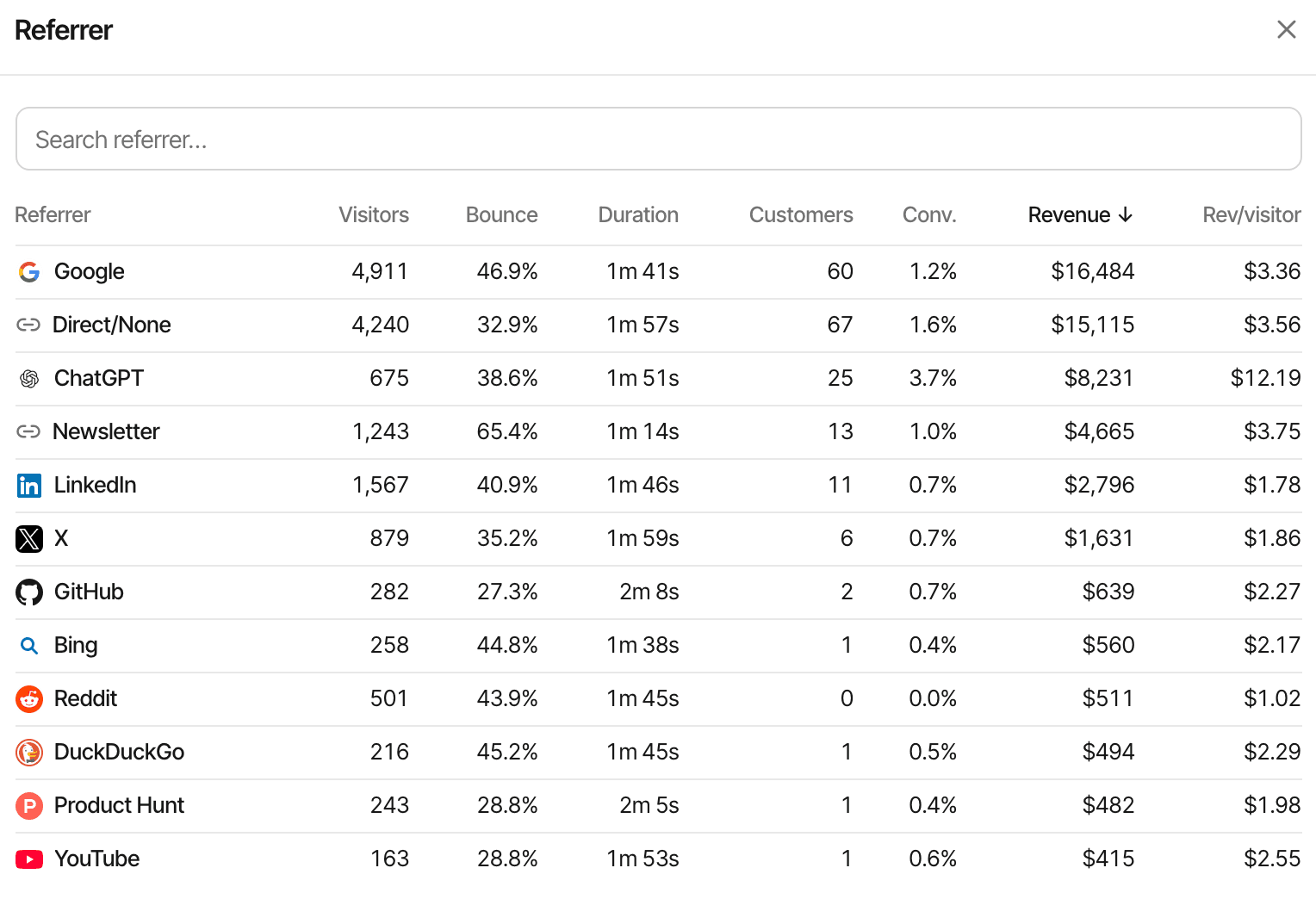
What Paddle revenue SuprAnalytics counts
| Transaction | How it's counted |
|---|---|
| Amount | How it's counted: The transaction's details.totals.total less details.totals.tax: after discounts, before tax. Paddle is the merchant of record and remits the tax (Paddle: how Paddle works (Paddle documentation, opens in a new tab)), so tax isn't your revenue. Paddle's fees aren't taken off. Transactions in other currencies are converted to your website's currency with daily rates. |
| First payment | How it's counted: A checkout (origin web) or a transaction created through the API (origin api). Counts toward new customers, conversion rate and revenue. |
| Renewal | How it's counted: Any transaction whose origin starts with subscription_: subscription_recurring for renewals, subscription_update for plan changes, subscription_charge for one-time charges. Revenue, but not a new customer. |
| Free transaction | How it's counted: Skipped, such as a zero-value subscription_payment_method_change. |
| Full refund or chargeback | How it's counted: Once approved, marks the payment refunded; it drops out of revenue. |
| Partial refund | How it's counted: Once approved, lowers the payment by the adjustment's subtotal, the refunded amount before tax. |
| Chargeback reversal | How it's counted: Not applied: a payment marked refunded by a chargeback stays refunded. |
So SuprAnalytics totals won't match Paddle figures that include tax or take off fees. Payment tracking also isn't subscription analytics: SuprAnalytics doesn't calculate MRR, ARR or churn, and cancellations, which aren't payments, aren't recorded. What it adds is where paying and renewing customers came from (subscription revenue).
First touch or last touch?
Each payment keeps two visits: the visitor's first visit ever and their last visit before paying. Last touch is the default and credits the visit that converted, even a direct one. With supr_session_id in the custom data, that is the exact visit the checkout opened in. First touch credits the visit that brought them in. Change it in Settings → Revenue → Attribution model; the switch re-credits past payments too. The first-touch vs last-touch guide works through examples.
Common Paddle attribution problems
| Problem | Likely cause and fix |
|---|---|
| No Paddle payments show up | Likely cause and fix: Check the notification's delivery log under Events → Notifications. 400 "Paddle is not configured for this website" means no secret key is saved for that website; 401 "Invalid signature" means the key belongs to another destination, or sandbox and live are mixed up. |
| Payments have no source | Likely cause and fix: The transaction's custom data carried no visitor id. Check that the script runs on the page with the button, or that your code passes customData, and identify signed-in users before checkout. |
| A button isn't tagged | Likely cause and fix: Its custom data already has a supr_visitor_id, the script tag carries supr-paddle="false", the element lacks class="paddle_button", or its data-custom-data isn't valid JSON. |
| A refund isn't taken off | Likely cause and fix: Paddle hasn't approved it yet. It's applied when adjustment.updated reports it approved. |
| Revenue lower than in Paddle | Likely cause and fix: SuprAnalytics counts the amount before tax, lowers partial refunds, takes off chargebacks and skips free transactions. |
More on this: Paddle revenue attribution · Paddle setup guide · Renewals and refunds · How revenue attribution works · Pricing