
Polar shows you every order. It doesn't show you which post, search or newsletter sent the customer. To see that, a visitor id from your website analytics has to ride along with the checkout and come back with the order.
With Polar this is shorter than with most payment providers, because checkout links can carry the id without any code. This guide covers both ways to pay with Polar, the webhook that reports each order, and where attribution can't find a source.
The quick answer
To attribute Polar revenue to traffic sources:
- Record each visit and its source with an analytics script on every page.
- Carry the visitor id into checkout. Polar checkout links get it automatically; Checkout API sessions take it as metadata.
- Add a Polar webhook for
order.paid,order.updatedandorder.refunded. - Each paid order is matched to the visitor, and your attribution model picks which of their visits gets the credit.
Why Polar alone can't tell you where customers came from
Polar knows the order: the product, the amounts, the customer and their email, and the subscription it belongs to. It also keeps metadata. A checkout link even accepts utm_source, utm_medium and utm_campaign in its URL and attaches them to the checkout session (Polar: checkout links (Polar documentation, opens in a new tab)).
Those tags describe the link that was clicked, not the visit before it. If a customer read your post on Reddit, came back two days later through Google and clicked the same buy button, the tags on that button are the same either way. The referrer, the landing page and the earlier visits live in your website analytics, which has never seen the order. Joining the two needs an id both sides share.
Step 1: Track website visitors and their sources
Add the SuprAnalytics script to the <head> of every page (installation guides). Each visit then records its referrer, its UTM tags, its landing page and a visitor id kept in a first-party cookie for a year. A visit with no referrer and no tags counts as Direct. The tracking parameters guide lists the tags it reads, and the Stripe guide explains sources and sessions in more depth; it all applies to Polar too.
Step 2: Carry the visitor into Polar checkout
Checkout links: nothing to add
When a visitor clicks a Polar checkout link (https://buy.polar.sh/polar_cl_…), the SuprAnalytics script adds ?reference_id= and their visitor id to the link before the browser follows it. Polar stores it with the checkout, the order comes back through the webhook, and the id names the visitor.
<a href="https://buy.polar.sh/polar_cl_XXXXXXXX">Buy now</a>
<!-- clicked: https://buy.polar.sh/polar_cl_XXXXXXXX?reference_id=6f1c… -->- A link that already has a
reference_idis left alone, so your own ids keep working. - A
reference_idonly counts as a visitor if SuprAnalytics has seen that visitor, so your own reference ids are never mistaken for one. - To stop the script changing a link, add
supr-polar="false"to it.
Checkout API: pass the id as metadata
If your server creates the checkout, read the supr_visitor_id cookie from the request and put it in the checkout's metadata. The webhook returns the order with that metadata.
import { Polar } from "@polar-sh/sdk";
const polar = new Polar({ accessToken: process.env.POLAR_ACCESS_TOKEN });
app.post("/checkout", async (req, res) => {
  const checkout = await polar.checkouts.create({
    products: ["<product id>"],
    successUrl: "https://yourdomain.com/thanks",
    metadata: {
      supr_visitor_id: req.cookies.supr_visitor_id,
      supr_session_id: req.cookies.supr_session_id,
    },
  });
  res.redirect(303, checkout.url);
});
Runs on your server; the access token never goes in browser code. req.cookies is Express with cookie-parser. Next.js and Python versions are in the Checkout API guide.
When there's no id: customer id and email
An order without a visitor id still counts. SuprAnalytics then looks for the Polar customer id on an earlier order that was matched, then a visitor with the same email, known from an earlier payment or from the identify call your app makes at sign-up. If nothing matches, the order is revenue without a source.
Step 3: Connect the Polar webhook
The connection is one webhook endpoint per website and its secret. There's no API key to share, and past orders aren't imported: SuprAnalytics records orders from the moment the webhook is set up.
Copy your webhook URL
In SuprAnalytics, open the website's Settings → Revenue, where Polar is the default provider, and copy the URL. It looks like
https://supranalytics.app/api/webhooks/polar/YOUR_WEBSITE_ID.Add an endpoint in Polar
In Polar, open Settings → Webhooks and click Add Endpoint. Paste the URL and choose the Raw format, which sends JSON (Polar: webhook endpoints (Polar documentation, opens in a new tab)).
Select three events
Select
order.paid,order.updatedandorder.refunded.Paste the secret
Copy the endpoint's secret, which starts with
whsec_, into Settings → Revenue with Polar selected, and save.
| Polar event | What SuprAnalytics does |
|---|---|
order.paid | What SuprAnalytics does: Records the order once Polar has collected the money (Polar: orders (Polar documentation, opens in a new tab)). Orders not paid yet are skipped, and so are free ones. |
order.updated | What SuprAnalytics does: Updates the stored order when it changes, such as a renewal order moving to paid. |
order.refunded | What SuprAnalytics does: Marks the order refunded, or lowers its amount for a partial refund. |
What happens on every delivery
- Signature check. Polar signs each delivery with the
webhook-id,webhook-timestampandwebhook-signatureheaders. SuprAnalytics checks the signature against your secret and refuses a timestamp more than 5 minutes off. A wrong secret is answered with 403 "Invalid signature" and nothing is recorded. Both Polar secret formats work: the Standard Webhooks one for secrets created since 8 September 2026, and the older one (Polar: webhook delivery (Polar documentation, opens in a new tab)). - Retries. Polar retries a failed delivery up to 10 times with exponential backoff, and disables an endpoint after 10 failures in a row.
- Duplicates. Each order is stored once, so a delivery that arrives twice doesn't count twice.
Step 4: Test in Polar's sandbox
Polar has a separate sandbox (Polar documentation, opens in a new tab) at sandbox.polar.sh, with its own products, tokens and webhooks. Test there; never make a real purchase just to test attribution.
- In the sandbox, add an endpoint for the test website's URL with the three events, and paste its secret into that website's Settings → Revenue.
- Open your staging site in a fresh window with a tagged link, such as
?utm_source=test&utm_medium=email&utm_campaign=attribution_check. - Click your checkout link (or start your API checkout) and pay with Polar's test card, 4242 4242 4242 4242 with any future date.
- In Polar, open the endpoint's deliveries. The order's delivery should show status 200; where the response is shown, look for
"attributed": true. - In SuprAnalytics, the payment appears in the visitor's journey and the Campaign report credits
attribution_check.
{
  "received": true,
  "result": { "visitorId": "…", "attributed": true, "duplicate": false }
}
"attributed": false means the order was recorded without a source: check that the checkout carried the visitor id. A retried delivery answers "duplicate": true.
When it works, add a second endpoint in your live Polar organization for your real website, with its own secret.
What Polar revenue SuprAnalytics counts
| Order | How it's counted |
|---|---|
| Amount | How it's counted: The order's net_amount: after discounts, before tax. Polar is the merchant of record and handles sales tax (Polar: merchant of record (Polar documentation, opens in a new tab)), so tax isn't your revenue. Orders in other currencies are converted to your website's currency with daily rates. |
| First order | How it's counted: Counts toward new customers, conversion rate and revenue. |
| Renewal | How it's counted: An order with the billing reason subscription_cycle, subscription_update or subscription_meter_cycle. Revenue, but not a new customer. Credited to the same visitor through the subscription's or customer's metadata, or the Polar customer id of an earlier matched order. |
| Free order | How it's counted: Skipped: there's no revenue to attribute. |
| Full refund | How it's counted: Marks the payment refunded; it drops out of revenue. |
| Partial refund | How it's counted: Lowers the payment by the refunded amount before tax. Polar supports partial refunds from the dashboard and its API (Polar: refunds (Polar documentation, opens in a new tab)). |
So SuprAnalytics totals won't match Polar figures that include tax. Payment tracking also isn't subscription analytics: SuprAnalytics doesn't calculate MRR, ARR or churn. What it adds is where paying and renewing customers came from (subscription revenue).
First touch or last touch?
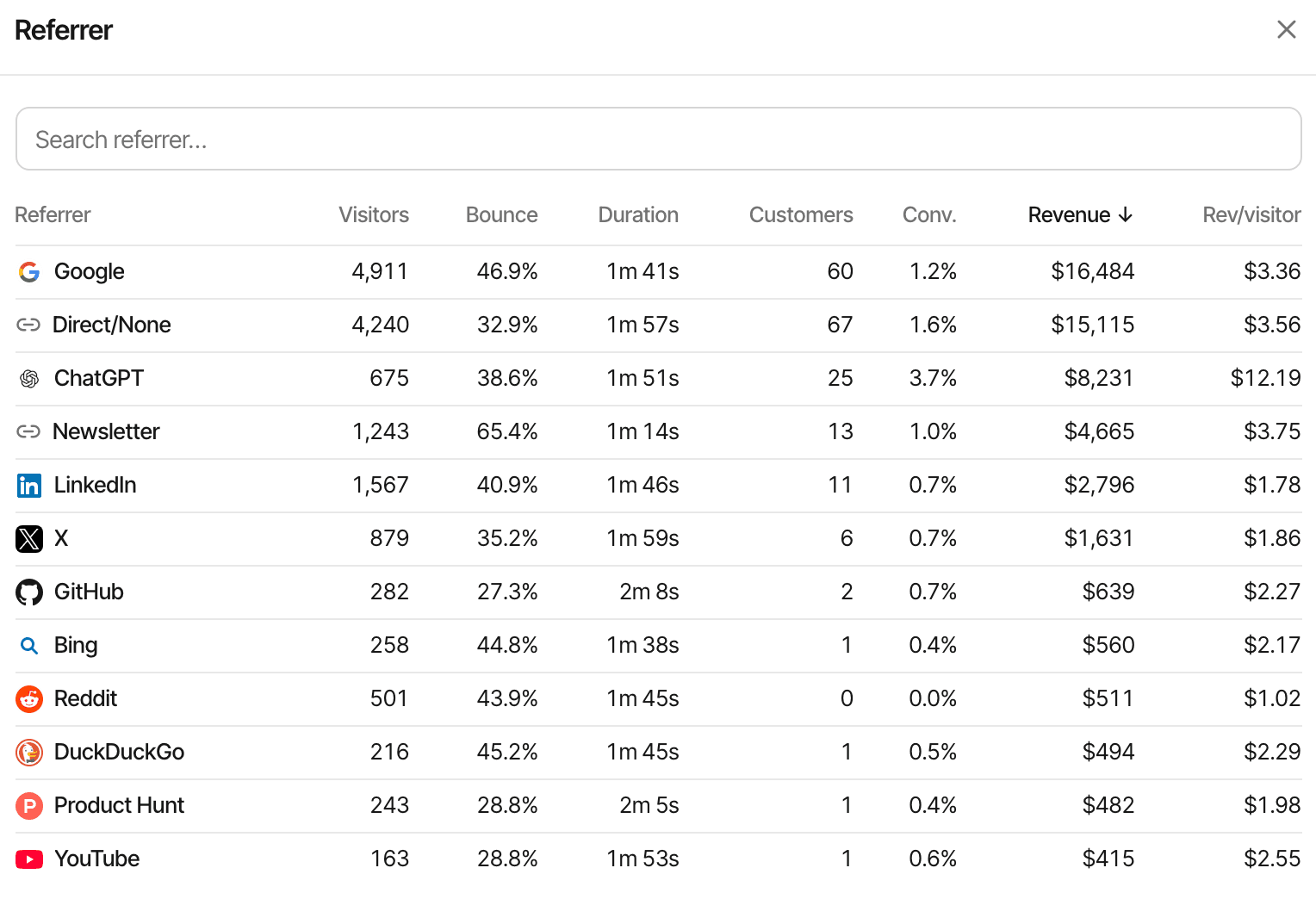
Each order keeps two visits: the visitor's first visit ever and their last visit before paying. Last touch is the default and credits the visit that converted, even a direct one. First touch credits the visit that brought them in. Change it in Settings → Revenue → Attribution model; the switch re-credits past orders too. The first-touch vs last-touch guide works through examples.
Common Polar attribution problems
| Problem | Likely cause and fix |
|---|---|
| No Polar orders show up | Likely cause and fix: Open the endpoint's deliveries in Polar. 400 "Polar is not configured for this website" means no secret is saved for that website; 403 "Invalid signature" means the secret belongs to another endpoint, or sandbox and live are mixed up. |
| Orders have no source | Likely cause and fix: The checkout carried no visitor id. Check that the script runs on the page with the checkout link, or that your server passes the metadata, and identify signed-in users before checkout. |
| A checkout link isn't tagged | Likely cause and fix: It already has a reference_id, carries supr-polar="false", or the click happened before the script loaded. The link must be on buy.polar.sh, or on another polar.sh address with polar_cl_ in it. |
| Too much Direct revenue | Likely cause and fix: Untagged links, apps that drop the referrer, or last touch crediting direct returns. Tag the links you share, or compare with first touch. |
| Revenue lower than in Polar | Likely cause and fix: SuprAnalytics counts the amount before tax, lowers partial refunds and skips free orders. |
More on this: Polar revenue attribution · Polar setup guide · Checkout links · How revenue attribution works · Pricing