
Locations and devices
See where your visitors are and what they browse with.
Two dashboard panels: one with a world map, countries, regions and cities, the other with browsers, operating systems and device types. Every row has its visitors and conversion rate, and a click filters the whole dashboard.
14-day free trial · No card required · From $9/month
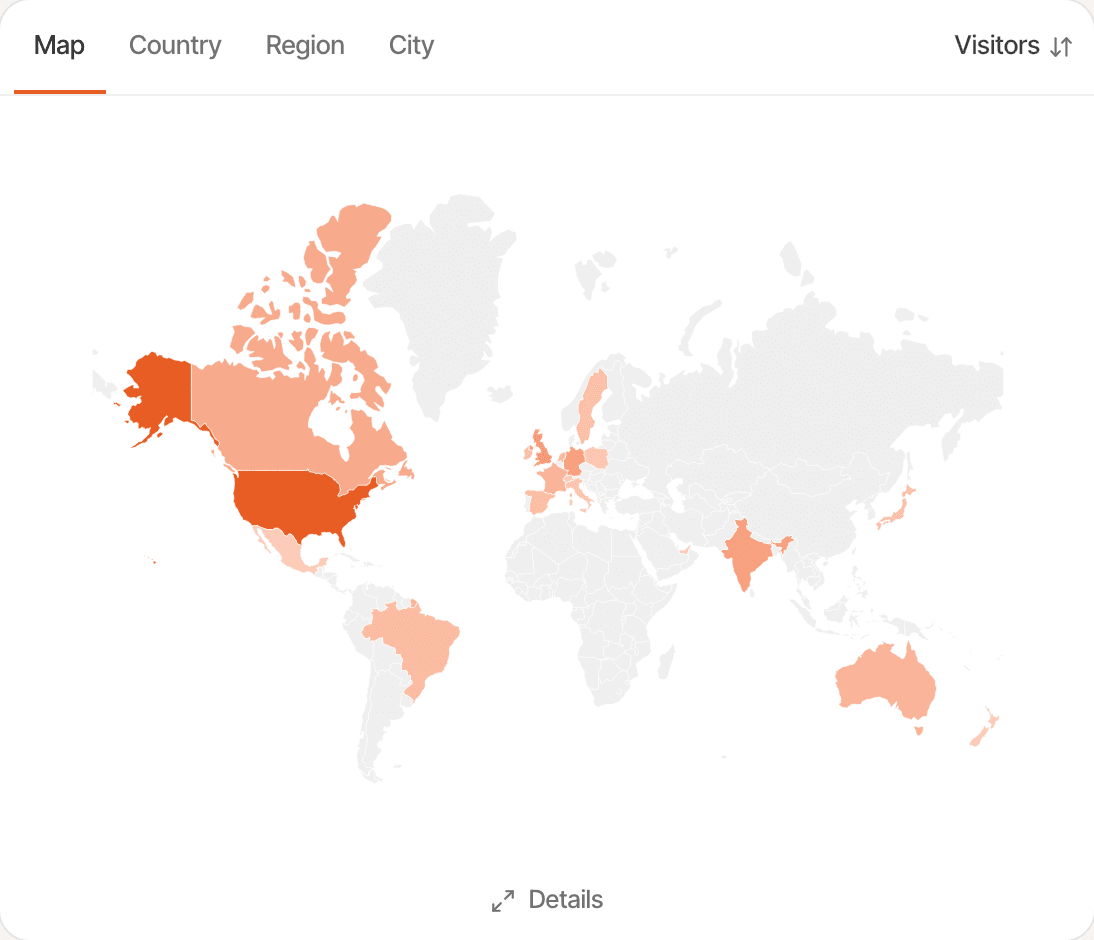
Locations.
- Map
- Countries shaded by visitors, from pale for the fewest to orange for the most. Hover one for its visitors, share and revenue; click it to filter.
- Country
- Each country with its flag, visitors and conversion rate, sorted by visitors or by revenue.
- Region and city
- Down to the state or the city, each with its country's flag.
Locations are worked out from the visitor's IP address as the hit arrives, and the address is never stored. When it gives no location, the country comes from the browser's time zone.
Devices.
- Browser
- Chrome, Safari, Firefox, Edge, Samsung Internet and the rest, with Instagram's and Facebook's in-app browsers named as such.
- OS
- The operating system of each visit, such as macOS, iOS, Android, Windows, Linux or ChromeOS.
- Device
- Desktop, mobile or tablet. A desktop browser on a screen narrower than 768 pixels counts as mobile.
- New vs returning
- The panel's fourth tab splits visitors into first-time and returning.
More than a count.
- Each row shows its share of visitors beside the count, and its bar is scaled to the biggest row
- Hover a row for its revenue, conversion rate and revenue per visitor
- Click rows in both panels to narrow the dashboard to, say, mobile visitors in Germany
- Details opens up to 200 rows with bounce rate, duration, customers, conversion rate and revenue, searchable and sortable
How it works, in detail.
The docs page “How metrics are counted” goes through it step by step.
Limits worth knowing
- There's no screen-size report and no browser-version report
- Some visits have no region or city; they show as Unknown
- IP addresses aren't kept, so a past visit's location can't be worked out again
Questions, answered.
Does SuprAnalytics store IP addresses?
No. The address is used in passing to work out the country, region and city, for rate limits and for IP exclusions, and is never saved.
How is the device type decided?
From the browser's user agent: mobile, tablet or desktop. A desktop browser on a screen narrower than 768 pixels counts as mobile.
Can I see revenue by country?
Yes. Hover a country on the map, or sort the Country tab by revenue. Details adds customers, conversion rate and revenue per visitor.
How do I filter the dashboard to one country or device?
Click its row, or add a filter from the Filter menu. Countries match by name or by code. See filters.
Are in-app browsers recognised?
Yes. Visits from Instagram's and Facebook's in-app browsers show under their own names in the Browser tab.
More features
- Traffic analysisVisitors, sources, pages, locations and devices, with filters and the change against the period before.Open
- Realtime analyticsWho's on your website right now, where they came from and what they're reading.Open
- UTM trackingCampaign tags read automatically, with visitors, conversions and revenue per campaign.Open
- AI trafficVisits from ChatGPT, Perplexity, Claude and other AI assistants, as their own channel.Open
- Google Search ConsoleThe Google searches that brought visitors, with clicks, impressions, CTR and position.Open
- Page analyticsThe pages people visit, where they enter, the links they leave through and every hostname.Open
- Filters and comparisonFilter the whole dashboard in a click and compare with the period before.Open
- Saved segmentsKeep a combination of filters under a name and apply it in one click.Open
- New and returning visitorsTraffic split into first-time and returning visitors, on the chart.Open
- Notes on the chartPin a note at a launch or a pricing change and see it next to the traffic it moved.Open
- Session recordingsWatch visits played back, tagged with rage clicks, errors and slow pages.Open
- HeatmapsWhere people click and how far they scroll, on desktop, tablet and mobile.Open
See it on your own website.
Every feature is on every plan, with a free trial and no card.
14-day free trial · No card requiredPricingHow it worksAll features