
SuprAnalytics vs Cloudflare Web Analytics
Looking for a Cloudflare Web Analytics alternative?
Keep Cloudflare Web Analytics if free, cookieless visit counts and Core Web Vitals are all you need. Choose SuprAnalytics when you need UTM reports, goals, funnels or revenue by traffic source, which Cloudflare's doesn't offer, with payments from Stripe, Polar, Paddle and Dodo Payments and live chat.
14-day free trial · No card required · From $9/month
At a glance
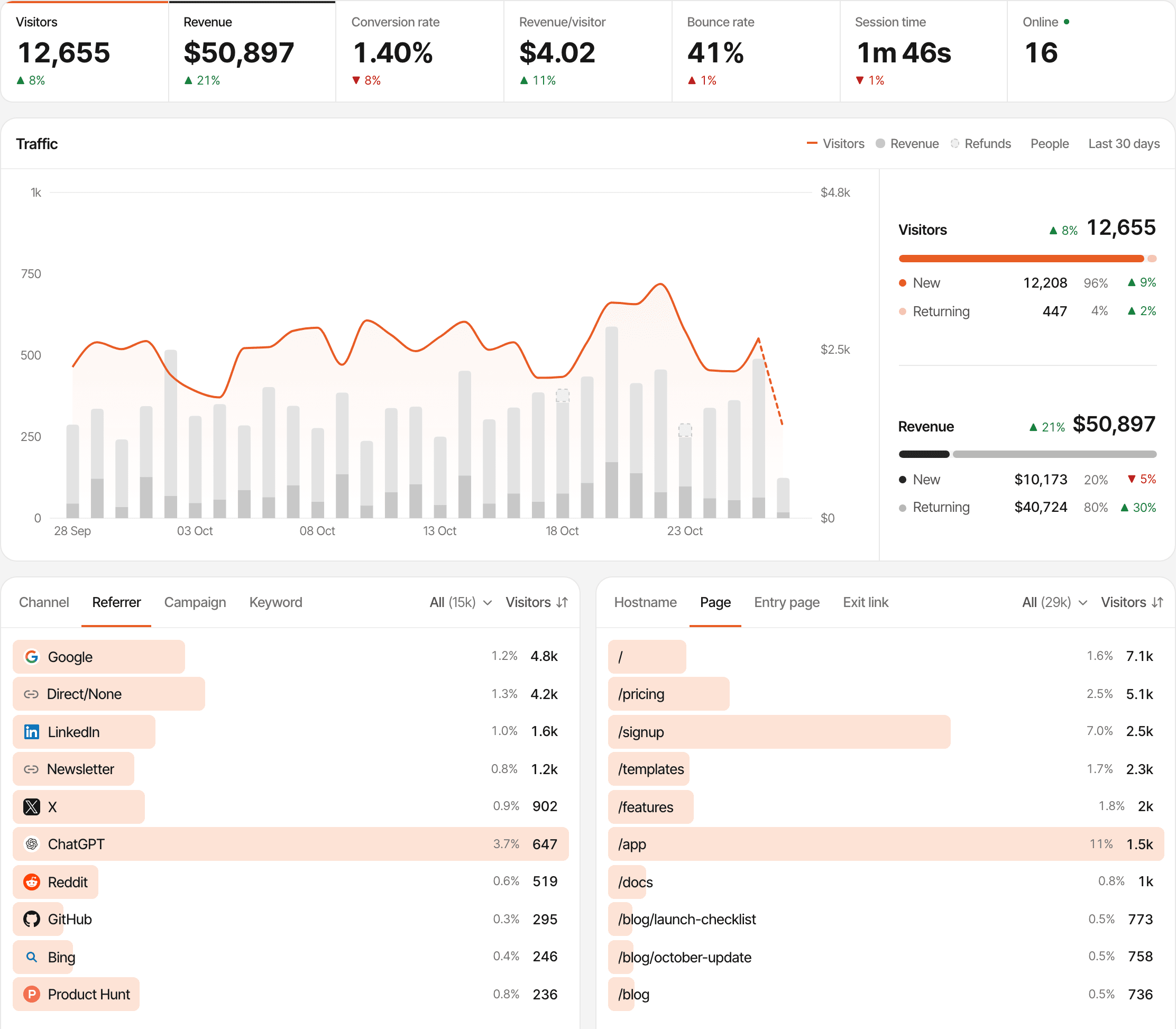
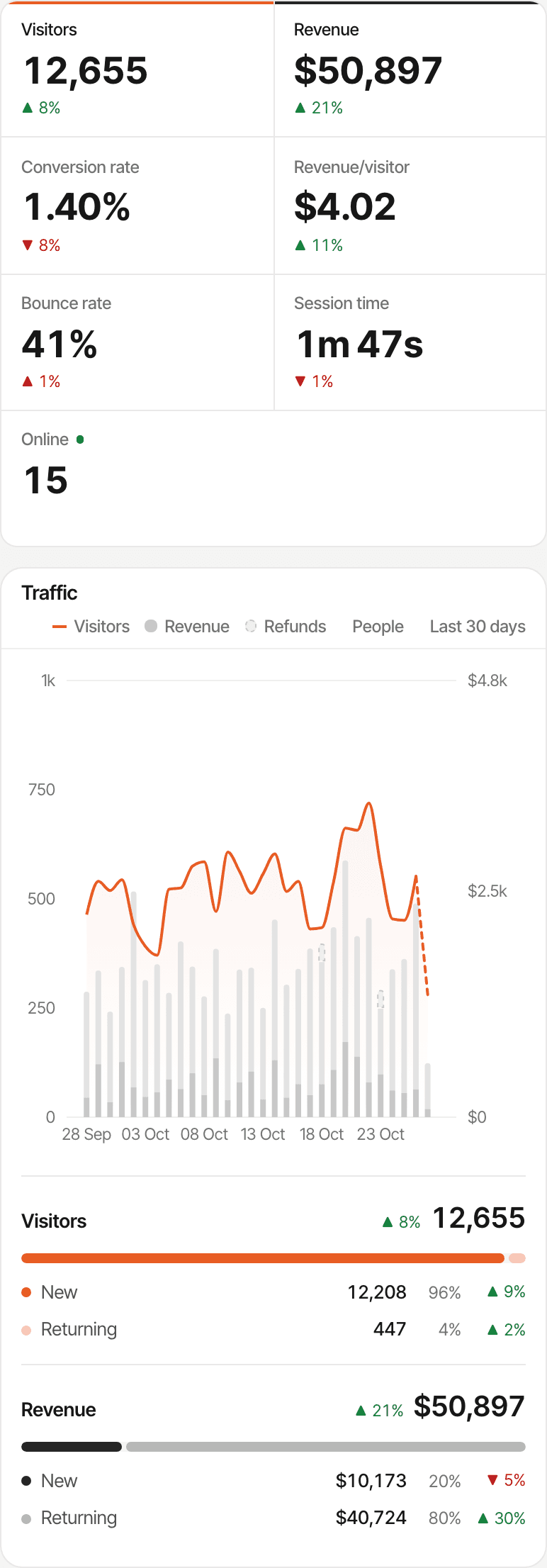
Both count pages, referrers, countries, devices and Core Web Vitals. Cloudflare's does it for free; SuprAnalytics adds visitors, campaigns, goals, journeys, payments and chat.
| Capability | SuprAnalytics | Cloudflare Web Analytics |
|---|---|---|
| Setup | One script tag on any website | Automatic on sites Cloudflare proxies; a script tag elsewhere |
| Website analytics | AvailablePages, sources, countries, devices, realtime | AvailablePaths, hosts, referrers, countries, devices, browsers, OS |
| Unique visitors | AvailableVisitors, sessions and pageviews | LimitedVisits and page views: a visit is a page view from another site or a direct link |
| UTM campaigns | Available | Not available“Not yet”: query strings aren't logged |
| Custom events and goals | AvailableFrom the page, HTML attributes or your server | Not available“Not yet”, its FAQ says |
| Funnels | AvailableA funnel step can be a payment | Not listed |
| Visitor journeys | AvailableEach visitor's visits, pages, goals, payments and chats | Not listed |
| Revenue attribution | AvailableFirst or last touch, per website | Not listed |
| Payment provider integrations | AvailableStripe, Polar, Paddle, Dodo Payments, and a payments API | Not listed |
| Built-in live chat | AvailableWidget and inbox | Not listed |
| Session recordings | AvailableOn by default; unlimited on every plan, kept 60 days | Not listed |
| Heatmaps | AvailableClicks, rage clicks and scroll depth; on by default | Not listed |
| AI referral traffic | AvailableAn AI search channel | Not listed |
| Core Web Vitals | AvailableLCP, INP, CLS, FCP and TTFB at p75, and a daily PageSpeed audit | AvailableLCP, INP and CLS at p75, with the elements that hurt each |
| Cookieless by default | LimitedA first-party cookie unless cookieless mode is on | AvailableNo cookies or local storage |
| Bot filtering | AvailableBots left out of your counts | AvailableAn Exclude Bots filter |
| Ad blockers | AvailableThe managed proxy serves the script from your subdomain | LimitedIts docs say blockers block the beacon |
| Websites | AvailableUnlimited on every plan | LimitedNo limit when proxied; 10 others, more on request |
| Data out | AvailableA read API, an MCP server and a CLI | AvailableA GraphQL API |
| Pricing and data kept | Monthly from $9, by events; 2 years to 5 years of data, unsampled | Free; six months of data, aggregated to about 10% after 7 days |
Last verified: , from Cloudflare's own website and docs. “Not listed” means Cloudflare's Web Analytics pages don't describe it. Product details change: see Cloudflare's Web Analytics docs and its FAQ.
Where SuprAnalytics stands out: from a visit to a payment
Cloudflare Web Analytics tells you how many visits a page had and how fast it loaded. SuprAnalytics follows the visitor on, to the goal and the payment, and credits the source that brought them.
- Step 1
A visitor arrives
From a search, a referrer, a campaign or an AI assistant
- Step 2
The visit is recorded
With its source and UTM tags, remembered by a first-party cookie
- Step 3
They complete a goal
A signup, a click, a started checkout
- Step 4
The payment is received
From your payment provider's webhook
- Step 5
It's matched when possible
By visitor id, a customer id it has seen, or an email
- Step 6
Revenue is attributed
To the source, by the model you chose
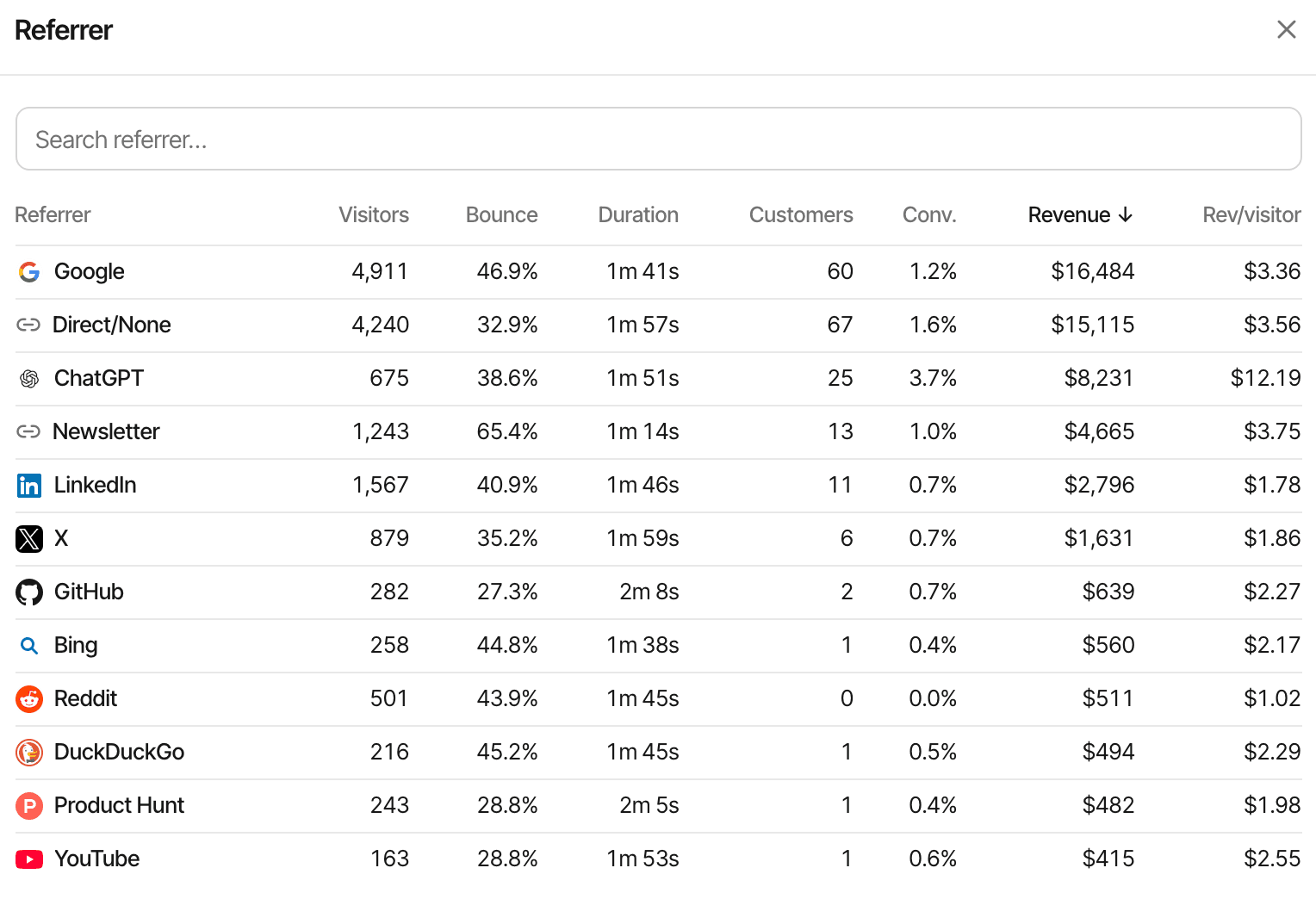
- Native webhooks for Stripe, Polar, Paddle and Dodo Payments; a payments API for anything else.
- First touch credits the visit that first brought the customer; last touch, the default, credits the visit the payment happened in. Each website picks one.
- Renewals are credited to the customer's original visit. A full refund marks a payment refunded; partial refunds lower it with Polar, Paddle and Dodo Payments
- UTM campaigns, channels and referrers, each with its visitors, customers and revenue
What it doesn't do: join visitors across devices on its own, import past payments, or report MRR, ARR or churn. Cloudflare's FAQ says custom events and UTM parameters aren't supported yet, and its Web Analytics pages describe no conversions or revenue. How revenue attribution works
From visit counts to the path each visitor took
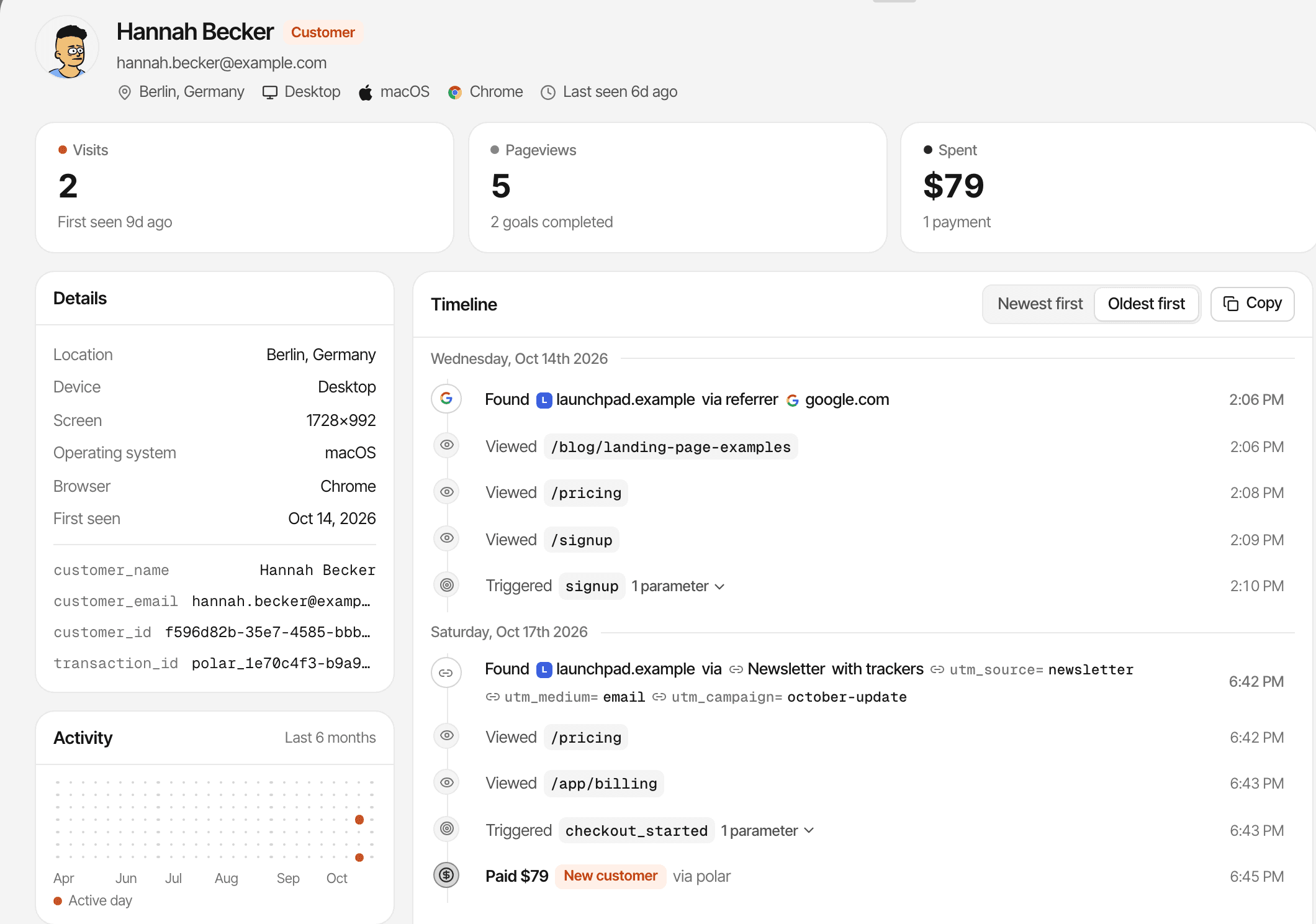
Cloudflare counts visits without recognising the visitor. SuprAnalytics keeps each visitor's journey, and funnels show how everyone moved through the steps you care about.
- The entry source of each visit, with its referrer or UTM tags
- Every page visited, and the goals completed
- Recorded payments, in the same timeline
- The conversation, if they chatted with you
- A name and email only if they give them in chat or your app identifies them
Recognising a returning visitor takes the first-party cookie. In cookieless mode a visitor is recognised for a day, and a phone and a laptop are always two visitors. About visitor journeys
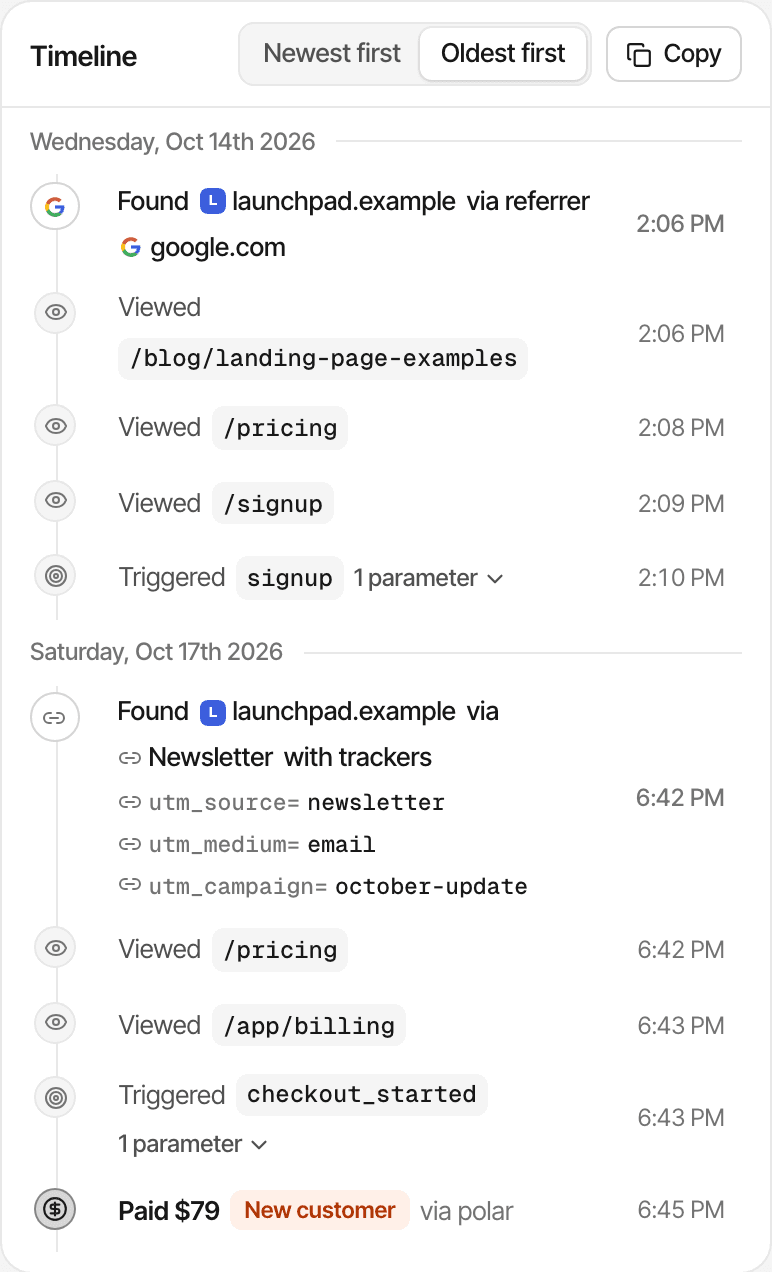
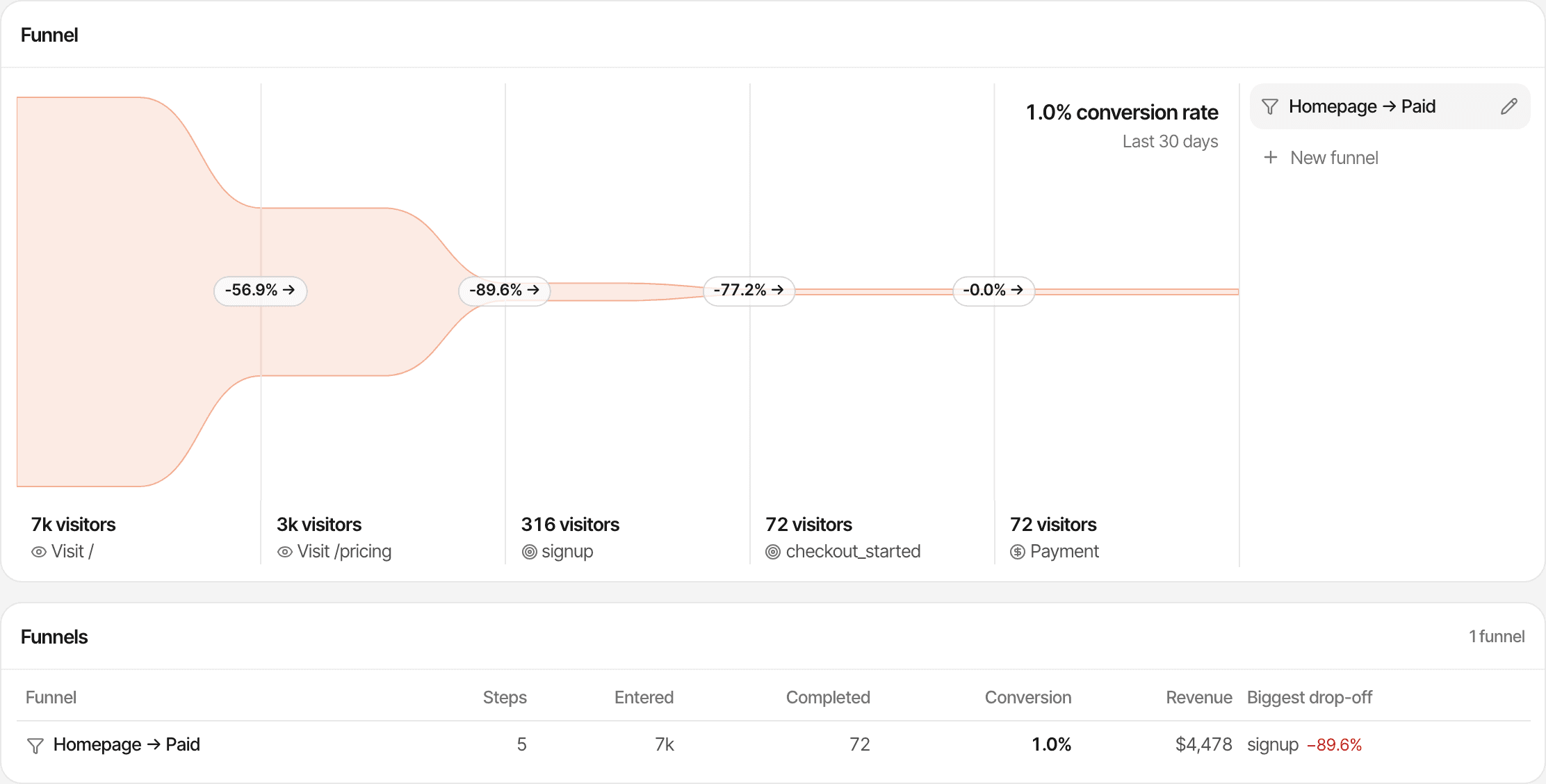
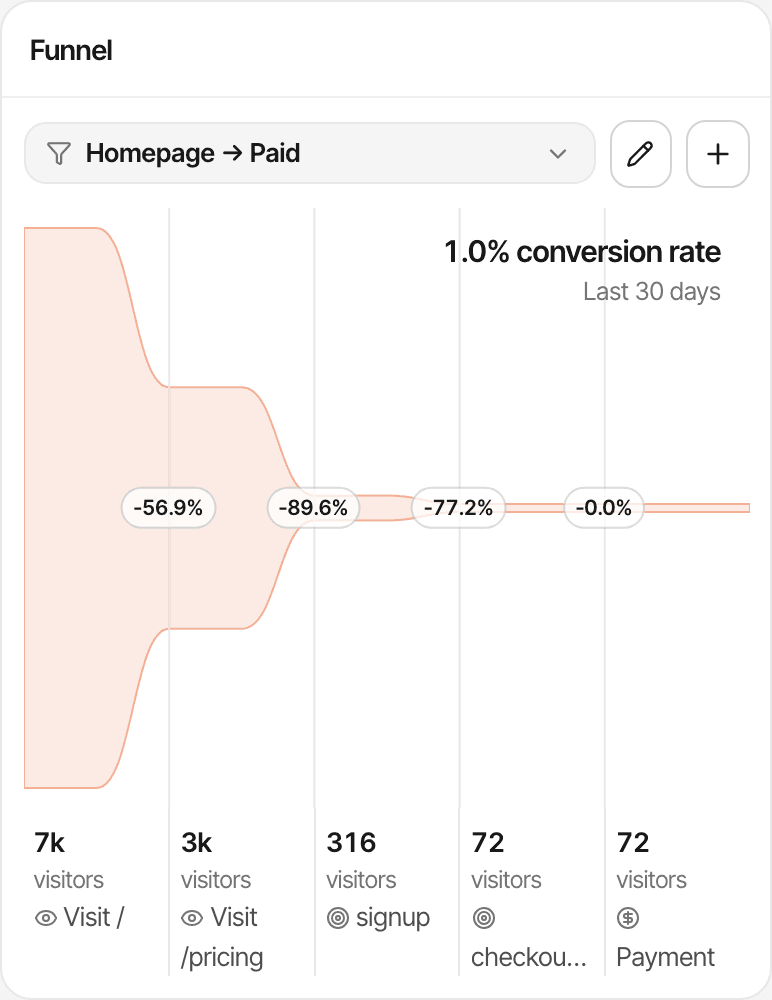
A funnel's last step can be a payment. How funnels work
Talk to the visitors you're measuring
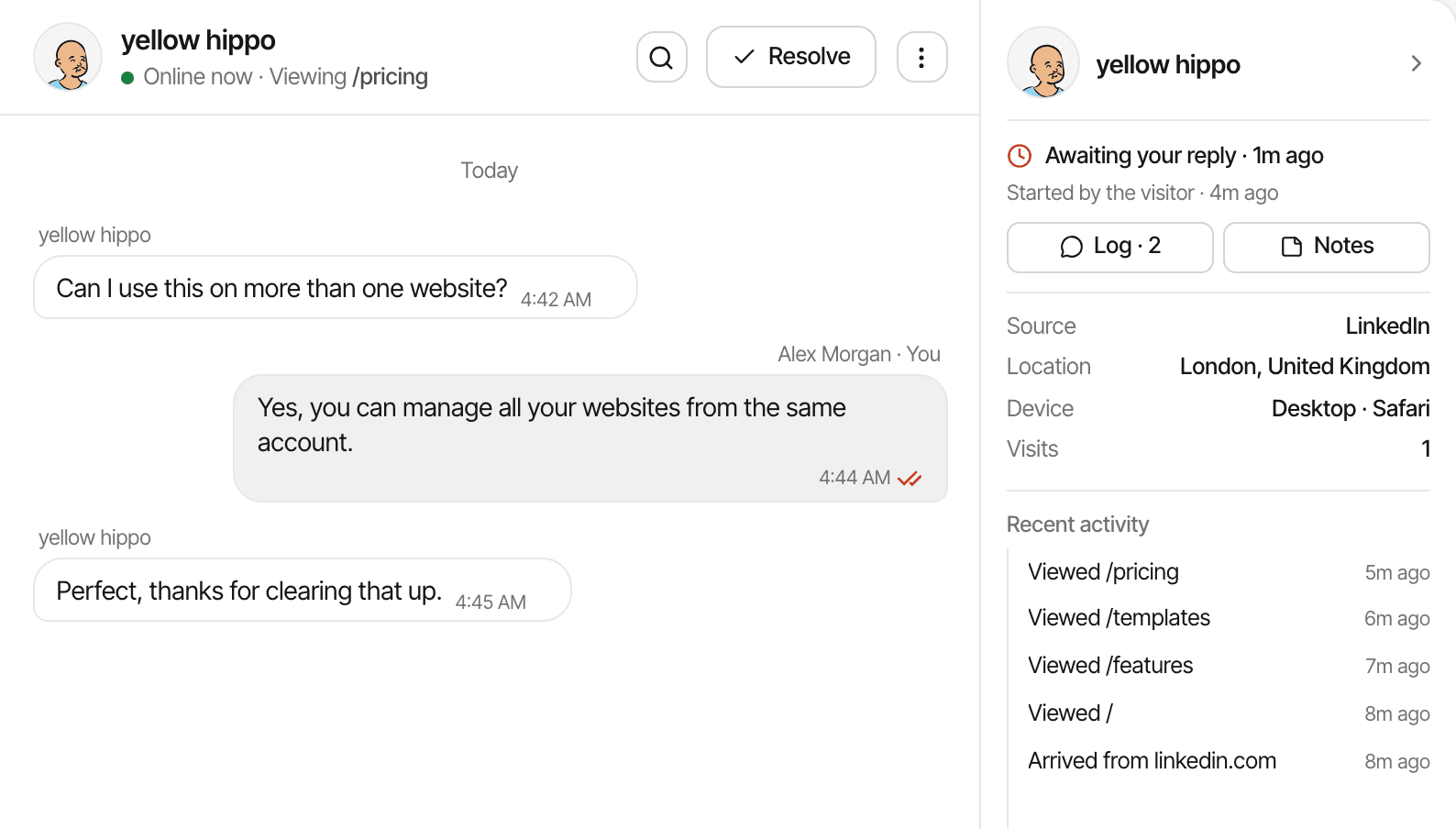
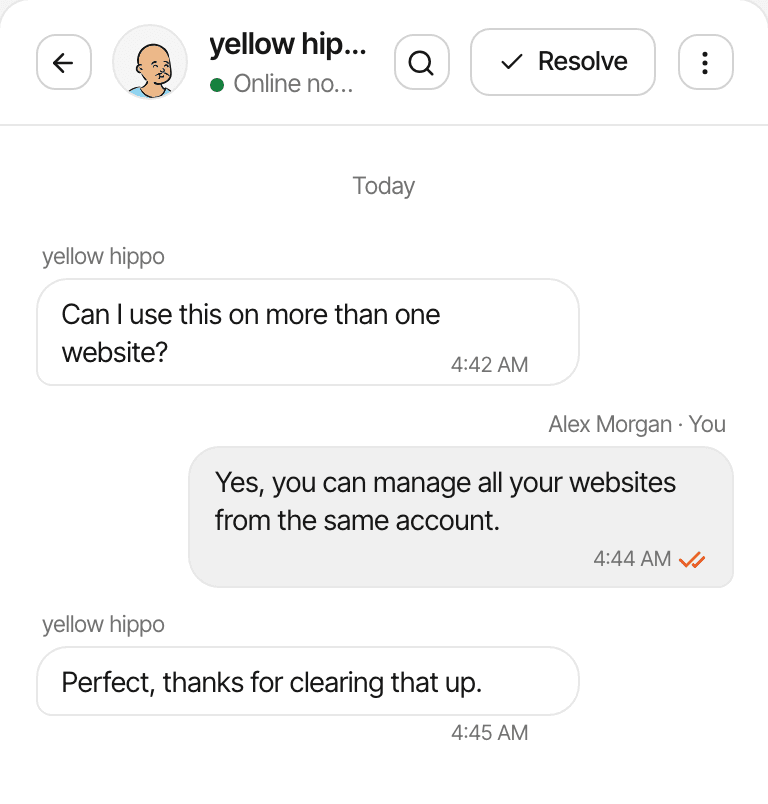
The chat bubble comes from the same script as your analytics, so each conversation opens beside the visit it belongs to.
- A chat widget and one inbox for every website, on every plan
- The visitor's source, the pages they read, their device and location beside each conversation
- Messages sent automatically when a visitor opens a page you choose
- Session recordings and heatmaps to see what visitors did before they asked
Visitors stay anonymous unless they type a name or email, or your app identifies them. Cloudflare's Web Analytics pages don't describe a visitor live chat, session recordings or heatmaps. More about live chat
Where Cloudflare Web Analytics may be the better choice
For free, private traffic and speed numbers, it's a strong default. If one of these matters most to you, it's probably the better fit.
It's free
Cloudflare Web Analytics costs nothing. SuprAnalytics has a 14-day trial, then starts at $9 a month.
Nothing to install on proxied sites
If Cloudflare already proxies your site, the automatic setup adds the beacon for you, with no limit on how many proxied sites you track. SuprAnalytics needs its script on your pages.
No cookies, no local storage
Cloudflare uses no client-side state to collect its metrics, and says it doesn't fingerprint visitors by their IP address or browser. SuprAnalytics sets a first-party cookie unless you turn cookieless mode on.
Core Web Vitals with the culprits
For LCP, INP and CLS it shows the 75th percentile, P50 to P99 on demand, and the five page elements that hurt each one most. SuprAnalytics shows real visitors' vitals at p75 by page, device, browser and country, and audits your homepage daily.
Less to look at
If visit counts, top pages, referrers and load times are all you need, Cloudflare's dashboard keeps it to that. SuprAnalytics does more, so there's more to set up and more on screen.
You don't have to choose: Cloudflare's beacon and the SuprAnalytics script run side by side, so you can keep Cloudflare's free numbers and add SuprAnalytics for campaigns, revenue, journeys and chat.
Which product should you choose?
Two honest lists. Pick the one that reads like your situation.
Choose SuprAnalytics if
- You want to know which campaigns and channels bring paying customers, not only visits.
- You need UTM reports, goals or funnels.
- You sell through Stripe, Polar, Paddle or Dodo Payments.
- You want to chat with visitors, and watch session recordings and heatmaps.
- You want more than six months of history.
Keep Cloudflare Web Analytics if
- You want free traffic and speed numbers and nothing more.
- Your sites are already proxied by Cloudflare and you'd rather not add a script.
- You need no cookies by default.
- Core Web Vitals, with the elements that hurt them, are what you mostly look at.
How does the pricing compare?
Cloudflare Web Analytics is free. SuprAnalytics is a monthly plan by events, with every feature on every plan. What you're paying for is what Cloudflare's doesn't do.
SuprAnalytics
- 6 monthly plans, from $9 for 100,000 events to $149 for 5 million
- Every feature and unlimited websites on every plan, revenue attribution, live chat, recordings and heatmaps included
- Counts pageviews, custom goals and outbound link clicks; never chat messages or payments
- 2 years to 5 years of data history, by plan, never sampled
- At the monthly limit, data collection pauses and the dashboard is restricted until the next cycle or an upgrade; no overage charges
- 14-day free trial, no card. No free plan
Cloudflare Web Analytics
- Free; it works without changing your DNS or using Cloudflare's proxy
- No limit on proxied sites; 10 sites per account otherwise, a soft limit support can raise
- Six months of data
- Unsampled data for the last 7 days; older data is aggregated to about 10%
- No custom events or UTM reports yet
Last verified: . Many sites run both: Cloudflare's free numbers for traffic and speed, SuprAnalytics for campaigns, revenue and chat.
Adding SuprAnalytics to a Cloudflare site
There's no migration to do. Here is what adding SuprAnalytics, or moving to it, involves.
Keep Cloudflare Web Analytics running
SuprAnalytics can't import its data (its importer reads Google Analytics 4, Plausible, Fathom and DataFast), and the two scripts can run on the same pages. The 14-day trial needs no card.
Add the SuprAnalytics script
One tag in the
<head>, or the guide for your platform. For ad blockers, use the managed proxy; for no cookies, cookieless mode.Connect your payment provider
So revenue is attributed from the first payment. How to connect one
Compare the numbers
Expect them to differ: Cloudflare counts a visit each time someone arrives from another site or a direct link, while SuprAnalytics counts visitors and their sessions. If you stop using Cloudflare's, change its setup under Manage Site.
Questions, answered.
What is the difference between Cloudflare Web Analytics and SuprAnalytics?
Is Cloudflare Web Analytics free?
Does Cloudflare Web Analytics use cookies?
Can Cloudflare Web Analytics track conversions, custom events or UTM campaigns?
How long does Cloudflare Web Analytics keep data?
Do I need Cloudflare's proxy to use Cloudflare Web Analytics?
Is SuprAnalytics cookieless?
Can I use Cloudflare Web Analytics and SuprAnalytics together?
How much does SuprAnalytics cost?
Cloudflare sources, read on : Web Analytics · About · Get started · FAQ · Limits · High-level metrics · Dimensions · Core Web Vitals
More comparisons
- vs Google AnalyticsFree, deep acquisition reports and Google Ads, or payments tied to each visit and a live chat.Open
- vs PlausibleSimple cookieless stats, or revenue attribution and visitor chat on top.Open
- vs PostHogA product engineering platform, or a focused website workspace.Open
- vs FathomPrivacy-first website stats, or traffic tied to payments and conversations.Open
- vs RybbitOpen-source, cookieless analytics, or payments by source and live chat.Open
- vs DataFastTwo revenue-first tools: live chat and unlimited websites set them apart.Open
- vs SelineLightweight analytics, or revenue from five payment providers and chat.Open
- vs Simple AnalyticsPrivacy-first simplicity, or payments credited to each traffic source.Open
- vs UmamiOpen-source, self-hostable stats, or hosted revenue attribution and chat.Open
- vs MatomoA full GA alternative you can host, or a focused revenue and chat workspace.Open
- vs MixpanelEvent-based product analytics, or website traffic tied to payments.Open
- vs PirschCookieless, German-hosted stats, or payments credited to each source and chat.Open
- vs Vercel Web AnalyticsPageview counts built into Vercel, or goals, funnels and revenue on any host.Open
- vs Microsoft ClarityFree recordings and heatmaps, or recordings beside traffic, revenue and chat.Open
- vs HotjarSurveys and heatmaps, now in Contentsquare, or unlimited recordings tied to revenue.Open
- When not to use SuprAnalyticsThe cases where another tool fits better, and which one.Open
Understand your traffic. Connect it to revenue.
See where visitors come from, what they do, and which sources bring paying customers, with live chat in the same workspace.
14-day free trial · No card requiredvs Plausiblevs Simple Analytics