
SuprAnalytics vs Microsoft Clarity
Looking for a Microsoft Clarity alternative?
Pick Microsoft Clarity if you want free session recordings and heatmaps with no traffic limits. Pick SuprAnalytics if you want them next to your traffic sources, the revenue each source brings from Stripe, Polar, Paddle or Dodo Payments, and a live chat with visitors, from $9 a month.
Both record visits and draw click and scroll heatmaps on desktop, tablet and mobile. Clarity adds Copilot summaries, a Google Analytics dashboard and mobile app SDKs; SuprAnalytics keeps every recording 60 days, unlimited on every plan, and ties each visit to what it was worth.
14-day free trial · No card required · From $9/month
At a glance
Recordings and heatmaps are on both sides. The differences: payments, traffic reports and live chat beside them on one; a free price, Copilot, Google Analytics and mobile apps on the other.
| Capability | SuprAnalytics | Microsoft Clarity |
|---|---|---|
| Session recordings | AvailableOn by default; unlimited on every plan, kept 60 days, up to 2 hours each | AvailableFree; up to 100,000 sessions a day per project, kept 30 days, favourites and a sample for 9 months |
| Heatmaps | AvailableClicks, rage clicks, scroll depth and clicks by source, for desktop, tablet and mobile; kept 60 days | AvailableClick, scroll and area maps for PC, tablet and mobile; up to 100,000 page views each, kept 9 months |
| Problems flagged | AvailableRecordings tagged with rage and dead clicks, JavaScript errors, slow pages, idle time and forms left unsent | AvailableFilters for rage clicks, dead clicks, excessive scrolling, quick backs and JavaScript errors |
| Masking | AvailableTyped text always hidden; all text optionally; supr-mask, supr-block and CSS selectors | AvailableInput boxes always masked; Balanced by default (numbers and emails), Strict or Relaxed; data-clarity-mask |
| Keep pages out of recordings | AvailableUp to 50 paths, with wildcards | LimitedRemove the script from those pages |
| Delete a recording | AvailableFrom the player | Not availableIts FAQ says single recordings can't be deleted or downloaded |
| AI summaries | LimitedNo built-in AI; the MCP server lets Claude or ChatGPT list recordings and count their tags | AvailableCopilot: chat about your dashboard, recording and heatmap summaries |
| Traffic sources | AvailableChannels, referrers and UTM reports, with an AI channel | AvailableFilters by referrer, UTM source, medium, campaign and channel, including AI platforms |
| Goals and funnels | AvailableA funnel step can be a payment | AvailableSmart events (nine detected automatically) and funnels |
| Revenue from payments | AvailableStripe, Polar, Paddle and Dodo Payments webhooks, and a payments API | LimitedPurchases for Shopify stores, checkout abandonment for Shopify Plus |
| Revenue by traffic source | AvailableFirst or last touch, per website | Not listed |
| Visitor journeys | AvailableVisits, pages, goals, payments and chats in one timeline | AvailableVisitor profiles |
| Live chat with visitors | AvailableWidget and inbox | Not listedIts Agent Dashboard measures a conversational agent on retail projects |
| Core Web Vitals | AvailableReal visitors' at p75, and a daily PageSpeed audit | AvailablePerformance score, LCP, INP and CLS |
| Google Analytics | LimitedImports your GA4 history; no live link | AvailableShows one GA property's data in a Clarity dashboard |
| AI crawlers | AvailableCrawler visits forwarded from your server | AvailableBot activity once a CDN is connected, and AI citations |
| Mobile apps | Not availableWebsites only | AvailableSDKs for Android, iOS, Flutter, React Native and more |
| API and AI assistants | AvailableA read API, an MCP server and a CLI | AvailableA Data Export API |
| Cookies and consent | A first-party cookie by default; cookieless mode is opt-in | First-party cookies plus Microsoft third-party cookies; a consent signal is required in the EEA, UK and Switzerland |
| Websites and team | Unlimited websites; members and viewers per website | Unlimited projects and team members |
| Price | From $9/month; 14-day trial without a card | Free |
Last verified: , from Microsoft's Clarity documentation. “Not listed” means its docs don't describe it. Product details change: see clarity.microsoft.com and Clarity's pricing.
Recordings and heatmaps, side by side.
Both play visits back and draw where people click and how far they scroll, on desktop, tablet and mobile. Here is how SuprAnalytics does it, and where Clarity differs.
Session recordings in SuprAnalytics
- On for every website from the start, with a switch for recordings and another for heatmaps in Settings → Recordings
- Record every visit, or 50, 25, 10, 5 or 1% of them
- Tagged as they happen: rage clicks, dead clicks, JavaScript errors, pages slower than 3 seconds, 90 seconds idle, forms left unsent, goals completed and payments made
- Group the list by entry or last page, visitor, source, campaign, device or tag, with each group's problems
- Kept 60 days on every plan, with no monthly limit on how many; they don't count toward your events
Heatmaps show clicks, rage clicks and scroll depth, each click coloured by the source that brought its visitor, and a list of every clicked element. Session recordings · Heatmaps
What stays private
- What people type into forms is always replaced with asterisks in the browser, before anything is sent
- Add
supr-maskto hide an element's text,supr-blockto leave it out, or list CSS selectors that are never captured - Hide all text on a website whose pages show personal details
- List up to 50 pages that are never recorded, with * as a wildcard
Canvases, frames from other websites and scripts are never recorded. Nothing is recorded for bots or excluded visits. Say in your privacy policy that visits may be recorded. Recordings docs
Clarity records up to 100,000 sessions a day per project and keeps them 30 days; favourites, labelled sessions and a sample of 1% (or 10 a day, whichever is more) stay for 9 months, as do its heatmaps. It masks input boxes in every mode, and numbers and email addresses in its default Balanced mode. It flags rage clicks, dead clicks, excessive scrolling, quick backs and JavaScript errors, and its Copilot summarises recordings and heatmaps.
Watch the visits, then see what they were worth.
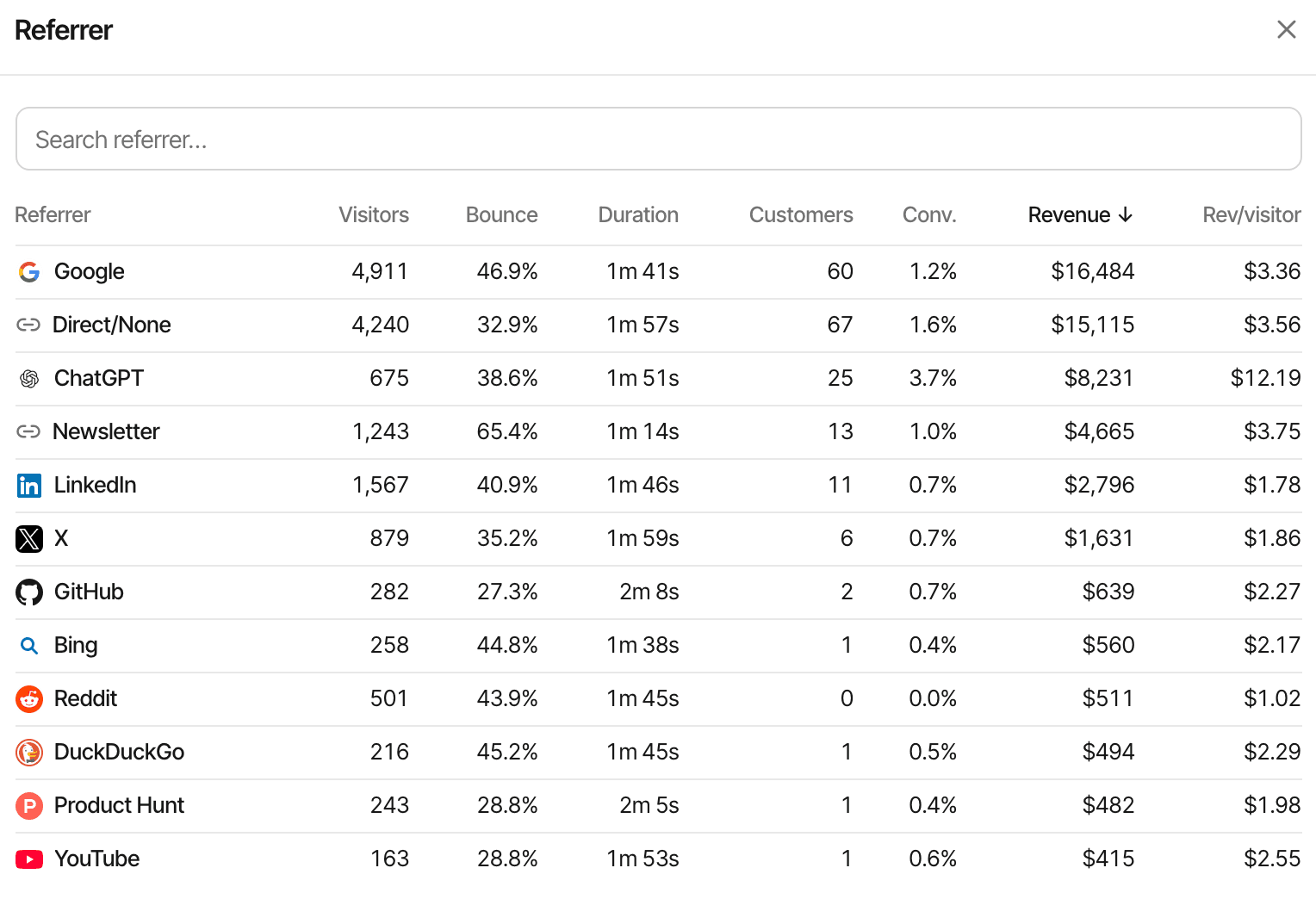
Clarity shows how people use your pages. SuprAnalytics also shows where they came from and which sources brought paying customers, so you can watch the visits from the channel that sells.
- Step 1
A visitor arrives
From a search, a referrer, a campaign or an AI assistant
- Step 2
The visit is recorded
With its source, and played back if you want to watch it
- Step 3
They reach a supported checkout
Which carries their visitor id
- Step 4
The payment is received
From your payment provider's webhook
- Step 5
It's matched when possible
By visitor id, a customer id it has seen, or an email
- Step 6
Revenue is attributed
To the source, by first or last touch; the recording is tagged Paid
Payment providers
- StripePass the visitor id in your Checkout Session or Payment Link
- PolarCheckout links are tagged by the script
- PaddlePaddle.js checkout buttons are tagged by the script
- Dodo PaymentsPayment links are tagged by the script
Anything else can send payments through the payments API. Renewals are credited to the customer's original visit, and a payment that can't be matched still counts in your revenue, without a source.
What Clarity's docs describe
Clarity's traffic filters cover the referring site, UTM source, medium and campaign, and channels including AI platforms. For revenue, it shows the share of sessions with a purchase on Shopify stores, and checkout abandonment on Shopify Plus. Its docs don't describe payments from Stripe, Paddle or other providers, or revenue by traffic source.
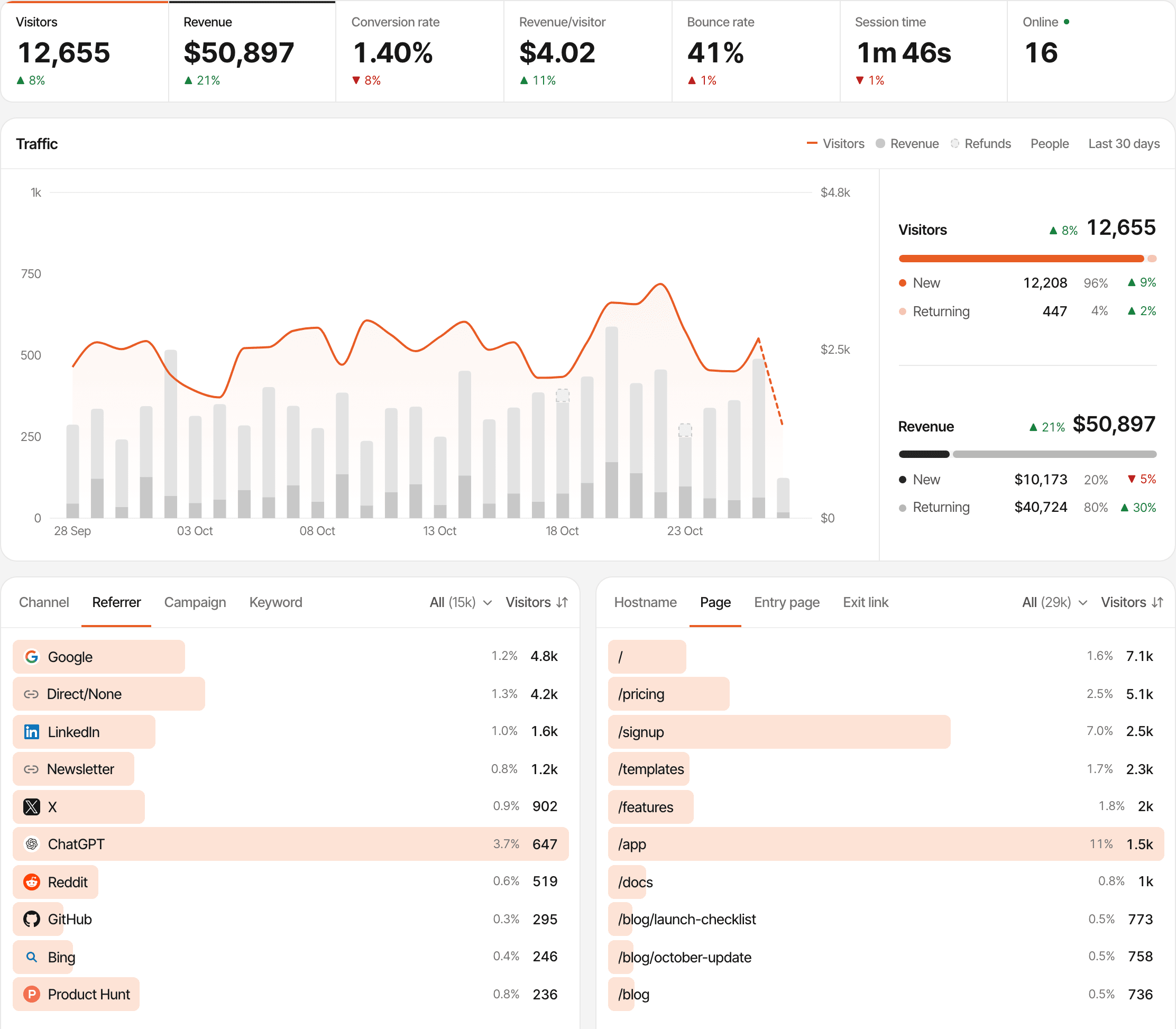
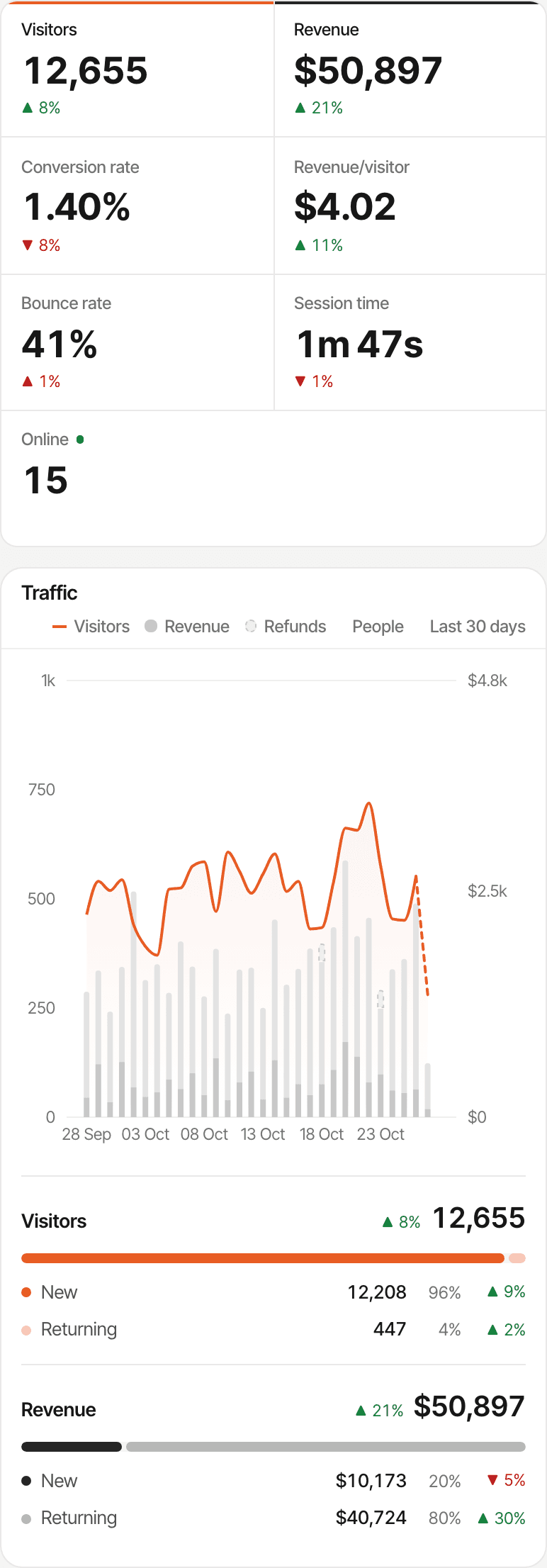
In SuprAnalytics the traffic is its own dashboard: channels, referrers, campaigns, pages, countries and devices, with goals, funnels, each visitor's journey and the change against the period before. How revenue attribution works
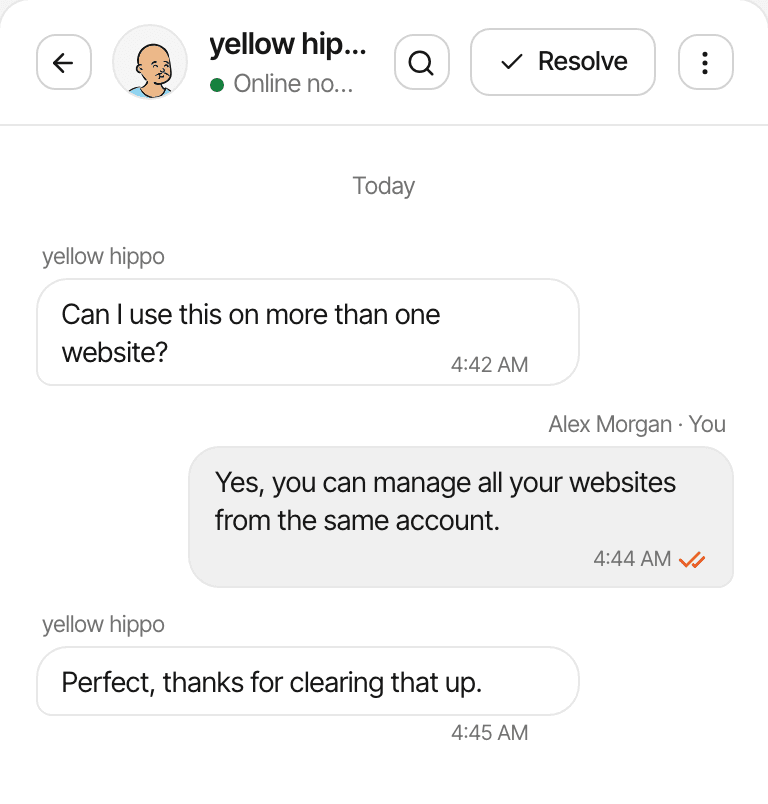
A recording shows where someone got stuck. A chat lets you ask them.
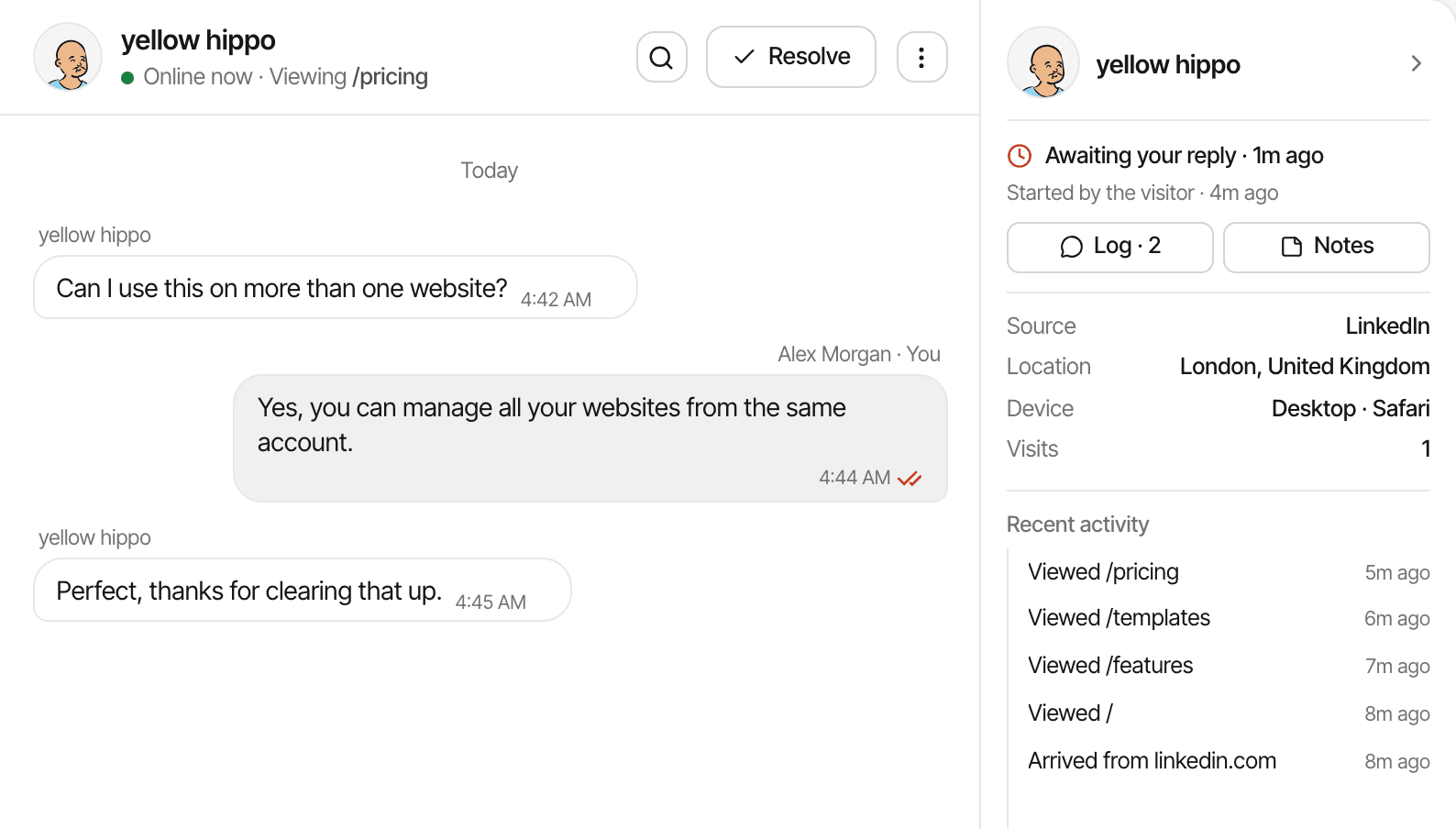
Visitors can message you from a chat bubble that comes with the same script, and each conversation opens beside the visit it belongs to.
- A chat widget and one inbox for every website, on every plan
- The visitor's source, pages, device and location beside each conversation
- A button on their profile opens their recordings, next to the chat and their journey
Visitors stay anonymous unless they type a name or email, or your app identifies them. Clarity's docs don't describe a chat for your team to answer visitors. More about live chat
Where Microsoft Clarity may be better
Clarity is a capable, actively developed tool, and hard to beat on price. If one of these matters most to you, it's probably the better fit.
Free, with no traffic limits
Clarity costs nothing and has no paid version; its docs say there are no traffic limits and no sampling, with unlimited projects and team members. Recordings are capped at 100,000 sessions a day per project, which few websites reach. SuprAnalytics starts at $9 a month after a 14-day trial.
Copilot and AI visibility
Copilot answers questions about your dashboard and summarises recordings and heatmaps. Clarity's AI visibility reports show AI citations, and bot activity once you connect a CDN. SuprAnalytics has no built-in AI: its MCP server lets Claude or ChatGPT read your data instead.
Google Analytics and ad campaigns
Clarity pulls a Google Analytics property's data into a dashboard of its own, and its ad campaign insights tie campaigns to what visitors did next. SuprAnalytics can import your GA4 history, but has no live link to it.
Mobile apps
Clarity has SDKs for Android, iOS, Flutter, React Native and other mobile frameworks. SuprAnalytics records websites only.
More behaviour signals
Excessive scrolling, quick backs, smart events detected without code, and area maps. Favourites and a sample of recordings stay for 9 months; SuprAnalytics keeps every recording 60 days, then removes it.
Two things to know before you install Clarity: since 31 October 2025 it needs a consent signal from visitors in the EEA, the UK and Switzerland for full recordings, and its docs say it shouldn't be used on websites aimed at people under 18.
Which product should you choose?
Two honest lists. Pick the one that reads like your situation.
Choose SuprAnalytics if
- You want recordings and heatmaps in the same place as your traffic sources, goals and funnels.
- You want payments from Stripe, Polar, Paddle or Dodo Payments credited to the source that brought each customer.
- You want recordings grouped by source or campaign, and the visits that paid tagged.
- You want to chat with visitors, with their visit and recordings beside the conversation.
- You want every recording kept 60 days, and to delete one when you need to.
Choose Microsoft Clarity if
- You want recordings and heatmaps at no cost, on any amount of traffic.
- You already use Google Analytics and want its data next to the recordings.
- You want AI summaries of recordings and heatmaps, or mobile app recordings.
- You don't need revenue by source or a chat with visitors.
How does the pricing compare?
Clarity is free. SuprAnalytics is a paid plan by monthly events, with recordings and heatmaps included on every plan.
SuprAnalytics
- 6 monthly plans, from $9 for 100,000 events to $149 for 5 million
- Every feature and unlimited websites on every plan, recordings, heatmaps and live chat included
- Counts pageviews, custom goals and outbound link clicks; never recordings, heatmaps, chat messages or payments
- 2 years to 5 years of analytics history, by plan; recordings and heatmaps 60 days
- At the monthly limit, data collection pauses and the dashboard is restricted until the next cycle or an upgrade; no overage charges
- 14-day free trial, no card. No free plan. Monthly billing only
Microsoft Clarity
- Free, with no paid version
- No traffic limits and no sampling, by its docs
- Recordings: up to 100,000 sessions a day per project, kept 30 days
- Heatmaps: up to 100,000 page views each, kept 9 months
- Unlimited projects and team members
Last verified: . Clarity's price comes from its FAQ and overview, which say it is “a free service forever”. What SuprAnalytics' plan buys is the traffic reports, revenue from your payment provider and the live chat beside the recordings.
Switching from Microsoft Clarity
There's no automatic migration. Here is what moving involves.
Keep Clarity running for now
SuprAnalytics can't import Clarity's recordings or heatmaps (its importer reads Google Analytics 4, Plausible, Fathom and DataFast), and Clarity keeps them 30 days. Run both through the 14-day trial.
Add the SuprAnalytics script
One tag in the
<head>, or the guide for your platform. Recordings and heatmaps start with the next visits; there's no second snippet.Move your masking rules
A
data-clarity-maskelement becomessupr-mask, orsupr-blockto leave it out entirely. Selectors you masked in Clarity's settings go in Settings → Recordings.Connect your payment provider
So revenue is attributed, and recordings are tagged Paid, from the first payment. How to connect one
Compare before you switch off
Expect different counts: Clarity ends a session after 30 minutes without activity and splits sessions for visitors who don't consent, and SuprAnalytics counts browsers by a first-party cookie. Compare trends, and keep any Clarity recordings you need before they expire.
Questions, answered.
What is the difference between Microsoft Clarity and SuprAnalytics?
Is SuprAnalytics a Microsoft Clarity alternative?
Is Microsoft Clarity really free?
How long do Clarity and SuprAnalytics keep recordings?
Does SuprAnalytics include session recordings and heatmaps on every plan?
Do I need a cookie banner for Clarity or SuprAnalytics?
Does Clarity track revenue?
Can I use Clarity and SuprAnalytics together?
Can I import my Clarity data into SuprAnalytics?
Microsoft Clarity sources, read on : FAQ · Overview · Data retention · Recordings · Masking · Cookies · Filters · E-commerce insights · Google Analytics integration
More comparisons
- vs Google AnalyticsFree, deep acquisition reports and Google Ads, or payments tied to each visit and a live chat.Open
- vs PlausibleSimple cookieless stats, or revenue attribution and visitor chat on top.Open
- vs PostHogA product engineering platform, or a focused website workspace.Open
- vs FathomPrivacy-first website stats, or traffic tied to payments and conversations.Open
- vs RybbitOpen-source, cookieless analytics, or payments by source and live chat.Open
- vs DataFastTwo revenue-first tools: live chat and unlimited websites set them apart.Open
- vs SelineLightweight analytics, or revenue from five payment providers and chat.Open
- vs Simple AnalyticsPrivacy-first simplicity, or payments credited to each traffic source.Open
- vs UmamiOpen-source, self-hostable stats, or hosted revenue attribution and chat.Open
- vs MatomoA full GA alternative you can host, or a focused revenue and chat workspace.Open
- vs MixpanelEvent-based product analytics, or website traffic tied to payments.Open
- vs PirschCookieless, German-hosted stats, or payments credited to each source and chat.Open
- vs Vercel Web AnalyticsPageview counts built into Vercel, or goals, funnels and revenue on any host.Open
- vs Cloudflare Web AnalyticsFree, cookieless visit counts, or campaigns, goals and revenue by source.Open
- vs HotjarSurveys and heatmaps, now in Contentsquare, or unlimited recordings tied to revenue.Open
- When not to use SuprAnalyticsThe cases where another tool fits better, and which one.Open
Watch the visits. See which sources pay.
Session recordings, heatmaps, traffic, revenue from your payment provider and live chat, in one workspace.
14-day free trial · No card requiredvs Hotjarvs PostHog